

AI Adoption for Hybrid Teams: What Works and What Fails in 2026
Last Updated: July 2026
AI adoption for hybrid remote business teams means selecting and using AI tools in daily work. It applies to teams that split time between office and remote locations. It covers tool selection, staff training, change management, and policy design. Success means building systems that work well for every team member. No matter where they work, each person should get equal access. Done right, it cuts outreach friction and speeds up decisions. It also sets clear output standards across the team.
AI Smart Ventures has helped hundreds of growing businesses build AI programs that work for distributed teams. Their approach focuses on behavior change, not just software setup. Owner-operators who follow a structured rollout step see faster adoption and fewer safety risks. They also get more consistent results than those who treat AI as a plug-and-play answer.
Hybrid work is the top operating model for growing businesses in 2026. Most teams include a mix of in-office and remote workers. They must share the same systems, knowledge, and goals without constant real-time contact. Getting AI to serve both groups equally takes more than picking the right subscription. The sections below cover the key decisions. These are the choices that separate successful hybrid AI programs from the ones that stall.
Key Takeaways
- Choose AI tools built for async work. Tools that make meeting summaries and organize shared knowledge cut the need for constant real-time coordination across time zones.
- Build an AI Champions Program. Find advocates from both in-office and remote groups to give peer support and drive adoption across the business.
- Pilot one workflow before a full rollout. Testing a single high-pain step with a small team proves value before you commit company-wide.
- Track output metrics, not activity. Measure task completion times and error rates rather than login counts to see where AI creates real gains.
- Standardize on a core set of approved tools. A fixed platform list cuts safety risk, lowers costs, and keeps everyone on the same technical base.
- Close the access gap between in-office and remote staff. Without clear planning, remote workers often get less AI access, which slows progress for the whole team.
What issues hurt hybrid AI adoption?
Hybrid teams face a distinct set of problems. Fully remote or fully in-office groups do not face these in the same way. The most common problem is an unequal gap between in-office and remote staff. Office workers often get hands-on demos and peer coaching. Remote workers often get a PDF guide and a link to a recorded webinar. This gap creates uneven adoption rates and leads to frustration on both sides.
Without clear usage policies, team members turn to unsanctioned tools to solve problems right away. This breaks up the tech stack. It also adds safety risks that take time and money to fix. Digital presenteeism makes the problem worse. When teams lack clear output goals, remote staff feel pressure to stay visibly online at all times. They do this to prove their value, even when it hurts focused work. Measuring output also gets harder when people work across different environments.
The answer starts with a shared tech stack and written usage guidelines. These give every team member equal access and equal ownership. They also give a clear picture of what good output looks like. A policy-first approach may feel slow at first. But it prevents costly fixes that come from undirected AI rollouts.
Which AI tools best support async work?
The best AI tools for hybrid teams do two things well. They automate records and they cut the need for live meetings. When remote and in-office employees can access the same info without waiting for someone, outreach gaps shrink. No one has to be online for others to move forward. Project momentum improves.
Microsoft Copilot for Teams creates searchable meeting summaries. Staff who miss a session can catch up on decisions without scheduling a follow-up call. Notion AI helps build a central knowledge base. Every team member can find procedures, project goals, and reference materials in one place. Asana AI routes task assignments and flags blockers without requiring manual manager check-ins. These tools move info out of email threads and buried chat logs. They put it into a shared system that anyone can access at any time.
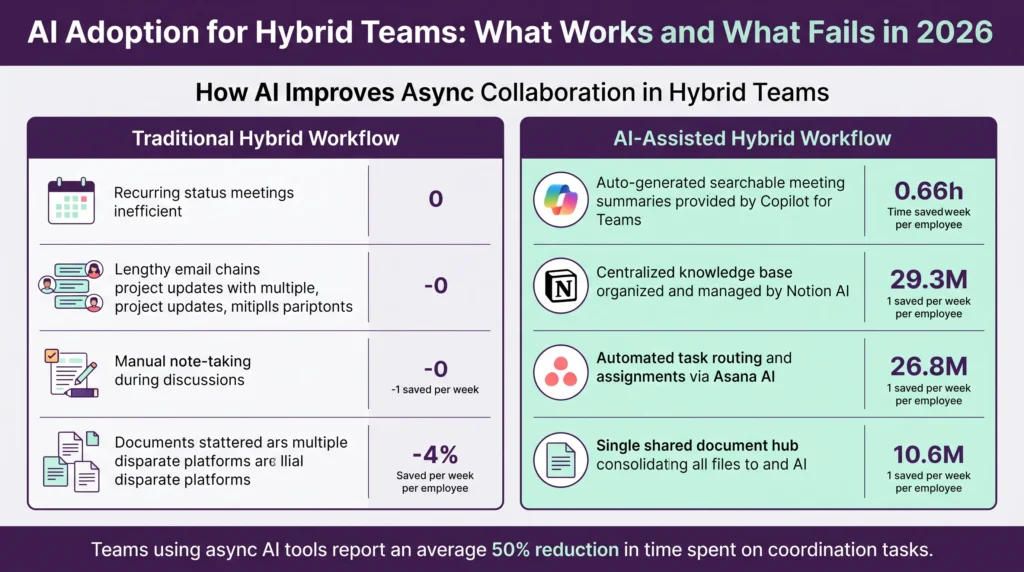
Teams that switch to async AI tools see a major drop in time spent on coordination tasks. McKinsey’s AI research confirms that structured AI programs deliver real returns for distributed teams. This frees up hours each week. Staff can direct that time toward higher-value work instead of status update meetings.
How should you train a distributed team?
Training a distributed team needs a different model than a standard in-person workshop. A single all-hands session does not work well when the team spans different time zones. Some members may not be able to attend live. Offering content in many formats increases participation. It also improves knowledge retention across both in-office and remote groups.
Contextual micro-learning is one of the best training models for distributed teams. Instead of pulling people into a separate training space, this approach delivers short prompts and tips inside the apps used daily. When a team member opens a new AI tool, a brief in-app guide shows the most useful first step. This method keeps learning tied to real tasks. It lowers the barrier to trying something new. Adoption improves when training appears in the normal flow of work, not as a separate task.
Manager behavior also drives adoption speed. When team leads use AI tools in their own daily work, adoption spreads faster. It also feels more normal to the rest of the group. Assigning a specific AI task as part of a weekly workflow gives every team member structured practice. This does not require extra meetings or adding steps to an already full schedule.
How do you measure AI impact across teams?
Tracking the right metrics is a key step for any growing business during an AI rollout. Focusing on the wrong ones is a common mistake. It causes teams to lose confidence in their tools. This happens even when those tools are working well. Login counts and usage dashboards feel like progress. But they do not show real operational improvement.
Output metrics give a clearer picture. Task completion time is a direct indicator. If a content team that used to need four hours to write a first draft now does it in two hours, the time saved is real and verifiable. Error rates, customer response times, and rework frequency are also useful signals. They show genuine changes in how work gets done. Teams that track output metrics find clearer proof of return on investment within the first 90 days of their pilot.
Set a measurement plan before the rollout begins. Set up a baseline for each target metric. Run the pilot for 30 to 90 days. Then compare results directly. This gives teams the data they need to make confident decisions about scaling or adjusting their tools. Teams that skip this step often struggle to justify kept investment once the initial momentum fades.
Ready to build a measurement framework for your hybrid team? AI Smart Ventures offers AI Advisory services that help growing businesses move from guesswork to data-driven AI decisions. Schedule a consultation to start building your roadmap.
What safety risks come with hybrid AI?
Safety is one of the most overlooked factors in hybrid AI adoption. When team members in different locations use different tools, the risk of data exposure rises sharply. Employees often paste sensitive customer info, financial records, or business steps into public AI platforms. Many do not realize this data may be stored or shared with third parties. It may also be used to train models.
An acceptable use policy is the first line of defense. This document lists approved platforms. It defines what data can and cannot be shared with AI tools. It also sets clear expectations for how AI outputs should be reviewed before use. Every team member should read and sign this policy. This must happen before they use any AI platform for work.
Role-based access controls are the second critical layer. These ensure that sensitive data only flows to the people who need it. For hybrid teams, this is especially key because the line between personal and work devices is often blurry. Business-grade AI platforms include built-in data governance features, audit logs, and access controls. The NIST AI Risk Management Framework offers practical guidance for setting up these controls. Free consumer versions of popular tools typically do not offer these protections. Using consumer-grade free tools for sensitive business tasks creates avoidable risk.
How do you build an AI champions program?
An AI champions program is a peer-led support structure. It speeds up adoption without relying on top-down mandates. The program picks two to four team members per department. These members come from both in-office and remote groups. They get advanced training and serve as go-to resources for their colleagues.
Champions are not expert trainers. Their role is to share what works in day-to-day practice. They answer quick questions from colleagues. They also model consistent tool use within the normal flow of their own work. When peers see a trusted colleague finish a task faster using AI, they are far more likely to try the same approach. Reading about it in a policy document does not have the same effect. Social proof from someone in the same role carries more weight than any official outreach.
Monthly champion check-ins keep the program active and useful. These sessions let teams surface problems and share wins. They also update the approved tool list as needs change. Champions who feel supported stay engaged longer. Their ongoing work becomes one of the most reliable drivers of adoption in any hybrid team.
What hybrid AI rollout mistakes cost you?
Most hybrid AI rollouts that fail do so for predictable, avoidable reasons. The most damaging mistake is launching too many tools at once. When teams face a flood of new platforms in a short period, they fall back on familiar habits. They ignore the new options entirely. Starting with one tool and proving its value in a specific workflow builds momentum. It also avoids the confusion that comes from too much at once.
Skipping the pilot phase is the second most common failure. A company-wide rollout without a controlled test gives leadership no output data. It also gives no chance to fix problems before they spread. A focused pilot with a small, willing group builds proof of concept. It also creates internal advocates who can support broader adoption when the program expands.
Ignoring change management is the third costly error. Buying great software is not the same as changing how people work. Without clear outreach, structured training, and visible manager buy-in, even well-chosen AI tools sit unused. Team members need to understand why the change is happening. They also need to know what it means for their daily responsibilities. Without that context, resistance builds naturally and adoption stalls before it gains any traction.
Frequently Asked Questions
What is AI adoption for hybrid remote business teams?
AI adoption for hybrid remote business teams is the structured step of selecting and using AI tools in daily workflows. It applies to teams split between office and remote locations. It covers tech selection, staff training, policy design, and change management. The goal is consistent, productive AI use for all team members. Clear guidelines and measurable outcomes should be in place before the first tool goes live.
Which AI tools are best for hybrid teams in 2026?
The most good tools for hybrid teams focus on async outreach and knowledge sharing. Microsoft Copilot for Teams creates meeting summaries and works with current Microsoft workflows. Notion AI builds central knowledge bases. Asana AI handles task routing and project tracking. Slack AI organizes conversations and surfaces relevant context. The best tool for any given team depends on its current tech stack, budget, and the specific workflows it wants to automate first.
How do you handle time zone differences in a hybrid AI rollout?
Focus on async AI tools that work without real-time coordination. AI-made meeting summaries, shared knowledge bases, and automated task routing cut the need for live meetings across time zones. Build training content in formats that team members can access on their own schedule. Set clear response time expectations and document all decisions in a shared system. This removes the pressure to be constantly online and helps all team members stay aligned.
How long does a hybrid AI adoption program take?
Most teams begin seeing measurable results within 30 to 90 days of their first focused pilot. A full company-wide adoption program typically takes three to six months. This depends on team size, tool depth, and the level of change management support in place. Teams that run a structured pilot first and follow a phased rollout tend to see faster adoption. They also see more lasting behavior change than those who try an all-at-once deployment.
What metrics should you track for hybrid AI adoption?
Track output metrics rather than activity metrics. Task completion time, error rates, rework frequency, and customer response times all show genuine output changes. Avoid measuring only login counts or session duration. These do not show whether work quality is actually improving. Set a baseline before the pilot begins. Measure results at 30 and 90 days. Then use that data to decide which tools to scale, which to adjust, and which to retire.
How do you prevent tool sprawl in a hybrid team?
Create a short, approved list of AI platforms before any rollout begins. Publish this list clearly and explain why each tool was selected. Give team members a formal request channel for proposing new tools rather than allowing independent downloads. Run quarterly tech stack reviews to find which tools are actively used, which overlap in function, and which can be retired. A central review step keeps the stack lean and cuts both cost and safety risk over time.
How do you get remote team members engaged in AI training?
Offer training content in many formats so remote staff can engage at a time and pace that suits their schedule. Short video walkthroughs, written quick-reference guides, and in-app micro-learning prompts all serve different learning styles. Assign remote advocates through an AI champions program to give peer support and normalize tool use. Include specific AI tasks in actual weekly workflows so that practice happens during real work, not only in separate training events.
What is digital presenteeism and how does AI help?
Digital presenteeism is the tendency for remote workers to stay visibly online at all times to signal output. This happens even when that behavior hurts their actual output. AI shifts team culture toward output-based measurement. It does this by producing documented results such as meeting summaries, completed task logs, and response time records. When teams measure what gets done rather than who is online, the pressure to appear constantly active decreases. This supports healthier work habits and better output from both in-office and remote staff.
How do you secure AI tools in a hybrid work environment?
Start with an acceptable use policy that lists approved tools. Define what types of data can be shared with AI platforms. Apply role-based access controls to limit exposure of sensitive info to only those who need it. Choose business-grade AI platforms with built-in data governance features, audit logs, and access management. Train every team member on data hygiene before they begin using any AI tool. Run regular safety audits to find gaps between your written policy and actual tool use.
How much does it cost to roll out AI for a hybrid team?
Costs vary based on team size, tool selection, and the level of training support needed. Most business-grade AI platforms start between $20 and $30 per user per month. Training and change management add to the total investment but are essential for lasting results. For a tailored plan based on your specific team structure and goals, contact AI Smart Ventures to schedule a consultation.
Should you build custom AI tools or use set up platforms?
Most growing businesses get faster results and lower risk by starting with set up platforms. Consider custom builds later, if needed. Commercial tools such as Copilot for Teams, Notion AI, and Asana AI offer proven features, regular updates, and vendor-supported safety controls. Custom development makes sense when specific workflows cannot be served by current products. Start with standard tools and validate your use cases with real data. Only pursue custom builds once you have a documented need that no ready platform can meet.
How do you align in-office and remote staff on AI expectations?
Start with a shared policy document that defines approved tools, acceptable use cases, and output standards for everyone on the team. Hold a joint kickoff that includes both in-office and remote staff. Set expectations together, not separately. Use AI tools that create a visible, shared record of work. Both groups can then see each other’s contributions. Review progress together on a regular schedule. Use output metrics rather than time-based measures so that location does not determine how output is checked.
Executive Summary
AI adoption for hybrid remote business teams works when it starts with a clear policy and the right async tools. A structured approach to training and measurement is also key. The most common failure points are unequal access between in-office and remote staff and tool sprawl from unmanaged software choices. Another common failure is relying on activity metrics that do not show real operational change. Teams that run focused pilots, build AI champions programs, and track task-level results see measurable improvements within 90 days. Safety and change management are foundational, not optional. Growing businesses that approach AI adoption with structure and clear expectations always outperform those that treat it as a simple software purchase.
What Should You Do Next?
Find one high-friction workflow in your hybrid team that AI could automate or cut this month. Assign an internal champion to lead the pilot and define your output metrics before day one. Set a 30-day check-in to review results before expanding the program to more tools or more team members.
AI Smart Ventures offers AI Advisory services for growing businesses ready to build a structured AI adoption program for their hybrid teams. Schedule a consultation to get a clear plan built around your specific goals and team structure.
People Also Read
- Why Is AI Usage Up But Business Impact Flat? The Adoption Puzzle Explained
- Claude Teams vs ChatGPT Teams vs Gemini for Business
About the Author
Nicole A. Donnelly is the Founder of AI Smart Ventures and an AI Adoption Specialist with 20 years of history as a founder and CEO and over a decade leading AI adoption plans. She helps businesses connect AI with clarity and confidence, driving innovation and lasting growth. Nicole has trained over 20,217 experts in Applied AI, delivered 624 workshops, and worked with close to 1,000 businesses across diverse industries.
Expertise: AI Transformation, AI Strategy, AI Rollout, AI Adoption, Applied AI, Marketing, Business Operations
Disclaimer: This content is for informational purposes only and does not constitute expert business or tech advice. Results vary based on industry, current systems and rollout commitment. Contact AI Smart Ventures for a consultation about your specific situation.

