
AI Data Readiness Checklist: What to Fix Before You Invest
Last Updated: April 2026
An AI data prep checklist is a set check of your existing data quality, access, and layout that shows whether your current data can support a working AI rollout before you spend on any tool. Per MIT Sloan Management Review (2023), team readiness, which includes data quality, is the top sign of AI project success in the first 90 days. The pattern across close to 1,000 businesses confirms it. Businesses that skip data prep reviews push their ROI window out by 60 to 90 days.
AI Smart Ventures has helped growing businesses through AI rollout planning across close to 1,000 businesses. The most clear finding is that data prep is not a tech problem. It is a process problem. Most growing businesses have enough data volume but lack the notes, naming rules, and access controls that let AI tools use that data reliably.
Finishing a data prep checklist takes one to two weeks and costs nothing beyond internal staff time. The payoff is avoiding the three most costly AI project failures. Rolling out a tool on bad data. Spending the first 30 days on cleanup rather than getting value. And building a workflow on field meanings that no new hire can follow without asking.
Key Takeaways
- Data must be under 20% errors or copies to work well. AI tools need fewer than 20% errors or copies to make reliable outputs. A CRM with 40% copy contacts will make summaries that name clients who no longer exist at the listed firm.
- Most growing businesses can finish a data prep audit in 5 to 10 days. A growing business with 2 to 20 staff can finish a data prep audit on its top three data sources in 5 to 10 business days with no outside help. Adding more sources at once always stalls without a set end date.
- Most AI tools take CSV, plain text, and JSON files natively. This includes ChatGPT API (Application Programming Interface) and Claude API. PDFs and scanned images need a conversion step, adding 1 to 3 days per file type to setup time.
- Naming one owner per data source stops bad AI outputs. Assigning one named owner per data source before AI rollout takes under 30 minutes. It is the single most useful step for stopping mixed AI outputs caused by clashing data entries.
- Skipping data prep costs 3 to 5 times more in staff hours. Businesses that roll out AI tools on bad data spend an estimated 3 to 5 times more in staff hours on post-launch cleanup than a pre-rollout audit would have needed. AI Smart Ventures sees this pattern across close to 1,000 businesses.
The AI data prep process is not about having perfect data before rolling out any tool. It is about having data that is clean enough for a set tool to read reliably within the first 30 days. A one-week audit and a focused cleanup sprint are almost always enough for a growing business targeting one workflow.
Why Does Data Quality Determine AI Project Success?
AI tools make outputs only as reliable as the data they process. A growing business with mixed naming, copy entries, or empty fields will get AI reports that are wrong in a way that is hard to spot. Per McKinsey’s State of AI (2024), 72% of businesses now use AI in at least one function. That means data quality problems that were once hidden are now actively hurting AI outputs at scale.
The real outcome of poor data quality is not that the AI tool stops running. It is that it runs on bad inputs and makes outputs that look correct but are not. A CRM with 40% copy records fed into an AI summary tool makes summaries for contacts who merged, left, or never existed as active clients. The cleanup needed after that finding always takes longer than a pre-rollout data audit would have needed.
What Does an AI Data Readiness Checklist Include?
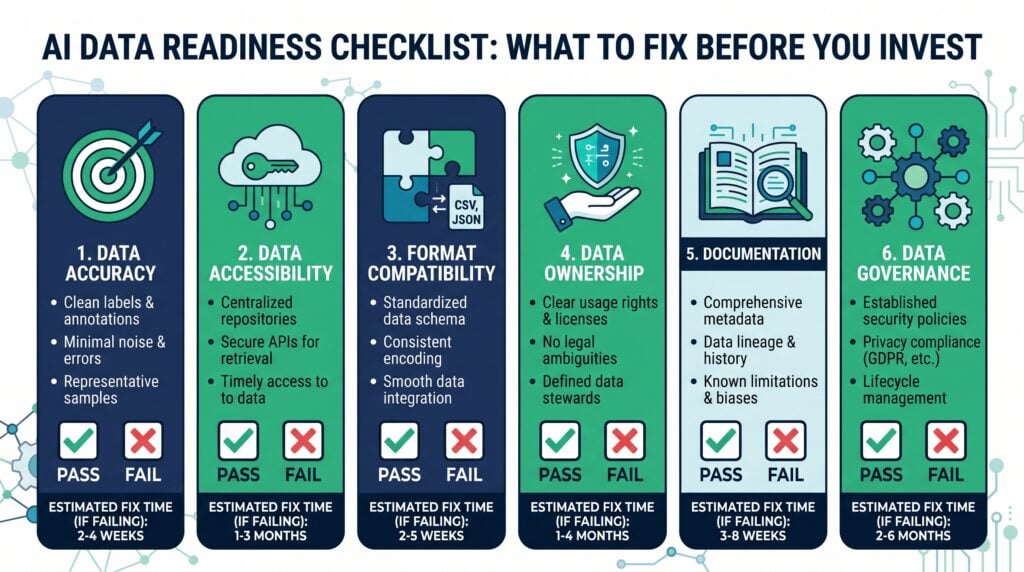
An AI data prep checklist covers six core areas. Clean data (fewer than 20% errors or copies). Easy access (no manual export needed). File fit (machine-readable files, not scanned images). Named owner (one named person per source). Field notes (meanings written down). And upkeep rules (a set process for updates). A business that passes all six areas on its main data source can roll out most AI tools within 30 days with no cleanup sprint.
The two areas that always fail on the first audit are field notes and upkeep rules. Teams with 5 to 15 staff usually rely on informal knowledge about what each field means rather than written meanings. That knowledge lives in one person’s head and is gone when they leave. When an AI tool hits a field called “status” with no context, it applies its own reading, making mixed outputs that cost more time to check than the notes would have taken to write.
For an always-updated list of AI tools vetted for service businesses, see AI tools and apps on the AI Smart Ventures resource hub.
If your team has checked the six areas and needs help picking the right AI tools for your current data setup, AI advisory services can map your data to the right rollout approach. AI Smart Ventures has helped close to 1,000 businesses through AI data prep planning and tool choice.
How Do You Audit Data Accuracy Before Deploying AI?
A data clean check for a growing business covers three steps. Copy rate (above 20% needs a cleanup sprint). Field fill rate (key fields should be at least 90% full). And data age (records not changed for 24 or more months need a confirm flag before AI use). Most growing businesses can finish this audit in one business day using a spreadsheet export of their main data source.
Running the clean check before any tool buy shows whether cleanup is a quick weekend task or a multi-week sprint. A CRM with 500 records and 8% copies needs one afternoon of cleanup. A CRM with 8,000 records and 35% copies needs a set sprint before any AI tool will make reliable outputs. Both audits use the same three-step process below. Only the result sets the overall cleanup timeline before rollout.
The three clean checks and what to do with each result:
- Copy rate check. Export your main data source as a CSV, open it in a spreadsheet, and use COUNTIF on the email address column to flag rows where the same address shows more than once. A copy rate above 20% needs cleanup before AI rollout using HubSpot CRM Free’s built-in merge tool or a manual spreadsheet pass for smaller data sets.
- Field fill check. For each key field (email, firm name, status, and any field the AI tool will use), count the share of filled rows using COUNTA divided by total rows. Fields below 90% full need a fill sprint or a choice about whether the field is truly needed for the AI workflow.
- Data age check. Filter for records where the last-updated date is more than 24 months ago. Flag these for a confirm pass before AI use. Old records in a CRM make AI summaries that name lapsed ties as active ones. This is the most common source of client-facing errors from AI-made contact notes.
Finishing all three checks takes under three hours for a data set with fewer than 5,000 records. It gives a clear pass or fail for each area before you spend time on cleanup that may not be needed.
What Data Formats Do AI Tools Actually Accept?
Most AI tools, including ChatGPT API and Claude API, process set text natively. CSV files, plain text, and JSON data work reliably without prep. PDFs and scanned images need a conversion step before AI tools can use them, adding 1 to 3 days per file type to setup time. Growing businesses with data in Google Sheets, Excel, or CSV already meet the file fit need for most AI tools priced under $100 per month.
The file fit gap matters most for businesses that store ops data in PDFs. Client deals, proposals, and invoices typically live in PDF format. An AI tool that needs to refer to deal terms or billing history needs either a conversion step or a set PDF parser before the content can be used. Confirm file fit with a sample file before picking any AI tool, not during the first week of rollout when the finding adds cost and delay.
What Should You Do If Your Data Fails the Checklist?
If your data fails two or more areas on the AI data prep checklist, the right response is a 4 to 6 week cleanup sprint before any tool buy. Running cleanup and rollout at the same time pushes the timeline to a real result by 8 to 12 weeks, based on the pattern across close to 1,000 businesses. A focused sprint on one data source costs far less in staff time than after-the-fact fixing of AI outputs built on mixed data.
The sprint works best when scoped to the one data source the AI tool will use first. Adding cleanup to all data at the same time is the most common cause of stalled data prep projects. The team doing the cleanup has main job tasks that come first when the sprint has no set end date. A four-week sprint on one source always beats an eight-week effort across all data in time-to-rollout.
The four-phase cleanup sprint for a growing business:
- Phase 1 (Audit, Week 1). Export the main data source and write down the total record count, copy rate, field fill rate for the top five fields, and data age spread. Share the audit results with one other person before starting any cleanup work.
- Phase 2 (Copy Removal, Weeks 2 to 3). Merge or remove copy records with matching email addresses or firm names. Fill key missing fields using available source records. Archive records not changed for 24 or more months that cannot be confirmed with a current contact.
- Phase 3 (Field Notes, Week 4). Write a one-page field guide listing every field name, its meaning, and allowed values. Name one owner per source and write their update tasks so any team member can follow them.
- Phase 4 (Upkeep Rules, Ongoing). Set a monthly 15-minute data review reminder. Define what “clean record” means for your main source. Build an onboarding process that teaches data entry rules to new team members without relying on informal explanation.
Businesses that finish all four phases before rolling out an AI tool report clear, reliable outputs from day one. Those that skip field notes always restart the cleanup after 30 to 60 days when the AI tool starts making results that no one can confirm.
Frequently Asked Questions
What Is an AI Data Readiness Checklist?
An AI data prep checklist is a set check covering six areas. Clean data, easy access, file fit, named owner, field notes, and upkeep rules. A business that passes all six areas on its main data source can roll out most AI tools within 30 days. A business that fails two or more areas should finish a 4 to 6 week cleanup sprint before committing any budget to a tool buy.
How Long Does a Data Readiness Audit Take?
A data prep audit on one data source takes one to three business days for a growing business with 2 to 20 staff. The audit needs a spreadsheet export, a copy count, a field fill check, and a file fit check. Adding the audit to three sources adds three to five more business days. The main cost is internal staff time, not software.
What Is the 30% Rule in AI?
The 30% rule in AI is the guide that 30% of any AI project budget should go to prep work, including data cleanup, field notes, and training, not just the tool. A growing business putting $1,000 into AI tool plans should direct about $300 in staff time to data prep before the tool goes live. The IBM Institute for Business Value (2024) names this split as a clear sign of first-90-day adoption success.
How Much Data Do You Need Before Deploying AI?
A growing business can roll out most AI tools well with as few as 500 to 1,000 clean, set records. Volume matters far less than quality. 500 fully filled records always make more reliable AI outputs than 10,000 copy-heavy records from the same source. If your business has fewer than 500 set records for a set use case, manual workflows are usually more time-saving than an AI tool for that workflow.
What Data Formats Do AI Tools Require?
Most AI tools take CSV, plain text, and JSON data without prep. PDFs, Word docs, and scanned images need a conversion step, typically adding 1 to 3 days per file type to setup time. A business that stores ops data in Google Sheets or Excel already fits the file needs of most AI tools priced under $100 per month, including ChatGPT Plus ($20 per month) and Claude Pro ($20 per month).
What Are the Signs Your Data Is Not AI-Ready?
The clearest signs that your data is not AI-ready are a copy rate above 20%, key fields filled below 80%, data stored mainly in PDFs rather than set files, no written field meanings, and no named owner in charge of quality. Two or more of these at the same time means a 4 to 6 week cleanup sprint is needed before any AI tool is bought.
What Should You Clean First Before AI Deployment?
Clean the data source the AI tool will use on day one of rollout, not all data at once. For a business rolling out AI for client contact, clean the CRM first. For a business rolling out AI for document review, clean the document library first. Putting the main use-case data source first stops the audit from growing into a months-long project before any tool goes live.
Is There a Free AI Data Readiness Assessment?
A basic data prep check can be done internally at no cost using a spreadsheet export and three checks. COUNTIF for copy rate. COUNTA compare for field fill. And a manual file fit review. Outside data prep checks from consultants range from $2,500 to $10,000 based on data volume and scope. Schedule a consultation to find out whether your current data needs an outside review or an internal sprint.
How Does Data Governance Relate to AI Readiness?
Data upkeep is the ongoing practice of keeping data quality good after the initial cleanup. It is the area most directly linked to whether AI outputs stay reliable over time. A business with strong upkeep rules in place before rollout can roll out an AI tool once and keep clear outputs without repeat cleanup sprints. Without upkeep rules, most growing businesses need a new cleanup sprint every 3 to 6 months as data drift builds up and AI output quality drops.
Executive Summary
An AI data prep checklist is a six-area check covering clean data, easy access, file fit, named owner, field notes, and upkeep rules. It shows whether a data source can support a working AI rollout without a costly post-buy cleanup sprint. Per MIT Sloan Management Review (2023), team readiness, including data quality, is the top sign of AI project success in the first 90 days. AI Smart Ventures finds that growing businesses that finish a one to two week data prep review before buying any AI tool reach a real result 60 to 90 days faster than those that start cleanup after rollout.
What Should You Do Next?
Export your main data source this week as a spreadsheet. Run a COUNTIF check for copy email addresses. Count the fill rate for your top five key fields. And find out whether your ops files are set or mainly in PDF format. If two or more checklist areas fail, plan a 4 to 6 week cleanup sprint before committing any budget to an AI tool.
AI Smart Ventures offers AI consulting services for growing businesses building AI prep plans before tool investment. Schedule a consultation to find the exact data gaps in your business and build a cleanup plan that fits your team size and timeline.
People Also Read
- What Is Shadow AI and Why Is It Growing in Your Company?
- How Do You Audit Your AI Stack? A Practical Review
About the Author
Nicole A. Donnelly is the Founder of AI Smart Ventures and an AI Adoption Specialist with 20 years of experience as a founder and CEO and over a decade leading AI adoption initiatives. She helps businesses integrate artificial intelligence with clarity and confidence, driving innovation and sustainable growth. Nicole has trained over 20,217 professionals in Applied AI, delivered 624 workshops, and worked with close to 1,000 organizations across diverse industries.
Expertise: AI Transformation, AI Strategy, AI Implementation, AI Adoption, Applied AI, Marketing, Business Operations
Disclaimer: This content is for informational purposes only and does not constitute professional business or technology advice. Results vary based on industry, existing systems and implementation commitment. Contact AI Smart Venturesfor a consultation regarding your specific situation.