

AI Enablement for Teams: How Is It Different From Training?
Last Updated: August 2026
An AI enablement program for teams is a working system, not a class. It pairs the right tools with new ways of working, plain rules and steady coaching, so people put AI to use on the job at hand. Training teaches a skill once. AI enablement for teams keeps that skill alive at the desk, inside the software your people open each morning. The test is not who showed up, but whether the work gets faster, cleaner and simpler to repeat.
AI Smart Ventures has guided growing businesses through AI adoption long enough to watch one pattern repeat. Teams leave a workshop full of ideas, then slide back to old habits inside a month, because nothing in their week has changed. The firms that break that pattern treat this as an operating choice, not a learning event.
That gap costs time you can feel in the schedule. Each quarter a team spends relearning the same tool is a quarter a rival spends stacking real gains. Worse, people who test AI with no guardrails start pasting client data into accounts no one owns.
Key Takeaways
- Training builds a skill and enablement builds a habit, so fund the twelve weeks after the workshop.
- Work by role, never by broad theme. A finance team and a marketing team need their own prompts, data rules and worked examples.
- Shared assets outlast star talent, because when one person improves a team agent, the whole team gains overnight.
- Track the work, not the roll call: cycle time, rework and weekly use inside the target workflow.
- Write the usage rules before the rollout, not after the first leak, since people test more freely when limits are clear.
Those five points share one root idea: AI skill lives in workflows, not in heads. A person who learns a clever prompt takes it away when they leave. A team that folds the same prompt into a shared agent, a checklist and a one-page rule set keeps that skill no matter who stays.
How is AI enablement different from AI training?
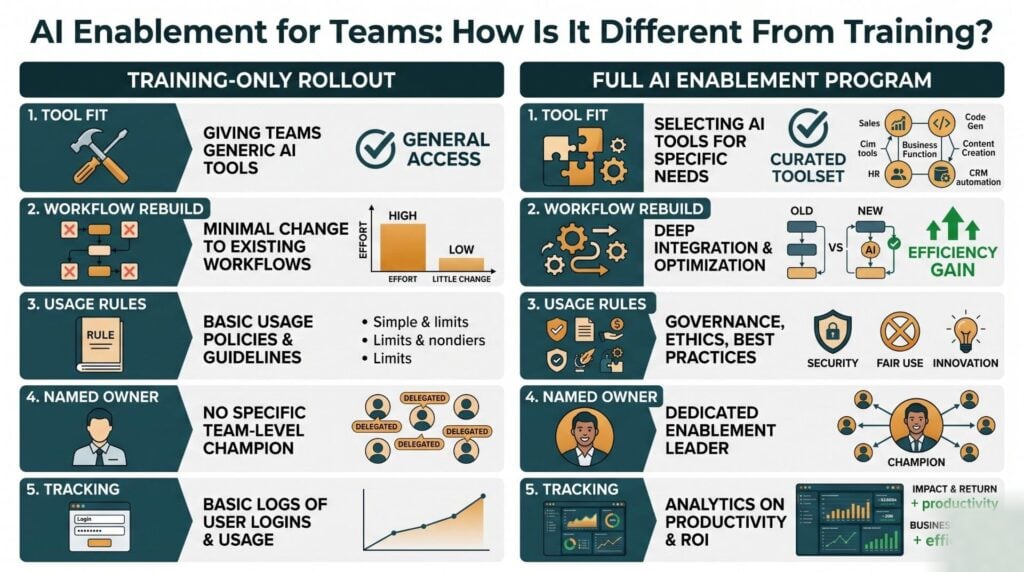
AI training teaches people how a tool works. AI enablement makes sure they can use it on a Tuesday afternoon, under deadline, with real client data and no trainer in the room. Training is an event with a start date and an end date. Enablement is a standing system: tools picked to fit the workflow, prompts and agents saved where the team already works, one named person to ask, and clear rules on what data may go where. Most firms buy the first part and skip the second, which is why the skills fade.
| Element | AI training | AI enablement |
|---|---|---|
| Time frame | A session or short course | An ongoing routine |
| Unit of value | One person’s skill | A shared team workflow |
| Typical measure | Attendance and completion | Cycle time, rework, weekly use |
| Ends when | The session ends | The workflow no longer needs it |
Both matter. Stopping at the workshop is the error, because training with no follow-through leaves you with well-briefed people and unchanged work.
Why do one-off AI training sessions fade?
One-off sessions fade because nothing in the working week backs them up. People come back to a full inbox, and the quickest path is the old path. According to Docebo’s 2026 AI Readiness Gap report, which asked 1,000 learners and 1,000 learning leaders across six countries, 57% of learners say their training is a poor fit for the job they do, and one in five have had no AI training at all.
Fit is the whole game. A broad session on prompt writing feels fun and changes nothing, while a session that rebuilds the report your team files every Friday changes that Friday for good. AI literacy grows as a by-product.
What does an AI enablement program include?
A working program has five parts: tools matched to real tasks, workflows rebuilt around those tools, a written rule set, a named owner, and a habit of tracking results. Drop one and the rest go soft. Tools with no workflow optimization just add steps, and new workflows with no rules add risk. Kyndryl’s 2026 People Readiness Report, based on 1,100 senior leaders in eight countries, found only 23% think their workforce is ready for AI, down six points on the year.
The same report names a small group it calls Pacesetters, 9% of those asked, who rebuild roles around AI and run change management next to the tech. They were 1.5 times more likely to report AI-linked revenue growth.
Are shared team agents replacing personal AI setups?
Yes, and 2026 is the year the tools made it plain. OpenAI launched Workspace Agents on 22 April 2026 as the heir to custom GPTs. Reworked, writing the day after launch, called them cloud-based agents that can run on a schedule or sit inside Slack, with an admin view of each agent built across the firm. OpenTools reports a retirement date of 26 August 2026 for custom GPTs on business accounts, so check your own console before you plan around either date.
The design point matters more than the product. One person edits a shared agent and the whole team gets the change, instead of ten people each keeping a private version. Here is what that shift means for capability building:
- Ownership moves from the person to the group, so a good workflow no longer walks out the door.
- Admins can see what has been built, which turns hidden use into managed use.
- Sign-off gates can force a human check before an agent sends mail or edits a sheet.
- Your work shifts from teaching prompts toward curating a short shelf of trusted agents.
Anyone still running AI adoption as a private side project has a call to make this month.
How do you enable AI in Microsoft Teams?
You switch on AI in Microsoft Teams by handing out Microsoft 365 Copilot seats. Microsoft’s setup guide gives the order: sign in to the Microsoft 365 admin center, open Billing, then Licenses, pick Microsoft 365 Copilot, and assign seats to people or to groups. Copilot then shows up inside the apps, though some can take up to 24 hours to display it.
Microsoft sets out the rollout as pilot, deploy, operate. Start with a small group of early users, learn what they truly reach for, then widen. The same guide says to review SharePoint sharing first, since Copilot can surface whatever a user already has rights to see.
Should enablement differ by team function?
Yes. A marketing team needs brand voice, draft review and reuse of old assets, while a finance team needs accuracy checks, help matching accounts and much tighter data rules. Same platform, two risk profiles, two views of what a good answer looks like. Build one core module on judgement and data safety for the whole staff, then add short sessions shaped to each job.
The Docebo research also found that 91% of learning leaders say their firms have not fully reworked workflows around AI. That is the real backlog, and it is where gains in operational efficiency come from.
How do you measure AI enablement success?
Measure the work, not the workshop. Four numbers tell you most of what you need: weekly use of the tool inside the target workflow, cycle time on the process you picked, the rework or error rate on what comes out, and the share of the team that has built or reused a shared asset. A stack of badges says nothing about whether Friday’s report got any lighter. If weekly use drops off after week three, the workflow fit is wrong, not the people.
Set a baseline before you start. Time one full cycle of the chosen process, count the handoffs, and write both numbers down. With no such record, every later claim about time saved is a guess in a good suit.
Enablement is easier when someone has run it before. AI Smart Ventures delivers AI training and upskilling built around your own workflows, drawing on more than 20,000 professionals trained in Applied AI.
Frequently Asked Questions
Can I add an AI agent to Microsoft Teams?
Yes. Microsoft Copilot Studio lets you build an agent and publish it, and Microsoft’s guide covers how to install it for yourself, share an install link, or send it for admin sign-off so it shows in the Build for your org part of the Teams app store. You can also let an agent into a team channel, where members mention it and everyone sees the reply.
Is there an AI for Teams?
Yes. Microsoft 365 Copilot is the built-in helper for Microsoft Teams, and it sums up chats, pulls out meeting actions and drafts replies from files your account can already reach. Custom agents built in Copilot Studio can answer from your own sources too. An agent cannot use a source that needs a personal sign-in, so those agents work in one-to-one chats only.
What is the 30% rule for AI?
The 30% rule is a rough guide, not a published standard. It says a tool should strip at least 30% of the effort out of a task before it earns a slot in the workflow, because smaller gains rarely survive the friction of changing habits. Time the task by hand, judge the saving with an honest eye, and skip whatever sits under the line.
What is the difference between AI adoption and AI enablement?
AI adoption counts logins and seats. AI enablement changes how the work gets done. Adoption tells you a tool is there; enablement tells you a process is now faster, safer or steadier because of it. You can hit 90% adoption and gain nothing if people use the tool for emails they were already writing fast. Enablement aims at the tasks that truly hurt.
Who should own an AI enablement program?
One named person, backed by a small group drawn from ops, tech and the teams doing the work. Groups stall because no one owns the calendar. The owner needs no deep tech skill. What they need is the power to change a workflow and guarded time to run the monthly review. In a smaller firm that is often the ops lead. Name them before you buy a thing.
How long does AI enablement take to show results?
Plan on 60 to 90 days for the first change you can measure in one workflow, then about a quarter for each new team after that. The first three weeks feel slow, because people are still learning where the tool fits. Gains build once a shared asset exists and others copy it. A promise of change within days describes a demo.
What should an AI usage policy cover?
Four things: which tools are cleared for use, which data may go into them, when a human must check the output, and who to ask when the answer is not clear. Keep it to one page people will read. Name the cleared accounts in plain terms, because private accounts are where client data tends to leak. Review the page each quarter.
Do all teams need the same AI tools?
No, and forcing one stack too hard is a common error. A single shared platform for general work keeps oversight simple, but a given team often needs a second, narrower tool that suits its process. Let each team propose one addition and defend it against a named task. Review those picks after a quarter, then retire whatever no one opened.
How do you keep AI enablement going after the first rollout?
Give it a standing slot. A 30-minute monthly session where two people show what they built holds momentum better than any refresher course, because it makes good work visible to the rest. Fold new hires into the same routine when they join. Retire agents no one uses. Skill fades quietly when no one is watching, and a repeat meeting is the simplest guard.
How do I get started with AI enablement for my team?
Start with one workflow that annoys everybody, not the flashiest use case. Map the steps, time a full cycle, then find the point where AI takes out real effort. Write the rules, run one short session shaped to the role, then review at 30 days. AI Smart Ventures runs an AI readiness check with growing businesses to pick that first workflow. Schedule a consultation to map yours.
Executive Summary
AI enablement for teams is the system that wraps around AI training: matched tools, rebuilt workflows, a written rule set, a named owner and a habit of tracking results. Training builds a skill, and the skill fades with nowhere to use it. Research published in 2026 shows the gap plainly, with most learners calling their training a poor fit for the job. The tools point the same way, from private prompt piles toward shared team agents with admin oversight. Start with one painful workflow, set a baseline, and widen.
What Should You Do Next?
Pick one repeat process this week: month-end close, vendor onboarding, weekly reporting. Time a full cycle by hand and note each handoff, so you hold a baseline to argue from later. Then draft a one-page rule set naming cleared tools, and run a 30-day trial with a small group before you widen it.
AI Smart Ventures offers AI training and upskilling for growing businesses that want AI skill built into daily workflows rather than handed over in a one-off class. Schedule a consultation to design an enablement plan around your own processes.
People Also Read
About the Author
Nicole A. Donnelly is the Founder of AI Smart Ventures and an AI Adoption Specialist with 20 years of experience as a founder and CEO and over a decade leading AI adoption initiatives. She helps businesses integrate artificial intelligence with clarity and confidence, driving innovation and sustainable growth. Nicole has trained over 20,217 professionals in Applied AI, delivered 624 workshops, and worked with close to 1,000 organizations across diverse industries.
Expertise: AI Transformation, AI Strategy, AI Implementation, AI Adoption, Applied AI, Marketing, Business Operations
Disclaimer: This content is for informational purposes only and does not constitute professional business or technology advice. Results vary based on industry, existing systems and implementation commitment. Contact AI Smart Ventures for a consultation regarding your specific situation.

