

AI for Client Reporting Without Losing the Personal Touch
Last Updated: August 2026
AI for client reporting is the use of AI to pull data, spot trends and draft the write-up a client gets. The tool does the gathering and the first draft, while a person still owns the read on what the numbers mean, the caveats and the advice. Done well, it cuts the gap between a month ending and a client hearing what that month was worth. Done badly, it makes a neat file that no one trusts and no one reads twice.
AI Smart Ventures has guided growing businesses through practical AI adoption for more than a decade, and reports are the first workflow most teams try to change. Client-facing work carries reputational weight, so it shows up fast when a tool saves time but quietly costs you trust. The same story plays out in ad agencies, book-keeping firms and law practices.
Reports are where you keep or lose a client, since they are often the only place your thinking shows up in full. Hand over a file that reads like every other file and you look like every other firm. Get it right and your best people spend that hour on the call rather than on the spreadsheet.
Key Takeaways
- Split the work, not the responsibility: let AI pull the data, spot the trends and draft, then keep the read, the caveats and the advice with one named person.
- Connect your data sources first, because most delay comes from numbers spread across six separate tools rather than from slow typing.
- Tell clients where AI sits in the process, because transparency is now what buyers expect and it costs you nothing to state.
- Guard the numbers with a check step no one may skip, and match each headline figure back to the tool it came from.
- Put a short, plain point of view at the top of each report, because clients pay for the read on the numbers rather than for the numbers themselves.
The teams that gain most here are rarely the ones with the smartest tools. They are the ones who chose up front which parts of a report a machine may touch, and which parts stay human by rule. That one decision does more for quality than any tool you buy.
How do agencies use AI to speed up client reporting?
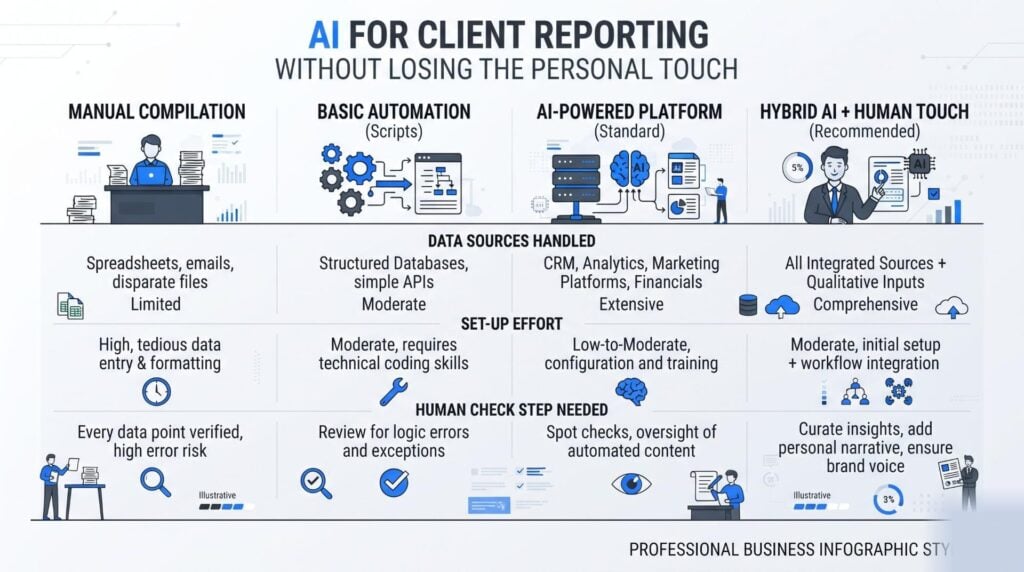
Agencies use AI to cut the three slow steps: pulling numbers out of six tools, turning those numbers into a first draft, and shaping that draft into a deck. A linked set-up pulls the data on a set day and hands the account lead a draft to edit. The time you save sits in the preparation rather than in the thinking. Most teams find the client call still takes just as long, which is the whole point of the change.
The order of operations matters more than the software, so list each report you send every month and mark the ones you rebuild from scratch. Those are your first candidates, since a repeatable shape is what machines handle well. The second gain comes from drafting, because a model that can read your data and your last three reports will give you a workable summary in seconds.
Which AI tools are best for automating client reports?
The best tool depends on where your data already sits, but the big shift in 2026 is that report tools stopped being places you visit. At Google Cloud Next ’26 in April 2026, Looker added a managed Model Context Protocol (MCP) server. That is a shared link letting an outside AI helper read approved company data. Dashboard agents and monitoring workflows arrived with it, so reporting now moves toward asking a question where you work and getting a grounded answer back.
That shift matters for three plain reasons:
- Data without a dashboard. An MCP link lets an AI helper read approved data straight from your data store, so each figure in a draft traces back to one source.
- Agents that watch the numbers. Tools now flag odd swings between reports, which means far fewer surprises on the client call.
- Access rules move to the front. Because helpers reach live data, who may see what turns into a reporting choice rather than an IT one.
| Set-up | Best for | Watch for |
|---|---|---|
| Multi-channel dashboard tools | Campaign and channel reports | Templates that read alike for each client |
| Power BI with Copilot | Teams already inside Microsoft 365 | Draft text that still needs checking |
| Deck-building tools | Firms that present in slides | Charts refreshing faster than the words |
| An AI helper on an MCP link | Odd questions across many sources | Access rules and data ownership |
What does a good AI workflow for client reports look like?
A good workflow runs in four steps: link, draft, check, send. You link your sources once so no one has to export a sheet by hand. The tool builds a draft on a set day, using a shape your clients already know. One named person then checks the figures and writes the read. You send the file through a channel you control, which keeps private data out of long email threads.
The check step is the one people drop when they get busy, and it is the one that saves you. Give it a slot of twenty to thirty minutes per client and put it in the calendar. Workflow optimization here is mostly about order, not speed, since a fast report with a wrong number costs more than a slow one.
Mapping that order is what AI Advisory work is for, drawing on 624 workshops run with growing businesses. Bring your current report calendar and we will show you where the check gate belongs.
How do you use AI in reports without losing accuracy?
You keep reports right by making the check a rule rather than a habit. Match each headline figure to the tool that made it, and cut any number the model cannot trace. The worry is broad: work from dbt Labs in April 2026 found that 71% of data staff fear wrong or made-up output reaching the people they serve. Trust in data is now a top goal for 83% of them, up from 66% a year before.
Three habits carry most of the load. First, keep the model close to your source data, since numbers pasted into a chat box lose their trail. Second, ask for the maths behind each claim so the checker can follow it. Third, keep a short list of figures that only a person may state, such as anything tied to a bill, a forecast or a promise in the contract. Getting this right is a process design job rather than a prompting trick.
Can AI replace manual reporting for agency clients?
No, AI cannot take over the human part of client reports, though it can take over most of the build around them. A model can chew through metrics and say what moved, but it does not know your client just lost a supplier. That missing piece is what turns a report into advice. A fair split is about eighty percent machine-led prep and twenty percent human-led read, tuned to how touchy the account is.
Clients seem fine with that split. In a July 2026 poll of 350 business owners, Karbon found that more than 80% say their accountant is worth more when AI takes on the routine work. That frees up time to talk strategy. Only 2% were uneasy about AI in the mix at all. The risk is not that clients turn the tools down, it is that they stop seeing your thinking in what you send.
How do you keep the personal touch in AI reports?
You keep the personal touch by owning the top and the tail of each report. Open with three lines that say what happened, why it happened and what you would do next, written by the person who knows the account. Close with two or three next steps tied to dates. All the parts in between can be built with help. Clients rarely ask how a chart was made, but they always notice when no one has read it.
Small human signs do a lot of work here. Annotate one chart with a note on why it dipped, and point back to a conversation from last month so the report feels continuous. Record a three-minute walk-through when the numbers look odd, since tone carries a calm that text cannot. That is what human-first AI looks like in practice: the machine builds, and a person stays on the hook for the meaning.
Frequently Asked Questions
What is the difference between AI reporting and business intelligence?
Business intelligence shows the data and leaves the meaning to you, while AI reporting adds a written layer that says what those numbers mean. A dashboard shows that sales fell nine percent, while an AI-drafted report says they fell, names the likely cause and suggests a response. Most teams run both, since the dashboard stays the source of truth and the write-up becomes the layer clients actually read.
How long does it take to set up AI client reporting?
Set-up runs from a few days to about three months, based on how many sources you link. A one-tool report with a template you already use can run inside a week. Pulling from a data store, a sales system and three ad tools takes longer, mostly due to access rights rather than the AI. Teams that list the metrics they need first tend to finish faster and rework less.
Should you tell clients that AI helped produce their report?
Yes, and most clients now expect it. The July 2026 Karbon poll of 350 business owners found that 89% want to be told where AI is used in their work. One line in your terms is usually enough: name the steps you automate, confirm that a named person checks each report, and say how you keep their data safe. Transparency protects you far better than silence does.
Can AI analyze qualitative client feedback for reports?
Yes, and this is one of its strongest uses. AI can take piles of survey replies, support tickets or call notes and group them into themes with sample quotes. That gives you proof of mood to sit beside your numbers. Always spot-check those themes against a batch of raw comments, since a summary can flatten a strong minority view into what looks like broad agreement.
What client data should stay out of AI reporting tools?
Keep names, card details, health notes and anything your contract locks down out of general tools. Before you link a source, ask whether the vendor will sign a data processing agreement (DPA), the contract that sets out how they store, use and delete your data. Use grouped or masked figures where the report allows it. If you would not email it in the clear, do not paste it into a chat box.
How do you stop AI reports from sounding generic?
Bland output usually starts with bland input. Give the model your real template, two strong past reports and the client’s stated goals, then tell it to follow that shape rather than invent one. Ban filler openings in the prompt and ask for a number in each claim. The best fix stays editorial: write the opening summary yourself each time, since that block is what clients read most closely.
Who should sign off on an AI-assisted client report?
One named person per account, and it should be the lead who will present it. Sign-off means they matched the headline figures to source tools, checked the story against what they know, and wrote the advice in their own words. Passing this task round the team weakens it, since blame spread wide tends to vanish under a deadline. Put the checker’s name inside the report itself.
How do you get started with AI for client reporting?
Start with one report rather than the whole calendar, picking the one that costs the most build time. Map where its data sits, then automate the pull before you automate any writing. Run it beside your manual version for one month so you can compare the two. AI Smart Ventures helps growing businesses order this work, drawing on close to 1,000 organizations served. Schedule a consultation to plan your first workflow.
Executive Summary
AI for client reporting works when it takes on the build and leaves the judgment alone. Link your data sources first, since numbers spread across six tools cause more delay than slow writing ever did. Draft on a set day, then hold a check gate that one named person owns and never skips. Tell clients which steps you automate, because being open is now what buyers expect. Keep the opening read and the next steps in human hands. That balance buys you faster reports, steadier operational efficiency and files that still sound like your firm.
What Should You Do Next?
This week, pick the one report that eats the most build time and write down where each of its numbers lives. Link those sources to one place before you automate any writing, then block a thirty-minute check slot per client in next month’s diary. Add a line to your terms that says how AI is used and who signs the report off.
AI Smart Ventures offers AI Advisory for growing businesses building report workflows that hold up under client scrutiny. Schedule a consultation to design a reporting process your team can run each month with clarity and confidence.
People Also Read
- How Do You Create an AI Policy When You Don’t Have a Legal Team?
- How Do COOs Lead AI Implementation? A Guide for Operations Leaders
About the Author
Nicole A. Donnelly is the Founder of AI Smart Ventures and an AI Adoption Specialist with 20 years of experience as a founder and CEO and over a decade leading AI adoption initiatives. She helps businesses integrate artificial intelligence with clarity and confidence, driving innovation and sustainable growth. Nicole has trained over 20,217 professionals in Applied AI, delivered 624 workshops, and worked with close to 1,000 organizations across diverse industries.
Expertise: AI Transformation, AI Strategy, AI Implementation, AI Adoption, Applied AI, Marketing, Business Operations
Disclaimer: This content is for informational purposes only and does not constitute professional business or technology advice. Results vary based on industry, existing systems and implementation commitment. Contact AI Smart Ventures for a consultation regarding your specific situation.

