

AI for the Director of Operations in an Owner-Operated Business Without IT
Last Updated: June 2026
An AI toolkit for a director of ops without IT is a set of no-code tools. It automates reports, planning, vendor emails, and team messages. Per a 2024 Salesforce State of work report, ops leaders who adopted AI tools saw a 25% improvement in day-to-day speed within 90 days. These tools are built for non-tech users and cost between $20 and $100 per user per month.
AI Smart Ventures has guided growing businesses through AI adoption and AI implementation for over a decade. Ops directors without IT face the same three problems: too many manual steps, no one to build a system, and a limited budget.
Key Takeaways
- No-Code Tools First – Tools like Zapier and Make let you automate repeated tasks in under two hours, with no coding needed. Zapier’s Starter plan costs $19.99 per month for up to 750 auto tasks.
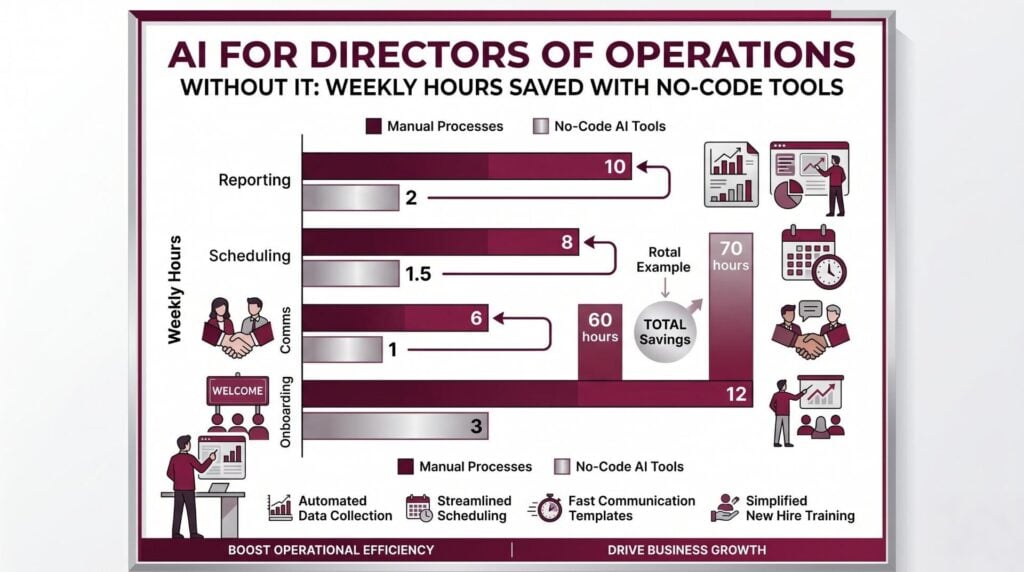
- Real Time Savings – per AI Smart Ventures’ AI ROI data, ops directors in owner-run businesses recover 25% of their working week within 60 days. A clear AI rollout is the key factor.
- Keep Costs Under $100/Month – For most ops roles at a 5-50 person business, a full AI stack costs $40-$90 per month. Anything above $500 per month needs a formal business case and a return on spend (ROI) review.
- Start With One Workflow – Research published in Harvard Business Review (Beer et al., 2016) shows that habit change succeeds best when one new behavior is mastered. Add more only after the first one sticks. Pick your most painful manual task and automate that first.
- Shadow AI is a Real Risk – When teams use AI tools without approval, shadow AI grows fast. A 2024 IBM Institute for Business Value report found that 60% of employees use at least one AI tool their employer has not sanctioned.
Why Are ops directors Adopting AI Now?
Owner-run businesses are adopting AI because the cost of not doing so is now clear. A director of ops managing 10-30 staff can automate weekly status reports, vendor follow-ups, and onboarding checklists for under $60 per month.
AI tools now work for non-tech users. You can set them up in an afternoon. No developer or IT approval is needed. Notion AI summarizes meeting notes and drafts SOPs for $16 per month on the Plus plan.
What AI Tools Does an ops director really Need?
An ops director in a 5-50 person business without IT needs four types of AI tools. These are: a general AI helper, a workflow automation tool, a knowledge management tool, and a message summarizer. The total cost sits between $40 and $90 per user per month.
- general AI helper – Claude (Teams plan, minimum 5 seats at $30 per user per month) or ChatGPT (Plus at $20 per user per month) handle drafting and summarizing. Claude does better on long docs.
- Workflow automation – Zapier (Starter at $19.99 per month for 750 tasks) or Make (Core plan at $9 per month for 10,000 ops). Zapier is easier to learn. Make is cheaper at scale.
- Knowledge and Project management – Notion AI ($16 per member per month on the Plus plan) keeps SOPs, meeting notes, and team wikis in one place. Use their pre-built ops template to start.
- Message Summarizer – Microsoft Copilot ($30 per user per month as a Microsoft 365 add-on) summarizes Teams meetings and emails. Only worthwhile if your business runs on Microsoft 365.
For a continuously updated list of AI tools vetted for ops directors, see AI tools and apps on the AI Smart Ventures resource hub.
How Do You Build an AI Stack Without an IT Team?
An ops director without IT can build a functional AI stack in five steps. Most complete this in one to two weeks with no outside help.
- Step 1: Audit Your Week – List each task you do manually more than once a week. These are your automation targets.
- Step 2: Pick One Workflow – Choose the task that costs you the most time. Automate it first with Zapier or Make. Do not move to step 3 until it runs without errors for five straight days.
- Step 3: Add a Knowledge Base – Set up Notion AI using their ops template. Load your top five SOPs and connect it to your team’s message tool.
- Step 4: Add a general AI helper – Once your knowledge base is live, add Claude or ChatGPT for drafting.
- Step 5: Review and Govern – Set a 30-day review. Check which automations save time. Check whether team members have started using unsanctioned tools. This is where AI governance begins.
The AI workflow automation guide from AI Smart Ventures covers each step in plain language.
AI Smart Ventures offers AI implementation for growing businesses. Schedule an AI readiness review to get a clear starting point.
Which AI Tools Compare Best for ops management?
Choosing the right tools comes down to three things: what the tool does, what it costs, and where it falls short. The six tools below cover the most common ops needs. Together they cost between $40 and $90 per month. Pricing reflects publicly listed rates as of April 2026. Always verify before committing.
| Tool | Monthly Cost | Best For | Limitation |
|---|---|---|---|
| Claude Teams | $30/user/mo (min 5 seats) | Long doc summarization, SOP drafting | No live business data without link |
| ChatGPT Plus | $20/user/mo | general drafting, Q&A, task templates | Context window smaller than Claude for long docs |
| Notion AI | $16/member/mo (Plus plan) | SOPs, meeting notes, knowledge management | Setup takes 3-5 hours without a template |
| Zapier Starter | $19.99/mo (750 tasks) | Connecting apps, setting up repeated tasks | Expensive at high task amounts; switch to Make |
| Make Core | $9/mo (10,000 ops) | High-volume automation on a tight budget | Steeper learning curve than Zapier |
| Microsoft Copilot | $30/user/mo (M365 add-on) | Teams meeting summaries, email drafting | Only worthwhile if already on Microsoft 365 |
For a continuously updated list of AI tools vetted for ops directors, see AI tools and apps on the resource hub.
How Do You Protect Your Business Data When Using AI?
An ops director needs three rules before any AI tool goes live. First: no customer or employee data in free-tier public tools. Second: a signed Data Processing Agreement (DPA) with each vendor. Third: one person who knows what each tool stores and for how long.
Most AI vendors offer a DPA in their paid plans. Claude’s Team plan does not use your inputs to train its models. If you handle private info under GDPR, use a paid plan rather than the free tier.
AI governance does not require a legal or IT team. It needs three rules, written down and shared before anyone opens a new tool.
What Results Should You Expect in 90 Days?
Most ops directors see clear results within 60-90 days. These include 25% of manual task time recovered, faster report turnaround, and fewer dropped vendor follow-ups.
Set a KPI for each tool in week one. For Zapier, track tasks automated per week. For Notion AI, track SOPs documented. Cut any tool that shows no improvement after 30 days.
Frequently Asked Questions
Will AI replace a director of ops?
AI will not replace a director of ops. It automates the repeatable, low-judgment tasks that consume 30-40% of the role today, such as status reports, follow-up emails, and data entry. The strategic and judgment-heavy work that defines an ops director cannot be automated with current tools. Directors who adopt AI well free up that time for higher-value decisions.
What is the easiest AI tool for an ops director to start with?
Zapier is the easiest starting point for most ops directors without IT. It needs no coding. It offers a visual drag-and-drop screen that most users master within an afternoon. The Starter plan at $19.99 per month handles up to 750 tasks. This covers the full initial rollout for a growing business. Start with one automation and run it cleanly for five days before adding a second.
How much does an AI stack for ops management cost per month?
A functional AI stack for an ops director in a growing business costs between $40 and $90 per month. This often covers one automation tool, one AI helper, and one knowledge management tool. Pricing varies by team size and plan tier. So check each vendor’s current pricing page before committing. For a precise estimate based on your exact workflow needs, schedule a consultation with AI Smart Ventures to map the right tools to your budget.
How long does it take to see results from AI tools?
Most businesses see clear time savings within 30-60 days of steady use. The first 30 days focus on setup and testing. Days 30-60 produce steady, repeatable results. By day 90, most ops directors know which tools are working and can add a second workflow. Businesses that rush the initial setup phase often take longer to see results. Skipping the test phase creates errors that cost more time to fix than the first manual step.
Do I need IT support to set up these AI tools?
You do not need IT support to set up the tools described in this guide. Claude, ChatGPT, Zapier, Make, and Notion AI are all designed for non-tech users. All come with help centers, video tutorials, and email support. The only exception is a locked-down Microsoft 365 environment, where Copilot may need admin access to activate. In that case, your Microsoft 365 account manager can handle it without an internal IT team.
What is the difference between Zapier and Make for ops?
Zapier is easier to learn and best for simple, two-step auto. Make is cheaper at scale. It handles more hard, multi-step workflows with branching logic and conditional steps. For most growing businesses starting out, Zapier’s Starter plan at $19.99 per month is the right choice. Once you exceed 500 auto tasks per month, Make’s Core plan at $9 per month becomes the more practical and cheap option.
How do I know if an AI tool is safe for business data?
A tool is safe for business data when it offers a signed Data Processing Agreement (DPA). It must not use your inputs to train its models. It must also encrypt data in transit and at rest. Paid plans from Claude, ChatGPT, and Notion AI all include these protections. But free tiers often do not. Check the vendor’s privacy policy before signing up and never paste customer names, financial records, or employee data into a free-tier public AI tool.
What happens if my team starts using AI tools without permission?
Unsanctioned AI tool use is called shadow AI, and it is common in owner-run businesses where no formal AI policy exists. The risk is that sensitive business data ends up in tools you have not reviewed for security or data handling. Creating a short approved-tools list and sharing it with your team solves 80% of the problem. Explain why unapproved tools are a data risk on one plain-language page. No legal or IT support needed.
How do I write an AI policy without a legal or IT team?
An AI policy for a growing business does not need to be a legal doc. It needs three elements on one page. First: a list of approved tools. Second: a rule about what data cannot go into AI tools. Third: a step for requesting a new tool. Use Claude or ChatGPT to draft the first version in under 30 minutes. Have your business owner review it. Update it each six months as your stack changes.
Which jobs are least affected by AI in an ops team?
Roles involving in-person teamwork, client relationships, supplier negotiations, and team management are least affected by AI automation. These roles require judgment, trust, and adaptability that current tools cannot replicate. Admin tasks, data entry, report writing, and meeting planning are most affected. An ops team that shifts its people toward judgment-heavy work will become stronger, not smaller, as AI handles the repeated layer of the job.
Executive Summary
An ops director in an owner-run business without IT can build a functional AI stack for $40-$90 per month using no-code tools like Zapier, Claude, and Notion AI, with no coder needed. Clear use starts with one automation workflow. Add tools in sequence. This steadily delivers a 25% reduction in manual task time within 60-90 days. The critical success factors are choosing tools with a signed Data Processing Agreement (DPA). Set a Key Performance Indicator (KPI) for each tool in week one. Cut any tool that has not saved clear time by day 90.
What Should You Do Next?
This week, list each manual task you repeat more than once per week. Then pick the one that costs you the most time. Set up a free Zapier account and automate that single task before you try anything else. Once that automation runs cleanly for five days, check the comparison table in this guide to choose your next tool.
AI Smart Ventures offers AI implementation work for growing businesses looking to build a clear, secure AI stack without IT. Schedule a consultation to map your first three automations and build an approved-tools list for your team.
People Also Read
- AI Transformation Without an IT Department: A Guide
- What Is Shadow AI and Why Is It Growing in Your Business?
About the Author
Nicole A. Donnelly is the Founder of AI Smart Ventures. She is an AI Adoption Specialist with 20 years of experience as a founder and CEO. She has spent over a decade leading AI adoption work. She helps businesses integrate AI with clarity and confidence, driving innovation and sustainable growth. Nicole has trained over 20,217 professionals in Applied AI, delivered 624 workshops, and worked with many organizations across diverse industries.
Expertise: AI Transformation, AI Strategy, AI Implementation, AI Adoption, Applied AI, Marketing, Business Operations
Disclaimer: This content is for informational purposes only and does not constitute professional business or technology advice. Results vary based on industry, existing systems and implementation commitment. Contact AI Smart Ventures for a consultation regarding your specific situation.

