

Best AI Productivity Apps for Business Teams in 2026
Last Updated: April 2026
An AI productivity app is a software tool that uses artificial intelligence to reduce the time cost of routine work – drafting documents, summarizing meetings, automating data entry, and managing schedules – so business teams can redirect hours toward higher-judgment tasks. According to McKinsey‘s 2024 State of AI report, 72% of organizations now use AI in at least one business function, yet most growing business teams still evaluate AI productivity tools by feature count rather than by the specific workflow task each tool eliminates.
AI Smart Ventures has worked with close to 1,000 businesses and organizations on AI adoption and marketing since 2015. Founder Nicole A. Donnelly, an AI Adoption Specialist with 20 years of experience as a founder and CEO, works with business owners selecting AI productivity tools and needing a structured framework for choosing the right tool for each workflow gap rather than subscribing to every tool that appears in a search result.
The most common AI productivity app selection mistake is choosing tools based on brand recognition and then discovering the tool does not address the specific daily task that consumes the most team time. The correct sequence is identifying the highest-cost repetitive task first, then selecting the AI tool designed to eliminate that specific task, rather than purchasing a broad platform and hoping it improves productivity across the board.
Key Takeaways
- One Task, One Tool First – The teams that sustain AI productivity gains consistently start with one AI tool that eliminates one specific daily task. Multi-tool adoption in the first 30 days produces tool confusion rather than productivity gains. The single-task-first rule applies regardless of team size or industry.
- AI Writing Tools Deliver the Fastest Measurable ROI – AI drafting tools like Claude and ChatGPT deliver measurable return on investment (ROI) in the first week because writing is the most universally distributed time cost across business teams. Email drafts, status reports, and client summaries are completed in minutes rather than hours.
- AI Meeting Tools Solve the Largest Hidden Time Problem – Most business teams spend more time on meeting-related tasks – note-taking, follow-up summarization, and action item distribution – than they realize. AI meeting tools like Fireflies AI and Otter.ai eliminate this hidden overhead in the first week of use.
- Platform Integration Determines Sustained Use – AI productivity tools used inside the platforms teams already work in – Slack, Google Workspace, Microsoft 365 – achieve higher 90-day adoption than standalone tools requiring separate logins. Integration determines whether a tool becomes a daily habit or a subscription the team forgets.
- The 90-Day Benchmark Separates Tools That Work From Tools That Do Not – Most AI productivity tools show genuine value within 90 days if adoption is consistent. Tools that have not produced a measurable reduction in a specific task’s time cost after 90 days should be replaced with a more targeted tool or a better-configured version of the same one.
Understanding these five selection principles allows a business owner to evaluate AI productivity apps by operational fit rather than marketing claims, producing sustained use and measurable time savings rather than a stack of underused subscriptions.
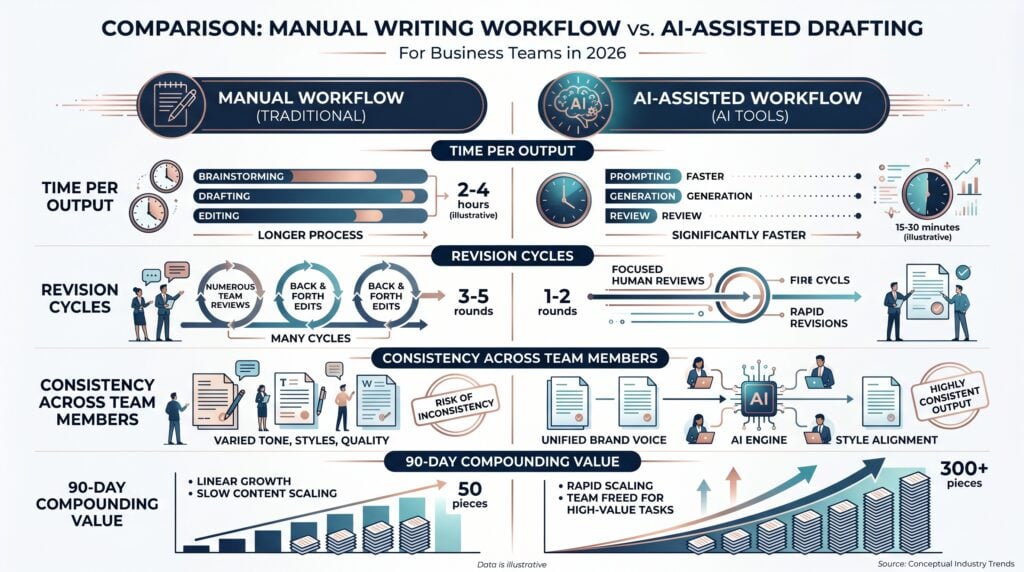
What Are the Best AI Productivity Apps for Writing?
AI writing and drafting tools are the highest-ROI starting point for most business teams because writing is the most universally distributed time cost: every team member writes emails, reports, summaries, and proposals regardless of role. According to Gartner‘s 2025 analysis of AI tool adoption, AI writing tools achieve the highest adoption rates among enterprise AI applications because they address a task every knowledge worker performs daily.
The most effective AI writing tools for growing business teams are general-purpose AI assistants configured with role-specific prompts, not specialized writing platforms that lock output to a fixed format. A business owner who builds three reusable prompts – a client email template, a status report structure, and a meeting follow-up format – recovers more time in the first 30 days than one who subscribes to a specialized writing tool that produces only one output type.
The most effective AI writing tools for growing business teams:
- Claude – Claude handles long-form drafting, document summarization, and structured output with strong instruction-following. The $20 per month Pro plan is the standard choice for business users who draft client-facing documents and need consistent tone adherence across outputs.
- ChatGPT Plus – ChatGPT is the most widely adopted AI writing tool with strong general-purpose drafting capability. The Plus plan at $20 per user per month adds GPT-4o access, file uploads, and custom GPTs that allow teams to configure brand-specific writing assistants.
- Microsoft Copilot – Microsoft Copilot integrates directly into Word, Outlook, and Teams, allowing team members to draft documents and emails without switching applications. Included in Microsoft 365 Business Premium plans for qualifying subscribers.
- Google Workspace AI – Google Workspace AI integrates into Docs, Gmail, and Sheets, providing AI drafting within the applications most Google-centric teams already use daily without requiring a separate tool subscription.
Teams can start with any of these tools at $20 per month or less, with measurable first-week time savings on email drafting and document production. Growing businesses evaluating which AI writing tool fits their existing document workflow can explore AI advisory services for owner-operators selecting their first AI productivity stack.
What Are the Best AI Productivity Apps for Meetings?
AI meeting tools address the highest hidden time cost for most business teams: the hours spent taking notes, writing summaries, and distributing action items for decisions made verbally but never documented. According to Harvard Business Review‘s 2023 research on AI adoption, AI meeting tools are consistently rated as the highest-satisfactory AI productivity investment by business teams because time savings are immediate and outputs replace a task no team member enjoys doing manually.
For a growing business running three or more recorded meetings per week, an AI meeting tool that joins automatically, transcribes, and produces structured summaries with action items eliminates manual note-taking entirely and creates a searchable archive that compounds in value as more meetings are recorded. The search archive – the ability to retrieve any decision made in any past meeting by keyword – is where the long-term ROI exceeds the per-session time saving.
The most effective AI meeting tools for growing business teams:
- Fireflies AI – Fireflies AI joins meetings as a bot participant, records audio and video, generates verbatim transcripts with speaker labels, and produces AI-structured summaries with action items. The Pro plan is $10 per user per month. Integrates with HubSpot, Salesforce, and Slack for direct action item handoff.
- Otter.ai – Otter.ai provides AI transcription with speaker identification, real-time captioning, and meeting summaries. The Pro plan at $17 per user per month adds team collaboration features and extended storage for meeting archives.
- Fathom – Fathom is a free AI meeting notetaker for Zoom users that records, transcribes, and generates AI summaries without a per-user fee. The free tier covers most growing business use cases for Zoom-centric teams.
- Zoom AI Companion – Included in paid Zoom plans, Zoom AI Companion generates meeting summaries, action items, and highlights directly within the Zoom platform for teams already on a paid Zoom subscription.
Most growing business teams achieve full meeting note elimination within the first two weeks of consistent AI meeting tool use. Teams that configure a custom summary template before the first recorded meeting receive actionable summaries from session one rather than generic outputs that require manual editing.
If your team is still taking manual meeting notes and distributing action items by hand, AI Smart Ventures offers AI training services for growing businesses building structured AI productivity programs. The AI Smart Ventures team has worked with close to 1,000 organizations on AI adoption since 2015.
What Are the Best AI Productivity Apps for Projects?
AI-powered project management tools reduce the administrative overhead of tracking work across projects, updating statuses, and coordinating across team members – the coordination tax that grows with team size and project count. AI Smart Ventures observes across close to 1,000 organizations that AI-enhanced project management tools consistently reduce coordination meeting frequency for teams that configure AI-powered status updates and task assignment automation.
For a growing business, the highest-value AI project management application is automated task generation from meeting summaries and project briefs – converting the output of other AI productivity tools directly into tracked work items without manual re-entry. Teams that connect their AI meeting tool to their AI project management platform eliminate the gap between verbal commitments and tracked tasks, reducing the rework that results when action items from meetings are not captured consistently.
| Tool | AI Features | Starting Price | Best For |
| Asana AI | Task automation, status summaries | $10.99/user/month | Cross-functional teams |
| Notion AI | Knowledge base + task tracking | $10/user/month | Document-centric teams |
| ClickUp AI | Automated task generation | $7/user/month | Multi-project teams |
| Monday.com AI | Workflow automation | $9/user/month | Visual project trackers |
The most effective AI project management tools for growing business teams:
- Asana with AI – Asana‘s AI features automate task creation from project briefs, generate status update summaries, and suggest task assignments based on team workload. The Business plan at $24.99 per user per month includes the full AI feature set.
- Notion AI – Notion AI adds AI drafting, summarization, and Q&A to Notion’s combined notes and task platform, making it effective for teams that use a single tool for both knowledge management and project tracking.
- ClickUp AI – ClickUp AI generates tasks from text descriptions, summarizes project updates, and writes subtask checklists. The Business plan at $12 per user per month includes AI features across all project views.
Growing businesses that need support building an AI-integrated project management workflow can explore AI consulting services for teams deploying AI productivity tools across multiple operational functions.
How Do You Choose the Right AI Productivity App?
Choosing the right AI productivity app requires a three-step selection process: identifying the specific daily task with the highest time cost, confirming the tool addresses that task in a workflow-compatible format, and verifying it integrates with the platforms the team already uses. Growing businesses that follow this structured sequence consistently achieve higher 90-day adoption rates than those selecting tools based on brand recognition or peer referrals without matching the tool to a specific workflow gap.
The most common selection mistake is evaluating tools by feature lists rather than by match to the team’s specific workflow gap. A team that loses more time to manual meeting notes than to email drafting should start with an AI meeting tool, not an AI writing tool, even if the AI writing tool is more widely recognized. The selection sequence determines whether the first tool delivers measurable ROI, which in turn determines whether the business owner continues investing in AI productivity tools at all.
The three-step selection process:
- Step 1: Identify the Highest-Cost Daily Task – Audit where team members spend the most unproductive time – writing, note-taking, or tracking. Select the task category that appears most frequently and takes the longest per instance. This determines which tool category to evaluate first.
- Step 2: Confirm Task-Specific Coverage – Within the selected category, test two tools with the actual task the team does daily. A trial using a real meeting or a real client email produces a more accurate comparison than evaluating features in the abstract.
- Step 3: Verify Integration With Existing Platforms – Confirm the tool integrates with the team’s primary platform – Google Workspace, Microsoft 365, or Slack – before subscribing. A tool that requires a separate login and manual export produces lower sustained adoption than one that operates inside existing workflows.
Teams that follow this selection sequence consistently report higher satisfaction at 90 days than those who subscribe based on reviews or referrals without matching the tool to a specific workflow gap.
What Does Implementing AI Productivity Apps Cost?
AI productivity apps for a growing business range from free for platform-embedded tools like Google Workspace AI and Fathom, to $10 to $25 per user per month for dedicated tools like Claude, Fireflies AI Pro, and Notion AI. A full productivity stack covering writing, meetings, and project management runs $30 to $60 per user per month for most growing business teams.
Enterprise implementations through large consultancies such as Accenture and Deloitte Digital are scoped for organizations requiring custom integration and dedicated implementation support – a different scope from a growing business evaluating monthly tool subscriptions. For a growing business, a team of five saving 30 minutes of writing and meeting time daily each recovers 37.5 hours per month – a return that exceeds most tool costs within the first week of consistent use. Schedule a consultation to identify the right AI productivity tool combination for your team’s specific workflow gaps and budget.
Frequently Asked Questions
What are the best AI productivity apps for business teams?
The most effective AI productivity apps for growing business teams are Claude or ChatGPT for writing and drafting, Fireflies AI or Otter.ai for meeting transcription, and Notion AI or Asana for task tracking. Most growing businesses need one tool in each of these three categories to cover the primary productivity gaps: writing time, meeting overhead, and coordination cost. Starting with the writing tool produces the fastest first-week ROI.
How much do AI productivity apps cost per month?
AI productivity apps for a growing business range from free for platform-embedded tools like Google Workspace AI and Zoom AI Companion, to $10 to $25 per user per month for dedicated tools like Claude Pro, ChatGPT Plus, and Fireflies AI Pro. A full productivity stack covering writing, meetings, and task management typically runs $30 to $60 per user per month. Most growing businesses start with one or two tools rather than a full stack.
Which AI productivity app saves the most time?
AI meeting tools consistently save the most measurable time for business teams because they eliminate a task – manual note-taking and action item distribution – that occurs multiple times per week. AI writing tools save the most time per individual session because drafting is the daily task with the highest per-output time cost. The combination of one AI meeting tool and one AI writing tool produces the fastest combined time saving in the first 30 days.
What is the difference between AI productivity apps and traditional productivity software?
Traditional productivity software provides structure for work – calendars, task lists, document editors – but requires the user to perform the work. AI productivity apps perform parts of the work: drafting the email, summarizing the meeting, generating the task list from a project description. The practical difference is that AI productivity apps reduce the time cost of producing outputs, while traditional software reduces the time cost of organizing them.
How do you choose the right AI productivity app for your team?
Choose an AI productivity app by identifying the specific daily task that consumes the most team time and selecting the tool designed to address that task. The correct selection sequence is: identify the highest-cost repetitive task, confirm the tool addresses that task in a workflow-compatible format, verify it integrates with the platforms the team already uses, and run a two-week trial before committing to a subscription.
Can AI productivity apps integrate with existing business tools?
Most AI productivity apps at the growing business tier integrate with Google Workspace, Microsoft 365, Slack, HubSpot, and Salesforce. Fireflies AI pushes meeting action items to Asana, Notion, and CRM (Customer Relationship Management) platforms. Claude and ChatGPT connect to hundreds of platforms through Zapier. Notion AI and Microsoft Copilot operate directly inside existing document platforms. Integration availability should be verified before subscribing, particularly for CRM and project management connections.
Do AI productivity apps work for non-technical team members?
AI productivity apps designed for business teams – Claude, ChatGPT, Fireflies AI, Notion AI – are built for non-technical users. The learning curve is primarily prompt quality: team members who write specific, structured prompts produce better outputs than those using vague instructions. Most non-technical team members reach functional proficiency with one AI productivity tool within two to three weeks of daily use with a role-specific prompt template.
What is the 90-day benchmark for AI productivity apps?
The 90-day benchmark states that an AI productivity tool should produce a measurable reduction in a specific task’s time cost within 90 days of consistent daily use. Tools that have not produced a measurable time saving after 90 days are either misconfigured, mismatched to the actual workflow gap, or being used inconsistently. The benchmark helps business owners distinguish tools that work from subscriptions that add cost without reducing workload.
How do you measure ROI from AI productivity apps?
Measure ROI from AI productivity apps by tracking time spent on the specific task before and after deployment. The baseline is the average weekly time spent on the targeted task before the tool is introduced. After 30, 60, and 90 days of consistent use, compare the same metric. A reduction of 30% or more at 90 days confirms positive ROI for most business-tier tools at $10 to $25 per user per month.
Executive Summary
The best AI productivity apps for business teams in 2026 address three workflow gaps: writing and drafting time, meeting overhead, and project coordination cost. AI writing tools like Claude and ChatGPT deliver the fastest first-week ROI; AI meeting tools like Fireflies AI and Otter.ai address the largest hidden time cost; and AI task management tools like Notion AI and Asana reduce coordination overhead as team size grows. Selection should be based on the specific daily task with the highest time cost, not brand recognition or feature count.
What Should You Do Next?
Identify the single daily task your team repeats most often that produces a consistent time drain – email drafting, meeting summaries, or status reporting – and run a two-week trial of the AI productivity tool designed for that specific task before evaluating a broader stack. Track time spent on that task before and after to establish a measurable baseline for the 90-day ROI check.
AI Smart Ventures offers AI advisory services for growing businesses selecting AI productivity tools and building structured adoption programs. Schedule a consultation to identify which AI productivity apps fit your team’s specific workflow gaps and budget.
People Also Read
- How to Integrate AI Into Existing Workflows Without Starting Over
- How to Get Your Team to Actually Use AI Tools
About the Author
Nicole A. Donnelly is the Founder of AI Smart Ventures and an AI Adoption Specialist with 20 years of experience as a founder and CEO and over a decade leading AI adoption initiatives. She helps businesses integrate artificial intelligence with clarity and confidence, driving innovation and sustainable growth. Nicole has trained over 20,217 professionals in Applied AI, delivered 624 workshops, and worked with close to 1,000 organizations across diverse industries.
Expertise: AI Transformation, AI Strategy, AI Implementation, AI Adoption, Applied AI, Marketing, Business Operations
Connect: LinkedIn | WebsiteDisclaimer: This content is for informational purposes only and does not constitute professional business or technology advice. Results vary based on industry, existing systems and implementation commitment. Contact AI Smart Ventures for a consultation regarding your specific situation.

