

How Do You Scale One AI Workflow to a Whole Team?
Last Updated: September 2026
Scaling AI workflows is the work of turning one person’s routine into a written standard that other people can run and still get the same result. It covers the steps, the named owner, the rules on who gets in, and the review habit that holds a routine steady as more hands touch it. The tool itself rarely changes at this point. What changes is how much of the job sits in one head, and how much of it now sits on a page that anyone on the team can open and read.
AI Smart Ventures has guided growing businesses through the point where a private habit has to turn into a shared one. That step tends to show how much of the work was never written down: the small fixes, the inputs the tool cannot cope with, and the calls the builder makes without noticing that they are making them.
Get this wrong and you do not end up with one workflow running five times. You get five versions of it, each one drifting from the others, while the person who built the first spends the week answering questions instead of doing their own work. A second attempt is always harder, because the team has watched a shared routine fall apart once.
Key Takeaways
- Adoption is not the bottleneck, spread is: a Census Bureau working paper published in April 2026 found 57% of AI-using firms apply it in three or fewer business functions.
- Write the standard before you hand out access: a routine that lives only in one person’s habits reaches the second user as a rumour rather than a set of steps.
- Add people in pairs, not in batches: the second user runs the routine while the builder watches, then fixes the written steps wherever the words did not survive contact with real work.
- Expect ownership to blur as the group grows: a Zapier governance survey of 548 US directors, VPs and C-suite leaders found 41% say AI ownership varies by department or business unit.
Those four points rest on one idea worth saying out loud. The thing you are scaling is not the tool and it is not the prompt. It is a standard: an agreed way of doing one job that gives a fair result whoever sits at the keyboard. Handing out access is the easy half of that, and it is the half most teams do first.
Why Do AI Workflows Stall After the First Person?
They stall because the routine never got split from the person who built it. One user learns which inputs work, which outputs need a second look, and when to drop the tool and do the job by hand. None of that is written down. So when a colleague is handed access, they get the software and none of the learning. Their results are worse, they blame the tool, and the routine quietly stays with one person.
The pattern shows up in national data. A US Census Bureau working paper published in April 2026, The Microstructure of AI Diffusion, splits AI adoption into three layers: whether a firm uses AI at all, how many business functions it reaches, and which worker tasks it touches. Among firms that had adopted, 57% used AI in three or fewer business functions and 65% kept it to three or fewer tasks. Firms are getting in. They are not getting across.
What Has to Exist Before You Add a Second User?
Four things, and not one of them is a licence. A standard that is written rather than remembered. One owner who decides what that standard says. One place it lives, so a second copy never shows up. And one check that tells a user whether an output is good enough to send. Put those four in place first, and the next person starts where you finished, rather than repeating the six weeks you spent working it out.
Waiting is not wasted time here. AvePoint’s State of AI 2026 report, published in June 2026 from 750 leaders, found 86.9% of firms had held back an AI rollout because their data security and governance were not ready. Delay is already normal, so spend it well. The week you give to writing the standard decides whether the next user needs a page to read or a trainer to sit with. AI enablement costs far less when the thing being enabled already has a shape.
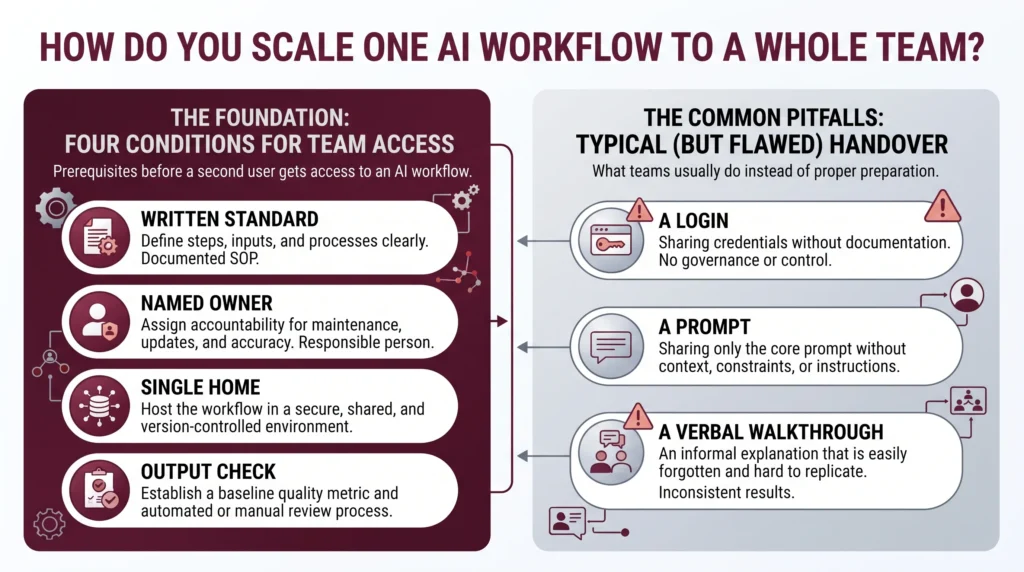
- A standard that is written, not remembered: if it lives only as a habit, the second user gets a rumour and makes up their own version of it.
- One named owner: one person signs off changes and takes the questions, so the standard has an editor and not a committee.
- One home for it: a single link everyone opens, so nobody can be right and out of date at the same time.
- One check on the output: a short test the new user runs before any of the work leaves the building.
How Do You Bring the Second and Third Person On?
One at a time, on live work, with the builder watching rather than talking. The new user reads the standard, runs the routine on a real task, and the builder steps in only when an output would have gone out wrong. Every question the new user asks marks a gap in the standard, so the answer goes in that same day. Training two people this way takes longer than one group session, and it holds up far better.
Order matters more than speed. Pick the second person for keenness rather than rank: someone who will say what went wrong instead of working around it in silence. The third person is the real test, because they should learn from the standard and from user two, not from you. If they still need the builder, the page is not yet carrying the routine. This is AI upskilling run as learning on the job, and it doubles as change management, since people who have edited a standard tend to defend it.
Practical AI implementation support from AI Smart Ventures turns one person’s working routine into a standard the whole team can run, with an owner and a review date attached to it.
What Breaks at Five Users That Did Not Break at One?
Agreement breaks first. At one user there is nobody to disagree with. At five, people bend the routine to fit their own corner of the work, and none of those changes get back to the standard. The builder turns into a help desk, taking the same three questions every week. Access requests queue behind whoever holds admin rights. And nobody can say which version made last month’s work, because there is no longer one version.
Those failures share a cause. The standard stopped being the thing people follow and became a starting point they edit in private. The Zapier governance survey of 548 US directors, VPs, and C-suite leaders found 41% say ownership varies by department or business unit, and 28% said formal policies sit on paper without being enforced across teams. Both figures describe one room, where several able people follow rules that no longer match each other. Operational efficiency drops while use climbs.
| What breaks at five | How you notice | What fixes it |
|---|---|---|
| One shared version | Two people show different steps | One home, edits made by the owner |
| The builder’s week | The same questions keep coming back | Answers go into the standard, not into chat |
| Access | New users wait days to get in | The owner grants access directly |
How Do You Keep the Standard From Drifting?
Give drift a route back into the page. Once a month, ask everyone who runs the routine to name one thing they do that the standard does not mention. The owner then takes the change, turns it down, or notes why an exception is allowed to stand. Nothing more elaborate is needed. That one habit keeps the written version close to the real one, and the written version is what you hand the next person who joins.
Drift is not bad behaviour. The work changes, clients change, and the tool itself shifts under you, so a standard that never moves is wrong within a quarter. What you manage is the distance between what people do and what the page says, not the fact that a gap exists at all. Tool-first AI agencies tend to hand over a build and leave that distance to grow. Workflow optimization is the ongoing half of the job: small dated edits, made by one owner, and told to everyone who runs the routine.
Frequently Asked Questions
How do you scale AI across a team?
Start with one routine that already works, write it down as a standard, then add users one at a time. Scaling AI is a writing and ownership job long before it is a matter of buying more logins. Name an owner, keep a single copy of the standard, and each month check the gap between what is written and what people really do. Widen access only after a second person has run the routine with no help.
Does AI have a scaling problem?
Yes, though the problem sits inside firms rather than in the tools. A Census Bureau working paper published in April 2026 found 57% of AI-using firms apply it in three or fewer business functions, and 65% keep it to three or fewer worker tasks. Firms get in, then stop spreading. What blocks them is usually a routine nobody wrote down and an owner nobody named, not the limits of the model.
How many people should run a workflow before you widen it?
Two, and that count includes the person who built it. One user proves the routine works. The second proves the standard works, because they have to run it from the page rather than from memory. If that second person needs the builder to finish, widen nothing yet and fix the wording first. Three or four users is enough to show up ownership problems while they are still easy to fix.
What is the difference between sharing a login and scaling a workflow?
A login gives somebody the tool. A standard gives them the routine. Sharing access spreads real skill only when the new user already knows the steps, the inputs to avoid, and what a good output looks like. Without that, you have added a person who will produce different work under the same name. Scaling means more people reaching the same fair result, not more people signed in.
How do you stop everyone building their own version?
Keep one copy of the standard in one place and route every change through its owner. Private versions show up when people cannot get a change made, so make the way in obvious and quick: a monthly round where anyone can propose an edit, decided inside a week. Then delete the old copies. A retired version left in a shared folder will be picked up and followed by somebody.
What if someone refuses to follow the standard?
Ask what they do instead before you ask them to stop. Refusal usually marks a real gap: the standard misses a case they handle, or it costs them time they do not have. If the exception is sound, write it in. If it is not, say so plainly and check their output for a fortnight. A standard nobody enforces teaches the whole team that none of it is binding.
How long does it take to bring a new person onto an AI workflow?
Plan a week of real work rather than an hour of training. The new user runs the routine on live tasks, the builder reads each output, and every question becomes an edit to the standard. Most people reach a good enough output within three or four runs when the page is clear. If it takes more than a fortnight, the problem is the writing rather than the learner.
How do you get started scaling an AI workflow across your team?
Pick the one routine that already works for a single person, then write down how they run it while they run it. Add the second user within two weeks, on live work, and let their questions rewrite the page. Book a review date a month out before anyone else gets in. To plan that rollout with help, schedule a consultation and bring the routine you already trust.
Executive Summary
Scaling one AI workflow to a team is a writing and ownership job, not a matter of handing out more logins. Before a second user arrives, the routine needs to be written down, given a named owner, kept in one place, and paired with a check on the output. Bring people on one at a time, on live work, and let their questions rewrite the standard. Expect ownership to blur once the group passes a handful of people, and set a monthly check between what the page says and what the team does. Widen access last, not first.
What Should You Do Next?
This week, name the one routine that already works for one person, and write the standard for it while they run it. Pick the second user by keenness rather than title, then give them a live task and the page instead of a walkthrough. Set the first review date before anyone else gets in.
AI Smart Ventures offers AI Implementation for growing businesses turning a single working routine into a team standard. Schedule a consultation to plan how your workflow reaches its second, third and fifth user without losing its shape.
People Also Read
About the Author
Nicole A. Donnelly is the Founder of AI Smart Ventures and an AI Adoption Specialist with 20 years of experience as a founder and CEO and over a decade leading AI adoption initiatives. She helps businesses integrate artificial intelligence with clarity and confidence, driving innovation and sustainable growth. Nicole has trained over 20,217 professionals in Applied AI, delivered 624 workshops, and worked with close to 1,000 organizations across diverse industries.
Expertise: AI Transformation, AI Strategy, AI Implementation, AI Adoption, Applied AI, Marketing, Business Operations
Disclaimer: This content is for informational purposes only and does not constitute professional business or technology advice. Results vary based on industry, existing systems and implementation commitment. Contact AI Smart Ventures for a consultation regarding your specific situation.

