

Sora Shutdown, Nvidia, Google Gemini, MIT, Anthropic and Healthcare AI Updates
Dear Friend,
Last week in our Applied AI session, we spent time testing how different AI models handle spreadsheets, reports, and presentations in real workflows. The big takeaway was practical: Claude stood out for formula-ready spreadsheets and even HTML calculators,and Gemini impressed on charts and polished reports. Most won’t do forumulas unless you explicitly ask them to, even then, double check to make sure they are there, they often weren’t.
Now for the biggest AI stories of the week…
OpenAI’s Sora Shutdown Is A Reminder That Focus Matters
OpenAI is discontinuing Sora, its AI video app, just months after launch. Reports show the move reflects a broader effort to simplify OpenAI’s product lineup and focus more tightly on areas with stronger long-term business value, like enterprise use and autonomous agents.
My take: Strong AI companies are learning that initial attention does not equal income. When you evaluate tools for your own workflows, make sure you look for ongoing usefulness and clear ROI, not just excitement.

Nvidia and Arm Bring the CPU Back Into the AI Conversation
Bloomberg’s focus this week was that CPUs are moving back to center stage in AI, not just GPUs. That lines up with Arm’s announcement of its first Arm-designed data center CPU for agentic AI infrastructure. They partnered with Meta and claim more than 2x performance per rack compared with x86 platforms.
For businesses, this matters because AI infrastructure is maturing beyond one-chip thinking. If you run large-scale workflows, data operations, or AI-heavy internal tools, the next wave of performance gains may come from better-balanced systems that improve cost, speed, and energy efficiency together.
My take: This is one of those stories that sounds technical, and it has day to day implications. The companies that benefit most from AI over the next year may not be the ones chasing every new model, but the ones paying attention to the full stack behind performance, output, and cost.

MIT Shows How AI Can Keep Warehouse Robots Moving and Margins Healthier
MIT researchers, working with Symbotic, developed a hybrid AI system that learns which warehouse robots should get priority in real time so traffic doesn’t pile up. In simulations modeled on real e-commerce warehouse layouts, the system improved throughput by about 25% over traditional approaches.
For logistics, retail, and fulfillment businesses, even small efficiency gains can compound fast. MIT’s own reporting notes that in giant warehouses, even a 2% to 3% improvement can have a major impact on your profit margin.
My take: This is not about replacing teams. It is about removing friction, increasing throughput, and making expensive systems work better with what a company already has.

Google Makes It Easier to Switch AI Tools Without Losing Your History
Google announced new switching tools for Gemini that let users transfer memories, personal information, and even full chat histories from other chatbots directly into Gemini. TechCrunch framed it exactly right: the chatbot market is now competing hard for user attention, and Google just made switching a lot easier.
For businesses, that lowers vendor lock-in. Teams can test tools more freely, keep valuable context, and avoid starting from zero every time they experiment with a new platform. That flexibility is good for testing, and it’s good for procurement decisions, too.
My take: This is a healthy shift for the market. When it becomes easier to move between AI tools, teams can choose what works best for the task instead of staying stuck with one platform out of convenience. That kind of competition usually leads to better products, better support, and better results for users.

Healthcare AI Keeps Moving From Admin Support Into Patient Care
The Wall Street Journal reported that startups are pushing AI further into patient care, not just back-office work. The story highlights companies like Doctronic, which recently raised $40 million and is piloting AI-written prescription refills in Utah under a regulatory sandbox, along with Limbic and RecovryAI in adjacent care workflows.
This shows how regulated industries are testing AI in narrowly scoped, supervised environments first. This is often the smartest path for any business trying to move from pilot projects into real, defensible deployment.
My take: The key lesson here is not “move fast and automate everything.” It is “start where the workflow is repetitive, measurable, and reviewable.” Healthcare is showing that careful implementation with a human-in-the-loop review can still move quickly when the business case is clear.
U.S. Court Developments Are Giving Businesses More Clarity on AI Boundaries
On March 26, a federal judge temporarily blocked the Pentagon from branding Anthropic a supply chain risk and from enforcing a directive that federal agencies stop using Claude. Judge Rita Lin said the government’s actions appeared arbitrary and punitive, and Anthropic said the case was necessary to protect its business and customers.
Separately, the U.S. Supreme Court declined earlier this month to hear Thaler v. Perlmutter, leaving in place the rule that works created entirely by AI without meaningful human involvement cannot receive copyright protection under current U.S. law. AI regulation in the U.S. is still evolving, but businesses are starting to get clearer signals around speech, contracting, and ownership.
My take: This is the kind of legal clarity businesses need. Not perfect clarity, but enough to make better decisions. The more companies understand where the boundaries are on copyright, contracts, and compliance, the easier it becomes to build responsibly and move forward with confidence.
Tools to Try This Week
- Open Forge AI – AIO platform for mastering AI search, leveraging advanced AI SEO and GEO-targeted insights to ensure your brand dominates the competition and wins more customers.
- ClickUp – based, all-in-one productivity and project management platform designed to replace multiple work apps by centralizing tasks, documents, chat, and goals.
- Gamma: Great for creating polished presentations, documents, and quick visual drafts without starting from a blank page.
Zapier vs. Make: a practical reminder that AI automation still comes down to workflow design
One of the clearest lessons this week is that AI results depend just as much on the system around the model as the model itself. Zapier stands out for its simplicity, large app library, and fast setup for non-technical teams, while Make is better suited for more complex, high-volume workflows that need stronger logic, routing, and error handling.
For businesses, this is useful because it shifts the conversation away from “Which AI tool is best?” and toward “Which workflow setup fits our team?” If your team wants quick wins connecting tools like Gmail, Slack, Google Sheets, ChatGPT, or Claude, Zapier is often the easier place to start. If your workflows involve more branching logic, structured data, or operational scale, Make may be the better fit.
And now they may not be necessary for a lot of the simple automations if you are using Claude Cowork.
Read the full guide on our blog here.
How to Build a Custom Website & Client Dashboard Using Google Stitch and Claude
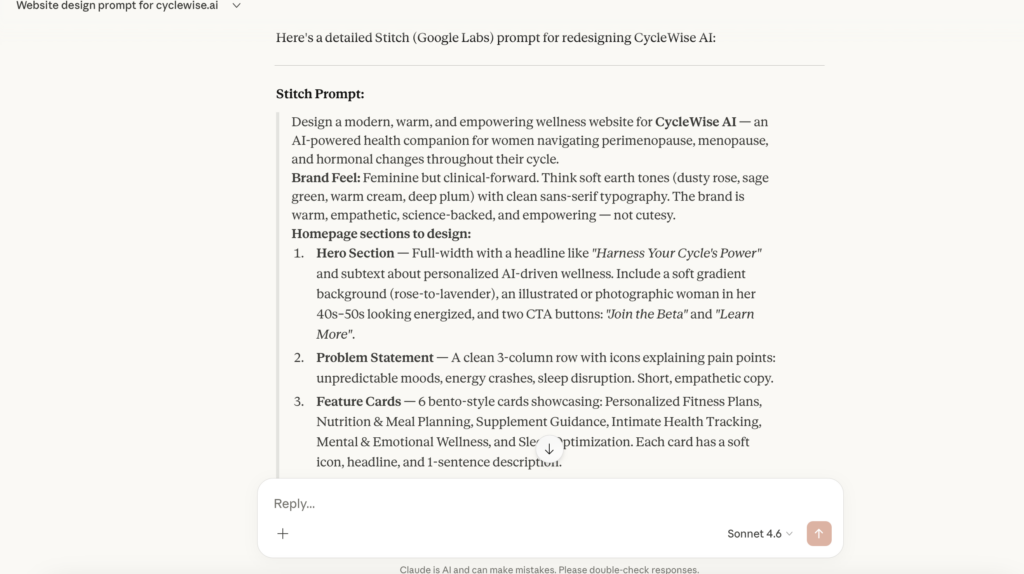
Step 1: Generate the Initial Design in Google Stitch
The goal here is to get your visual foundation laid out quickly without burning through coding credits.
- Prepare your brand kit: Know your colors, fonts, and vibe beforehand. If you have a specific brand kit, feed it directly into your prompt.
- Use Claude for prompt engineering: If you aren’t sure how to describe what you want, ask Claude to write a highly detailed UI/UX design prompt for Google Stitch.
- Try the Voice Feature: Google Stitch allows conversational voice prompting. You can speak naturally (e.g., “I want a clean, minimalist real estate site using black, white, and natural wood tones”).
- Request animations: If the result is too static, explicitly prompt Stitch to add elements like “shooting star effects” or other modern web animations.
Step 2: Review and Refine the UI
Google Stitch is great, but it usually needs a human touch before it’s ready to export.
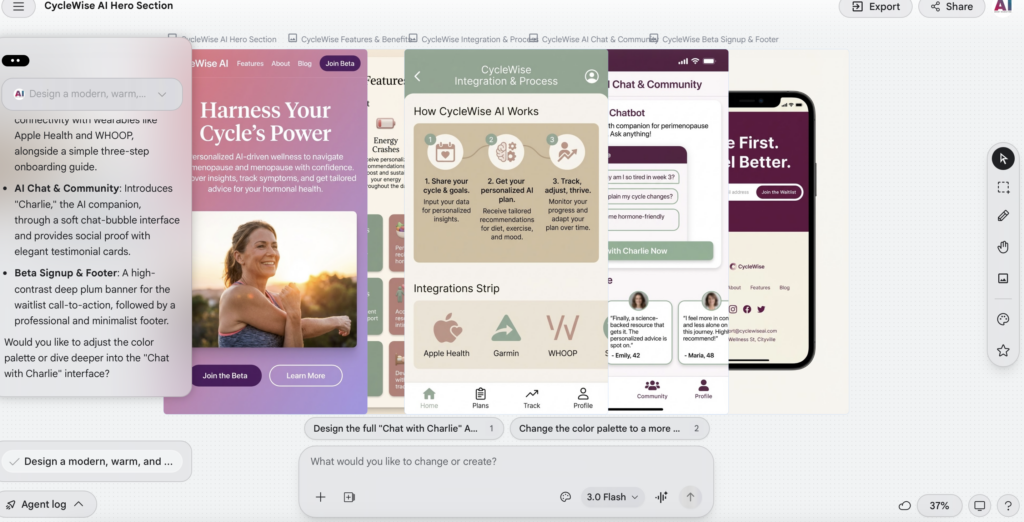
- Preview in a new tab: The default view can be cramped. Click the preview box and open it in a new tab to see it at full scale.
- Check the mobile version: This is crucial. Switch to the mobile view in the preview to ensure elements aren’t cutting off. If they are, prompt Stitch to fix the mobile responsiveness.
- Edit directly in Stitch: Click the pencil icon to modify text, swap out oversized images, or change colors. Doing this visually in Google Stitch saves you from having to use Claude Code credits later for minor aesthetic tweaks.
Step 3: Prompt Stitch for the Admin Dashboard
This is where you add real value for your clients—giving them a place to track their business.
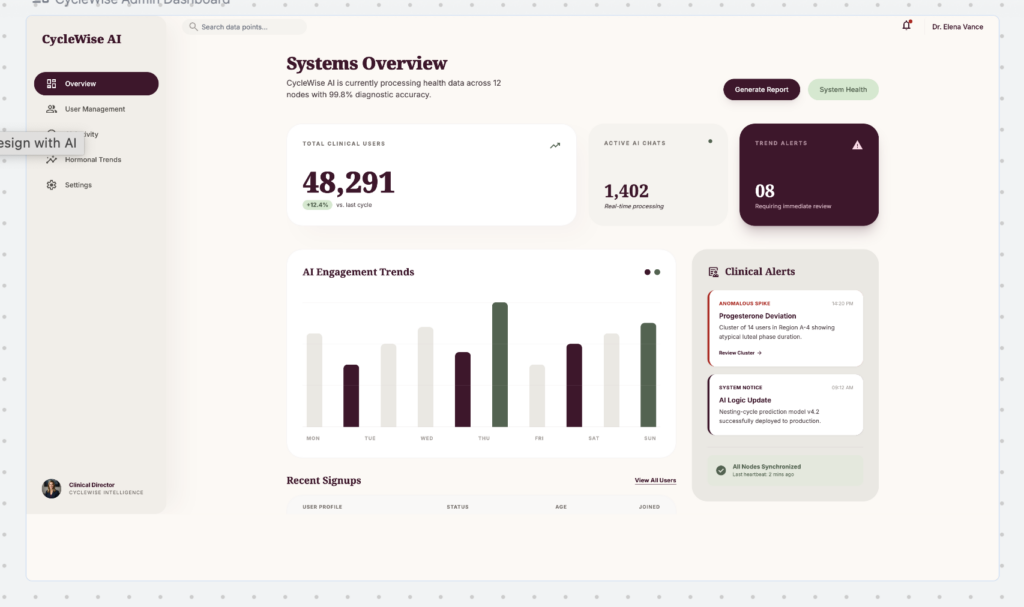
- Create a new page: Ask Stitch to generate a separate “Admin Dashboard.”
- Specify the widgets: Tell Stitch exactly what data points the website owner needs to see.
- Include lead generation: Request a widget for a waitlist or inquiry form (capturing first name, last name, and email).
- Include business metrics: Ask for a revenue tracker, a connected calendar for scheduling, and an SEO/Blog content monitor.
Step 4: Export to Claude Code for Backend Assembly
Once the front-end design looks exactly how you want it, it’s time to make it functional.
- Copy the code: In Google Stitch, click the Export button and select Code to clipboard.
- Paste into Claude: Bring that code over to Claude (or Claude Code).
- Build the logic: Ask Claude to wire up the functional elements (e.g., connecting the fake dashboard numbers to actual data streams eventually).
- Add security: Crucially, prompt Claude to build a login screen with a temporary password to ensure the admin dashboard is gated and secure.
Join the Conversation
Got a burning question, a fresh take, or just want to share your latest AI wins? Hit us up at [email protected]. Your insights keep this community growing and thriving!
See you in the Lab,
-Nicole A. Donnelly
Founder, AI Smart Ventures
AI Strategy, Consulting, Training, and Implementation

