

Website AI Chatbots: Should Yours Have One?
Last Updated: September 2026
An AI chatbot for a website is a chat box that reads your help pages and answers questions in plain words, so people do not have to go looking. It knows nothing by itself. It finds what you have already written, turns it into a reply, and hands that reply over in seconds. That one fact decides whether the tool helps you or makes you look bad, because the answers are only as good as the pages behind them.
AI Smart Ventures has guided growing businesses through this choice often enough to know it turns on content, not software. Owner-led teams tend to arrive asking which tool to pick. The better question is whether the answers a bot would repeat are written down, up to date, and agreed on inside the firm.
Get that order wrong, and you lose more than setup time. A bot fed stale pages repeats your worst answer to everyone who asks, fast, in public, with your name on it. Get it right and pages you already pay to keep up start working at midnight.
Key Takeaways
- Judge the content, not the tool: a website chatbot repeats what your help pages already say, so read those pages before you compare tools.
- Write down what you answer every week: if your team keeps typing the same reply and nobody has published it, that writing is the real job.
- Keep one answer per question: answers that clash in your pages clash in the chat box too, and few teams see it coming.
- Say no when the volume is low: a site with few repeat questions gains little, and someone still has to check the replies.
- Build the exit before the entrance: people need a clear route to a human, and the bot has to say plainly when it cannot help.
- Give the answers an owner: pages nobody tends go stale within a quarter, and the bot keeps quoting them anyway.
Notice what those share. Five of the six are content choices and only one is about software, which is the honest shape of this call. A chatbot is a delivery layer, and a delivery layer makes good pages easier to reach and weak ones harder to hide.
What does a chatbot do with your help content?
A website chatbot searches your published pages, picks the parts that look close to the question, and rewrites them as a direct reply. That is the whole trick. It adds speed and wording. It adds no knowledge or judgment your pages lack, so the tool works like a megaphone. Clear, current help pages come back as clear answers, while thin or clashing pages come back as confident nonsense.
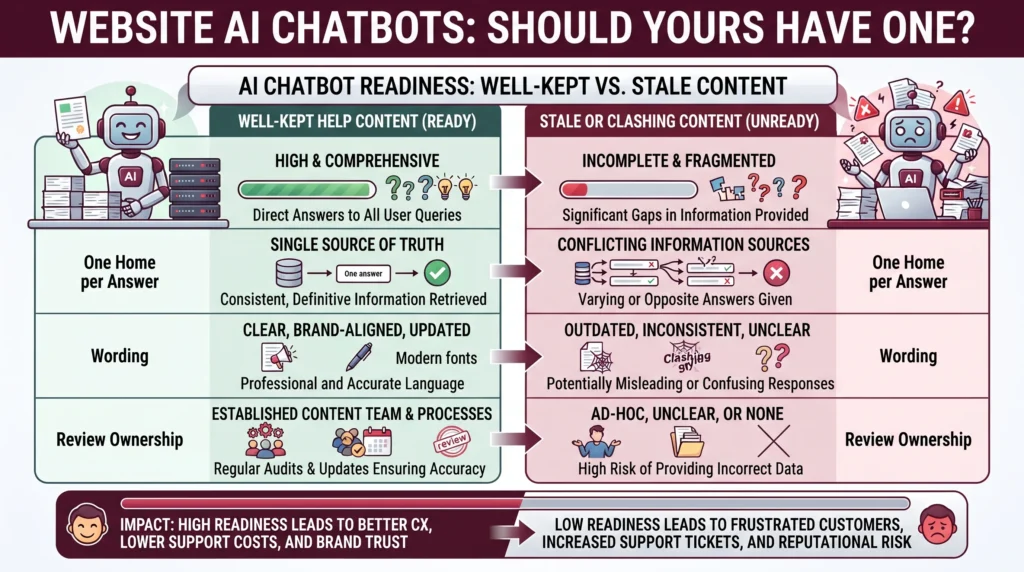
Research on search shows why clashing pages hurt more than missing ones. In Retrieval-Augmented Generation with Conflicting Evidence, the authors built a document set full of vague, noisy and wrong entries, and the best model tested scored only 32.60 on exact match. Your visitor never sees a search problem. They see a firm answering wrongly with full confidence, and one line from your bot can tie you to a promise your rules never made.
What state does your help content need to be in?
Your help content is ready when a stranger could answer your twenty most common questions from what is published. Each question needs one answer, not three versions spread across a page, a PDF, and an old email. The wording has to be current, the rules have to be the ones you follow, and anything you would not put in writing should not be there. Nothing else matters as much.
People also treat a site chatbot like a search box, not a chat. Nielsen Norman Group watched nine people work through eight site bots in April 2026 and found they typed as little as they could, wanted the answer at once, and lost patience with padding. Help pages written as a warm essay do badly under that pressure. Short, scannable answers do well, and that is the same habit that makes a page useful to a human.
- Coverage: every question your team answers more than twice a month has an answer on the site.
- One home: a single page owns each answer, and old versions get deleted rather than left to rot.
- Plain wording: answers use short sentences a visitor can scan with no prior context.
- A named owner: one person checks the pages on a set schedule and reads what the bot could not answer.
Who is a website chatbot really right for?
A website chatbot suits a firm with three things at once: a steady flow of repeat questions, published answers to most of them, and someone who owns that content. Booking-heavy service firms qualify. So do products with a real help center, and teams whose staff spend hours typing the same reply. The pattern is repeat questions plus written answers, and both halves have to be there.
Volume on its own is not the test. A California Management Review analysis from April 2026 reports that between 53% and 77% of people surveyed have had a bad or annoying time with a chatbot, and it blames loops, padding, and dead ends rather than the idea itself. Repeat questions tell you a bot would have work to do. Written answers tell you it can do that work without guessing.
Who should not add a chatbot yet?
Wait if your answers live in people’s heads, if your rules change most weeks, or if your site gets few enough visitors that you can still reply yourself. Wait too when the questions you get are mostly high-stakes: refunds, who qualifies, safety, anything where a wrong answer costs more than a slow one. A chatbot is a poor first step in AI adoption while the work behind it is still argued about.
A second group should hold off, and it is bigger than the first. These are teams using the chatbot to avoid writing anything down. Tool-first AI agencies push that framing, because the setup looks quick and the writing does not. What follows is a bot that answers well for a fortnight and then drifts, since nobody ever settled what the answers were. Practical AI starts with the writing, then picks the tool.
What should you check before switching it on?
Check five things. The bot says what it can and cannot help with. A route to a person shows on every reply. It says no clearly instead of making things up. Every question it misses is logged. One person reads that log weekly and fixes the pages behind it. Then test it with the ten questions you dread, and if the answers make you wince, the content is the problem.
Handing over to a person is where most launches come apart. Nielsen Norman Group’s chatbot design rules, published on 24 April 2026, argue for one bot per site that handles what it can and passes the rest to a human, rather than trapping people in a menu of chat options. Treat the log of missed questions as your content to-do list. It is the most useful thing the tool gives you in month one.
AI Smart Ventures works with growing businesses on the content and workflow optimization choices that come before any tool goes live, through AI Implementation. Ask for a scoped starting point, not a tool shortlist.
Frequently Asked Questions
How do you integrate an AI chatbot in a website?
Most tools hand you a snippet of code or a plugin, and you paste it into your site template so the chat box loads everywhere. That step often takes an afternoon. The real work sits either side of it: choosing which pages the bot may read, fixing the answers it repeats, and setting the point where it passes someone to a human.
Can I add AI to my website without a developer?
Yes, in most cases. Hosted chatbot tools are built for site owners rather than coders, and joining one to a common site builder is a copy-and-paste job. You need a developer when you want the bot reading data behind a login, or writing into another system that your team already runs. None of that changes the content work, which stays yours either way.
Is there a free way to add AI to my website?
Yes. Most vendors run a free tier that caps how many chats you get a month and puts their badge in the corner, which is enough to test whether your help pages hold up. Treat it as a content trial, not a launch. What stops you is rarely the plan you are on; it is how many of your answers are written down.
What changed about website chatbot accuracy in 2026?
Bots are now judged on the documents they are given, not the model alone. Sierra Research put out tau3-bench 1.0.0 in March 2026, adding a banking knowledge domain of 97 tasks and 698 policy and procedure documents, so agents are scored on finding the right written rule. A grading fix that July repaired a clash inside one of those documents, and scores moved.
Does a chatbot replace the need for a help center?
No. It leans on one. A chatbot with no help pages behind it either answers from thin air or refuses everything, and both cost you trust. It changes how people reach your help pages, not whether you have to write them. Firms that skip the help center and buy the chat box tend to build the help center later, under pressure.
What happens when the chatbot gives a wrong answer?
You own it. Answers in your chat box count as answers from you, so a bot promising something your rules do not allow creates a real problem, not a technical one. Keep the risk small: narrow what the bot may discuss, keep high-stakes topics with your team, log every reply, and read a sample each week so you find the bad ones fast.
How many questions should the bot cover at launch?
Start narrow. Cover the ten to twenty questions your team fields most often, publish one clean answer for each, and let the bot decline the rest with a quick handoff. A small, accurate scope beats a wide, shaky one, and the log of misses tells you what to add next. Widening the scope before the content is stable is why these projects stall.
Should the chatbot tell visitors it is not a person?
Yes, and put it in the opening line rather than burying it. People adjust what they expect when they know they are talking to software, and they get angry when they work it out halfway through. A clear opening also says what the bot covers, which cuts the questions it cannot answer. This is a design call as much as an ethical one.
How do you know whether the chatbot is working?
Track four things: the share of chats that end without a handoff, how fast someone reaches a human when they ask, whether the log of missed questions is shrinking, and what your customer scores do after launch. Read them together, never one alone. A high resolve rate sitting beside falling scores usually means the bot is closing chats rather than answering them.
How often does the content behind a chatbot need review?
Weekly at first, then monthly once the log of misses settles. Any change to a rule, a product or an opening hour needs the matching page fixed the same day, because the bot will keep quoting the old wording until someone edits it. Put that check on one named person’s calendar. Content ownership is ordinary change management, and it keeps the tool honest.
Will a chatbot annoy the visitors who wanted a person?
Only if you make reaching a person hard. The annoyance in the research comes from loops, repeats and hidden exits, not from the bot itself. Show the route to a human on every reply, keep it open after hours as a form, and most people will try the bot first. Blocking the exit costs you trust and operational efficiency alike.
Where should we start if our help content is not ready?
Start with the questions, not the software. Log every question you get for two weeks, group them, and write one clear answer for the twenty that repeat most. That work improves your site whether or not a bot goes live, and it tells you honestly if you need one. Schedule a consultation if you want that groundwork scoped with an AI advisory partner.
Executive Summary
A website chatbot boosts your help content rather than replacing it. It finds published answers and rewrites them, so good pages become fast, easy support and weak pages become fast, easy error. That makes this a content call first. Firms with repeat questions, written answers and a named owner get real value. Firms whose answers live in people’s heads, whose rules shift weekly, or whose questions are mostly high-stakes should fix the writing first. Check scope, handoff and logging before launch, then read the missed questions weekly.
What Should You Do Next?
Spend the next two weeks logging every question that reaches your inbox, phone and chat, then group them and count the repeats. Write one clean answer for the top twenty and publish them where a visitor can find them. Only then compare chatbot tools, because that list is also your test data.
AI Smart Ventures offers AI Implementation for growing businesses working out where AI fits in customer-facing work. Schedule a consultation to test your help content before you commit to a tool.
People Also Read
About the Author
Nicole A. Donnelly is the Founder of AI Smart Ventures and an AI Adoption Specialist with 20 years of experience as a founder and CEO and over a decade leading AI adoption initiatives. She helps businesses integrate artificial intelligence with clarity and confidence, driving innovation and sustainable growth. Nicole has trained over 20,217 professionals in Applied AI, delivered 624 workshops, and worked with close to 1,000 organizations across diverse industries.
Expertise: AI Transformation, AI Strategy, AI Implementation, AI Adoption, Applied AI, Marketing, Business Operations
Disclaimer: This content is for informational purposes only and does not constitute professional business or technology advice. Results vary based on industry, existing systems and implementation commitment. Contact AI Smart Ventures for a consultation regarding your specific situation.

