

What Should Your AI Policy Include? A Business Template
Last Updated: August 2026
An AI policy template is a short set of written rules for how your staff may use AI tools at work. It names the tools people can use, the data they must never paste in, and the point where a person has to check the output. Most templates also cover who owns the work, when to say AI helped, and who signs off on a new tool. The aim is not paperwork. The aim is one clear line the whole team can see.
AI Smart Ventures has guided growing businesses through AI adoption since long before governance reached the boardroom. Client work keeps showing the same thing: the rules that change behavior are the short ones people read, while long legal drafts sit unread in a shared drive.
The gap between a written rule and a daily habit is where the real risk sits. Staff who cannot find a clear answer will make their own call. It favors the tool that saves them an hour. That is how client records land in a public model.
Key Takeaways
- Keep the page short, because two pages that people read will beat twenty pages that no one opens.
- Name your approved tools and keep the list current, since a rule about “suitable software” gives your team nothing to act on.
- Ban whole types of data, not single cases: client records, financial data, staff files and plans you have not made public.
- Pair the rules with training, because the rules show where the line sits and the training shows people how to work inside it.
- Colorado’s new AI law takes effect on 1 January 2027, so build notice and record keeping into your policy now.
Read together, those five points describe a page that works as a tool rather than a shield. Most such rules are written to protect the firm from its own staff. That is why they read like a warning and get ignored. The ones that stick do the reverse, telling people what they are free to do before drawing a few hard lines around the rest. Writing one is also the first piece of AI governance most growing businesses ever make, and it forces useful questions.
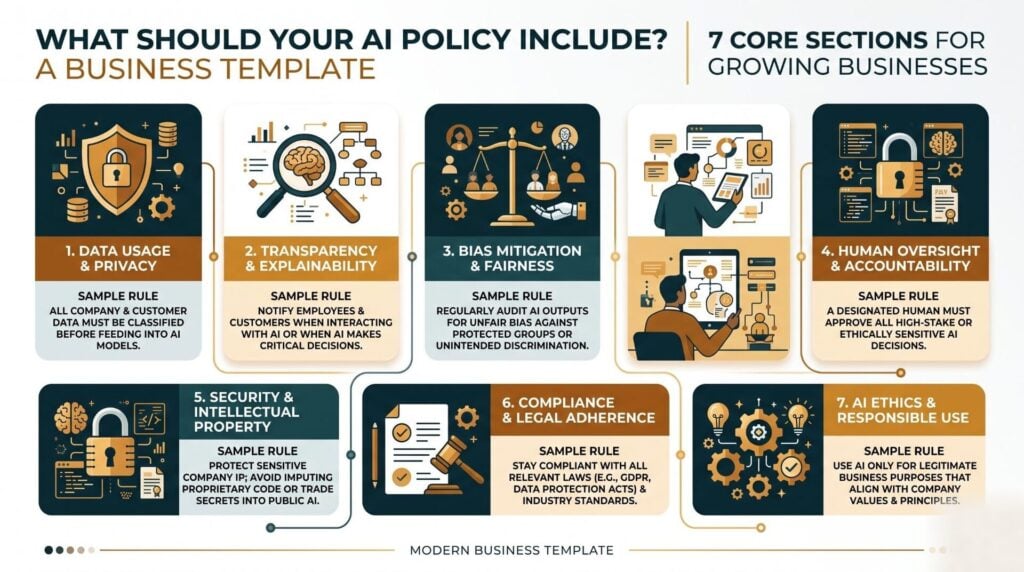
What Are the Core Sections of an AI Policy?
Seven sections cover almost every case: scope, allowed use, banned data, an approved tool list, notice, who owns the work, and what happens after a breach. Scope says who the rules apply to and which tools they cover. Each of the other sections can run to a few short lines. A page that fits on two sides gets read far more often than one that reads like a vendor contract.
| Section | What it has to answer |
|---|---|
| Scope | Who this covers and which tools count |
| Allowed use | Tasks staff may run through AI |
| Banned data | What must never be pasted in |
| Approved tools | The current list and who owns it |
| Notice | When staff must say that AI helped |
| Ownership | Who holds rights to AI-assisted work |
| Enforcement | What happens after a breach |
Two of those carry most of the weight, because banned data stops a real loss while the approved tool list is what your team checks most often. Who owns the work needs a plain line, not a legal essay: work made with AI help on company time belongs to the firm.
How Do You Create an AI Usage Policy for Staff?
Build your AI policy in five steps. Ask your team which tools they already use, and expect the answer to be longer than you thought. Decide which of those you will approve. Then write the data rules in plain words, with real cases of what is allowed. Send the draft round for comment, because staff spot the clauses that block real work.
- Survey first: ask each team what they use and what they paste in, because unnamed answers get you closer to the truth than a manager’s guess.
- Approve a short list: two or three vetted tools cover most work, and a short list is far easier to keep current.
- Ban data by type: name the kinds of data that must stay out, rather than listing every tool to avoid.
- Review the draft with staff: the people doing the work will tell you which rules block a task with no safe option.
- Train, then sign: a signature without training is paperwork, and training without a signature leaves you no record.
What Are the Risks of No AI Policy at Work?
The main risks are leaked data, broken client contracts, weak output, and no grounds to act. Staff without a rule will still use AI, so having no rules does not slow that use down. It only hides the use from you. According to PagerDuty, whose June 2026 survey covered 1,250 office workers, two-thirds had used AI tools at work that they believed were not allowed.
That same survey found 88 percent had shared work data with public AI tools, and 31 percent had shared financial data or private company files. A WatchGuard survey from July 2026 put unapproved AI tool use at 64 percent of staff. Neither number points to a discipline problem. Both point to people trying to finish work with the fastest tool in reach.
Contract risk is the one owners miss most. Many client deals limit where a client’s data may be handled. Pasting their file into a public model can break those terms long before anything leaks.
Which AI Tools Should Your Policy Approve?
Approve tools that pass three checks. The vendor must not train its models on what you type in. The terms must match the promises you made to clients, and the tool must have a named owner inside your business. Brand names matter less than settings, because the same product often ships in a free version that learns from your data and a paid one that does not. Write the standard into your rules and let the names under it change.
Before you approve a tool, ask the vendor for a Data Processing Agreement (DPA). A DPA is a contract that spells out what a vendor may do with the data you send, where it is stored, and how long they keep it. Keep each DPA on file beside the tool’s entry, so your next review starts from records rather than memory.
Reviews slip whenever the job belongs to everyone, so name one owner for the list. Vendor-neutral AI advisory helps here, since the question is rarely which tool is best but which one is safe.
What New AI Rules Should Your Policy Track?
Track the notice rules first, because those arrive soonest and are easiest to build into a short page. The clearest current case is Colorado, where Governor Jared Polis signed Senate Bill 189 on 14 May 2026. It repealed the Colorado AI Act and replaced it with the Automated Decision-Making Technology Act. That is a tighter law, built around telling people what happened. The new rules take effect on 1 January 2027.
- Notice comes first: you must tell a person before an automated system is used on a major decision about them.
- Reasons follow a bad outcome: that person gets a plain note on the decision and the part the system played, within 30 days.
- Records are kept: files covering those calls must be held for three years.
- Older duties were dropped: the new law removed the duty of care on bias, plus yearly impact checks and the risk program rule.
- One condition applies: the start date rests on the Colorado attorney general finishing the needed rulemaking first.
You do not need a Colorado office for this to matter, because rules of this shape spread. Know which calls your tools shape. Tell people when they are affected, and keep a record you could produce later. The NIST Generative AI Profile from July 2024 is the best free guide to the wider frame, and it is voluntary.
How Do You Make an AI Policy Stick?
Rules stick when people are trained on them, reminded of them, and see them applied the same way each time. Email the page out and almost no one changes what they do. Run a 45-minute session on the safe way to handle the three tasks people want AI for, and behavior moves. Enforcement matters, but it works best as the last step rather than the first.
Set a formal review twice a year, plus one more each time you adopt a major new tool. AI literacy across the team is what turns a written line into a working habit. That makes this a change management job more than a legal one, and practical AI training closes the gap a page will always leave.
AI Smart Ventures offers AI consulting for growing businesses that want a policy their team will really follow, drawn from work with close to 1,000 organizations. Talk to our consulting team before your next tool rollout.
Frequently Asked Questions
What should an AI policy include for a growing business?
Seven sections cover it: scope, allowed use, banned data, an approved tool list, notice, who owns the work, and what happens after a breach. Each can be a few short lines, and the whole page should fit on two sides so people really read it. Banned data and the tool list stop the most damage, so write those two first, then add a review date and a named owner.
What data should staff never put into AI tools?
Four types should stay out of any public AI tool: client records and private data, financial data, staff and HR files, and plans you have not made public. Naming types works better than naming tools, because the tools change every few months while the types do not. Add one worked case under each type, and treat work covered by a client contract with extra care.
Should your AI policy ban ChatGPT or other named tools?
No, because most tools ship in more than one version with very different data terms, so a brand ban solves less than it seems to. A free account may train on what you type, while the paid work version of the same product does not. Write a standard your tools must meet, then keep an approved list under it that you refresh twice a year.
What is the difference between an AI policy and an acceptable use policy?
An acceptable use policy covers tech broadly: email, browsing, devices and passwords. An AI policy handles the risks tied to AI tools, such as training on your input, who owns the output, notice, and text that reads well while being wrong. Most growing businesses do best by adding AI clauses to the handbook they already have, kept as one clearly named section that people can find.
How often should you update your AI policy?
Twice a year is the right baseline, with an extra review whenever you adopt a major tool or a new law takes effect. Colorado’s new AI law, which begins on 1 January 2027, is exactly the kind of change that should trigger one. Put both dates in a shared calendar with a single named owner, because a stale tool list is worse than no list at all.
Do staff have to say when they used AI?
It depends on the work, so set the rule yourself rather than leaving it to judgment. A fair default is that internal drafts need no note, while anything a client or the public sees does. Where AI systems shape calls about people, notice is becoming a legal duty rather than a courtesy, so write your rule in one line and give two cases.
Who owns work created with AI help?
Your policy should state plainly that work made with AI help on company time belongs to the firm, and staff should confirm that when they sign. Rights over purely AI-made material are still unsettled in many countries, which is a strong case for keeping a human editing step on anything that matters. Record which tool was used on major work, since that record helps if ownership is ever queried.
How much does it cost to create an AI policy?
Writing the first version costs time rather than money, and a small team can draft one in roughly two focused weeks. The real costs arrive later, in vetting tools, reading vendor terms and training staff, and those are the parts that change behavior. Free templates give you a starting shape but no view of your own data flows. Schedule a consultation to build rules around how your team really works.
Executive Summary
An AI policy template gives your team one clear answer on what they may put into AI tools and when a person must check the output. Seven sections cover it: scope, allowed use, banned data, approved tools, notice, who owns the work, and what happens after a breach. Two pages beats twenty, because short pages get read. Skipping it does not slow AI adoption; it just hides that use from you. Colorado’s new AI law takes effect on 1 January 2027, and building notice and records in now costs far less than adding them later.
What Should You Do Next?
This week, ask each team which AI tools they use and what they paste in, then write that list down. Draft your banned data types and your approved tool list next, since those two sections stop most real losses. Book a short training session for the week after.
AI Smart Ventures offers AI consulting for growing businesses building AI governance their teams will follow in daily work. Schedule a consultation to turn your draft into rules people apply without being chased.
People Also Read
- Why AI Strategy Comes Before Implementation
- What Are the Biggest AI Implementation Mistakes? (And How to Avoid Them)
About the Author
Nicole A. Donnelly is the Founder of AI Smart Ventures and an AI Adoption Specialist with 20 years of experience as a founder and CEO and over a decade leading AI adoption initiatives. She helps businesses integrate artificial intelligence with clarity and confidence, driving innovation and sustainable growth. Nicole has trained over 20,217 professionals in Applied AI, delivered 624 workshops, and worked with close to 1,000 organizations across diverse industries.
Expertise: AI Transformation, AI Strategy, AI Implementation, AI Adoption, Applied AI, Marketing, Business Operations
Disclaimer: This content is for informational purposes only and does not constitute professional business or technology advice. Results vary based on industry, existing systems and implementation commitment. Contact AI Smart Ventures for a consultation regarding your specific situation.

