

Why Are Employees Resistant to AI and What to Do About It?
Last Updated: August 2026
An AI resistant employee is a team member who avoids, delays, or quietly blocks the AI tools their company has asked them to use. The behavior rarely looks like open refusal; it shows up as low log-in counts, a pilot no one finishes, and work that keeps routing around the new system. The cause may be fear of job loss, doubt about what the tool puts out, or a sense that a familiar role is being reshaped without consent.
AI Smart Ventures has guided growing businesses through the awkward stage of AI adoption, where the tool works and the people do not follow. One pattern repeats across those projects: the teams that stall are almost never the least skilled ones, and they are usually the teams whose jobs changed before anyone told them what the change would mean.
Ignoring that pattern costs real money, because a stalled rollout burns license fees, weeks of manager time, and the goodwill you will need for the next try. Worse, your best people learn that silence is safer than saying they are stuck, and that lesson spreads well past AI.
Key Takeaways
- Read pushback as data, not defiance. When AI adoption stalls, the tool is usually fine and the job design is not.
- Name the four fears out loud. Job loss, skill gaps, doubt about output, and lost control drive most of it, and none of them shrink while leaders duck the topic.
- Guard status, not just jobs. People take up AI much faster when their own judgment still shapes the final call.
- Train by role, never by tool. A session built on the work someone truly does beats a feature demo every time.
- Count use, not attendance. Repeat log-ins and hours saved tell you whether AI adoption is real; a full training room tells you nothing.
All five share one belief: pushback is a fair answer to a change nobody explained, so the fix sits with leaders rather than with the person holding out. New research now backs that up, and it points at something most rollout plans never check.
What causes employees to resist AI at work?
Four fears drive most of it: losing the job, lacking the skill, doubting the output, and giving up control of decisions. They seldom arrive as open debate; they arrive as a pilot that slips two weeks and a quiet return to the old spreadsheet. ADP Research found that just 22% of workers worldwide strongly agree their job is safe from being cut.
That study covered more than 39,000 working adults in 36 markets, so the worry is not a quirk of one office. It is the ground your announcement lands on, and every word you say about AI gets heard through it, whether or not you mention head count.
Four fears, four different repairs:
- Job loss. Put in writing what happens to the role before the tool shows up.
- Skill gap. Offer AI upskilling and basic AI literacy that start from the person’s real weekly tasks.
- Doubt about output. Show your team where the tool gets things wrong, not only where it shines.
- Lost control. Keep a human call at the end of any workflow that affects a person.
Is AI resistance about skills or identity?
Identity, far more often than skill. Work from Harvard Business School, published in February 2026, calls these tools self-disruptive: they lift results for the firm while they chip away at the standing of the very managers asked to approve them. That is why a skilled, willing team can still stall: the person who signs off on the rollout is often the person whose job it quietly shrinks. Professors Das Narayandas and Shunyuan Zhang set out three ways that threat shows up in daily work.
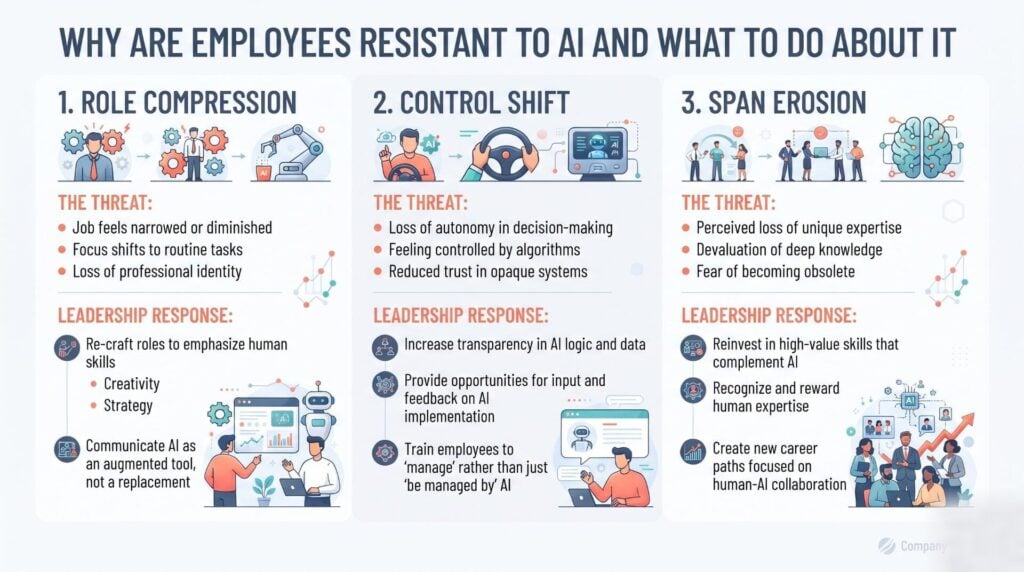
- Role compression. Work shifts from deciding to checking, so the skill that once defined the job stops being visible.
- Control shift. The final say moves to an algorithm or a central team, and the person keeps the blame without the power.
- Span erosion. Sway over people, budgets and process shrinks, which feels like a demotion even when the title holds.
Writing in HBS Working Knowledge in June 2026, the same pair expect at least 30% of generative AI projects to be dropped. They pin the cause on identity rather than on the models, and their fix reshapes the job first, so that adopting the tool is a move the person can defend.
How does poor communication fuel AI resistance?
Silence never stays empty. When leaders skip the reason a tool is arriving, people write the missing story themselves, and their version is far worse than anything you would have said. A blunt mandate with no context reads as a warning shot. Staff then protect themselves the cheapest way they can: they show up, nod, and keep working the way they always have.
The cost is more than slow uptake, because a team that hides its doubts also hides its mistakes, so you lose the early warnings that keep a project on track. Sound change management treats this as a design problem, not an attitude problem.
Two questions settle most of the fear, and both belong in the first announcement rather than the fourth: what happens to my job, and who checks the machine.
What jobs will be resistant to AI?
Jobs resist AI when they mix physical mess, personal blame, and trust that has to be earned face to face. Skilled trades qualify, because no two job sites match. Front-line health care qualifies, because someone has to own the call. Hard bargaining, crisis work, and senior leadership qualify, because the tough part is reading people and living with the result. AI still touches all of these roles, clearing paperwork and drafting first versions, but it never carries the blame.
That line matters for how you talk to your team. Telling a plumber or a nurse that AI will replace them is both wrong and likely to backfire. Telling them AI will eat the paperwork is true, checkable, and far easier to believe.
How do you turn resistant employees into users?
Start with one person and one task the tool clearly speeds up, then leave the final call with them. Uptake spreads through peers rather than orders, and a colleague who wins back forty minutes a day will convince more people than any slide deck. Keep the first pilot small and low-risk, and let staff report what went wrong without penalty.
- Listen first. Ask which parts of the week people would hand over and which parts they would fight for.
- Rewrite the role. Put on paper what the job becomes once routine work is automated, and make the new version read like a step up.
- Run role-based AI training. Use the team’s own files in the session, not a demo data set.
- Pilot something small. Give it four weeks, a weekly check-in, and room to fail.
- Keep a human in the loop. Any call about pay, hiring or reviews gets a named reviewer.
Role-based AI Training beats a tool demo, because it starts from the work your team already owns, and more than 20,000 professionals have now been through ours. Talk to our training team about the group that has stalled.
How do you measure whether resistance is easing?
Watch what people do, not just what they say. The clearest early sign is repeat use thirty days after training, because the novelty has worn off by then and only real value keeps someone logging in. Pair that with hours saved on the exact task you set out to change, so the team can see a number they helped move. Then track something softer that most dashboards miss: how often staff volunteer that the tool got it wrong. Silence there means the feedback loop is broken, and a broken loop hides every other problem you have.
| Signal | What to track | What it tells you |
|---|---|---|
| Repeat use | Trained staff using the tool weekly after 30 days | Whether uptake outlived the training buzz |
| Hours saved | Time on the target task before and after | Whether the work itself really changed |
| Quality | Error or rework rate on AI-assisted output | Whether speed cost you accuracy |
| Candor | Tool mistakes staff report without being asked | Whether people feel safe raising problems |
Review these monthly for one quarter, then quarterly. Gains in operational efficiency that last six months are real. Anything that fades by week five was a training bump, so redesign the workflow rather than book another session.
Frequently Asked Questions
Which 3 jobs will not survive AI?
Basic data entry, plain transcription, and simple scheduling are the three roles most at risk as software agents get better. Each one is rule-bound, repeated daily, and easy to check for errors, which is what today’s models handle well. The work does not vanish overnight; it folds into a job that runs the software, so people doing it now should learn to steer the tools while they still have time.
Which 5 jobs will survive AI?
Five broad groups hold up well: skilled trades, front-line health care, sales built on real relationships, teaching and coaching, and senior leadership. Each one leans on hands-on judgment, earned trust, or blame that a named person has to carry. AI still helps in all five by clearing paperwork and drafting first versions. The likely result is a lighter admin load, not a smaller trade, for anyone who learns to steer it.
What is the 30% rule for AI?
The 30% rule is a rollout guide: automate about a third of a person’s most repeated work, then stop and let the team settle. A modest target hands back real hours without hinting that the whole job is up for grabs. It is a rule of thumb rather than a formal standard. Teams that blow past it in month one tend to trigger the pushback they hoped to avoid.
How do you convince employees to use AI?
Show one person one task the tool clearly speeds up, then let them keep the final say. Broad talk about benefits moves nobody, but a writer who sees a usable first draft land in ninety seconds will go and try it again the next week. Orders produce log-ins and little else, while real use grows when the person still owns the choice and gets the credit for the result.
What are employees’ biggest ethical concerns about AI?
Three worries come up most: where their prompts and files are stored, whether the tool carries bias into calls about people, and who gets credit when AI writes the draft. A written data policy answers the first, and human review before any call on pay, hiring or reviews answers the second. Naming who did the work answers the third. Teams that see those answers in writing object far less.
What is the first step to address AI resistance?
Ask before you announce. Run a short session where people say which parts of the week they would hand over and which parts they would fight for, and write it all down without arguing. That one talk surfaces blockers you would otherwise hit in month three. It also turns a mandate into a joint redesign, which is the strongest sign that a rollout will hold.
Can you require staff to use AI tools?
You can, and in most roles you should not lead with it. A rule buys you compliance: people open the tool, paste something in, then finish the job the old way. Rules work once a tool is proven and the workflow is written down, not during a pilot. Set a clear expectation that everyone will learn the tool, then let each team decide where it fits.
How long does it take to shift a resistant team?
Expect four to twelve weeks before you see real change, based on how many roles are hit and how badly the first try landed. A workable order runs listening sessions in week one, role-based training in weeks two and three, then a small pilot with weekly check-ins. AI Smart Ventures works with growing businesses on exactly that sequence. Schedule a consultation to map yours.
Does AI resistance vary by seniority?
Yes, and the gap is wide. ADP Research found that 35% of C-suite leaders strongly agree their job is safe from being cut, against 23% of middle managers and just 18% of staff with no direct reports. The people furthest from the decision feel the most exposed. That is why a message written for a board meeting so rarely lands on the shop floor.
How can I get my team to actually use AI tools without disrupting our current workflows?
Pick one workflow, not the whole stack. Choose a task that is genuinely tedious and low-stakes, route the AI output through a named person before it affects anyone outside the team, and make the time saved visible with a real number — hours per week, not a feeling. Teams resist AI most when the change lands as a surprise and the risk of getting it wrong lands on them personally. Remove both: announce the pilot clearly, name who owns the quality check, and celebrate the first week’s win out loud. The habit forms from there. AI Smart Ventures builds change management into every implementation engagement — book a consultation to plan a rollout your team will follow.
Executive Summary
AI resistant employees are usually guarding their standing, not rejecting a tool. Harvard Business School researchers name three threats behind it: role compression, control shift, and span erosion. Their work expects at least 30% of generative AI projects to be dropped for that reason. ADP Research sets the backdrop, with only 22% of workers sure their job is safe. The answer is not a louder mandate. Rewrite the role, train by task, pilot something small, and keep a named human in every call that affects a person, then count repeat use rather than attendance.
What Should You Do Next?
Pick the one team whose AI adoption has stalled and book a 45-minute listening session this week, with no slides and no tool in the room. Write down which tasks people would hand over and which ones they would fight for. Then run an AI readiness check on the single workflow you want to change first, and rewrite the job description before the tool returns.
AI Smart Ventures offers AI Training for growing businesses whose AI adoption has stalled on people rather than tools. Schedule a consultation to plan a rollout your team will use.
People Also Read
- How to Get Your Team to Actually Use AI Tools
- Microsoft Copilot vs Google Gemini: Which Should I Choose?
About the Author
Nicole A. Donnelly is the Founder of AI Smart Ventures and an AI Adoption Specialist with 20 years of experience as a founder and CEO and over a decade leading AI adoption initiatives. She helps businesses integrate artificial intelligence with clarity and confidence, driving innovation and sustainable growth. Nicole has trained over 20,217 professionals in Applied AI, delivered 624 workshops, and worked with close to 1,000 organizations across diverse industries.
Expertise: AI Transformation, AI Strategy, AI Implementation, AI Adoption, Applied AI, Marketing, Business Operations
Disclaimer: This content is for informational purposes only and does not constitute professional business or technology advice. Results vary based on industry, existing systems and implementation commitment. Contact AI Smart Ventures for a consultation regarding your specific situation.

