

The Business Owner’s AI Tools Guide: What to Use and What to Skip
Last Updated: July 2026
An AI tools guide for business owners 2026 is a practical framework for choosing a small, useful AI stack and skipping costly tools that do not solve a real need. In 2026, the best approach starts with one clear need, a small test, and a result the owner can check. AI Smart Ventures works with small firms to apply this method to real workflows without adding needless cost or risk.
The AI tools market has grown fast. There are now over 10,000 AI products available, and more launch each week. Most firm owners feel overwhelmed by the choices. They want to know which tools will actually help and which ones to ignore. The answer depends on your goals, your team size, and how your firm runs today.
Key Takeaways
- Start with one use case – Pick one task, like email drafting or meeting notes, before adding more tools to your stack.
- ChatGPT leads adoption – Over 60% of business owners start their AI journey with ChatGPT, per OpenAI’s 2025 usage data.
- Automation cuts admin time by 30% – Tools like Zapier and Make remove repetitive steps from your daily workflow.
- Watch the cost – Many AI apps charge $50 to $200 per month for features that free tools already provide.
- Check security first – Always confirm a tool is SOC 2 compliant or GDPR-ready before linking it to your business data.
Choosing AI tools is not just a tech decision. It is a firm decision. The tools you pick should match your workflow today and your goals for the next 12 months. A good choice process saves money and avoids the frustration of switching platforms mid-year.
What AI Tools Work Best for Daily Tasks?
For daily tasks, ChatGPT and Claude handle writing, research, and summarizing well. Otter.AI transcribes meetings in real time. Notion AI organizes notes and projects in one place. These tools cover the tasks that eat the most hours each week for most firm owners. Most cost $10 to $30 per user per month.
Daily task tools work best when they fit your current workflow. You do not need to rebuild your system to get started. Pick the task that takes the most time each week, like writing reports or summarizing long emails. Add one tool that handles that task. Check results after 30 days before adding more tools to your stack.
Which AI Tools Help With Customer Outreach?
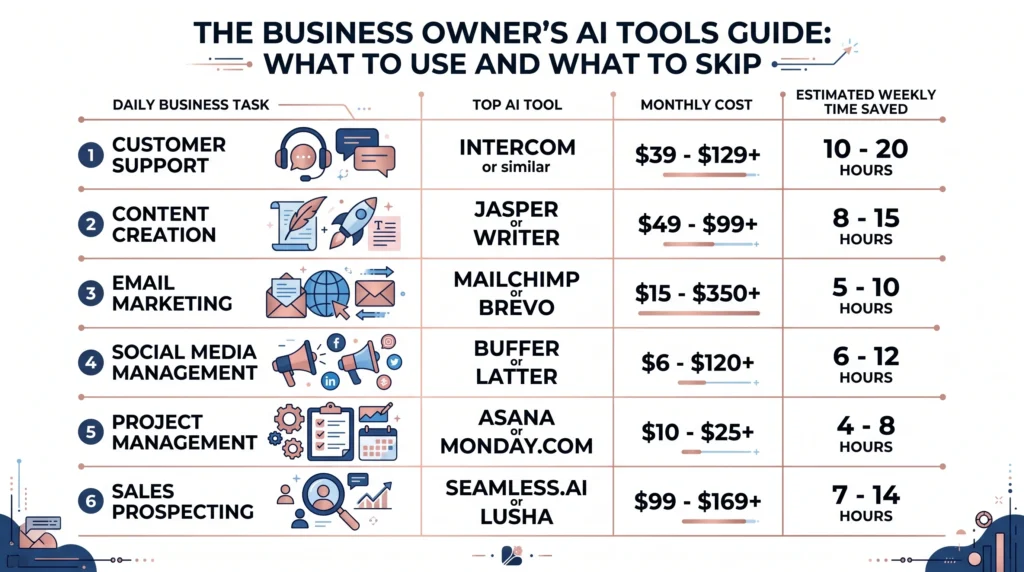
HubSpot AI builds email sequences and scores leads on its own. Jasper writes ad copy and social posts in your brand voice. Apollo.io finds contacts and drafts outreach emails fast. Together, these tools save 5 to 8 hours per week on writing and follow-up tasks. However, each tool needs clear brand guidelines and exact prompts to produce useful output.
Set your tone, target audience, and brand voice before you start using any outreach AI. Review each message before it goes out. AI drafts are a starting point, not a finished product. A quick edit pass before sending keeps your voice consistent and on-brand.
What Tools Should Business Owners Skip in 2026?
Skip AI tools that do one narrow task and charge more than $30 per month for it. Many “AI-powered” apps are just older software with a chatbot added on top. They cost more and deliver less than broader tools like ChatGPT or Claude. Ask: can you do the same task in a free or cheaper tool? If yes, skip the specialized app.
Many firm owners pay for five or six AI tools when two or three would do the same work. Consolidation saves money and reduces confusion. The table below shows which categories are worth exploring and which tend to disappoint.
| Category | Worth Trying | Often Overhyped |
|---|---|---|
| Writing assistants | Claude, ChatGPT | Niche “AI writer” apps over $30/month |
| Meeting notes | Otter.AI, Fireflies.AI | Single-feature tools over $50/month |
| Outreach | Apollo.io, HubSpot AI | One-step email senders |
| Automation | Zapier, Make | Complex platforms needing a developer |
| Project management | Notion AI, ClickUp AI | AI add-ons that don’t connect to your stack |
How Do You Build a Simple AI Stack?
A simple AI stack covers three areas: content creation, communication, and workflow automation. For most growing firms, ChatGPT Plus or Claude Pro handles content, Otter.AI covers meeting notes, and Zapier automates tasks between apps. This three-tool stack costs $60 to $80 per month and handles about 80% of common AI use cases for firm owners.
Build your stack in stages, not all at once. Start with content and communication tools in month one. Add automation in month two after you see which tasks repeat most often. Each new tool should solve an exact, known problem before you add another.
Here is what a starter AI stack looks like in practice:
- Content: ChatGPT Plus or Claude Pro ($20/month) for writing, summarizing, and research.
- Meetings: Otter.AI ($16.99/month) for live transcripts and action items.
- Automation: Zapier (free to $19.99/month) for connecting apps and cutting manual steps.
- Outreach (optional): HubSpot AI (free CRM tier) for email sequences and lead tracking.
This starter stack costs under $80 per month total. It fits most growing firms and scales as your needs change.
AI Smart Ventures offers AI rollout services for growing firms. Schedule a call to get an AI stack built for your exact workflow and goals.
How Do You Know If a Tool Is Worth Keeping?
Judge an AI tool on three things: time saved, output quality, and cost per result. If a $30 per month tool saves 3 hours per week, that is a clear win. If it saves less than 30 minutes per week, drop it. Track results for the first 60 days before you decide to keep or cancel any tool.
Most firm owners hold onto tools too long without checking results. Set a reminder at day 30 and day 60 to review each one. Here are four signs a tool is worth keeping:
- It saves 2 or more hours per week on a real, recurring task.
- Your team uses it without being reminded to do so.
- The output needs only minor edits before use.
- It connects cleanly with the other tools already in your workflow.
If a tool fails all four checks after 60 days, cancel it. Your AI stack should get leaner and more effective over time, not bigger and more expensive.
How Do You Protect Business Data With AI Tools?
Data safety starts before you sign up for any tool. Check that the vendor is SOC 2 Type II certified and does not train on your inputs by default. Most major tools offer a data opt-out setting in their account controls. Turn this on before sharing any client or financial data. This step protects both your firm and your clients.
If your firm handles health data, review HIPAA guidance before using AI with those records. If you serve EU clients, check GDPR needs for each tool you consider. Most vendors offer data processing agreements on request. Ask for one before sharing sensitive records. Skipping this check creates real legal exposure for your firm.
Frequently Asked Questions
What is the best first AI tool for a business owner?
ChatGPT Plus is the best first AI tool for most firm owners. It costs $20 per month and handles writing, research, and summarizing across many tasks. Start with one exact job, like drafting weekly emails or summarizing meeting notes. Once you see results, add more tools to your stack. Most owners see clear time savings within the first two weeks of consistent use.
How much should I budget for AI tools in 2026?
A practical AI tools budget for growing firms starts at $60 to $100 per month. This covers a writing AI, a meeting notes tool, and a basic automation platform. AI Smart Ventures helps firm owners build cost-effective AI stacks through AI consulting for owners who want expert guidance. Do not pay for tools before testing the free version. Scale your budget only when a tool proves its value.
Are free AI tools good enough for business use?
Free AI tools handle many common firm tasks well. ChatGPT’s free tier, Otter.AI’s free plan, and Zapier’s free tier each cover real daily use cases at no cost. The main limits are usage caps and fewer links with other apps. For heavy daily use, paid tiers are worth the upgrade. For occasional tasks, the free versions are often a solid starting point.
How do I choose between ChatGPT and Claude?
Both ChatGPT and Claude handle writing, research, and summarizing very well. ChatGPT connects to more third-party plugins and has a broader app ecosystem. Claude often produces cleaner, more structured writing with a natural tone. Try both tools on the same task and compare the results. Most firm owners stick with whichever one matches their writing style and daily workflow needs.
Can AI tools replace employees?
AI tools replace tasks, not people. A writing AI handles first drafts, not firm plans. A scheduling AI manages bookings, not client relationships. The goal is to free your team from repetitive work so they can focus on higher-value tasks. Think of AI as a way to make your current team more effective, not a way to reduce headcount.
What AI tools work well for marketing?
Jasper helps with ad copy, HubSpot AI handles email sequences, and Canva AI assists with visual content creation. These tools can cut content creation time by 40 to 60 percent, per HubSpot (2025). However, they work best when given a clear brand voice guide before you start using them. Without that structure, the output often feels generic and off-brand.
How long before I see results from AI tools?
Most firm owners see results from AI tools within 30 days of consistent use. The first two weeks are for learning: you refine prompts and build a routine. By week three and four, you should see steady time savings on recurring tasks. If you see no results after 60 days, the tool or the use case may not be the right fit. Try another tool or another task first.
How do I know if an AI tool is secure enough for business use?
SOC 2 Type II certification is the first thing to look for before signing up for any AI tool. Also check for a clear data opt-out policy and a privacy policy that stops your inputs from training their models. Ask for a data processing agreement if your firm handles sensitive client records. Pairing tool choice with an AI advisory review helps catch security risks before they become problems.
Executive Summary
Firm owners in 2026 have more AI tool choices than ever. But choosing well matters more than choosing many. A simple stack covering content creation, meeting notes, and workflow automation costs under $100 per month and can save 5 to 10 hours per week. Start with one use case, track results at 30 and 60 days, and add tools only when each one proves clear value in your workflow.
What Should You Do Next?
List the three tasks in your week that take the most time. Pick one AI tool that handles that task well and test it daily for 30 days. Track the time saved, then add a second tool from the starter stack above if the first one delivers results.
AI Smart Ventures offers AI consulting services for growing firms. Schedule a call to get a custom AI tool plan built for your exact goals.
People Also Read
- Which AI Tools Should You Use First: A Practical Guide for Growing Businesses
- Top AI Automation Tools for Growing Businesses in 2026
About the Author
Nicole A. Donnelly is the Founder of AI Smart Ventures and an AI Adoption Specialist with 20 years of experience as a founder and CEO and over a decade leading AI adoption initiatives. She helps businesses integrate artificial intelligence with clarity and confidence, driving innovation and sustainable growth. Nicole has trained over 20,217 professionals in Applied AI, delivered 624 workshops, and worked with close to 1,000 organizations across diverse industries.
Expertise: AI Transformation, AI Strategy, AI Implementation, AI Adoption, Applied AI, Marketing, Business Operations
Disclaimer: This content is for informational purposes only and does not constitute professional business or technology advice. Results vary based on industry, existing systems and implementation commitment. Contact AI Smart Ventures for a consultation regarding your specific situation.

