

How to Choose the Right AI Tools for Your Business in 2026
Last Updated: July 2026
Choosing the right AI tools is a step. You look for software that solves real business problems. The goal is to improve speed and find new growth chances.
Business owners need to look past the marketing hype. You need tools that fit your current workflow. They should not need a big IT team to run. The right tool saves time, reduces errors, and helps your business grow. It should not need a costly setup.
AI Smart Ventures has helped hundreds of growing businesses pick and use AI tools. We focus on tools that deliver real results. We start with your business problems, not the tech. Every tool we pick must serve a clear purpose and fit your team’s skills.
According to McKinsey’s State of AI research, AI adoption in business is growing fast. New tools appear every month in marketing, operations, and finance. Many business owners feel overwhelmed by the choices. A clear framework helps you cut through the noise and find tools that work.
Key Takeaways
- Define the specific business problem you want AI to solve before you browse any tool directory.
- Focus on function and fit over impressive feature lists or brand recognition.
- Budget for the total cost of ownership. Include training, connection, and ongoing support fees.
- Verify that any tool you consider connects natively with the software your team already uses.
- Run a time-limited pilot test before committing to a full company rollout.
- Build a clear scaling plan for tools that show measurable results after a successful pilot.
What Should You Define Before Looking for AI Tools?
Before you open a single product page, write down the outcome you want. Starting with a problem statement is the best way to avoid a bad purchase. Teams that start by browsing often buy the wrong tool. The software may look good in a demo but never solve a real problem.
Ask your team where hours are wasted. Find out where errors happen most. Look for the places where customers run into problems. Those answers become your filter.
Write down two or three top problems. Rank them by business impact and how often they occur. This gives you a clear test for every tool you consider. When a vendor shows features, ask: Does this solve my top problem? If the answer is no, move on.
Being clear at this stage is the best way to pick the right tool. Clarity here is the single biggest factor in a successful selection.
How Do You Check an AI Tool’s Core Features?
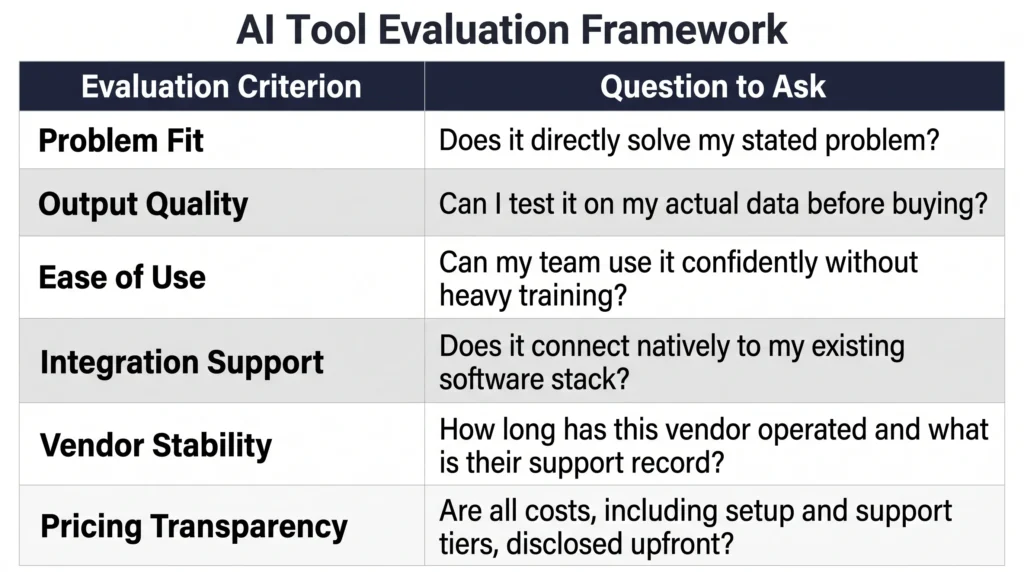
Once you have a clear problem, test each tool against one question: does it solve your problem steadily? Vendors often show long lists of features. But growing businesses need focused tools, not feature sprawl.
Ask for a demo based on your use case. Do not let the vendor run their standard presentation. Ask to see results using data like yours. Find out how the tool handles errors.
Check the vendor’s roadmap and how often they release updates. A tool with regular improvements and good support is a safer bet. Tools like Gartner’s AI research offer independent analysis of major tool categories. Look for comments about uptime and support quality, not just features.
What Are the Hidden Costs of Rolling out AI Tools?
Most AI tools show a monthly price. But the real cost is higher once you add setup, training, and ongoing management. Growing businesses often underestimate these costs. Then they struggle to justify the spend when results are slow.
A real budget covers more than the subscription fee. Add onboarding time, training hours, and any setup work. Also plan for the slowdown that comes with any new workflow change.
Ask vendors about setup fees, data migration costs, and per-user pricing. Some tools charge by usage volume. Costs can rise a lot as your business grows. Others charge extra for fast support. Know these numbers before you sign.
A tool with a higher upfront cost but good onboarding often delivers better results. A cheap option with no guidance can cost more in the long run.
How Do You Check Connection Features?
A tool that does not connect with your current systems can create more work. Before testing any tool, map the software your team uses every day. Include your CRM, email platform, and project management tool.
Then check if the tool connects to those systems natively. A native connection is more reliable than a third-party connector. Ask vendors for a list of certified connections. Make sure your software versions are supported.
Ask for references from businesses using the same tech stack. If key connections are missing, find out the cost of building custom connections. Factor that into your decision.
When a tool fits your current workflow well, setup is faster and your team adopts it more easily. If your team spends more time on workarounds than real work, stop. That is a clear sign the tool is not the right fit.
How Do You Run a Successful AI Pilot?
A pilot is a short, controlled test. It lets you measure real results before making a full commitment. Set a window of four to eight weeks. Define your success criteria before you start.
Pick a small group of three to six people. Choose people who cover the range of skill levels in your team. Give them specific tasks tied to your problem. Track their results each week.
Collect numbers like time saved and error rates. Also gather feedback on ease of use and any frustrations. Compare results against your baseline at the end of the pilot. A good pilot shows you if the tool works in your world, not just in a vendor demo.
If results are positive, you have the evidence to justify a broader rollout.
If you want help structuring your AI tool evaluation or running a more good pilot, our AI advisory services can guide your team through each step. Book a consultation to get a structured starting point tailored to your business.
How Do You Scale After a Successful Pilot?
A good pilot means you can expand. But do not roll out the tool to the whole company at once. Good scaling needs a plan for training, records, and team support.
Turn your pilot team into internal champions. Ask them to help their colleagues during the broader rollout. Create a short training guide based on what worked.
Roll out to one team at a time. Collect feedback at each stage. Set clear goals for each phase, like adoption rate or time saved. Review results at 30, 60, and 90 days.
If a tool is not delivering at scale, find out why. Is it training, workflow fit, or a product issue? Know the cause before you decide to keep or replace the tool.
Frequently Asked Questions
How long does the AI tool evaluation step typically take?
Most growing businesses can finish a structured evaluation in three to six weeks. Spend the first week or two defining your problem and researching options. Use one week for demos and vendor talks. Then take one or two more weeks to check connections and pricing.
Rushing raises the risk of picking a tool that looks good in a demo but fails in real use. A steady pace saves time and money during setup.
What should you do if a tool doesn’t connect with your current software?
First, check if the vendor plans to add that connection. If not, find out the cost of a connector or custom build. In some cases that cost is worth it. In others, it means the tool is not the right fit.
Ask yourself if changing your workflow is practical. Or would another tool with native connection work better over time?
Should you hire an outside consultant to help choose AI tools?
Outside help can shorten your evaluation and reduce costly errors. This is especially true when your team has little history with AI tools. A consultant with industry history can filter options fast. They can ask better vendor questions and spot risks your team might miss.
The value is highest when you are testing several tools at once. It also helps when your team does not have time for a full review. One focused use can prevent months of trial and error.
How many AI tools should a business use at one time?
There is no fixed number. But adding tools faster than your team can absorb causes confusion. It also lowers adoption rates.
Most businesses do best starting with one or two high-impact tools. Build skill with those before you expand. A large stack of half-used tools creates more work than a small set used well.
Check your current tools before adding anything new. Look for overlap and subscriptions you are not using.
How do you measure the ROI of AI tools?
Start by recording baseline numbers before you launch any tool. Track hours spent on a task, error rates, and output volume. After setup, track the same numbers at 30, 60, and 90 days.
Calculate time saved. Multiply that by the hourly cost of the people involved. Compare that figure to the tool’s total cost. Salesforce’s State of AI research shows that businesses tracking these numbers make smarter decisions about what to keep.
Also note soft improvements like less team stress or faster decisions. These matter too, even if they are harder to measure.
How should you handle data privacy when using AI tools?
Review the vendor’s data agreement and privacy policy before sharing any customer data. Confirm where data is stored and how long it is kept. Check if the vendor uses your data to train their AI models.
For businesses with legal needs, make sure the vendor meets those standards. The NIST AI Risk Management Framework is a good reference for understanding strong AI governance. If you are not sure, start with non-sensitive data during your pilot. Expand access only after you are satisfied with the vendor’s approach.
Can free trials give you an accurate picture of an AI tool?
Free trials are useful for testing basic features. But they rarely match real-world conditions. Time limits and feature restrictions make it hard to test at scale.
Get the most from a trial by using real tasks from your workflow. Do not use generic sample data. Set a clear goal before the trial starts. Pair it with a reference call from a similar business for a clearer picture.
What should you do if your team resists adopting a new AI tool?
Resistance usually comes from three places. The first is not knowing why the tool is being added. The second is worry about job impact. The third is a tool that does not fit the actual workflow.
Address each issue directly. Explain the problem the tool solves and how it affects each person’s work. Involve team members in the pilot so they see the benefit for themselves.
Short, hands-on training works better than long documents or recorded videos.
When should you stop using an AI tool and switch to another?
Think about switching when a tool keeps missing the benchmarks you set. Also switch if vendor support is slow or your needs have changed. These are all valid reasons to move on.
Before you leave, write down what the tool failed to do and why. Use those findings when you look for a replacement. Switching is a smart decision, not a failure. It frees up the budget for a better fit.
How much does AI advisory support typically cost?
Costs vary based on the scope of work and the provider. AI Smart Ventures offers support for growing businesses. Options range from a single consultation to a longer partnership.
The best starting point is a direct conversation about your goals. You can book a session at aismartventures.com/consultation.
Executive Summary
Choosing the right AI tools starts with a clear problem statement. You also need a structured evaluation step and a realistic view of total cost. Businesses that define goals first and test before committing do better than those that buy on impulse.
Hidden costs, weak connections, and low team adoption are the top reasons AI tools fall short. A clear step, from problem to pilot, gives you the evidence to invest with confidence. Scale only what works. Focus on outcomes, not features.
What Should You Do Next?
Start by writing down two or three business problems you want AI to solve. Use the framework in this article to assess your options. Run a pilot before committing to a full rollout. Track real results from day one.
AI Smart Ventures offers AI Advisory for growing businesses. We help you make confident, results-driven decisions about AI tools. Schedule a consultation to get a clear, set up plan for your next steps.
People Also Read
About the Author
Nicole A. Donnelly is the Founder of AI Smart Ventures and an AI Adoption Specialist with 20 years of history as a founder and CEO and over a decade leading AI adoption plans. She helps businesses connect AI with clarity and confidence, driving innovation and lasting growth. Nicole has trained over 20,217 experts in Applied AI, delivered 624 workshops, and worked with close to 1,000 businesses across diverse industries.
Expertise: AI Transformation, AI Strategy, AI Rollout, AI Adoption, Applied AI, Marketing, Business Operations
Disclaimer: This content is for informational purposes only and does not constitute expert business or tech advice. Results vary based on industry, current systems and rollout commitment. Contact AI Smart Ventures for a consultation about your specific situation.

