

AI Automation for Business: How It Works and When to Use It
Last Updated: August 2026
AI automation for business is the use of software that reads messy input, works out what happens next, and finishes the step on its own. Older rules-based tools follow a fixed script, so they stop at anything odd. AI automation reads an email, a form or a scanned document, and works out what is being asked. The mechanics matter less than the choice in front of you: which work should hand off, and which should stay with your people.
AI Smart Ventures has guided growing businesses through AI implementation in back-office, finance and client work. One pattern repeats, and it is never a technical problem. Teams pick the wrong first process, then blame the tool when the output lands late and needs correcting.
A bad first pick costs more than a late launch. It burns the goodwill of the people who have to run the new system, and your next two projects rest on that goodwill. Picking well is most of the job, and it gets easier once you know what a ready process looks like.
Key Takeaways
- Hand off work that repeats, sits in writing, and already gets checked by someone, because missing any one of those three is what stalls a build halfway.
- What AI can do is not the same as what your team will accept. Some of the work it handles well is work the people doing it want to keep.
- Close to 37% of the time AI saves goes straight back into fixing its output, so count the checking time before you call a process automated.
- Sales and marketing leads real use at 52% of AI-using firms, and most firms run AI in three or fewer parts of the business.
- Order beats size. One task, tracked for four weeks and then built a step at a time, beats a rollout across a whole department.
- Give every automation one named owner, since someone has to spot when quality slips and decide whether to pause the workflow.
Read as a set, those points give you a filter more than a plan. Most processes fail at least one of the tests, which is the good news. Your first project then picks itself, instead of getting argued over for a quarter.
Which Tasks Are Ready for AI Automation Now?
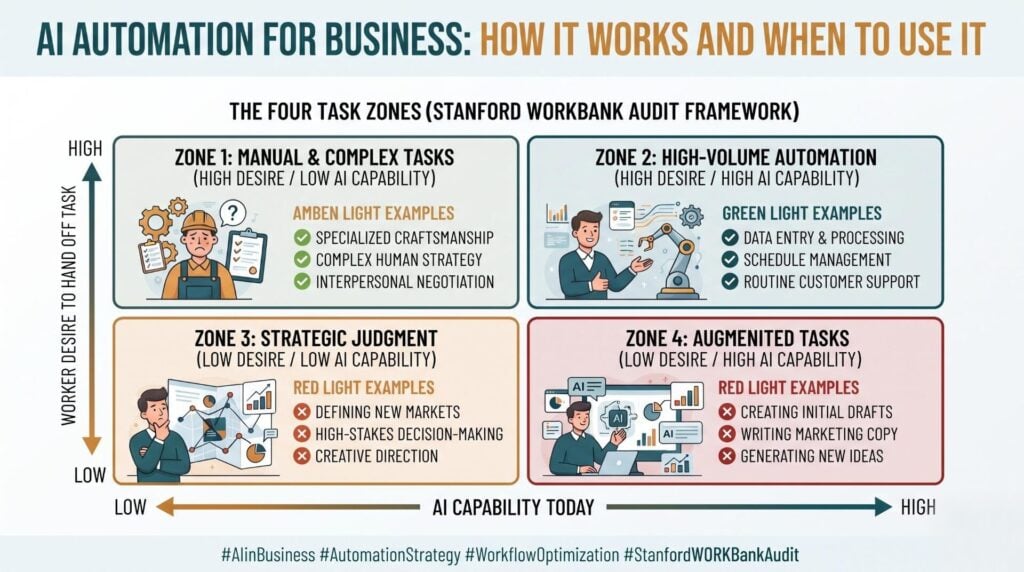
A task is ready when three things are true at once. It repeats often enough to matter, the steps already sit in writing, and a person checks the result before it goes out. Stanford’s Future of Work with AI Agents audit asked 1,500 workers about 844 tasks across 104 occupations, then sorted the work into four zones. The green light zone holds tasks that workers want handed off and that AI can handle now. Start there.
| Ready signal | What it looks like in your week |
|---|---|
| It repeats | The same request lands daily, in roughly the same shape |
| It sits in writing | Someone could run it tomorrow from your notes |
| It is already checked | A person signs off before anything goes out |
| The team wants it gone | They call it the boring part of the job |
Workers rated the idea positively for 46.1% of the tasks studied. The reason given most often was freeing up time for work that matters more. That is a wide green zone, so what growing businesses lack is rarely candidates. It is the patience to finish one build before starting the next.
What Makes a Task a Bad Automation Candidate?
A task is a poor candidate when the odd cases outnumber the routine. It is also a poor pick when nobody has documented the steps, or when the work carries a relationship rather than a result. The same Stanford audit names a red light zone: work AI can already do, but which the people doing it would rather keep. Their reasons were lack of trust (45%), fear of job loss (23%), and the loss of human contact (16.3%).
Work that is not documented anywhere is the quiet killer here. If a process lives in one person’s head, a build copies their shortcuts, their assumptions and their bad Tuesday. Writing in the MIT Sloan Management Review in March 2026, Benjamin Laker argues that decisions involving values, trust or a person’s standing belong to the manager. That test works just as well on back-office work, and what AI can do is not by itself a reason to build.
What Is an Example of AI Automation in Business?
The most common live example is request handling. An email or form arrives, the system reads it, tags it, drafts the reply, and routes it to a person for sign-off. The 2026 AI supplement to the Business Trends and Outlook Survey was put out by the U.S. Census Bureau in April 2026. It found sales and marketing in front at 52% of AI-using firms, with strategy work at 45% and IT at 41%. None of that is exotic work.
Writing, reading documents and looking things up lead at the individual task level, so that is the proven ground. Tools such as Zapier or Make shift the record between systems once a decision has been made, though the decision itself is the part worth designing. Note that 57% of firms using AI touch three or fewer parts of the business, so a narrow build is normal rather than timid.
When Does Automating a Process Make Things Worse?
It gets worse when the output takes more checking than the manual job ever did. Research from Workday in January 2026, drawn from 3,200 leaders and staff, found that 85% of workers save one to seven hours a week. Close to 37% of that time returns as rework. Capability is still uneven across whole jobs: JobBench, released on 25 May 2026, ran 36 models against 130 real professional tasks, and the strongest scored 45.9%.
Only 14% of staff in that Workday sample saw a clear net gain, which says more about scope than about AI. Quiet failure does the rest of the harm. A broken step keeps running, the bad output looks like normal output, and nobody spots it until a customer does. Build the check first, then build the rest.
How Should You Sequence Your First Automations?
Run it in four moves. Track one task for four weeks, then write the steps down as they really happen. Build the middle of the job rather than all of it, and keep a person on sign-off until errors turn boring. Most teams flip that order and start by picking a tool, which is why so many builds stall. Workflow optimization is the goal here, and the tool is your last call rather than your first.
- Baseline. Track how long the task takes and how often it goes wrong, across four full weeks.
- Write it down. Capture the steps, the odd cases, and the person who decides today.
- Build one step. Usually the reading, sorting or drafting, rarely the sending.
- Set the gate. A named reviewer signs off the output until quality holds for a month.
Teams stuck between a documented process and a working one need hands on the build, not more strategy. AI Implementation from AI Smart Ventures builds that first workflow with your people, backed by 10M+ professional hours saved across client work.
Who Owns the Decision to Automate a Process?
One named person owns it, and that job does not end at launch. AI changes what oversight looks like rather than removing it. Someone has to watch for drift, answer for the output, and call the pause when quality slips. Census figures show that 66% of firms using AI apply it only to support work people already do. Job cuts tied to AI show up in just 2% of firms. The owner sits with the process, not in the IT queue.
The Stanford audit adds a point worth knowing before you hand out that role. Workers wanted an equal partnership with the system in 47 of the 104 occupations studied. Shared control is what they expect, not a compromise you talk them into. Change management and capability building both go better when you build toward that, instead of arguing with it.
Frequently Asked Questions
Can I make money from AI automation?
Yes, though the gain shows up as spare capacity rather than as a new revenue line. Handing off a repeat task returns hours to the people who already sell, serve or deliver. Those hours only convert if you decide up front where they go. Teams that leave the question open watch the time get soaked back up by the admin. Choose what the freed hours will fund before you build.
How much does AI automation cost to get started?
Cost tracks three things: how many steps you hand off, how clean your data already is, and how much gets built on your own systems rather than bought ready-made. It drops sharply when you pick one written-down repeat task, and it climbs when a build spans several teams at once. Expect a first workflow to take weeks rather than quarters. Schedule a consultation to scope yours before you commit.
What jobs can I get with AI automation?
Roles fall into three groups: AI implementation specialists who build the workflows, process analysts who map and write them up, and operations leads who own quality after launch. Basic AI literacy is now assumed, so the edge comes from process work. Employers want both halves of the skill set, meaning tool know-how plus a real grasp of how the business runs. Deep work in one well-known platform beats broad tool exposure.
What is the difference between AI automation and rules-based tools?
Rules-based tools follow a fixed script and stop whenever an input fails to match. AI automation reads messy material such as email, PDFs and chat logs, works out what is being asked, then acts on it. The real difference is odd cases: rules need every one defined up front, while AI copes with variety but needs review. Use rules where inputs stay steady, and AI where they do not.
What should you document before automating a task?
Write down four things: what starts the task, the steps in the order they really happen, the odd cases and who deals with them, and the person who signs off today. Most teams find the odd cases hardest, because those live in habit rather than in any file. If writing it up takes more than a week, the task is too broad to hand off yet.
Should you automate customer conversations?
Automate the routing and the draft, not the relationship. Sorting inbound messages by intent, pulling up account history and preparing a reply are safe uses that cut waiting times. Decisions about a complaint, a renewal or a mistake belong with a person, since those conversations carry trust. Give customers a clear route to a human within one step, and say plainly when AI wrote the draft.
How long does the first automation take to pay back?
Most first builds return the effort inside one to two quarters, as long as the task was tracked before launch. Payback stalls in two cases: nobody baselined the manual version, so the gain cannot be shown, or the output needs heavy fixing. Count review time in the total rather than treating it as a side note. A build that saves an hour and adds twenty minutes of checking still counts.
Does AI automation replace jobs?
Rarely, at least in the measured data so far. The 2026 Census supplement found job cuts tied to AI in only 2% of firms, while 66% of firms using AI apply it purely to support work people already do. Roles shift faster than headcount, moving people from doing the step to checking it, handling exceptions and talking to customers. Plan for the retraining.
How do you know an automation has stopped working?
Watch three numbers each week: the volume it handles, the share of output a reviewer edits, and how many items it pushes back to a person. A rising edit rate is the earliest warning, and it usually shows up well before any complaint does. Set the limit up front, say one in five outputs needing edits, and agree who pauses the workflow. Quiet failure is the costly kind.
Executive Summary
AI automation earns its place in work that repeats, sits in writing, and already gets checked. What AI can do is not the test on its own, since plenty of work it handles well is work the team would rather keep. Close to 37% of the time saved comes back as rework, so counting review time is part of honest measurement. Start with one task, track it for four weeks, build one step, and keep a named owner on the result. Order matters more than size, and operational efficiency comes from finishing rather than starting.
What Should You Do Next?
Pick one task this week that repeats daily and already has a reviewer attached. Track its time and error rate for four weeks before you look at a single tool. Then write down the steps and the odd cases exactly as they happen. That one page tells you whether the process is ready, or whether it needs cleaning up first.
AI Smart Ventures offers AI Implementation for growing businesses deciding where automation belongs and where it does not. Schedule a consultation to map your first workflow and set the review gate around it.
People Also Read
About the Author
Nicole A. Donnelly is the Founder of AI Smart Ventures and an AI Adoption Specialist with 20 years of experience as a founder and CEO and over a decade leading AI adoption initiatives. She helps businesses integrate artificial intelligence with clarity and confidence, driving innovation and sustainable growth. Nicole has trained over 20,217 professionals in Applied AI, delivered 624 workshops, and worked with close to 1,000 organizations across diverse industries.
Expertise: AI Transformation, AI Strategy, AI Implementation, AI Adoption, Applied AI, Marketing, Business Operations
Disclaimer: This content is for informational purposes only and does not constitute professional business or technology advice. Results vary based on industry, existing systems and implementation commitment. Contact AI Smart Ventures for a consultation regarding your specific situation.

