

How Do You Manage AI Risk When You Don’t Have a Legal Team?
Last Updated: August 2026
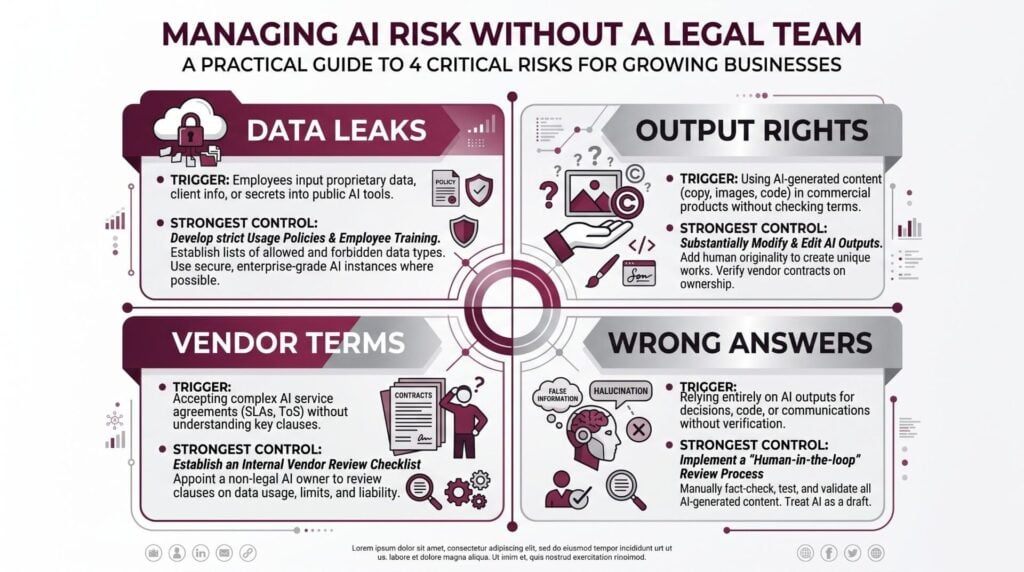
Managing AI risk without a legal team is the practice of setting clear rules for how staff use AI tools, so your guard rails come from policy, vendor checks and training rather than counsel. It covers four gaps: private data that leaves your hands, output you cannot claim, vendor terms that trap you, and wrong answers that sound right. The work is mostly process, not law, so an ops lead can own it.
AI Smart Ventures has guided founder-led organizations through AI adoption since long before AI risk reached the board table. One pattern repeats across that work. The firms that stay out of trouble are rarely the ones with lawyers on call; they are the ones who wrote down which tools were fine, then kept that list fresh.
The gap between how fast your team picks up AI and how fast you set rules is where harm starts. One past client contract can break a privacy clause you signed years ago, and you may not hear of it for months. Closing that gap costs a few hours, not a retainer.
Key Takeaways
- Write a one-page AI use policy first: name the tools staff may use, the data that stays out of prompts, and who checks output before it ships.
- Texas has enforced its own AI law since January 2026, and written proof that you follow the free NIST AI Risk Management Framework is a defense you can build alone.
- Treat free AI accounts as public space. Paid business plans tend to switch model training off by default, and that one change removes most of your data risk.
- Assume you do not own work that came from prompts alone. Your own edits, choices and shaping are what make a piece yours to defend.
- Training beats paperwork, because teams follow rules they have practiced and ignore a page they have only signed.
Notice what those five share: not one of them needs a lawyer to start. AI risk in a growing business is mostly an ops problem in legal clothing, and the controls that count are choices about tools, data and daily habits.
What AI Risks Should You Actually Worry About?
Four risks cause almost every problem here: data that leaks, unclear rights to output, vendor terms that block your exit, and wrong answers that read like facts. Leaks are the most common and the easiest to stop. A July 2026 Pollfish survey of 500 employed US adults, run for Kolmogorov Law, found 38% had put work data into a personal AI account their boss does not control.
The detail inside that survey is what makes it useful. About 23% had pasted internal emails, memos or files into a personal account, and smaller groups fed in client records or code.
Wrong answers are the second risk. AI tools write fluent text whether or not the facts hold up, so a bad number reads just like a good one. The 2026 SANS Institute AI survey, out on 13 July 2026, found 76% of security teams now hold AI oversight duties while more than half have no formal audit method behind them.
Which AI Rules Already Apply to Your Business?
Some already do, and you do not need a legal chief to meet them. The clearest live example is the Texas Responsible Artificial Intelligence Governance Act, or TRAIGA, which took effect on 1 January 2026. Per Duane Morris, writing in May 2026, it reaches anyone who does business in Texas, sells to Texans, or runs AI in the state. Four points matter when you have no counsel:
- Wide reach, narrow bans. Norton Rose Fulbright notes the law covers those who build AI and those who deploy it, yet the bans target intent: knowing bias, harm-seeking design and unlawful fake media.
- Written proof of framework use is your defense. Broad alignment with the NIST AI Risk Management Framework, plus its Generative AI Profile, supports a legal defense. That framework is free and written in plain English.
- You get time to fix things. The Texas attorney general holds sole power to act and must send written notice first. The firm then has 60 days to cure the issue.
- Private suits are not the risk. The law gives no right to sue, so your exposure runs through the state and through your own client contracts.
Texas is one state, yet the lesson travels: the law now rewards firms that can show their homework. A dated policy, a tool list and a short log of reviews are that proof.
How Do You Write an AI Policy Without a Lawyer?
You write one page, in your own words, that covers five things. An AI use policy is not a contract; it is an in-house rule that tells staff what is fine and who is on the hook. The IAPP has shared a sample built around purpose, data type, data groups and review, with checks twice a year at first. These five headings cover the same ground:
- Approved tools. List the AI tools staff may use for work, by name and by plan type. Anything else needs a request, which keeps shadow AI in view.
- Banned inputs. Name the data that never goes into a prompt: client records, contracts, payroll, health data, logins and numbers not yet public.
- Human review. Say that a named person checks AI output for accuracy before it reaches a client. Give the check to the role, not the person.
- Telling clients. Decide when you say that AI helped, and write that answer down once so nobody has to guess mid-call.
- An owner. Name one person who keeps the list fresh, approves new tools and reviews the page on a set date. Rules with no owner decay fast.
Writing the policy is the easy half; keeping it alive as your tools change is the part most teams drop. Our AI consulting team helps growing businesses turn a one-page policy into a review rhythm that survives real work.
How Do You Know If Your AI Tools Are Compliant?
You check four things in the vendor’s own terms, then write down what you found. Start with the Data Processing Agreement, or DPA, the contract term that spells out how a vendor handles the data you send it. Business and team plans tend to keep your inputs out of training, while free plans often do not. That one switch is the biggest control you hold.
| What to check | Where to look | What good looks like |
|---|---|---|
| Model training | DPA or privacy terms | Inputs kept out of training |
| Rights to output | Terms of service | The customer owns the output |
| Security proof | Trust or security page | A current SOC 2 or ISO 27001 report |
| Exit terms | Contract and admin console | You can export data and cancel freely |
Log the answers in a simple sheet: tool name, plan tier, date checked, who checked it. That sheet is your audit trail, and it turns a claim of good practice into proof. Admin settings need the same care, because a paid plan with sharing left on protects nobody.
Who Owns the Content Your AI Tools Produce?
Less than you might hope, and the answer turns on how much of the work was yours. The US Copyright Office set out its view in Copyright and Artificial Intelligence, Part 2: Copyrightability, out on 29 January 2025. Human authorship stays a bedrock rule there, so prompting a model does not by itself give you enough control to claim the output.
Rights can still attach to your creative choice, order and shaping of AI output, and to real human edits of it. So the draft a model hands you is not an asset, while the version your team rebuilt and fact-checked often is. Split in-house use from public work: first drafts are safe ground for AI, while logos and product copy need a human hand.
How Do You Get Your Team to Follow the Rules?
Through short, practical AI training tied to the work people really do, repeated more than once. Policies fail on rollout, not on drafting. A 45-minute session where staff bring a real task and run it through an approved tool beats any memo, because the questions surface while someone is watching. Build AI literacy this way and the rules read as skill rather than restraint.
Three habits carry the weight. People learn to check output before it travels, which handles accuracy. They learn what counts as a banned input by seeing real files from your own drive, which handles leaks. They learn where to ask when a new tool shows up, which handles shadow AI.
Repeat the session when you add a tool, and fold the policy into onboarding so new hires meet it in week one. AI upskilling and change management point the same way: pair a clear rule with real practice and you get adoption.
Frequently Asked Questions
How do you protect your business from AI-related legal issues?
Start with a written AI use policy that names approved tools and bans set data types from prompts. Move your team onto paid business plans where model training is off by default. Require a named person to review AI output before it reaches clients. Keep a dated log of tool checks and policy reviews. Those four steps handle most risk, and none of them needs a lawyer.
What AI policies should a business have without a lawyer?
One AI uses a policy covering five headings: approved tools, banned inputs, human review, telling clients, and a named owner who keeps it fresh. Keep it under 500 words so people read it. Add a short vendor sheet logging each tool’s training setting, output rights and security proof. Review both on a fixed date twice a year at first, then yearly once your tool list settles.
Do you need a lawyer to write an AI use policy?
No. An AI use policy is an in-house rule for your team, not a contract with an outside party, so you can draft it yourself in plain words. Counsel is worth the spend in three cases: a client contract with odd AI limits, regulated data such as health or credit records, and any use of AI in hiring or lending calls.
Is it safe to put company data into a public AI chatbot?
Treat a free account as public space. Inputs to those accounts can be used to improve the model unless the vendor says otherwise, and most free plans do not. Paid business and team plans often keep your data out of training by default and give admins central controls. If the data would embarrass you in a customer email, it does not belong there.
Who owns content created by AI tools?
Prompting alone does not give you copyright. The US Copyright Office held in January 2025 that human authorship stays a core rule, so purely machine-made output falls outside cover. Rights can attach to your creative choice, order or editing of that output, which means work your team truly reshaped is defensible. Keep drafts and edit history for assets of value.
What is shadow AI and why does it matter?
Shadow AI is the use of AI tools your business never approved, paid for or set up. It matters because those accounts sit outside your security controls and your audit trail, so you cannot see what data went where. A July 2026 survey found only about 36% of workers had a clear written policy on this. Publish a tool list and hidden use turns visible.
Who should own AI risk if you have no compliance officer?
One named person, usually an ops lead or a founder, with the power to approve tools and say no. Ownership fails when it is spread across a group that meets rarely. The role needs about two hours a month: reviewing new tool requests, checking vendor term changes, and confirming the list still matches reality. Give that person a calendar reminder and one sheet.
How long does it take to get a basic AI risk policy in place?
Most growing businesses reach a working baseline within two to three weeks. Week one covers the tool inventory and the plan upgrades. Week two covers drafting the one-page policy and the vendor sheet. Week three covers the team session and onboarding. If you want an outside read on the gaps first, schedule a consultation with AI Smart Ventures for an AI readiness check.
Executive Summary
Managing AI risk without a legal team comes down to four moves you can make this month. Write a one-page AI use policy naming approved tools, banned inputs, human review, client disclosure and an owner. Move your team onto paid business plans where model training is off by default. Check each vendor’s terms for training, output rights and exit terms, then log what you found. Texas TRAIGA shows where the law is heading: written proof that you follow a known framework counts as good faith.
What Should You Do Next?
This week, list every AI tool anyone on your team touches, including personal accounts used for work, and mark which ones train on your inputs. Upgrade or replace those, then draft your one-page policy and put a named owner and a review date on it. Book a 45-minute team session so the rules get used.
AI Smart Ventures offers AI consulting for growing businesses building practical AI oversight without in-house counsel. Schedule a consultation to turn your tool list into a policy your team will follow.
People Also Read
- The 90-Day AI Quick Win: Where to Start When Everything Feels Urgent
- Why Your Team Stopped Using the AI Tools You Bought
About the Author
Nicole A. Donnelly is the Founder of AI Smart Ventures and an AI Adoption Specialist with 20 years of experience as a founder and CEO and over a decade leading AI adoption initiatives. She helps businesses integrate artificial intelligence with clarity and confidence, driving innovation and sustainable growth. Nicole has trained over 20,217 professionals in Applied AI, delivered 624 workshops, and worked with close to 1,000 organizations across diverse industries.
Expertise: AI Transformation, AI Strategy, AI Implementation, AI Adoption, Applied AI, Marketing, Business Operations
Disclaimer: This content is for informational purposes only and does not constitute professional business or technology advice. Results vary based on industry, existing systems and implementation commitment. Contact AI Smart Ventures for a consultation regarding your specific situation.

