

AI for Creative Agencies: Where It Fits in Your Workflow
Last Updated: August 2026
AI for creative agencies is the use of AI tools at chosen points in the job, rather than across all of it. The parts that gain most are the routine ones: research, mood boards, size and format cuts, review routing and client reports. The parts that gain least are the ones where taste and trust decide the outcome. Knowing which is which matters far more than the tools you buy.
AI Smart Ventures has guided growing businesses through AI adoption inside design and studio teams. Firms that map the work first see real gains, while firms that buy tools first end up with a bill and a puzzled staff. The job is not picking software; it is working out which stage of your process can safely take a rough first draft.
Get that call wrong and you pay twice: once for tools no one opens, then again in rework when a machine draft reaches a client with no human pass. Get it right and your people keep the parts of the job they trained for, while practical AI takes the resizes, the tagging and the status notes no one ever wanted.
Key Takeaways
- Sort each stage by volume and judgment. AI pays off where work is high in volume and low in judgment, and that split, not the tool, decides where it sits.
- Start on one in-house task, never a client account. Pick a routine job your team resents, run it for a month, and count the hours you win back.
- Ideas gain speed, not taste. Use AI to widen the first sweep of options, then keep the choosing and the case you make in the room with your leads.
- Size and format work is the biggest win. Turning one signed-off asset into every channel cut is volume work, and most firms find their first real hours there.
- Review is where the tools are heading. Routing, staged sign-off and file history now sit inside the review apps your clients open each week.
- Write the client rules before you need them. Labels, data handling and a named approver protect the bond when something goes wrong.
A pattern hides inside those six points. AI earns its keep where output is high and judgment is low, and it quietly loses money when that split flips. Sort your work by that one test and most tool calls answer themselves.
Where does AI fit in a creative workflow?
AI fits at five points: research and first ideas, mood boards, size and format work, review routing, and client reports. Those stages are routine, high in volume, and safe for a rough first pass. It fits poorly at the final call on the work, at the client bond, and anywhere your name rides on taste. Here is a test: if a junior would draft it and a senior would sign it off, AI can draft it too.
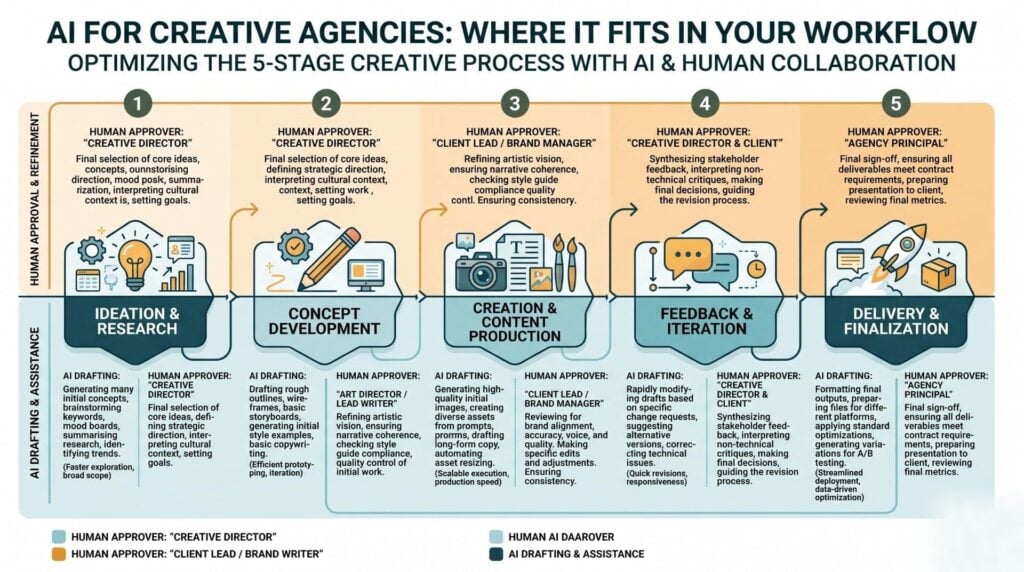
| Stage | What AI does well | What stays human |
|---|---|---|
| Research and first ideas | A wide sweep of refs | The point of view you sell |
| Mood boards | Fast image variants | The edit and the story |
| Builds and format cuts | Resizes, crops and batch edits | Craft on the hero asset |
| Review and sign-off | Routing, reminders and change recaps | The sign-off itself |
| Handover and reports | Draft reports, tagging, asset lists | Explaining the result |
Read that middle column as drafting help, never as finished work, because workflow optimization here is about order rather than about buying more software.
How do you introduce AI into an agency workflow?
Start with one in-house task that no client ever sees, and run it for a full month before you touch live accounts. Pick a routine job your team dislikes, such as tagging assets or cleaning up transcripts. Set a plain measure before you begin: hours spent now against hours spent after. That single number is what earns you the right to move the method onto client work, because trust follows proof.
- Log one week of real work. Write down each task that repeats and how long it takes.
- Pick the dullest item on the list. Dull jobs carry the least risk and the most goodwill.
- Run it beside the old way for four weeks. Keep the by-hand version so you can compare fairly.
- Write the rule down. A one-page note beats a training day no one remembers, and it makes change management simpler when the next tool lands.
How does AI help with ideas and research?
AI helps by widening the first sweep of options, not by picking the right one. That is now one of the most common uses among brand marketers. According to the WFA and LIONS Clients and Creativity 2026 study, out on 17 June 2026, 55% use AI to test concepts and 52% use it for ideas. Treat what comes back as raw stock. What you sell is still the angle you choose and the case you can make for it.
Mood board tools such as Adobe Firefly Boards, plus the AI panels inside Figma, have made the reference stage much quicker. Feed the model your own archive, the client’s brand file and the interviews you ran, and the first sweep starts from something only you hold.
What does AI change in production and versions?
Production is where AI moved from making single images to running the whole job. On 18 June 2026, Adobe widened its creative agent across Firefly, Photoshop, Illustrator, InDesign, Premiere and Frame.io in public beta, with After Effects in private beta and links into ChatGPT, Claude, Copilot, Gemini and Slack. The effect for agencies is simple: you describe the outcome you want, and the tool then runs the steps in order.
Version work is the clearest win in the whole job. One signed-off key visual becomes dozens of sizes, crops and language cuts, and almost none of that needs a creative director. Adobe’s Firefly Creative Production, still in beta with a small set of brands and agencies, is built for this: batch inputs, long jobs and a routing step for review. Keep the hero asset in human hands.
Working out which build steps to hand over needs an outside read of your own pipeline. AI Smart Ventures offers AI Implementation for growing businesses that want the workflow built, not just the tools bought.
Can AI speed up review and sign-off cycles?
Yes, and this is the stage most firms miss. Review is where jobs stall, because sign-off rests on people, not on build speed. On 31 March 2026, Frame.io became the main review surface inside Adobe Workfront, taking over from the old proof flow and carrying staged sign-offs end to end. Reviewers can now be asked in while a share is being built, and friction like that is what stretches a two-day round into five.
Name one approver per stage, because a review with five equal voices is not a review at all. Then let the system chase the reminders, so your account team stops spending Friday afternoons on it.
Where should AI stay out of your process?
Keep AI out of the final call on the work, out of the client bond, and out of anything shown as original craft with no human pass. The trade risk is sameness. The same WFA and LIONS research found 58% of senior marketers worry AI is making creative work look alike, while only 35% say they use it to make the work better rather than just faster. Speed is easy to buy. Standing out is not.
Buyers notice. A Canva and Harris Poll study of 1,415 marketing leaders and 3,547 buyers, out on 14 May 2026, found 70% of buyers say AI-made ads are missing their soul, while 87% of those leaders think the best ads still need a human touch. Human-first AI is a business case, not a soft one. If your work looks like a rival’s, your client has no reason to keep it with you.
How should you handle AI in client handover?
Handle it with a written rule, agreed before the first brief, covering three things: what AI may touch, what data may go into it, and who signs off. File history now ships with the work. Content Credentials travel inside a file and record where it came from, what was changed, which tools were used and whether AI was involved. A client can check that without asking you. Assume one will.
Labelling practice is still mixed. Adobe’s 2026 Creators’ Toolkit Report, run with The Harris Poll across more than 16,000 creators and out on 16 June 2026, found 49% always or often say when AI was used, while 18% rarely or never do. The same report found 85% think the final call should stay with the human, and 57% say AI output needs a fair amount of editing.
Frequently Asked Questions
Which AI tools are creative agencies actually using in 2026?
Most firms use tools that already sit inside their design stack. That means AI features in Adobe apps, Figma and Canva for the art, plus an assistant such as ChatGPT, Claude or Gemini for research, briefs and recaps. Review apps including Frame.io and Workfront now carry these features too, and Adobe’s June 2026 update links its creative agent to those assistants, so the stack is joining up rather than growing.
How do creative agencies use AI without killing creativity?
By putting it before and after the creative act, never inside it. AI widens the first sweep of refs and takes the size and format work afterwards, while the idea and the craft on the hero asset stay with named people. The WFA and LIONS 2026 research found 58% of senior marketers worry about sameness, and that risk grows when a bland prompt stands in for a real point of view.
What AI tools save the most time for creative teams?
Version and admin tools save the most, by a wide margin. Batch resizing, format cuts and language swaps turn one signed-off asset into dozens with no further creative input. After that, meeting notes, transcript cleanup and asset tagging give back steady weekly hours. Ideal tools feel faster but save less, because a human still has to read, judge and bin most of what comes back.
Which stage should an agency automate first?
Start with an in-house stage that no client ever sees, such as asset tagging or status notes. In-house work gives you room to fail with no cost to your name, and it builds team trust before anything touches a live account. Run it for four weeks beside the old way so you can compare hours and quality fairly. Move to client work once that comparison exists in writing.
How do you keep client work out of AI training data?
Use team or business accounts rather than personal ones, since free tiers often use what you type to improve models by default. Check the setting yourself instead of trusting the sales page, and check it again after big updates, because defaults change. Then write a short list of approved tools and keep client material off everything else. Two named tools beat a long policy no one reads.
Should you tell clients when AI was used?
Yes, and it is far easier at the start of a job than after an awkward question. Adobe’s 2026 creator research found 49% always or often say so, which means practice is mixed and clients cannot assume. Content Credentials inside a file make the record checkable anyway. The Canva 2026 study found 74% of buyers would feel better about AI in ads if firms had written policies.
What skills does a creative team need for this?
Workflow skills, not prompt tricks. Your team needs to spot where a task sits on the volume and judgment split, brief a model with the client’s own material, and edit output back to brand standard. AI literacy across the whole team matters more than deep skill in one person. The WFA and LIONS study found 78% of senior marketers see AI upskilling as vital to future creative advantage.
How much does it cost to add AI to an agency workflow?
Scope drives the cost, not the software. Most teams start on tiers they already hold inside their design stack, so the real spend is time: mapping the work, running a four-week pilot, and writing the rules that follow. Cost drops sharply when you fix one repeat task instead of touring every tool on the market. Schedule a consultation to scope your first stage.
Executive Summary
AI for creative agencies works stage by stage, not all at once. Research, mood boards, version work, review routing and reports take it well, because those stages are routine and safe for a rough draft. The final call, the craft on the hero asset and the client bond do not. The 2026 releases from Adobe and Frame.io moved AI from making single assets to running whole build and sign-off runs. Firms that map the work first keep their margin. Firms that buy tools first collect bills and sameness.
What Should You Do Next?
Log one week of real production work and mark each task as high or low judgment. Pick the dullest low-judgment task on that list, run AI against it for four weeks beside your old way, then write down the hours saved and agree your labelling rules with one client.
AI Smart Ventures offers AI Implementation for growing businesses that want AI built into the workflow rather than bolted on beside it. Schedule a consultation to map your build stages and choose the first one to change.
People Also Read
- Claude Teams vs ChatGPT Teams vs Gemini for Business
- How to Get Started With AI When You Know Nothing
About the Author
Nicole A. Donnelly is the Founder of AI Smart Ventures and an AI Adoption Specialist with 20 years of experience as a founder and CEO and over a decade leading AI adoption initiatives. She helps businesses integrate artificial intelligence with clarity and confidence, driving innovation and sustainable growth. Nicole has trained over 20,217 professionals in Applied AI, delivered 624 workshops, and worked with close to 1,000 organizations across diverse industries.
Expertise: AI Transformation, AI Strategy, AI Implementation, AI Adoption, Applied AI, Marketing, Business Operations
Disclaimer: This content is for informational purposes only and does not constitute professional business or technology advice. Results vary based on industry, existing systems and implementation commitment. Contact AI Smart Ventures for a consultation regarding your specific situation.

