

AI for Customer Experience: A Practical Framework
Last Updated: August 2026
An AI customer experience program is a plan for how software helps at every point where people reach your business. It covers the first question typed on your site, the wait for a reply, and the check-in after a fix. The goal is not to take people out of work. It is a steadier answer, given by software when software is enough and by a person when it is not.
AI Smart Ventures has guided growing businesses through AI adoption inside their service teams. One pattern repeats: firms that see real gains start with one common question type, not a new platform. The tools rarely decide the result. The scoping does.
Get this wrong and you lose more than a monthly fee. A bot that cannot finish the job, and cannot pass you to someone who can, teaches your best buyers that reaching you is hard. That lesson comes back at renewal.
Key Takeaways
- Start with one question type that already floods your inbox, and automate only that until fix rates hold steady for a month.
- Build the route to a person before you switch the bot on. Buyers forgive a bot that cannot help, never one that traps them.
- Link the tool to your CRM on day one, since a bot with no order history writes bland replies that people spot.
- Pick two measures before launch, first-contact fix rate and the share of chats closed without staff, and read both weekly.
Those four moves rest on one idea: your AI is only as good as the process behind it. A workflow that confuses your own staff will confuse a model trained on it. Fix the workflow first.
What is an AI-powered customer experience?
An AI-powered customer experience uses models to read what someone wants, pull up the right record, and reply in plain words by chat, email or phone. One thing sets it apart from older bots. A rules-based bot waits for an exact keyword, while a model reads what the person meant and acts on it. The best setups stay in the background, sorting tickets and drafting replies, so buyers notice speed and not software.
Three parts do the work. One reads the message and decides where it belongs. Another pulls the answer from your own help content, not the open web. The third acts, by updating the record or booking a callback.
Where does AI actually improve service quality?
AI improves service quality in four places you can measure: reply speed on routine questions, how closely staff answers match, cover outside working hours, and the case notes an agent sees before picking up. That last one gets missed. Give a person a clean record of what has happened so far, and you remove the top gripe in support work, which is being asked to explain the same problem twice.
| Where AI helps | What changes for the customer | What to watch |
|---|---|---|
| Routine questions | An answer in seconds, at any hour | Accuracy of help content |
| Triage and routing | Fewer transfers between teams | Wrong-queue rate in week one |
| Proactive follow-up | An update before they chase | Operational efficiency by week four |
Why do most AI service tools fail customers?
Most AI service tools fail at the handoff rather than the answer. In March 2026, Ada published a study of 2,000 people across three continents. Only 24% had their most recent AI chat sorted out with no staff at all, and just 32% rated it an 8 or better out of 10. The gap is not that people hate AI. It is software that starts a job it cannot finish.
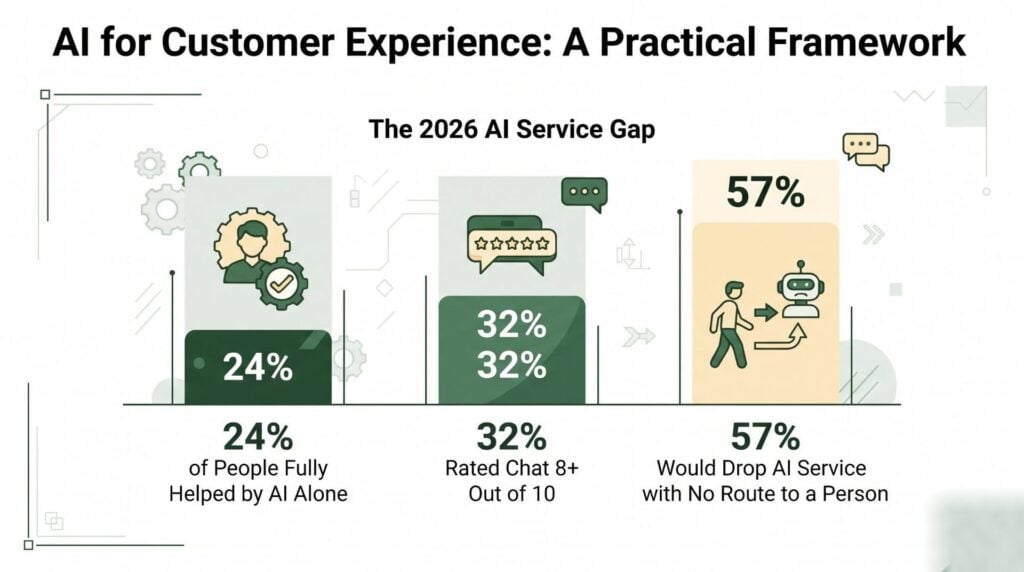
Four patterns explain most of it:
- Dead ends. In the same Ada study, 57% said they would drop a firm’s AI service for good if they could not reach a person.
- Ambition ahead of readiness. Adobe’s 2026 AI and Digital Trends survey found 78% of firms expect AI agents to handle support within 18 months, while only 16% have rolled them out. It also found 49% of firms believe buyers prefer AI agents, against 19% who do.
- Thin grounding. The model answers from general knowledge because nobody linked it to the returns policy, shipping table, or price list.
- No owner. A tool with no named person reading its chats drifts within weeks, and nobody notices until gripes arrive.
Raw power is no longer the limit. On 30 June 2026 Microsoft made Service Agent in Microsoft 365 Copilot generally available, giving service teams case notes, grounded answers and case updates in one chat window. Design and ownership now split a rollout that works from one that annoys.
How do you roll out AI across support channels?
You roll it out in a fixed order: audit, ground, pilot, link, then widen. Start by sorting recent tickets to find which questions repeat most. Ground the tool in your own help content before it speaks to anyone. Run a small pilot on one channel with a live person on hand, then link the CRM so replies carry order data. Widen only when the numbers hold for four straight weeks.
- Audit the last 500 tickets and group them by type, because three or four groups often cover half your volume.
- Rewrite the help content behind those groups first, since the model is only as accurate as the source you point it at.
- Pilot on one channel with one question type for two weeks, keeping a route to a person in every chat.
- Link your CRM so the tool sees order status and past contacts, which is where a reply that fits the buyer comes from.
- Widen the scope once the full-fix rate holds steady for a month.
Flip that order and you spend the next quarter on change management you could have skipped.
Matching the sequence to your own ticket data is where most teams stall. AI Smart Ventures offers AI Consulting to help growing businesses choose that first workflow and set the guardrails around it.
How do you measure AI customer experience gains?
Track four things at first and ignore the rest: first-contact fix rate, the share of chats closed without staff, handling time on cases that do reach your team, and how buyers rate the AI chats on their own. Split that last score by channel. A blended number hides whether the bot helps or hurts. Set a baseline in the two weeks before launch, or you will argue about gains rather than prove them.
| Metric | What it tells you | When to read it |
|---|---|---|
| First-contact resolution | Whether answers land first time | Four to eight weeks |
| Full resolution without staff | Whether the tool finishes the job | Weekly from launch |
| Handling time on escalated cases | Whether case notes help staff | Two to four weeks |
| Satisfaction on AI chats | Whether buyers accept the channel | Eight to twelve weeks |
Send these to the same people weekly. That habit turns an AI implementation into capability building rather than a tool purchase.
How do you protect customer data when using AI?
Protect it three ways at once: contract terms, setup, and tight scope. Start with a Data Processing Agreement (DPA), the contract that sets out what a vendor may do with the data you send them, and confirm in writing that your chats stay out of model training. Then limit what the tool can reach, because a bot answering shipping questions has no reason to see card records. Scope is the control teams skip.
Two habits do the rest. Mask card and ID numbers before they reach the model, and set a time limit on chat logs. Both are setup choices, not build projects.
Frequently Asked Questions
What is the 30% rule for AI?
The 30% rule is a rough planning guide rather than a formal standard. It says to expect about a 30% net gain in output from an AI rollout once you subtract the time your team spends learning the tool and fixing its work. Use it as a check against vendor claims of 80% deflection, and treat a first quarter near 30% as normal.
What is one way AI improves the customer experience?
One clear way is an accurate answer at any hour. A buyer who wants a ship date at 11pm gets it in seconds instead of waiting until morning. That single change lifts first-contact fix rates more than any other starting use, and it guards your staff too, since the questions that land overnight are often the same handful that wear good people down.
Can I use ChatGPT for customer service?
Yes, with limits. ChatGPT works well as a back-office aide that drafts replies, sums up long ticket threads, and suggests next steps for a person to approve. Pointing it straight at buyers is a different call, because the free product has no link to your order data and no audit trail. For that, use a business tier and switch logging on.
Does AI reduce the need for customer service staff?
It tends to change the work rather than the headcount. Software soaks up routine questions while your team moves to cases needing judgment, an apology or a deal. The Ada study found only 24% of people sorted out their last AI chat without staff, so human cover stays needed. Plan for role changes and AI upskilling, not for headcount cuts.
What is the first step to using AI for customer experience?
Read your last 500 tickets and sort them by how often the same question shows up. The top three or four groups often cover 40% to 60% of volume, and that is your starting point. Pick one, write out the correct answer path, then check whether your help content already holds it. Most teams find a content gap before a tooling gap.
What is the difference between an AI chatbot and an AI agent?
A chatbot answers; an agent acts. A chatbot reads the question and returns text from a knowledge base, which suits policy and how-to queries. An agent can also change things: update an address, issue a credit, move a ship date, then log what it did. The split matters at buying time, because agent-grade tools need write access and a tighter permissions review.
How do you stop an AI agent from giving wrong answers?
Ground it in your own content and cap what it may say. Link the model to a curated knowledge base rather than open web search, then set it to back off and pass the chat on when it is not sure. Read a sample of at least 50 chats each week for two months. Wrong answers often trace back to stale help pages.
How does AI handle customer data privacy?
Through contract terms and setup, never by default. Sign a data processing agreement and confirm your records stay out of model training. Check where the data sits, how long chat logs are kept, and which staff can read them. Mask card and ID numbers before they reach the model, and keep access narrow enough that a shipping bot cannot see billing history.
Which support metrics change first after an AI rollout?
Reply speed moves first, often within two weeks. First-contact fix rates follow over the next four to eight weeks as the knowledge base gets corrected. Buyer ratings are slowest, closer to three months, because they cover the whole journey rather than one fast reply. Ticket volume sometimes rises briefly at launch while people test the new channel, then settles below the old mark.
Should you tell customers they are talking to AI?
Yes, and say it in the first message. The Ada study found 57% would drop a firm’s AI service for good if they could not reach a person when they needed one, which shows how much control matters here. Clear disclosure with a visible route to staff costs you nothing, and it heads off the gripe that does lasting harm: feeling tricked.
How many tickets should AI handle at the start?
Aim for 10% to 20% of volume in the first month, drawn from a single question type. That range gives you enough chats to spot patterns without putting your whole buyer base on an untested path. Raise the share once the full-fix rate holds for four straight weeks. Teams that switch on every group at launch spend the next month switching things off.
How long does it take to launch an AI customer service pilot?
Most teams need four to eight weeks: one to two weeks reading tickets, two weeks setting up the tool, then two to four weeks live at small scope. The slow part is rarely the software. It is agreeing what a correct answer looks like. AI Smart Ventures runs an AI readiness check before setup begins. Schedule a consultation to map your first workflow.
Executive Summary
AI improves customer experience when the scope is tight and the handoff is clean. The 2026 data is blunt: only about a quarter of people get a full fix from AI alone, and most will walk away from a service with no route to a person. Tooling has caught up, so what separates teams now is workflow design, grounded content and weekly review. Start with one repeating question type, ground the model in your own help content, then link your CRM before you widen.
What Should You Do Next?
Pull your last 500 support tickets this week, sort them by type, and pick the group with the highest volume and the clearest correct answer. Rewrite the help page behind it before you look at any tool. Then run a two-week pilot on one channel, with a person on hand in every chat.
AI Smart Ventures offers AI Consulting for growing businesses building practical AI into service workflows. Schedule a consultation to choose your first customer experience workflow and set the measurement around it.
People Also Read
About the Author
Nicole A. Donnelly is the Founder of AI Smart Ventures and an AI Adoption Specialist with 20 years of experience as a founder and CEO and over a decade leading AI adoption initiatives. She helps businesses integrate artificial intelligence with clarity and confidence, driving innovation and sustainable growth. Nicole has trained over 20,217 professionals in Applied AI, delivered 624 workshops, and worked with close to 1,000 organizations across diverse industries.
Expertise: AI Transformation, AI Strategy, AI Implementation, AI Adoption, Applied AI, Marketing, Business Operations
Disclaimer: This content is for informational purposes only and does not constitute professional business or technology advice. Results vary based on industry, existing systems and implementation commitment. Contact AI Smart Ventures for a consultation regarding your specific situation.

