

Employee AI Adoption When Training Alone Isn’t Working
Last Updated: August 2026
An employee AI adoption gap is the space between the training your staff sat through and the work they changed after it. Everyone showed up for the 90-minute session, and a few people tried the tool that day, but within a month the old process was back. Nothing broke and no one refused. The habit had nowhere to attach itself, because the job around it stayed exactly as it was.
AI Smart Ventures has guided growing businesses through AI adoption long enough to know this stage is the hard one. The session itself often lands well, and people leave keen to try. What stops them waits back at the desk: a full schedule, a fixed template, and no one willing to say which parts of the process they may redraw.
The stall costs you quietly. You pay for seats no one opens, managers stop asking about the tool because the answer is awkward, and your next rollout begins with a team that watched one fail. A rival on weaker software pulls ahead, because they changed the work and you changed the slides.
Key Takeaways
- Read weak usage after training as a workflow problem, not a knowledge problem. Your session already taught them what the tool does.
- Give the AI a step somewhere to live, because if using it means a new tab and a fresh paste of context, busy staff skip it.
- Delete a step each time you add one. Use holds when the new route is shorter than the old one, not when it merely exists.
- Name who may change the process. Trained staff stall because no one told them they could rewrite the template they inherited.
- Make one person’s real usage visible. Watching a peer do the actual job with AI shifts habits more than one more slide deck.
- Time the task, not the login. Clock one weekly job before and after, then judge whether the habit is real.
Read together, these share one root: the skill arrived and the setup for using it did not. That is why a second round of training draws the same curve as the first, a short spike and a slow slide back. Fixing the setup is dull work, and it is the only kind that holds.
Why do trained employees still avoid AI tools?
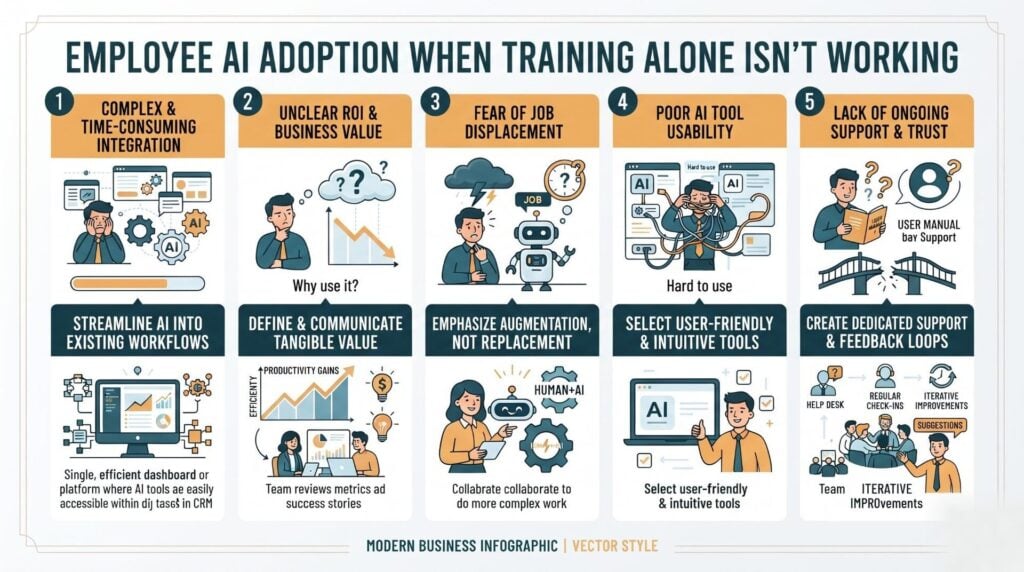
Trained staff avoid AI tools for five practical reasons, and none of them is a gap in knowledge. The tool sits outside the workflow, so every use costs extra minutes. No one has confirmed the process may change. The output needs context the tool cannot reach. No peer is visibly using it on live work. And saying out loud that you used it still carries a cost.
That last one is now measurable. Research from Atlassian’s Teamwork Lab, published in June 2026, tested 961 US knowledge workers who all read the same piece of work. When the writer disclosed AI help, readers rated that person ten times lazier and were 24 points less likely to back them for a visible project. In firms that praise AI use openly, the penalty nearly went away.
| What blocks usage | What to change |
|---|---|
| Tool sits outside the job | Move the step into the system where work happens |
| No room in the week | Book three runs on live work, in working hours |
| Process is not theirs to change | Name an owner who can approve a new version |
| No peer uses it | Ask a colleague on another team to walk it through |
How do you get employees to actually start using AI?
Pick one weekly task and rebuild that single task so the AI step replaces something rather than adding to it. Choose work that repeats, eats real time, and needs little judgment: the status update, a first-draft quote, the meeting notes no one enjoys. Run it with the person who owns the job, in their tool, on their live files. Then retire the old step in writing.
Breadth is not the lever here, because teams that pick eight use cases at once spread focus so thin that no habit forms, while one workflow rebuilt well hands everyone a working example to copy. Practical AI beats broad AI literacy at this point, because your staff already have the skill; what they lack is one finished path.
If your team finished a session and nothing shifted, our AI training rebuilds the task around the tool instead of repeating the lesson. Talk to our training team about the workflow you want moving first.
What support do employees need after AI training?
Staff need four things after training: time inside working hours, a written note on what they may change, the context the tool needs, and one named person to ask when something breaks. Support is not more content, because most of those who stall are not stuck on prompts at all; they are blocked by a full schedule, a sign-off chain, or a file the tool cannot open.
Time is the barrier they name most. Skillsoft’s 2026 review of the workplace AI skills gap found lack of time named the biggest block on building AI skills by 58% of leaders and 59% of staff. It also found only 16% of staff get training before new AI tools arrive, and just 9% report firm-wide rules for those tools, while about 30% say the guidance varies by team and goes unwritten.
Unwritten guidance reads as no guidance to the person deciding whether to paste a client file into a chat window. Write down what is allowed, what is not, and who decides; one page does more for AI enablement than a second workshop.
Why does watching a peer beat another training session?
Because adoption spreads sideways, not down. The Work AI Index 2026, published on 10 June 2026 by Glean’s Work AI Institute, surveyed 6,000 full-time digital workers across the US, UK and Australia. It found the average worker is 2.4 times more likely to pick up AI when a leader uses it, 3.2 times when a teammate does, and 5.6 times when a peer on another team does.
That order is worth sitting with, because it flips the usual rollout plan. Peers on other teams carry the most weight, since they build for the messy version of the work, so their workflows survive real use. The same report shows where the value leaks. 77% of AI users juggle several tools each week, 60% rerun a prompt elsewhere when the first answer is weak, and 53% say the facts they need are out of reach.
So the next move is not another session. Ask someone who has truly changed a task to run it live in a normal meeting, mistakes included. Change management lands better as a demo than a memo.
How do you measure if AI adoption is working?
Time one task end to end, rather than counting tool logins. Take the workflow you rebuilt, note how long it used to take, then clock the same job monthly and count the runs that used AI without a nudge. Add a quality check: does the output pass review first time? Seat counts and course finishes climb while nothing improves, which is why they flatter a stalled rollout.
Two warning signs belong on that list: rework, where a draft looks finished and costs more to repair than it saved, and quiet drop-off, where usage holds in week two and is gone by week six. Both surface in task timing before a dashboard notices.
Frequently Asked Questions
Why do employees resist AI tools and how do you fix that?
Most of what looks like resistance is a blocked process rather than a bad attitude. Staff who cannot alter a template, a report format or a sign-off step have no clean way to use the tool there. Fix the permission first: name the person who owns each process, let them approve a new version, and write it down. The mood problem fades once the practical one does.
How long does it take before AI use becomes a habit?
Plan for about 90 days on one task, with the first 30 closely backed. Habits form through repeat runs on real work, so a weekly job gives you roughly twelve tries, while daily jobs form faster. If usage is still patchy after three months of honest effort, the workflow is the problem rather than the person, so redraw the step instead of more coaching.
Should you make AI use mandatory?
Mandates produce logins, not adoption, because people comply by opening the tool, doing the work the old way, and leaving the tab running. Make the AI route the default path for one named task instead, then close the old route once the new one clearly works. A rule without a redesign creates a box-ticking drill, and drills stop the day someone stops watching.
What is the difference between AI training and AI adoption?
Training passes on skill, while adoption changes what people do on a Tuesday with no reminder. You can score training by turnout and by how sure people feel afterwards. Use only shows in the work: a shorter cycle, a step that no longer exists, a draft that arrives ready. Treating the two as one thing is why programs post warm feedback beside flat usage.
Do you need an AI policy before people will use AI?
A short written policy helps more than most owners expect, because doubt reads as a ban. Staff who do not know whether client data may go into a chat window will avoid the tool. One page covering approved tools, banned data, what to disclose and who to ask removes that pause. Keep it current, explain why it exists, and review it on a set date.
What if employees only use AI for small tasks?
That is normal, and it counts as progress, because small jobs are where trust gets built, and staff who sum up notes for a month often move on to drafts and analysis by themselves. The mistake is leaving them there. Once a small habit holds, point that same person to one nearby job with higher stakes, and keep the review step in human hands.
Is it a problem when staff use AI tools you never approved?
Read it as a signal rather than a crime. The Work AI Index found half of workers use tools that were never approved, or approved ones in ways the rules do not allow, mostly because the official option is slow or distant from the job. Ask what the other tool does better, then approve it with guardrails or close the gap in yours.
How do you answer someone who fears AI will cost them their job?
Answer plainly and in detail, because a vague comfort line reads as dodging. Say which tasks you expect AI to absorb, which parts of the role stay human, and what you will do if the work truly shrinks. Then show it: give that person early access, a say in how the workflow gets redrawn, and credit when it improves. Fear drops fastest when people help build it.
Why does adoption slip back after a strong first month?
Early energy runs on novelty, and novelty is short-lived. When the workload returns to normal in week five, anything costing extra minutes goes first. Use survives that week only when the AI route is truly faster and the old route has been closed. Check in during weeks four to six rather than at quarter end, when a restart costs far more.
Should you give AI agents names and roles like staff?
Be careful with that framing. Fortune reported in May 2026 on Boston Consulting Group research covering more than 1,200 HR and finance staff. People reviewing a document credited to a named AI “employee” caught fewer errors, felt less to blame for them, and pushed the review onto a colleague. Keep ownership with a person, and name the human behind each output.
Where should you start when training has already failed?
Start with one workflow, not one more course. Pick a weekly task, watch someone do it, find the step where the tool gets skipped, and rebuild that step. Scope drives what this asks of you: one workflow with one team runs in weeks, while a wider redraw across a department needs a longer sequence. Schedule a consultation with AI Smart Ventures to pick that workflow.
Executive Summary
Employee AI adoption stalls after training because skill and setup are separate problems. Staff who understand the tool still skip it when every use costs extra minutes, when no one has cleared a change to the process, when the tool cannot reach the files it needs, and when admitting AI help carries a cost. The fix is workflow optimization rather than more content: rebuild one weekly task so the AI step replaces an old one, name a process owner, and let a peer show it working.
What Should You Do Next?
This week, pick the weekly task your team complains about most and watch one person do it start to finish. Mark the step where the tool gets skipped, then rewrite that step so the AI route replaces the manual one instead of sitting beside it. Name who owns the new version before month end.
AI Smart Ventures offers AI training for growing businesses whose teams have finished sessions and still are not using the tools. Schedule a consultation to rebuild your first workflow and get usage that holds.
People Also Read
- AI Pricing Models Explained: Per Seat vs Per Token vs Flat Rate
- What Is an AI Center of Excellence and Do You Need One?
About the Author
Nicole A. Donnelly is the Founder of AI Smart Ventures and an AI Adoption Specialist with 20 years of experience as a founder and CEO and over a decade leading AI adoption initiatives. She helps businesses integrate artificial intelligence with clarity and confidence, driving innovation and sustainable growth. Nicole has trained over 20,217 professionals in Applied AI, delivered 624 workshops, and worked with close to 1,000 organizations across diverse industries.
Expertise: AI Transformation, AI Strategy, AI Implementation, AI Adoption, Applied AI, Marketing, Business Operations
Disclaimer: This content is for informational purposes only and does not constitute professional business or technology advice. Results vary based on industry, existing systems and implementation commitment. Contact AI Smart Ventures for a consultation regarding your specific situation.

