

AI for Founder-Led Law Firms Beyond ChatGPT: Ethical Walls and Conflict Checks
Last Updated: June 2026
An AI system for founder-led law firms is a set of tools and rules. It screens for conflicts, blocks access between matters, and keeps client data safe. It does this without sending case details to a public AI model. The ABA’s 2025 Legal Technology Survey found 40 percent of lawyers now use AI in at least one area of practice. That is up from 19 percent in 2022.
AI Smart Ventures has guided growing businesses through AI implementation and AI consulting in industries where client trust matters most.
Running a founder-led firm means you are the managing partner and the compliance officer at once. AI can save real time on intake, conflict checks, and record review. But those gains only show up when the tool fits your bar rules.
Key Takeaways
- Conflict Check Speed – AI conflict tools like Clio Duo cut check time from 45-60 minutes to under 5 minutes per matter, per Clio’s 2024 Legal Trends Report.
- Ethical Wall Rules – Model Rule 1.10 needs timely screening, written notice, and access limits. Any AI tool you use must enforce these controls to qualify as an ethical screen.
- Data Risk – Free AI tools like ChatGPT may train on your input by default. This breaks ABA Formal Opinion 512 (2023) on client privacy unless you disable data sharing.
- Cost Range – Legal AI tools range from $49/user/month at MyCase to $1,000+/month for Harvey. The top-tier tools are out of reach for most 1-5 lawyer firms.
- Compliance Gap – A 2024 survey by the Legal Technology Resource Center found 62 percent of lawyers using AI have not checked their state bar’s guidance on AI.
These key points show one tension: AI tools move fast and bar rules move slowly. The issue is not the tech. Most founders use general-purpose AI without checking if it meets their professional responsibility.
Why Does AI Compliance Matter for Law Firms Now?
At least 18 state bars had released AI ethics views by end of 2024. Check the ABA Center for Professional Responsibility for details. The core duties have not changed. Skill under Rule 1.1. Privacy under Rule 1.6. Control under Rules 5.1 and 5.3. Not knowing how your AI tool handles data is a skill failure now, not just a tech gap.
Founder-led firms carry this risk alone. There is no general counsel to check vendor terms. There is no conflicts team to catch errors. If client data goes through an unvetted AI tool, the bar does not care about your firm size. A good compliance setup built in 4 to 6 weeks costs far less than one bar complaint.
What Is an Ethical Wall in an AI Context?
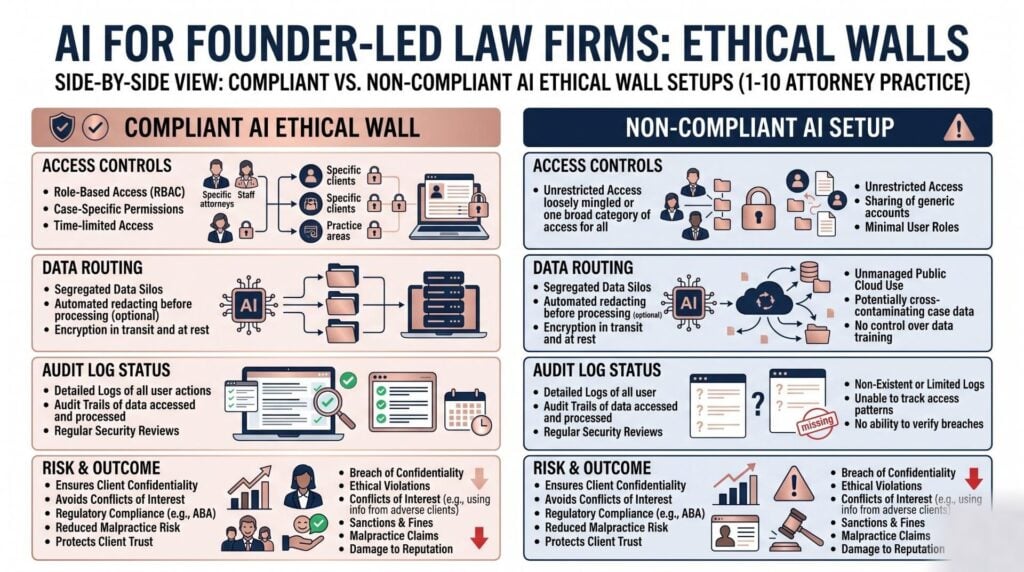
An ethical wall, also called a screen, is a written block. It stops a lawyer or staff member from seeing any matter where they have a conflict. In an AI system, your tools must enforce the same block. They cannot show case notes to a user screened off from that matter.
Your AI system needs role-based access controls at the matter level. It also needs a log of who saw which records and when. Tools like Clio and MyCase have built-in matter-level access rules. These work for most founder-led firms. If you add Microsoft Copilot on top, check that its access settings follow your record rules. Make sure they do not override them.
How Do Conflict Checks Work With AI Tools?
AI conflict tools check new client details against your client list, adverse party records, and lawyer history. They flag matches for review before you open the matter. Clio’s 2024 Legal Trends Report found AI conflict screening cuts each check to under 5 minutes. By hand it takes 45 to 60 minutes.
Some tools check only your own firm data. Others pull from outside records. Clio Duo and Lawgeex work with your internal records. Westlaw Precision and Lexis+ with Protege check against outside legal records. This adds accuracy but raises data-sharing questions. Resolve those in the vendor contract. The vendor Data Processing Agreement (DPA) is the key document to read before signing any AI tool that handles client names.
Here is a comparison of the main AI tools for conflict checks and matter control:
| Tool | Monthly Cost | Conflict Check | Ethical Wall Support | Best For | Limitation |
|---|---|---|---|---|---|
| Clio Duo | From $109/user/mo (Higher plan) | Yes, within Clio matters | Matter-level RBAC, audit logs | 1-20 lawyer firms on Clio | No external DB enrichment |
| Harvey | Custom, typically $1,000+/mo | Partial (contract review focus) | Private instance launch | Firms with high record volume | Too costly for solo firms |
| Lawgeex | Custom, check vendor | Contract conflict flags | SOC 2 Type II, private launch | Contract-heavy steps | Not a full practice control system |
| Westlaw Precision | Check vendor for pricing | Yes, adverse party search | Data location controls | Court work firms | High cost for transactional work |
| MyCase | From $49/user/mo (Basic plan) | Basic conflict check | Matter-level access controls | Solo and 1-5 lawyer firms | Basic keyword match only |
| ChatGPT (Team/Business) | $30/user/mo (Team plan, min 2 seats) | No built-in check | No training on your data | General drafting and research | Not a conflict system |
For an updated list of AI tools vetted for service businesses, see AI tools and apps on the AI Smart Ventures resource hub.
Need help picking the right AI tools? AI Smart Ventures offers AI consulting for growing businesses building safe AI workflows.
What Bar Rules Govern AI Use in Law Firms?
Three rules govern AI use in law firms. Rule 1.1 covers skill. Rule 1.6 covers privacy. Rules 5.1 and 5.3 cover control. ABA Formal Opinion 512 (2023) confirmed two things. First, sending client data to a third-party AI tool without proper protections breaks Rule 1.6. Second, using a tool without knowing how it handles data is a skill failure. State bars in California, Florida, New York, and Texas have issued their own rules. Some are stricter than the ABA standard.
Founder-led firms must watch every AI tool a non-lawyer uses. You need clear policies, written review steps, and a named owner for AI control. The NIST AI Risk Management Framework offers a free model for those controls. AI governance is not just best practice here. It is a duty.
Before using any AI tool with client data, run through this checklist:
- DPA Review – Read the Data Processing Agreement. Confirm the vendor does not train on your data. Check where data is stored. Look for a 72-hour breach notice.
- Bar Opinion Check – Search your state bar’s site for AI rules. By April 2026, California, Florida, New York, and Texas had all released views.
- Access Audit – Map which staff can see which matters. Any AI tool you add must follow those limits, not override them.
- Written Policy – Write a one-page rule on tools and banned data types. Add a review step before any AI output goes to a client.
Any firm that skips this list is not saving time. It is adding risk.
How Do You Prevent Client Data Leaks With AI?
The most common data leak in a founder-led firm is not a breach by a bad actor. It is a staff member pasting a client contract into a free AI tool for a quick summary. That sends private data to a third-party server. The vendor may train on it. That breaks Rule 1.6 and can trigger a bar complaint.
The fix is a tiered tool policy. Split your AI tools into three lanes:
- Public Research Only – Free tools like Google Gemini are used only for research on public law. No client details.
- Matter Work with DPA – Tools like Clio Duo, Harvey, or Lawgeex with a signed DPA handle all matter work.
- Banned Use – No tool gets client names, case facts, or money details without a lawyer checking the vendor’s data terms first.
The ABA’s 2025 Legal Technology Survey found firms with a written AI policy had 30 percent fewer data issues than those without. The tiered approach gives your team clear rules from day one. It stops staff from making calls about sensitive data on their own. Review the policy once a year as tools and bar rules change.
Frequently Asked Questions
What is the difference between an ethical wall and a conflict waiver?
An ethical wall blocks a conflicted lawyer from using a matter. A conflict waiver is written client consent to a conflict that already exists. Walls prevent the issue. Waivers address a conflict the client can consent to, after full notice. For new-matter intake, run a conflict check first. Build a screen if needed. Pursue a waiver only as a last step.
Can I use ChatGPT for legal research without violating privacy?
Yes, for research on public legal questions that contain no client-identifying information. If the prompt names a client or case facts, use a legal AI tool with a signed DPA instead. Paid ChatGPT tiers do not train on your data, but public usage still raises bar questions. Check your state bar’s guidance before using any AI tool with case-specific content.
How much does a legal AI conflict check system cost?
Pricing starts at $49/user/month for basic checks in MyCase. Harvey costs $1,000+/month, which is out of reach for most 1 to 5 lawyer firms. Clio’s Higher plan at $109/user/month gives the best mix of conflict checking and audit logs for growing firms. For help scoping the right fit, schedule a consultation with AI Smart Ventures.
Do bar rules require me to disclose AI use to clients?
Several state bars now recommend notice when AI drafts client-facing work. California’s 2024 guidance needs contract letter language. New York focuses on control rather than required notice. Check your state bar’s current opinion, since this area is changing faster than most professional responsibility rules. When in doubt, add a short sentence in your contract letter. It costs nothing and protects you if a client questions the work.
What is ABA Formal Opinion 512 and why does it matter?
ABA Formal Opinion 512 (2023) is the ABA’s ruling on how privacy and skill rules apply to AI tools. It confirms that sending client data to a vendor without proper protections breaks Rule 1.6. The opinion also says lawyers must understand how their AI tools handle data. This meets the skill duty under Rule 1.1. Every founder-led firm using any AI tool should review this opinion before going live with any new tool.
How long does it take to set up an approved AI system?
Most 1-10 lawyer firms can build an approved AI workflow in 4-6 weeks. The first two weeks cover vendor selection, DPA review, and a written AI use policy. Weeks three and four focus on setting matter-level access rules and testing the conflict check process. The final two weeks are for staff training. Run the AI tool in parallel with your manual process to confirm results match. Ongoing maintenance after launch typically takes 30-60 minutes per month.
What happens if I use a non-set AI tool and a bar complaint is filed?
A bar complaint for an AI-related data issue is treated like any Rule 1.6 violation. Fines range from a private warning to suspension. Bar panels care most about whether the lawyer had a written process in place before the issue. A written AI use policy, a signed vendor DPA, and written staff training all lower your risk greatly.
Can AI tools replace a full conflicts check?
No. AI tools speed up screening and reduce missed links. But lawyer judgment is still required for every flagged match. If you dismiss a flag without review, that is your professional duty failure, not the tool’s. Use AI conflict checking as a first-pass screen. It makes your review faster, but it does not make final decisions.
Which AI tools have the strongest data security for law firms?
Harvey and Clio both offer private-instance launch with SOC 2 Type II cert. That is the baseline most legal risk insurers need. Lawgeex also provides private launch with data location controls. Microsoft Copilot for Microsoft 365 keeps your data within your Microsoft tenant without training on it. This is accepted under many bar views for general legal work. Always check certs directly with the vendor, as terms can change without notice.
Executive Summary
Founder-led law firms can cut conflict screening time by 80 to 90 percent using tools like Clio Duo or Lawgeex. The tools must come with a signed DPA, matter-level access controls, and a written AI use policy. ABA Formal Opinion 512 (2023) and at least 18 state bars set the floor. Skill means knowing how your tool handles data. Privacy means keeping client data out of public AI models. Firms that invest 4 to 6 weeks in proper setup avoid bar complaints and legal risk. Those that skip it add risk to every new matter they open.
What Should You Do Next?
This week, open your practice system. Check that access controls are on for every active matter. Pull one vendor contract for any AI tool you use. Search for “training,” “model improvement,” or “data use” to see how your client data is handled. If no DPA exists or those terms are missing, fix that gap before your next client intake.
AI Smart Ventures offers AI consulting for growing businesses launching AI in compliance-sensitive industries. Schedule a consultation to review your tools, your vendor agreements, and your firm’s compliance posture.
People Also Read
About the Author
Nicole A. Donnelly is the Founder of AI Smart Ventures and an AI Adoption Specialist with 20 years of experience as a founder and CEO and over a decade leading AI adoption initiatives. She helps businesses integrate artificial intelligence with clarity and confidence, driving innovation and sustainable growth. Nicole has trained over 20,217 professionals in Applied AI, delivered 624 workshops, and worked with close to 1,000 organizations across diverse industries.
Expertise: AI Transformation, AI Strategy, AI Implementation, AI Adoption, Applied AI, Marketing, Business Operations
Disclaimer: This content is for informational purposes only and does not constitute professional business or technology advice. Results vary based on industry, existing systems and implementation commitment. Contact AI Smart Ventures for a consultation regarding your specific situation.

