
AI for the GM in an Owner-Operated Business: A Daily Rhythm
Last Updated: May 2026
An AI daily rhythm for a GM (General Manager) in an owner-run firm is a set of recurring AI tool use patterns. Morning briefings. Midday task work. And end-of-day reporting. These embed AI into the GM role’s actual workflow rather than treating AI as a separate task that competes with daily duties. The rhythm maps AI to existing work moments so that it survives schedule pressure rather than being cut when the day gets busy.
AI Smart Ventures has helped close to 1,000 growing firms through AI adoption calls. This includes general managers in owner-run firms who need AI to fit into a daily role that has no spare time for tech trials. The firm’s AI training work covers sessions built for non-technical managers who need to add AI to daily workflow within the limits of a full daily schedule.
A set daily AI rhythm is the split between AI use that builds over time and AI that gets dropped when the daily ops get busy.
Key Takeaways
- Adoption staying power. Managers with a set daily AI use pattern keep using AI tools at much higher rates than those using AI on an ad hoc basis. A rhythm that maps AI to existing work moments survives schedule pressure rather than being cut by it. Gartner research shows fewer than 30% of CEOs are happy with AI returns, making lasting daily adoption the measure that matters most.
- Role fit. The GM role in an owner-run firm suits AI daily rhythm adoption well. The role combines repeat admin tasks (reporting, booking, contact) with high-judgment calls that benefit from faster information prep.
- Time went back: 4 to 6 hours per week. GMs who add AI to daily morning briefing, booking, and reporting tasks get back 4 to 6 hours per week in admin time. Each 10 to 15 minute AI window replaces a manual task that previously took 30 to 45 minutes across the day.
- Rhythm design. A GM AI daily rhythm works best when it mirrors existing workflow timing. AI morning briefing replaces the manual email scan. AI booking help replaces manual calendar management. And AI reporting replaces manual data gathering.
Why Do GMs Need an AI Daily Rhythm?
GMs in owner-run firms need a set AI daily rhythm because without one, AI tools stay as extra tasks rather than workflow parts. Extra tasks are the first things cut when the daily ops get compressed. A rhythm that maps AI use to existing work moments (the morning email review, the midday status update, the end-of-day reporting round) creates AI use that survives schedule pressure rather than being cut by it.
The owner-run GM context makes rhythm especially key because the role has fewer supports than a corporate GM role. No assistant. No set analytics team. And no split between daily response and strategic thinking. GMs in owner-run firms who build set AI daily rhythms keep using AI at six months at higher rates than those who adopt AI tools without a set use pattern. The rhythm is the adoption structure that makes AI investment produce returns.
What Does a Practical GM AI Daily Rhythm Look Like?
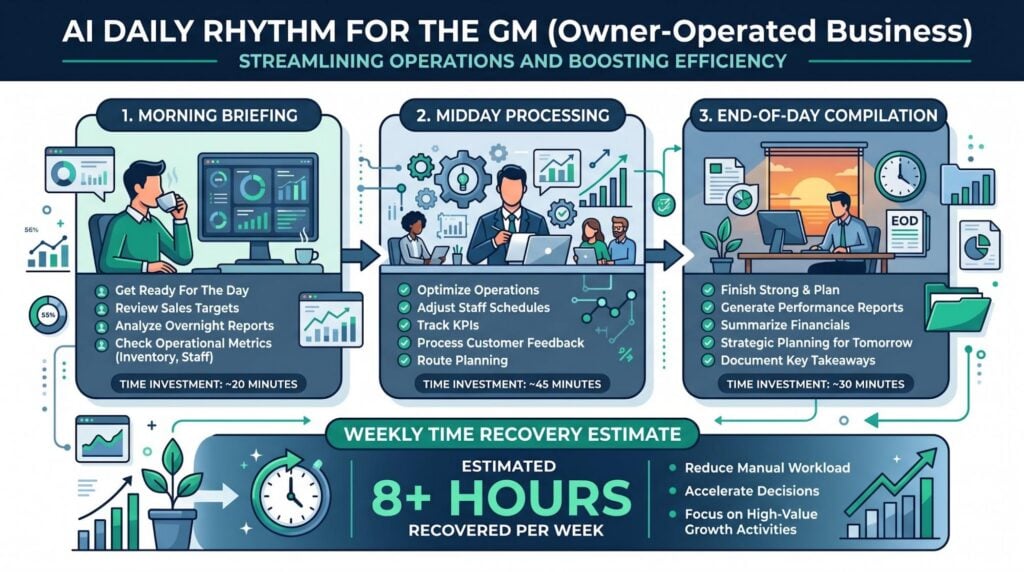
A practical GM AI daily rhythm runs on three anchor moments. A morning briefing window where AI prepares daily priorities and flags messages needing response. A midday work window where AI handles booking, status reporting, and task hand-off. And an end-of-day window where AI gathers metrics and drafts the next day’s agenda. Each window is 10 to 15 minutes of AI use time. Not an extra hour.
The rhythm works because it replaces the manual version of each task rather than adding AI as a layer on top. GMs who replace set manual admin tasks with AI versions keep using AI tools at higher rates than those who add AI alongside unchanged manual workflows. Adding AI on top adds time. Replacing a task with AI saves it.
McKinsey’s 2025 State of AI research shows 88% of groups now use AI in at least one function. Replacement-based adoption is the design rule that splits productive daily use from dropped tool plans. Replacement is the design rule. Adding AI on top is the failure mode.
| Rhythm Window | AI Tasks | Manual Task Replaced | Weekly Time Recovery |
| Morning briefing (10-15 min) | Email triage, priority flagging, calendar review | Manual email scan, calendar check | 1.5-2 hours/week |
| Midday processing (10-15 min) | Status report drafts, task delegation formatting | Manual status updates, delegation emails | 1.5-2 hours/week |
| End-of-day compilation (10-15 min) | Metric compilation, next-day agenda draft | Manual data gathering, agenda preparation | 1-2 hours/week |
The three windows together produce 4 to 6 hours of weekly admin time got back when each AI task fully replaces its manual version.
AI Smart Ventures offers AI training services for general managers in owner-run firms. Schedule a consultation to build a daily AI rhythm matched to your set GM role, workflow timing, and current tool stack.
Which GM Functions Benefit Most From AI Daily Rhythm?
The GM functions that benefit most from AI daily rhythm are those with the highest volume of repeat, format-driven output. Contact drafting. Status reporting. Booking. And ops metric gathering. These functions share a trait. The GM knows what the output should look like before starting. AI handles the format and first draft. The GM handles the judgment and editing. High-volume, low-variation tasks are where AI daily rhythm produces the fastest time savings.
Strategic planning, hiring calls, and vendor talks benefit less from daily rhythm AI use. They need more judgment than format work. And the judgment cost of reviewing AI output on these tasks often approaches the time cost of doing them by hand. GMs who use AI for contact drafting and status reporting every time report higher satisfaction with AI tools than those applying AI to strategic planning functions first. Format-driven tasks build the GM’s AI skill before it is applied to judgment-based work.
Four GM functions ranked by daily rhythm AI return:
- Contact drafting. Staff updates, vendor emails, client summaries, and owner reports all follow repeat formats that AI drafts in under 2 minutes, saving the GM 3 to 5 minutes per message at high daily volumes.
- Status and metric reporting. Weekly ops reports, shift summaries, and KPI summaries involve gathering data the GM already has into a steady format, which AI handles every time without the mental overhead.
- Booking and scheduling. Calendar management, meeting prep, and agenda drafting are repeat format tasks where AI saves 20 to 30 minutes per day across a full calendar.
- Task hand-off formatting. Converting verbal calls into written task assignments with clear results, deadlines, and who owns what is a format task AI handles in under a minute per hand-off.
These four functions give the highest time savings per AI minute invested in the GM role. AI Smart Ventures offers AI advisory support for GMs building AI use case maps for their set daily roles.
How Do You Build the GM AI Rhythm?
Building a GM AI daily rhythm without disrupting existing workflows needs a one-at-a-time start. Pick the single manual task in the morning window that costs the most time. Replace it with an AI version. And run that replacement for 30 days before adding the next task. Adding all three rhythm windows at once creates the same adoption failure as any complex new system. Multiple unfamiliar tools competing for attention during a compressed daily schedule.
The 30-day single-task rule also produces the tracking data that makes each next adoption call easier. GMs who add one AI task per 30-day window keep adoption across all three rhythm windows at much higher rates than those who add all tasks at once. The step-by-step approach is slower in calendar terms. But much faster in overall lasting adoption terms.
Gartner research shows fewer than 30% of CEOs are happy with AI returns. The 30-day step-by-step approach is the method that actually produces the return the subscription is paying for.
For GMs who already use GoHighLevel for client pipeline and follow-up, the midday window is a natural first AI addition. GoHighLevel’s AI follow-up steps, pipeline status views, and booking links replace several manual midday tasks in one tool. That is the ideal first AI window task because it replaces work the GM is already doing. Not new work. And the data to track the time saving is already there.
Four steps to build the GM AI daily rhythm without workflow disruption:
- Pick the highest-time manual task. Find the single morning task that costs the most time and has the clearest format needed. This is the first AI replacement. Not the most exciting use case.
- Build one prompt template. Create a prompt that produces good output for that task in one attempt, and save it as a reusable template. Do not start a new AI task until this template works reliably.
- Run the replacement for 30 days. Use only the AI replacement for this task for 30 days. Track the time saved. Write down the result before adding the next window task.
- Add one task per window. After 30 days of reliable replacement, add the next highest-time task in the same window or open the midday window with a single task. Keep the one-at-a-time rule throughout.
These four steps produce a GM AI rhythm that builds over three to four months rather than collapsing within the first two weeks.AI Smart Ventures offers AI rollout support for GMs building set AI adoption plans within owner-run firm limits.
How Do You Measure Whether the GM AI Rhythm Is Working?
Tracking whether the GM AI daily rhythm is working needs three numbers. Time spent on the replaced task before AI. Time spent on the AI-assisted version. And the edit rate, the share of AI output needing real editing. A daily rhythm producing less than 30% time cut or an edit rate above 30% needs a prompt redesign before the next rhythm window is added.
The weekly time savings count (total minutes got back across all active rhythm windows) is the number that makes the AI adoption case to the business owner. GMs who present weekly time savings data to their owner-operators get approval to expand AI tool use to more team members at higher rates than those reporting AI use by gut feel.
McKinsey’s 2025 State of AI research shows only about one-third of groups have moved from AI testing to scaling. The weekly time savings number is what makes the case to move from one GM to team-wide rollout. The tracking converts personal output into a business case.
Frequently Asked Questions
What Is an AI Daily Rhythm for a GM?
A set of recurring AI use patterns mapped to the natural timing of the GM’s workday. Morning briefing tasks. Midday work tasks. And end-of-day gathering tasks. Each pattern replaces a set manual task rather than adding AI alongside the existing manual version. GMs who build a set daily AI rhythm keep using AI tools at much higher rates than those using AI on an ad hoc basis. The rhythm survives daily pressure rather than being cut by it.
Why Do GMs in Owner-Operated Businesses Need a Defined AI Rhythm?
Without one, AI use is cut by daily pressure and never becomes routine. A rhythm that maps AI to existing work moments (the morning email scan, the midday status update, the end-of-day reporting round) creates AI use that survives schedule compression rather than being cut first when the day gets busy. The rhythm is the adoption structure that converts AI spend into lasting daily returns.
What Should a GM Do With AI in the Morning?
Handle email triage, priority flagging for the day’s agenda, and calendar review. This replaces the manual morning email scan with an AI-assisted briefing that takes the same amount of time but produces a set priority list rather than an unprocessed inbox. The morning window gives the highest return because it shapes the rest of the day’s calls. One good prompt asks for a summary of unread emails by urgency and action type.
What GM Tasks Benefit Most From AI?
Those with high volume and a set format. Contact drafting. Status and metric reporting. Booking. And task hand-off formatting. These have clear output standards the GM can check fast, keeping edit rates low and time savings high. Strategic planning, hiring calls, and vendor talks benefit less from daily rhythm AI because the judgment cost of reviewing AI output often approaches the time cost of doing them by hand.
How Do You Introduce AI to a GM’s Workflow Without Disrupting Operations?
One task at a time. Pick the single highest-time manual task in the morning window. Build one prompt template that reliably replaces it. Run the replacement for 30 days. And track the time savings before adding the next task. Adding all three rhythm windows at once creates adoption failure. The step-by-step approach produces lasting adoption at twice the rate. The goal is reliable replacement of one manual task before any new AI use is added.
How Long Does It Take to Build a GM AI Daily Rhythm?
Three to four months when adding one task per 30-day window. First month: morning replacement. Second month: midday task. Third month: end-of-day gathering. By month four, the full rhythm is running reliably. Trying to compress this timeline by adding multiple tasks at once typically produces short-term adoption followed by dropping when daily pressure increases.
What Is the Correction Rate and Why Does It Matter for GM AI Use?
The edit rate is the share of AI output a GM must really edit before using it. An edit rate above 30% means the GM spends more time correcting AI output than the AI saved in the first place. That cuts the net time benefit to zero. Edit rates above 30% usually signal a prompt design problem rather than a tool skill problem. A one-session prompt revision usually cuts it below the 30% mark.
How Do You Make the GM AI Rhythm Case to a Business Owner?
Use weekly time savings data. Total minutes got back across all active rhythm windows, stated as hours per week at the GM’s hourly labour cost. A GM getting back 5 hours per week at an effective hourly rate of $50 produces a $250 weekly return from a $50 monthly AI plan. A 20-to-1 return. The tracking converts personal output into a business case the owner-operator can check on financial terms.
Executive Summary
A GM AI daily rhythm in an owner-run firm maps AI use to three anchor moments in the natural workday. Morning briefing. Midday work. And an end-of-day gathering. It replaces set manual tasks rather than adding AI as an extra tool. GMs who build a set daily AI rhythm keep using AI tools at much higher rates than those using AI on an ad hoc basis. The rhythm survives daily pressure rather than being cut by it. The weekly time savings count converts the GM’s personal output into a business case the owner-operator can check financially.
What Should You Do Next?
This week, find the single manual task in your morning routine that costs the most time and has the clearest format needed. Write one AI prompt that produces good output for that task and test it for three straight mornings. By the end of month, record the minutes saved per day compared to the manual version and use that number as your first GM AI rhythm tracking data point.
AI Smart Ventures offers AI training for growing firms and groups, including set daily rhythm design sessions for GMs in owner-run firms who need AI to fit into a full daily schedule without disrupting existing workflows. Schedule a consultation to build a daily AI rhythm matched to your set GM role and workflow timing.
People Also Read
- What Is AI Adoption: How to Get Your Team on Board with AI
- Why Your Team Stopped Using the AI Tools You Bought
About the Author
Nicole A. Donnelly is the Founder of AI Smart Ventures and an AI Adoption Specialist with 20 years of experience as a founder and CEO and over a decade leading AI adoption initiatives. She helps businesses integrate artificial intelligence with clarity and confidence, driving innovation and sustainable growth. Nicole has trained over 20,217 professionals in Applied AI, delivered 624 workshops, and worked with close to 1,000 organizations across diverse industries.
Expertise: AI Transformation, AI Strategy, AI Implementation, AI Adoption, Applied AI, Marketing, Business Operations
Disclaimer: This content is for informational purposes only and does not constitute professional business or technology advice. Results vary based on industry, existing systems and implementation commitment. Contact AI Smart Venturesfor a consultation regarding your specific situation.