
AI Productivity Benchmarks for Owner-Operators 2026
Last Updated: May 2026
An AI productivity benchmark for owner-operators is a set target for how much time, cost, or output gain AI (Artificial Intelligence) tools should give per business function. It lets owner-operators check whether their AI rollouts are at or above the expected return. McKinsey’s 2025 State of AI confirms that groups tracking AI at the use-case level are much more likely to achieve real business impact than those without tracking plans. The benchmark is the split between written return and invisible underperformance.
AI Smart Ventures has helped growing firms and groups through AI adoption calls, including owner-operators who roll out AI tools without a tracking plan and cannot tell whether their spend is performing. The firm’s AI advisory work spans professional services, retail, and service-based businesses where the gap between expected and actual AI output is widest when benchmarks are absent.
Owner-operators who track AI performance against set benchmarks get more value from their tool spend than those who judge by gut alone.
Key Takeaways
- Tracking gap. McKinsey’s 2025 State of AI confirms that groups tracking AI at the use-case level are much more likely to achieve real business impact. A set benchmark is the fastest path from tool cost to written return.
- Top function. Content and marketing workflows give the highest written time savings per AI tool rollout across owner-run businesses. HubSpot’s 2025 State of Marketing shows marketing teams save 10 or more hours weekly using AI, with content creation as the top use case.
- Admin savings: 5 to 7 hours per week. Owner-operators using AI for booking, email, and meeting notes get back 5 to 7 hours per week in admin time. AI Smart Ventures sees this across owner-run service firms setting up their first admin auto workflow.
- Customer service return. AI-assisted customer service tools cut response time for owner-run businesses handling routine requests. Salesforce’s 2025 State of Service report shows 88% of service pros say conversational AI speeds resolution times, with AI now resolving 30% of cases without human input.
- Payback mark: 30%. An AI tool that does not cut its target task time by at least 30% in the first 90 days is underperforming for its use case. Below that mark, setup overhead and output editing nearly offset the time savings. No net gain.
Setting a benchmark before rollout is the split between knowing an AI tool is working and hoping it is.
What Are AI Productivity Benchmarks and Why Do They Matter?
An AI productivity benchmark is a target performance standard. The minimum gain an AI tool must give to justify its cost and setup overhead. Without one, AI adoption stays a tech buy rather than a business performance call. Underperformance is hidden until the tool has cost months of licence fees. Benchmarks turn personal tool checks into trackable business numbers that owner-operators can act on.
Benchmarks matter most in owner-run businesses because the owner’s time is the scarcest resource any AI tool uses. An AI tool saving 45 minutes on a task that used to take 2 hours is at 37.5% time cut. Above the 30% floor. A tool saving 20 minutes on the same task is at 16.7%. Below the floor and worth replacing or resetting.
Which AI Functions Deliver the Best Benchmarks in 2026?
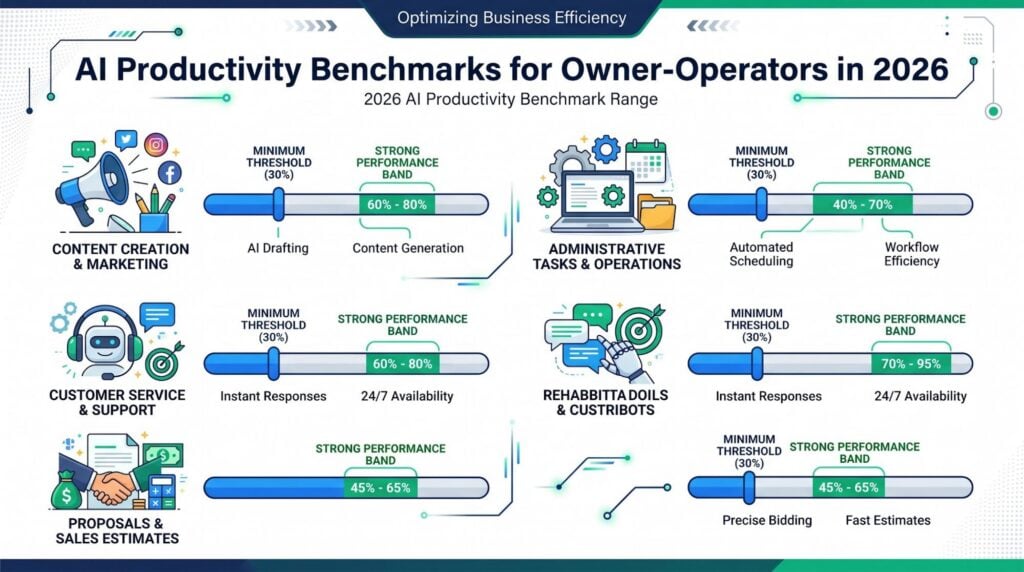
The AI functions giving the most written output gains for owner-run businesses in 2026 are content and marketing auto, admin task handling, and customer service response. These three share traits AI handles well at owner-operator scale. High task repeat. Clear quality standards. And a number attached to the time spent.
Content and marketing leads because writing-assist and booking tools have reached a point where first drafts, social posts, and email steps need minimal human editing when built on well-designed prompts. HubSpot’s 2025 State of Marketing research shows 67% of marketing teams save 10 or more hours weekly using AI. Content creation is the most common use case. That makes marketing and content the highest-returning area for owner-operators rolling out their first AI output tool. Admin auto follows closely, with booking, inbox triage, and meeting note tools giving steady 5 to 7 hour weekly time recoveries across business types.
The four AI functions giving the most reliably tracked returns for owner-operators in 2026:
- Content and marketing. First-draft making, email steps, and social post booking save 3 to 4 hours per week. 90-day payback on most owner-operator marketing stacks.
- Admin auto. Booking, inbox triage, and meeting notes return 5 to 7 hours per week when set up correctly. The highest-volume time recovery area.
- Customer service response. AI-assisted tools speed first-response time for businesses handling 20 or more daily requests. Salesforce research shows 88% of service pros confirm conversational AI speeds resolution. Highest gains on FAQ-type requests needing no judgment.
- Proposal and contract drafts. Professional services firms using AI for proposal first drafts cut drafting time by 40 to 55%. Highest returns on repeat scope structures.
These benchmarks show median performance across written owner-operator rollouts. Not best-case vendor claims.
AI Smart Ventures offers AI advisory services for growing businesses setting AI output benchmarks and checking tool performance. Schedule a consultation to build a tracking plan matched to your business functions and AI tool stack.
What Do Realistic AI Productivity Benchmarks Look Like?
Real AI output benchmarks in 2026 target written median performance, not vendor marketing claims. They track the set task the AI handles rather than broad workflow gain. The benchmark is a ratio. Time saved divided by time previously spent, tracked over a 90-day window after the tool reaches steady-state use. A tool that has not hit its benchmark by day 90 is either set up wrong, used against the wrong task, or underperforming.
The 30% time cut mark is the most useful minimum benchmark across functions. Below 30%, setup overhead and output editing nearly offset the time savings. Owner-run businesses that set function-specific benchmarks above 30% achieve higher scores and longer tool keeping than those using generic output targets. A higher bar forces better prompt design and tool choice from the start.
| AI Function | Minimum Benchmark | Strong Performance | Best Tool Type |
| Content first drafts | 30% time reduction | 50-65% time reduction | Writing AI (ChatGPT, Claude) |
| Email and scheduling | 30% time reduction | 50-60% time reduction | Scheduling + inbox AI |
| Customer service responses | 35% time reduction | 60-70% time reduction | Service AI (Zendesk, Intercom AI) |
| Proposal and contract drafts | 30% time reduction | 40-55% time reduction | Document AI (specialized tools) |
| Financial reporting | 25% time reduction | 35-45% time reduction | Spreadsheet AI (Copilot, Gemini) |
Check these ranges against your set task volume and tool setup before treating them as set outcomes. AI Smart Ventures offers AI consulting support for owner-operators building benchmark plans for their set tool stack.
How Do You Set Your Own AI Productivity Baseline?
Setting an AI output baseline means tracking the current task time before rolling out the AI tool. Not guessing it afterward when memory is not reliable. Track actual minutes on each target task daily for 10 business days. Then work out the weekly average. That number becomes the benchmark floor. After 90 days of AI rollout, track the same task time and work out the percentage gain against the baseline.
The baseline write-up also creates the business case for continued AI tool costs. Owner-operators who write down a task-time baseline before AI rollout are much more likely to keep AI tools after 12 months than those checking performance without a tracked baseline. The baseline converts a personal feeling of usefulness into a number that either backs or challenges the continued cost. Without the number, every check is personal. “It feels useful” is not a business case for a recurring software cost.
How Do You Know When an AI Tool Is Underperforming?
An AI tool is underperforming when it fails to hit its function-specific benchmark within 90 days of steady-state use, has a human edit rate above 30%, or creates more overhead than it saves. The 90-day window matters because most tools need 30 to 45 days of prompt tuning before hitting their performance ceiling. Checking before day 30 gives unfairly negative readings.
The human edit rate is the most actionable early signal. Owner-operators with edit rates above 40% are working at the same pace as those without AI for the same function. Editing time offsets speed, leaving no net gain from the tool’s output. Tracking the edit rate monthly converts AI tool management from a gut call into a data-based decision about whether to reset or replace each tool in the stack.
Tools like GoHighLevel for email follow-up, booking, and pipeline handling hit the 30% benchmark mark for those functions when set up with the right auto sequences. GoHighLevel’s built-in analytics make it easy to track response times and booking done rates against a pre-rollout baseline. That data visibility is exactly what the benchmark approach needs.
Three signals that show an AI tool should be replaced or reset:
- Benchmark miss at day 90. If the tool has not hit the 30% time cut mark for its target function after 90 days of steady use, prompt tuning has failed. Replace the tool.
- Edit rate above 30%. When owners spend more than 30% of the tool’s expected time savings on editing output, the net gain is below the mark. No matter what the benchmark number shows.
- New overhead added. If managing the AI tool’s output needs a new workflow step that did not exist before, the overhead is likely offsetting the time savings.
These three signals together set the replacement call for any AI tool in an owner-run business stack. AI Smart Ventures offers AI rollout support for owner-operators resetting underperforming AI tools or replacing them with better-matched options.
Frequently Asked Questions
What Is an AI Productivity Benchmark for Owner-Operators?
An AI output benchmark is a target standard for how much time gain a set AI tool should give within 90 days of rollout. It lets the owner check whether the tool earns its cost. Benchmarks convert personal checks into trackable outcomes. The minimum useful benchmark for most owner-operator AI rollouts is a 30% cut in the time spent on the set task the AI tool handles.
Which AI Functions Deliver the Best Returns for Owner-Operators in 2026?
Content and marketing auto, admin task handling, and customer service response. Content and marketing leads with 3 to 4 hours saved per week. Admin auto returns 5 to 7 hours weekly through booking, inbox triage, and meeting notes. Customer service AI speeds first-response time for businesses handling 20 or more daily requests. Salesforce research confirms 88% of service pros say conversational AI speeds resolution.
What Is a Realistic AI Productivity Target for Content Creation?
A 30 to 50% cut in first-draft making time within 90 days. Strong performers hit 50 to 65% cut. Owner-operators using AI writing tools for email steps, social posts, and blog first drafts typically hit the 30% mark by day 45 as prompt quality improves. The 65% upper range applies to high-volume, repeat content formats where the AI prompt is fully tuned.
How Do You Measure AI Productivity in an Owner-Operated Business?
Three steps. Track actual task time for 10 business days before AI rollout to set a baseline. Run the AI tool for 90 days. Then track the same task time and work out the percentage cut. Time tracking does not need complex tools. A shared spreadsheet or simple time-tracking app covers most owner-operator tracking needs. The ratio of new task time to baseline task time is the core output metric.
What Is the Minimum AI Productivity Improvement Worth the Investment?
A 30% cut in target task time, held over 90 days of steady-state use. Below 30%, setup overhead, prompt management, and output editing typically offset the time savings. No net gain. Tools giving 30 to 50% cuts justify their costs. Tools above 50% often justify expanding rollout to other functions.
How Long Does It Take for AI Tools to Reach Benchmark Performance?
AI tools typically need 30 to 45 days of active use to hit benchmark performance as the owner tunes prompts, adjusts the workflow, and cuts output edit rates. Checking AI tool performance before day 30 gives inaccurate readings. The reliable check window is day 60 to day 90, after the prompt design is stable and workflow setup is done.
What Is the Human Correction Rate for AI Outputs?
The human edit rate for AI outputs is the share of the tool’s expected time savings the user spends editing or fixing AI-made content. An edit rate above 30% signals that net time savings are below the useful mark. Owner-operators with edit rates above 40% are working at the same pace as those without AI for the same function. Editing time offsets speed.
How Do You Know When to Replace an AI Tool?
Replace an AI tool when it has run for 90 days without hitting its function-specific benchmark, has a human edit rate above 30% after prompt tuning, and peer benchmarks confirm other tools hit the target for the same function. Before replacing, check whether underperformance is from prompt design (fixable) or tool skill (replace). Most AI underperformance in owner-run businesses is a prompt design problem that a one-hour revision session can fix.
Executive Summary
AI output benchmarks for owner-run businesses in 2026 set the minimum acceptable gain per function. 30% time cut for most areas. Content and marketing tools reach 50 to 65% as a strong performance target. Customer service AI speeds resolution times for businesses handling routine requests, with Salesforce research confirming 88% of service pros report faster resolution. Per McKinsey’s 2025 State of AI, groups tracking AI at the use-case level are much more likely to achieve real impact. Owner-operators who write down a task-time baseline before rollout and check performance at day 60 to 90 achieve stronger written returns and keep AI tools longer than those checking by feeling. The benchmark converts AI adoption from a cost into a written output investment.
What Should You Do Next?
This week, pick one AI tool you currently use and track the actual minutes you spend on the task it handles. Every session for 5 business days. That number is your baseline. After 90 days of steady use on that task, track the same time and work out the percentage cut. By end of month, compare your result to the 30% minimum mark and decide whether the tool earns its cost or needs to be reset.
AI Smart Ventures offers AI advisory services for growing businesses and groups setting AI output benchmarks, checking tool performance, and building tracking plans for owner-run AI rollouts. Schedule a consultation to build a benchmark plan matched to your set business functions and AI tool stack.
People Also Read
- How Do You Prove AI ROI to Your Board? The 2026 Framework for Demonstrating Value
- What Is AI Marketing Strategy and Why It Matters in 2026
About the Author
Nicole A. Donnelly is the Founder of AI Smart Ventures and an AI Adoption Specialist with 20 years of experience as a founder and CEO and over a decade leading AI adoption initiatives. She helps businesses integrate artificial intelligence with clarity and confidence, driving innovation and sustainable growth. Nicole has trained over 20,217 professionals in Applied AI, delivered 624 workshops, and worked with close to 1,000 organizations across diverse industries.
Expertise: AI Transformation, AI Strategy, AI Implementation, AI Adoption, Applied AI, Marketing, Business Operations
Disclaimer: This content is for informational purposes only and does not constitute professional business or technology advice. Results vary based on industry, existing systems and implementation commitment. Contact AI Smart Venturesfor a consultation regarding your specific situation.