

AI Tool Comparison: What Actually Separates Them in 2026
Last Updated: September 2026
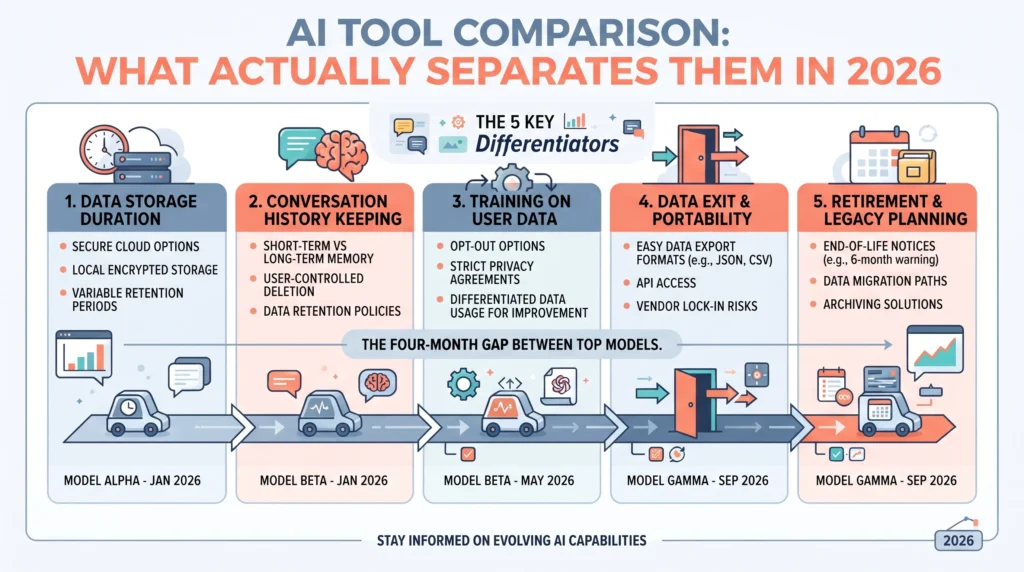
The difference between AI tools is now mostly about data, not features. Two tools can draft the same email, sum up the same contract, and answer the same client, then treat that work in very different ways once it lands on a server. What changes is where your text sits, how long it is kept, whether it trains a model, how easily you can take it out, and who warns you before the version you rely on is switched off.
AI Smart Ventures works with growing businesses that already pay for more AI tools than anyone can name. The pattern in AI advisory work repeats. Teams watch demos, pick the tool that looked best in the room, and never read the lines about what happens to the files they upload. What a tool can do wins the signature. What it does with your data sets the price of changing your mind.
That gap grows quietly. A tool you can walk away from in a week is a very different asset from one holding two years of client notes in a form nobody can export. By then, the choice has been made for you.
Key Takeaways
- Compare the terms, not the features: the gap between top models now closes in months, so what lasts is what each tool does with your data.
- Check the training default on each plan: the free tier and the team tier of one product often make opposite choices about using your work.
- Ask how long your text is kept: some tools hold it for days and some for years, and a setting clicked at signup decides which.
- Treat leaving as a feature: know what you can export, in what form, and how much notice the contract wants.
- Read the retirement policy: the model your AI implementation runs on will be retired one day, and vendors differ on the warning they give.
Those five checks share a shape. Each is answered on a page the vendor already puts online, not in a sales call, which is good news for a team with no buyer on staff. Reading beats piloting here, and it takes an afternoon.
What actually separates AI tools in 2026?
What separates AI tools in 2026 is what they do with your data, not what they can do for you. Epoch AI reported on 29 May 2026 that the best open-weight models trailed the leading closed ones by an average of four months. For most business work, that is a diary detail. What has not closed is how tools store, keep, train on, and hand back your text.
So a feature table tells you less each year. Both tools sum up the meeting. One keeps the notes for a month and the other for five years; one lets an admin switch training off, the other only on a plan you do not have. Those facts decide whether your AI adoption can be undone. Ask about them early, and the shortlist shrinks on its own, before a second demo.
Where does your data go when you use AI?
Your data goes wherever the account you signed in with sends it, and most work runs on accounts nobody picked. Harmonic Security studied 1,935,247 AI session minutes across a panel of firms in the seven weeks to April 2026. It found 64.5% of what people did on personal accounts was work, not personal use. On one big free tier, that figure was 80.2%.
The plan you are signed in to is the real control point, and you cannot see it from outside. Staff who log in with a home address get the consumer terms of that product, whatever your firm agreed elsewhere. Nothing was hacked and no rule broken, because there was no rule. AI literacy work naming which login handles client files closes more risk in a week than a new tool does in a quarter.
Does the tool train its models on your work?
Sometimes, and the answer moves with the plan rather than the brand. Anthropic’s consumer terms update, posted on 28 August 2025, asks people on its Free, Pro and Max plans to pick. Allow training and chats are kept for five years; say no and the window stays at 30 days. That same page leaves business plans, API use, and government and school accounts out of the change.
Developer terms often run the other way. OpenAI’s data controls page says data sent to its API has not been used to train its models since 1 March 2023 unless a customer opts in. One brand can hold two opposite defaults at once. So check the plan your team is really on, read it on the vendor’s own page, and write down the date you read it, because these pages get edited without notice.
How long does an AI tool keep what you type?
Anything from nothing to several years, and 2026 showed how fast that can move. PYMNTS reported on 1 September 2026 that Anthropic had reworked the rules it brought in that June for its newest models, after business customers pushed back on a forced 30-day copy of their traffic. The 30-day window stayed. Who holds that copy, and who reads it, did not.
Two lessons sit inside that story. A new rule can land on a tool you already use, with nothing for you to sign. Pushing back also works, so these terms are a live talk rather than a fixed fact. The other end of the range shows up on OpenAI’s own page: abuse logs kept for up to 30 days, and zero storage open only to approved customers, on some endpoints, never by default.
What happens to your data when you leave?
Less than you would hope, unless the contract says so. Europe wrote it down first. Under the EU Data Act, switching rules that began on 12 September 2025 cap the notice a provider can ask for at two months, allow up to 30 days to move the data, and make the provider list every type of data and digital asset a customer can take out.
Most growing businesses sit outside that law, and it still helps, because it names the questions worth asking anywhere. What can I export, in what form, how much notice do I owe, and who helps me? From 12 January 2027, the same rules stop providers from billing customers to switch away. Put those four questions in writing before you sign, and leaving becomes a task rather than a fight you start from behind.
Working out which tools you could actually leave is a short job that usually reorders the shortlist. AI Advisory covers that review for growing businesses wanting a neutral read before renewal.
What support do you get when a tool breaks?
Support means two things here: help when something fails today, and warning before the model in your workflow is switched off. Teams miss the second one. Anthropic’s model retirement page promises at least 60 days of notice before a public model is retired, and posts the dates up front. Its Claude Opus 4.1 was flagged on 5 June 2026 and switched off on 5 August 2026.
Set that beside Google’s Gemini API retirement page, updated on 2 September 2026, which says the listed shutdown dates are the earliest ones possible and promises notice without naming a period. Neither is wrong. They are two different promises, and the gap bites when a retirement breaks workflow optimization your team spent months on. Ask what notice you get, and whether it comes by email or only on a web page.
How do you compare AI tools without a demo?
Read five pages instead of booking five demos. For each tool on the list, find the plan your team is really on, then answer five questions from the vendor’s own site: what is stored, for how long, whether it trains a model, what you can take out, and what notice you get before it is switched off. Write each answer down with the date beside it.
This is where tool-first AI agencies and in-house fans part company with the business. A demo shows what a tool can do today. The vendor’s own pages show what changing your mind will cost, and that answer survives the next model release. AI Smart Ventures observes that the teams who cut back best ran this check before renewal, not after an incident, and practical AI capability building follows the same order: read first, pilot second.
- Storage: which plan and which country hold the text your team pastes in.
- Time kept: how many days or years it stays, and what changes that.
- Training: whether your work feeds the vendor’s model, and who can stop it.
- Exit: what you can take out, in what form, with how much notice.
- Retirement: how much warning arrives before the model you built on goes.
Frequently Asked Questions
What is the difference between all the AI tools?
Less than the ads suggest on what they can do, and more than most buyers check on data. Top models now sit within months of each other on public scores, so the real gaps are in the terms: where your text sits, how long it is kept, whether it trains a model, and what you can take out. Compare those four, and a crowded field splits fast.
What are the 5 main AI tools?
The five groups that matter for most teams are chat assistants, image and video makers, coding helpers, tools that forecast from your numbers, and tools that link apps and run steps in order. Naming the group beats naming a product, because products change every quarter and groups do not. Pick the group that matches your bottleneck, then compare data terms inside it.
What are the 4 AI tools?
Four types cover most business use: tools that write or draw, tools that forecast from your records, tools that run rule-based steps, and agent tools that chain steps with little oversight. Each type raises a different data question. Writing tools raise training use, forecasting tools raise where data sits, and agent tools raise access, because they hold keys to your other systems.
What are the top 3 AI tools?
There is no fixed top three, and any list is stale within a quarter. A better question is which assistant already sits inside the software your team opens each morning, because use follows the easy path. Rank the options on three things: whether the plan you would buy trains on your work, how long it keeps what you type, and how cleanly you could leave.
What AI is better than ChatGPT?
For most business tasks, none is clearly better, because the gap between the top assistants shrank to a few months during 2026. Choose on fit, not on scores. A tool inside your document suite gets used; one that needs a new tab does not. Then read the plan terms, since two assistants with the same output can hold your text for very different spans.
Can one AI tool do everything?
No, and trying tends to create the sprawl it was meant to fix. A general assistant drafts, sums up, and reviews well, but it will not run timed jobs across your systems or keep the trail a finance team needs. Two or three tools with clear jobs beat one that half fits. Put that line in writing, so staff knows which tool takes client files.
What is the difference between AI and machine learning tools?
AI is the wider field, and machine learning is the method inside it that learns patterns from data. The tools you buy are mostly AI apps with a machine learning engine underneath. It matters for one reason: these tools learn from the records you feed them, so the output is only as good as those records. Fix the records first, or the tool will repeat your errors.
How do you start comparing AI tools for your team?
Start with what you already pay for. List every AI tool, note the plan each person is on, then pull the storage, training, and exit terms from each vendor’s own site. Most teams find two tools doing one job, plus one they could not leave. AI Smart Ventures runs that review as AI advisory work, and you can book a consultation to work through it.
Executive Summary
AI tools have caught up with each other on what they can do, so the comparison worth running in 2026 is about data. Five questions split them: what a vendor stores, how long it keeps it, whether your work trains a model, what you can take out, and how much warning arrives before a model is retired. Those answers sit on vendor pages, change with the plan rather than the brand, and get edited without notice. Check them before renewal, so operational efficiency never rests on terms nobody has read.
What Should You Do Next?
Open the AI tools your team already uses and write down the plan each person is really on, not the plan you bought. Spend one afternoon this week reading the storage, training and export terms for each, dating every answer. Then drop whatever doubles up with a tool you could not leave.
AI Smart Ventures offers AI Advisory for growing businesses comparing AI tools before renewal, including the change management that follows a cut. Schedule a consultation to review your stack and agree what stays.
People Also Read
- How to Hold Your AI Marketing Partner Accountable (and What to Measure)
- AI for Property Management: How Landlords Automate Workflows
About the Author
Nicole A. Donnelly is the Founder of AI Smart Ventures and an AI Adoption Specialist with 20 years of experience as a founder and CEO and over a decade leading AI adoption initiatives. She helps businesses integrate artificial intelligence with clarity and confidence, driving innovation and sustainable growth. Nicole has trained over 20,217 professionals in Applied AI, delivered 624 workshops, and worked with close to 1,000 organizations across diverse industries.
Expertise: AI Transformation, AI Strategy, AI Implementation, AI Adoption, Applied AI, Marketing, Business Operations
Disclaimer: This content is for informational purposes only and does not constitute professional business or technology advice. Results vary based on industry, existing systems, and implementation commitment. Contact AI Smart Ventures for a consultation regarding your specific situation.

