

Best AI Project Management Tools for Growing Businesses in 2026
Last Updated: July 2026
An AI project management tool uses AI to automate and improve how teams plan and track work. These tools go beyond simple task lists. They study past data to predict timelines and spot risks early. They also cut manual reporting for team leads. This gives teams more time for work that needs human thinking.
AI Smart Ventures has helped hundreds of growing businesses pick and adopt AI project management tools. The team matches platforms to specific team types and workflows. They help owner-operators avoid the most common and costly setup mistakes.
Choosing the right tool takes more than reading a feature list. Teams differ in size, project type, and tech comfort level. A good fit between a tool and a team’s style matters. It decides if the investment pays off. The sections below cover what to focus on and which platforms lead in 2026. They also show how to track results after go-live.
Key Takeaways
- The best AI project management tools use predictive analytics to flag risks early. They catch timeline shifts before they become expensive problems.
- Pick tools that connect to your current tech stack, including Slack, Google Drive, or your CRM. This reduces friction and keeps data in one place.
- High-value AI features include automated status reports, smart task breakdowns, and smart alerts. These keep leadership aligned without constant check-ins.
- Total cost goes beyond the monthly subscription. Factor in data migration, setup, and team training before you commit.
- Track specific metrics like project cycle time, on-time delivery rate, and hours saved on reporting each week.
- Team adoption is the most common failure point. Pick tools with simple interfaces and invest in structured onboarding to protect your investment.
The sections below cover the full path. They start with the right features and end with tracking results after go-live.
What’s the Main Benefit of AI in Project Management?
The main benefit of AI in project management is predictive visibility. Traditional tools show you what already happened. AI tools show you what is likely to happen next. McKinsey’s research on AI in business shows that teams using predictive tools move faster and plan more accurately. They study past project data to forecast timelines and spot tool conflicts early. This shift from reactive to proactive management is the key advantage these platforms offer.
AI models study task patterns to find which projects are falling behind. They flag when a team member’s workload is too high. This helps catch burnout before it sets in. They also suggest realistic deadline changes based on past projects. For teams running many projects at once, this prevents costly surprises. The result is faster project completion and stronger confidence in your delivery timelines.
Which Core AI Features Should You Focus?
Growing businesses should focus on four core AI features. These are: AI-driven task breakdown, automated status reports, smart tool suggestions, and smart alert systems. Each one targets the most common friction points where manual work slows teams. Using even two or three of these produces clear gains. Teams often see results within the first 60 days.
AI-driven task breakdown turns big project goals into smaller sub-tasks with suggested owners and timelines. Automated status reports pull live data from project boards. They write key player updates for you. Smart tool suggestions flag when team members are overloaded. Managers can then rebalance before deadlines slip. Smart alert systems notify the right people only when a milestone is at risk. This cuts down on unnecessary meetings and email threads.
How Do You Choose the Right Tool for Your Team?
Start by mapping your current workflows. Find where the biggest friction points are. A tool that automates something your team rarely struggles with adds little value. Find the three tasks that take the most manual effort each week. Then look for platforms that fix those specific problems. Match the tool to the problem, not the other way around.
Next, check your current tech stack. The best tool is the one that connects cleanly with what you already use. If your team runs on Google Workspace, pick a platform with native Google Drive and Gmail sync. If you use Slack daily, find tools that push alerts into your current channels. Avoiding new data silos is just as key as adding new features.
Finally, involve the people who will use the tool daily in your selection step. Their feedback on interface clarity predicts adoption success better than any feature list. If your team resists a tool, it will deliver no return. This is true no matter how good it looks on paper.
AI Smart Ventures helps growing businesses pick and adopt AI project management tools that match their workflows. Explore our AI Advisory service to get expert guidance on platform selection and planning. Schedule a consultation to find which platform will deliver the fastest results for your team.
What Are the Top AI Project Management Platforms?
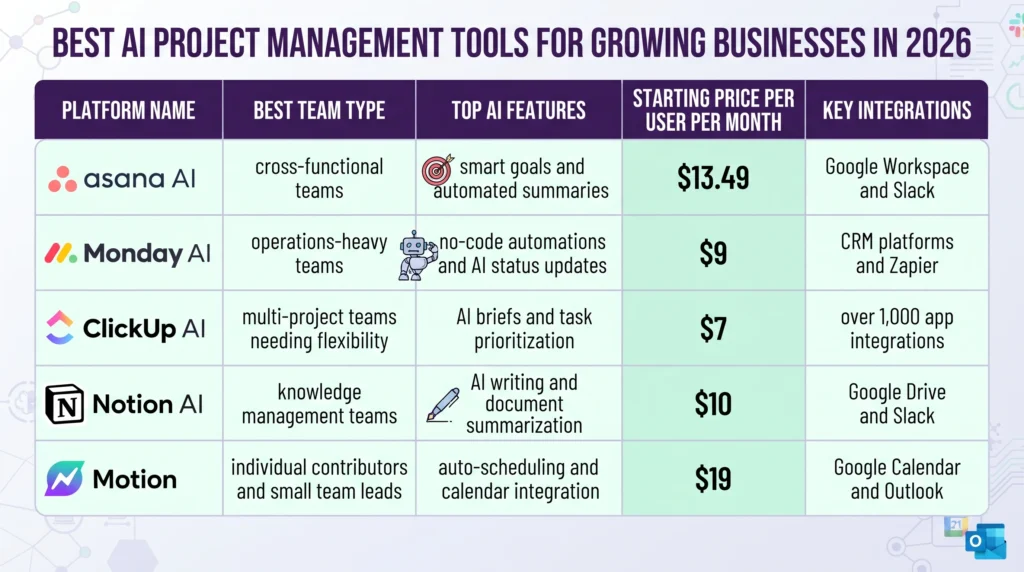
Several platforms stand out as strong options for growing businesses in 2026. Each one offers a different mix of AI features, pricing, and connections. Matching the right platform to your team type matters more. Picking the most popular name is not enough. The five platforms below cover the most common use cases.
Asana AI suits teams already using Asana who want AI added to their current workflows. Its features include smart goal tracking, AI-suggested task links, and automated progress summaries. Monday.com AI works best for operations teams running recurring steps. It has a no-code automation builder that non-technical users can manage on their own. ClickUp AI offers one of the broadest feature sets ready. It includes AI-written project briefs, progress reports, and smart task focus. It fits teams managing many project types across departments. Notion AI serves teams that use Notion as their main knowledge base. It adds AI writing and document summarization to their current workflow. Motion auto-schedules tasks based on priority and calendar availability. It is a strong fit for individual contributors and small team leads with packed schedules.
How Do You Measure Success After Adoption?
Measuring success means setting baseline metrics before you go live, not after. Record your current average project cycle time, on-time delivery rate, and hours spent weekly on manual status reporting. These three numbers give you a clear before-and-after comparison. Capture them in a shared document before launch day.
After 60 days, compare your new numbers against the baseline. Teams that track completion rates always reach project goals faster. Going by gut feel takes longer. Also track key player satisfaction with project updates. Track missed milestones and total meeting time per project too. A clear improvement in two or three of these areas confirms the tool is working. If the numbers have not shifted, review onboarding quality. Also check which features the team is actually using.
What Does Rollout Actually Cost?
The monthly subscription is only one part of the total cost. Growing businesses often underestimate the full investment needed to get results. Budget for data migration, initial setup, and structured team training from the start. These items are the foundation that decides if the tool delivers real value.
Data migration can take a few hours or several weeks. It depends on the depth of your current project records. It also depends on the formats each platform accepts. Setup time varies based on the number of connections you need. Team training is the budget line most often cut and most often regretted. Teams that skip structured onboarding take two to three times longer to reach full adoption. Add a 15 to 20 percent buffer on top of your estimated total to cover unexpected friction.
How Do You Get Team Buy-In for New Tools?
Buy-in starts with why, not how. Before introducing the new tool, explain what problem it solves. Focus on the people who will use it every day. Show them how it saves their time. That is more persuasive than citing company speed targets. People adopt tools that make their own work easier. Make that benefit concrete from day one.
Find two or three internal champions who are excited about the change. Champions build peer trust that top-down mandates cannot match. Run a structured pilot with one team or one project type before rolling out broadly. A successful pilot gives you real time-saving data and genuine feedback. These make broader adoption easier. Most teams see noticeable gains within 30 to 45 days of consistent use. Visible leadership support during that window is a strong predictor of long-term adoption.
Frequently Asked Questions
What makes AI project management tools different from standard ones?
Standard project management tools track tasks and deadlines. AI-powered tools predict outcomes, suggest tool assignments, and write automated reports. They study past data to find patterns that human managers often miss. This lets teams act on emerging risks before they become real problems. The result is fewer surprises, faster fixes, and a stronger project delivery record over time.
Which platform is best for a growing team?
The right platform depends on your current workflows and tech stack. ClickUp AI and Monday AI are popular with growing teams for their broad connection options and flexible pricing. Asana AI suits teams already inside the Asana ecosystem. Motion works best for individual contributors with packed daily schedules. Check each option against your specific workflow pain points rather than picking the most visible brand.
How long does it take to see results from a new tool?
Most teams begin to see clear speed gains within 30 to 60 days of consistent use. Speed of results depends on the quality of initial onboarding and how fully the team uses the ready AI features. Teams that skip setup steps or avoid advanced features tend to see slower returns. Structured training during the first two weeks cuts the time to full adoption.
Can AI project management tools replace a project manager?
No. AI tools handle data collection, pattern recognition, and routine reporting well. They do not replace the judgment, outreach skills, and key player management that good project managers give. What they do is reduce the administrative burden a lot. This frees project managers to focus on higher-value work: decision-making, team alignment, and client outreach. Think of the AI as a capable assistant that handles tracking so the manager can focus on leadership.
Are these platforms secure enough for sensitive business data?
Most leading platforms offer strong safety standards, including SOC 2 Type II compliance, role-based access controls, and encryption for data in transit and at rest. Review each vendor’s safety records before signing a contract, especially if your projects involve client data or proprietary info. Ask mainly about data retention policies and whether your data contributes to training the vendor’s AI models.
What connections should I focus?
Focus on connections with the tools your team uses most often. The most valuable connections for growing teams typically include Slack, Google Workspace, Microsoft 365, your CRM platform, and time-tracking software. A platform that connects cleanly to your current tools reduces friction and keeps data in one place. Native connections built into the platform are generally more reliable than third-party automation connections.
How much does AI project management software typically cost?
Most platforms charge between $7 and $25 per user per month at the standard business tier. Annual billing typically reduces the rate by 15 to 20 percent compared to monthly plans. Factor in estimated costs for data migration, setup, and team onboarding to get a realistic total for your first year. The monthly subscription fee alone rarely reflects what it actually costs to get the tool producing results.
Do these tools work well for remote or hybrid teams?
Yes. AI project management tools work well for remote and hybrid teams because they centralize info and reduce the need for in-person outreach. Automated status reports and smart alerts keep distributed team members aligned without extra meetings. Most leading platforms are fully cloud-based and work from any device, making them a practical fit for teams across many locations and time zones.
How do I get started with AI project management tools?
AI Smart Ventures offers AI Advisory services for growing businesses ready to check and adopt AI project management platforms. The team helps you find the right tool for your workflows, plan your setup timeline, and train your team for confident adoption. Schedule a consultation to get a practical plan built around your specific situation and team needs.
Executive Summary
AI project management tools are moving from a competitive edge to a standard practice. This is true for growing businesses in 2026. The best platforms combine predictive analytics, automated reporting, and smart tool allocation. They help teams move faster and plan more accurately. Choosing the right tool means auditing current workflows and checking connection fit. It also means budgeting for the full cost of setup. Success depends less on which platform you pick. It depends more on the quality of your onboarding and adoption step. Teams that set baseline metrics before go-live, invest in structured training, and track results always outperform those who skip these steps. The return on a well-run adoption is measurable and grows over time.
What Should You Do Next?
Audit your current project management workflows. Find the three tasks that take the most manual effort each week. Use those pain points to shortlist two or three platforms. Try running a parallel trial to compare them. Involve the team members who will use the tool daily in the evaluation. This builds buy-in before launch day.
AI Smart Ventures offers AI Advisory for growing businesses ready to find and adopt the right AI project management platform. Schedule a consultation to get a clear, practical adoption plan built around your team’s actual workflows.
People Also Read
- Best AI Automation Stacks for Growing Businesses in 2026
- AI for Project Management: How Asana AI, Monday AI, Notion AI, and ClickUp AI Compare
About the Author
Nicole A. Donnelly is the Founder of AI Smart Ventures and an AI Adoption Specialist with 20 years of history as a founder and CEO and over a decade leading AI adoption plans. She helps businesses connect AI with clarity and confidence, driving innovation and lasting growth. Nicole has trained over 20,217 experts in Applied AI, delivered 624 workshops, and worked with close to 1,000 businesses across diverse industries.
Expertise: AI Transformation, AI Strategy, AI Rollout, AI Adoption, Applied AI, Marketing, Business Operations
Disclaimer: This content is for informational purposes only and does not constitute expert business or tech advice. Results vary based on industry, current systems and rollout commitment. Contact AI Smart Ventures for a consultation about your specific situation.

