
Client Restrictions on AI Use: What Do You Do?
Last Updated: November 2026
Client restrictions on AI use are terms in a contract that limit or bar the AI tools you may use on one client’s work. They sit in the deal, not your own policy, so they beat the rules your team set in-house. Some name one task; others ban a whole class of tools, or ask for a sign-off first. The promise is yours from the day you sign.
AI Smart Ventures has guided growing businesses through AI adoption at the point where a client draws a line they did not draw last year. The limit rarely comes up in a talk. It turns up in a renewal pack, found by someone skimming for the dates.
That gap between signing and seeing is where the harm sits. Work goes on as it always has, and the breach is months old before anyone reads the words with care. Nobody has accused you yet. You just cannot answer if they ask.
Key Takeaways
- Read the clause before your policy: the contract beats the rules your team set in-house, so what you owe this client is not yours to decide.
- Scope turns on use, not the label: Linklaters wrote in July 2026 that the test “turns not on the tool but on how it is used”.
- Built-in AI is the blind spot: in Drata’s State of Third-Party Risk Management 2026, a poll of 309 IT and security leaders found that just 37% were sure they could spot where AI was in use.
- A sign-off per use will break: lawyers at Davis+Gilbert call a sign-off for each use of an AI-enabled productivity feature neither realistic nor operationally practical.
- Keep a record, not a promise: the same Drata poll found 38% rated their own ability to gather AI-governance proof below good.
Read together, the clause stops being a legal problem. It turns into a question about what your team touches on a Tuesday. So the words and the workflow must be read side by side. One without the other leaves a rule nobody keeps.
Where do client AI restrictions usually turn up?
In four places, and rarely the one you expect. The master services agreement holds the main clause. A data processing agreement (DPA), the contract that sets out how a supplier may handle data for a client, often holds a second and tighter one. Security questionnaires add promises someone made in a hurry. Renewal addenda bring the newest wording of all, which is why most limits turn up late.
Each paper was written by a different team, so the four rarely agree. The Davis+Gilbert note makes the point plainly: most agency master agreements were drafted years before tools like ChatGPT existed, and the AI terms come later as riders or changes. Those riders tend to flow down, binding the freelancers and small firms you hire. So pull all four papers for that account and treat the tightest wording as the one that rules.
Does the ban cover research and transcription too?
Nearly always more than drafting, and the clause rarely says so cleanly. A rule written around finished copy can still reach research, write-ups, translation and typing up calls, because all four put client material into a model. Meeting notetakers are the common shock. A June 2026 note from Mayer Brown says such tools sometimes join a call quietly, and people only grasp later that they were in the room.
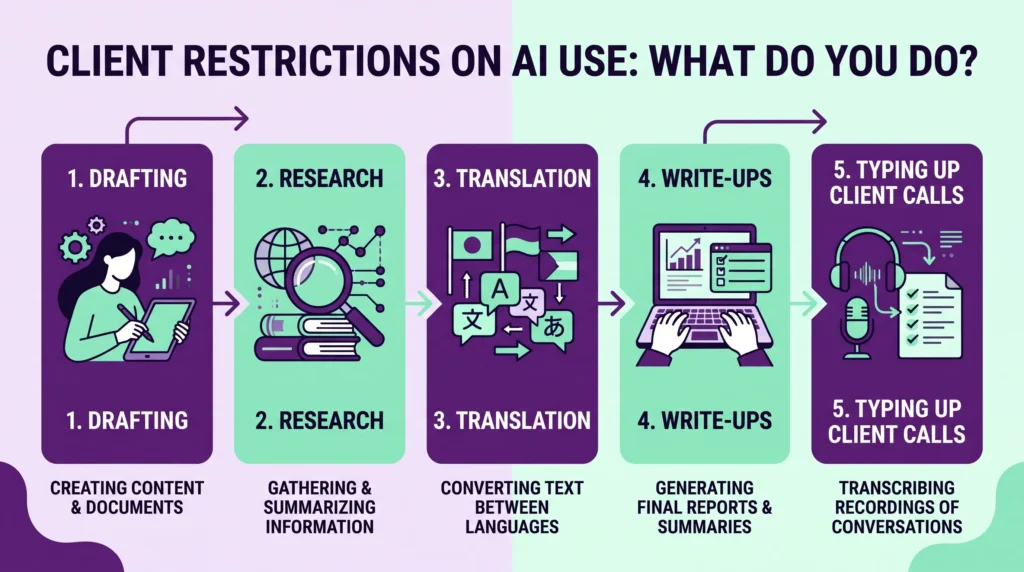
Reading how far that goes is legal work, not operations work. A note from Linklaters dated 29 July 2026 warns that wording that bars any form of “training or improvement”, drawn with no line between kinds, may stop you putting client data into AI systems at all. Whether your clause goes that far is one for your own lawyer, and it is the step here you should not take alone. Bring the clause and your task list.
Does a restriction reach AI built into your software?
Often yes, and this is the hard case, because most of these clauses predate the problem. The tools you already pay for keep adding AI to routine updates. Drata wrote up that very pattern on 27 October 2026: AI showing up as a feature inside platforms a buyer had already waved through, plus an agent feature shipped quietly in a release. Your older clause says nothing about it.
Linklaters draws the same line, noting that some tools are badged as AI while others are old platforms that added it later. Ask how a tool is used, not what it is called. A clause that treats a small feature like a system that decides covers too much and guards nobody better. Practical AI work means listing what is in use on that account, then asking the client which features they meant to stop.
How do you run one client’s work differently?
By splitting the account, not the person, and giving one owner the job. The rule has to be held in the tooling, not in somebody’s head, because a rule held in a head fails the first busy week. Pick which files, which folders and which tools belong to that client. Workflow optimization on a fenced account starts with that map, and who owns the line matters more than how it gets built.
The settings belong to whoever runs your systems, and that is a separate job. What sits with you is the list. Davis+Gilbert say to keep a list of allowed tools, set out who to ask about riskier uses, and train staff on what is allowed. Mayer Brown adds a line worth taking: private meetings should default to no AI notetaker unless the safeguards are checked. Change management does the rest, and AI literacy is knowing which tools are off limits where.
AI Smart Ventures offers AI Advisory that turns a client’s AI clause into one page your team can work from. Bring the contract and that account’s tool list.
What if the restriction cannot be followed as written?
Say so before you sign, then put up something tighter in its place. Two sources now call a blanket sign-off per use unworkable. Linklaters warns that asking for consent each time AI is used can quickly lead to deadlock, and the Davis+Gilbert note calls a sign-off for every use of an AI-enabled productivity feature neither realistic nor operationally practical. Keeping quiet is the one choice that cannot end well.
What goes in its place is a tiered rule. Linklaters says to set out classes of AI use and match the controls to each, asking consent only where truly needed. Davis+Gilbert run a like line, splitting routine in-house use from AI that feeds work the client sees, and carving out early ideas as allowed. Put it in writing and ask for the clause to be changed, not kept in theory. That talk is capability building as much as contract work.
How do you prove you stuck to the restriction?
With records kept at the time, because nothing put together later will convince a soul. Few teams can do it yet. The Drata poll of 309 IT and security leaders found 38% rated their own ability to gather AI-governance proof below good, and just 42% had a set way to check third-party AI risk. Generic AI consultants start at the tool list, and the clause comes first.
Four records carry the weight: the list of allowed tools with its dates, the access call for that account, the exceptions you asked for and what the client said, and a short log of any slip. Davis+Gilbert frame the test as your compliance with agreed review steps, which makes it a paperwork question, not a tech one. Keep the file where the account team can reach it, and read it again when a tool gets an update.
Frequently Asked Questions
What is the legal risk of breaking an AI clause?
Contract risk first: a limit you agreed and did not keep is a breach, and what happens next is set out in the same deal. Past that, lawyers point at blame for the output, at data handling, and at who owns what a model made. None of it lands as one rule, because the answer turns on your words and your country. Ask your own lawyer what your clause puts at stake.
Does silence in the contract mean AI is allowed?
Not safely. Davis+Gilbert put it bluntly: where a deal says nothing about AI, the supplier bears the full weight of any risk that shows up. Silence takes away the client’s instruction, not your answer for the work you hand over. So treat a quiet contract as a reason to raise it yourself, in writing, before the next brief lands rather than after something goes wrong.
Does the client need your tool list up front?
Yes, and sooner than feels easy. The Davis+Gilbert note calls treating AI as something to hide from clients one of the biggest mistakes agencies make. A short list of tools and the tasks they touch settles the question in one email. It also guards you later, because a client who waved the list through cannot be shocked by it after the fact.
Can a client’s restriction reach your subcontractors?
Commonly, yes. These clauses are often written to flow down, so the rule follows your freelancers and vendors as well as your own staff. Davis+Gilbert back that very shape, with the same terms asked of a firm’s vendors and subcontractors. Check your own subcontracts carry that wording before you take it on upstream, because a promise you cannot pass on is one you hold alone.
Who inside your business should own the clause?
One named person per account, with the systems work sitting apart. The clause owner reads the words, keeps the tool list, and says what gets raised. Whoever runs your systems carries out the split itself. Splitting the two roles matters, because the person who grasps the contract is rarely the person holding the settings, and a job shared between them reliably becomes nobody’s.
Does a paid or private AI tool satisfy a no-AI clause?
Not by itself. A limit on AI use is often about whether AI touched the work, not about where the model sat. Private hosting answers a data question your clause may not be asking at all. Read what the words bar: the tool, the task, or the data. If the contract bars AI-assisted output, a tool with better locks on it still makes AI-assisted output.
Who do you tell when the clause was broken?
Your own clause owner first, then the client where the contract or the law requires it. Write down what happened before you decide anything: which task, which tool, whose account, and when. Check what the deal asks you to report, and whether the work needs doing again. Take advice on the wording before you send it. Then fix the cause, because one slip means the line was never built.
When does an AI clause need re-reading?
At every renewal, and each time a tool on your list changes. Drata’s point about questionnaires holds for clauses too: a bolted-on set of AI questions ages the moment it ships. Features arrive in updates nobody flagged, so a clause agreed last year may now describe software that no longer exists. Put the review in the same calendar slot as the renewal date.
Will a restriction undo the speed you promised?
Some of it, and less than most teams fear. The work that truly needed a model is narrower than the work that drifted onto one. Mapping the fenced account’s tasks tends to show a handful that need a new method, with the rest untouched. Rebuild those few with care, then quote your timelines from the slower method so the operational efficiency you claim stays real.
How do you start on a client AI restriction this week?
Pull the four papers for that account: the master agreement, the DPA, any security questionnaire you sent back, and the latest add-on. Read them in one sitting and write down every task the wording reaches. That list is the start of an AI strategy you can defend, and it takes an afternoon. Schedule a consultation to turn it into a rule your team will keep.
Executive Summary
Client restrictions on AI use live in the contract, so they beat your own policy from the day you sign. They hide in master agreements, data processing agreements, security questionnaires and renewal addenda, so most turn up late. Read how far the words go with your own lawyer, because a clause built around drafting can reach research, typing up calls and the AI your current software keeps adding. Then hold the line in your tooling, give one person the account, and keep records as you go. Where a clause cannot be worked, ask for a tiered one in writing.
What Should You Do Next?
This week, pull every signed paper for the fenced account and read them in one sitting. List the tasks the wording reaches, name one person to own the line, and write down which tools that account may touch. Then book the next review for the renewal date, before the following add-on lands.
AI Smart Ventures offers AI Advisory for growing businesses that need a client’s AI clause turned into something their team can follow. Schedule a consultation to turn that clause into a working rule, with AI enablement your account team can prove.
People Also Read
About the Author
Nicole A. Donnelly is the Founder of AI Smart Ventures and an AI Adoption Specialist with 20 years of experience as a founder and CEO and over a decade leading AI adoption initiatives. She helps businesses integrate artificial intelligence with clarity and confidence, driving innovation and sustainable growth. Nicole has trained over 20,217 professionals in Applied AI, delivered 624 workshops, and worked with close to 1,000 organizations across diverse industries.
Expertise: AI Transformation, AI Strategy, AI Implementation, AI Adoption, Applied AI, Marketing, Business Operations
Disclaimer: This content is for informational purposes only and does not constitute professional business or technology advice. Results vary based on industry, existing systems and implementation commitment. Contact AI Smart Ventures for a consultation regarding your specific situation.