

Connecting AI to Software You Already Use: A Guide
Last Updated: September 2026
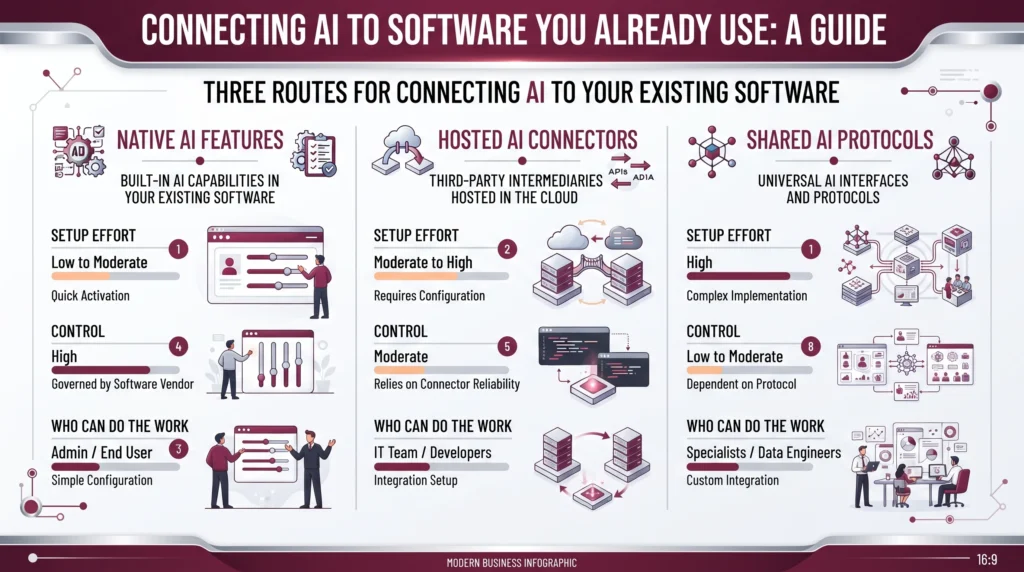
Connecting AI to existing software is the work of giving an AI tool access to the systems your team already runs, so it can read and act on real records instead of pasted text. It happens in three ways: a native AI feature in a tool you own, a ready-made connector between apps, or a shared standard that lets one AI tool reach many systems at once. The aim is context. It is not one more dashboard to log into.
AI Smart Ventures has guided growing businesses through this exact choice, and the pattern holds. The software in place holds more useful context than any new platform arrives with. What turns an AI tool into a habit, rather than an unopened tab, is the order in which you join things up.
Get this wrong, and you pay twice. Once for a platform that repeats what you own, and again in the hours your team spends copying data into it by hand. Get it right, and the tools you own start to answer questions they could never answer before, drawing on data you have held for years.
Key Takeaways
- Start where the context lives: your CRM, help desk or shared drive holds the history an AI tool needs, so joining it beats teaching a new platform from scratch.
- Connecting is a standard now, not a custom build: the Model Context Protocol shipped its biggest update on 28 July 2026, and vendors now ship ready-made servers for apps you own.
- Most first connections need no engineer: native features and hosted connectors cover the common jobs, and you need an engineer only for private logic or odd data.
- The join is where things break: stale or doubled records travel straight into the answer, so clean one source before you widen access.
All four points share one root. Value comes from the data, not from the screen, and so does most of the operational efficiency people expect from AI. That is why an AI tool wired into two well-kept systems usually beats a broad rollout across ten messy ones.
What does connecting AI to your software mean?
Connecting AI to your software means letting an AI tool read from, and sometimes write to, systems you own, under rules you set. Three routes cover nearly all of it. Native AI features ship in tools you pay for. Hosted connectors link common apps on a trigger. And the Model Context Protocol, a shared standard, shipped its biggest update to date on 28 July 2026, which made that third route much easier to buy. Each route trades control against effort.
The three routes are not rivals, and most teams end up with all of them. A native feature is quickest to try, since the vendor sets up the login and the access rules for you. A connector suits work that crosses two or three apps, such as turning a support ticket into a summary and posting the result back. The standard earns its place when one AI tool has to reach several systems without its own build for each. Choose per job. Never per company.
Why connect AI instead of buying a new platform?
Connect first, since the context an AI tool needs sits in the software you run. A new platform starts empty, so someone has to fill it. Your own tools hold the past year of work. A new one holds none of it. You can measure the gap: Salesforce’s 2026 Connectivity Benchmark Report, out in February, found large firms running 957 apps on average, with just 27% of them joined up. The value no one collects sits in those missing joins.
A second reason is trust. An answer drawn from your own records can be checked against the record. An answer from a fresh platform rests on whatever someone typed in that week. Staff can see where the answer came from, and that is what keeps them using it in month three. It is also where tool-first AI agencies steer owners wrong, since a new platform is much easier to sell than the slow work of joining what you have.
How do you connect AI without a developer?
You connect AI without a developer by switching on features your vendors already built, then adding a connector for work that crosses two apps. Start in the tool you own. Most major software now ships an AI panel that reads just the records you can see. A connector service comes next. It passes data between apps when something happens, such as a new form or a closed ticket. Private logic and odd data formats are the parts that still need an engineer.
Habit matters more than scale here. In a 2026 SBE Council survey, 82% of the owner-led firms studied had put money into AI tools, and the median firm ran five of them. Most of those five sit beside the systems that hold the work, not in them. Join two of them well, leave the rest alone, and you beat the firm that buys a sixth. That is practical AI, and it is mostly a question of order.
What should you connect AI to first?
Connect the tool holding your customer history first, which is often the CRM or the help desk. Questions repeat there. The records have structure, and a wrong answer is easy to catch. Small scope is the point: one job, one system, one week. Pick a job such as drafting a reply from the last three tickets, and give read access only. Widen the scope after the output holds up for two weeks of real use, not after a demo goes well.
Two questions set the order for everything after that. How often does the task repeat, and how fast can a person tell the answer is wrong? A weekly task with an obvious failure makes a strong second pick. A rare task with a quiet failure makes a poor one. Ranking your list this way is plain workflow optimization, and it shapes the result far more than your choice of model does.
- Pick one repeating job: choose work your team does at least weekly, not a showpiece no one really needs.
- Read before write: begin with read access, and add the right to write once the output holds up.
- Name the checker: one person reads what the tool puts out, every day, for the first two weeks.
- Keep the manual path open: leave the old route working until the joined-up one has earned its place.
Mapping that first join is the step most teams skip, and it is where AI implementation support repays the effort fast. Bring the task you repeat most often, and we will work out which system should hold it.
What usually goes wrong when you connect AI?
The join fails far more often than the model does, and bad data is the main cause. Fivetran’s 2026 Agentic AI Readiness Index, out in May, names data quality and lineage as the top barrier, picked by 42% of the data leaders it surveyed. Double entries, stale fields and half-filled records all travel into the answer. The tool states them just as firmly as it states the good ones. Fix the source first. Then join it.
Three other failures show up often enough to plan for. A connection gives access, so a tool can end up reading a folder no one meant to share. Connectors also break quietly when a vendor changes an interface, which is part of why the July 2026 protocol update set a twelve month notice before any feature is retired. Third, no one owns the join, so answers drift and the fix waits. Give each connection a named owner before you switch it on.
Frequently Asked Questions
How do you connect AI to your app?
Send your app’s data to a model through an API, or let a connector service do that for you. A request carries the text or the record across, and the reply comes back into your app. Teams without developers often route this through a hosted automation tool instead of writing the call themselves. Start with one high-volume job, such as sorting inbound mail, before you wire up anything else.
How do you connect AI to existing software on Android?
Through the vendor’s own API or mobile toolkit, or by triggering an outside AI step from an event your Android app already sends. When an app offers no AI hook at all, a webhook into a linking service is the normal way round it. Many mobile products now ship an AI helper of their own, so read the release notes first. Keep inputs steady, since messy fields give messy answers.
What is the 30% rule in AI?
There is no agreed 30% rule in AI, despite the phrase doing the rounds in adoption threads. People tend to mean that a task should fill a fair share of someone’s week before it is worth joining an AI tool to it. Treat it as a rough filter, not a standard. A better test pairs how often the job repeats with how fast a person can spot a wrong answer.
What is the 10/20-70 rule for AI?
It splits effort, not spending. BCG sums it up as roughly 10% technology, 20% algorithms and data, and 70% people, processes and organizational change. Applied to connecting AI, it means the connector is rarely the hard part. The hard part is deciding who checks the output, what the tool may touch, and how the old manual process is retired once the new one works.
Can you add AI to your computer?
Yes. You can install a desktop helper or a browser add-on, and some models now run on your own machine if the hardware is up to it. A local setup keeps data on the laptop, which suits private files, but it asks more of your memory and chip. For most owner-operators, a hosted tool joined to the work systems is the better answer, since the context lives there.
Do you need an API to connect AI to your software?
Not always. An API is the common route, the agreed way two programs swap data, yet plenty of joins never touch one directly. A native AI feature in your software has the link built in. A connector service holds the API details for you. You meet the API itself only when you need something the ready-made options cannot give you.
What is MCP, and why does it matter for connecting AI?
MCP, the Model Context Protocol, is an open standard that lets an AI tool reach many systems through one method, instead of a separate build for each. It matters because vendors now ship ready-made servers for software you already run. At Google Cloud Next in April 2026, Google said more than 50 managed servers were live or in preview, covering Gmail, Drive and Calendar among others.
How long does a first connection take?
A native feature can be switched on the same morning. A connector between two apps is often a matter of hours, once you know the trigger and the fields it should carry. The checking takes longer: about two weeks of watching real output before you trust it, and longer still if your records need cleaning. Plan your time around the review, since that is the part teams get wrong.
Who should own a connection once it is live?
One named person, not a committee and not the vendor. That owner reads the output weekly, keeps a note of what the tool may see, and switches it off when the source system changes. In smaller teams this is often whoever does the task today, which is also sound change management, since they can weigh the tool’s answer against what they would have written.
What does it take to get started connecting AI to your software?
Time and a clear first task, more than tech. Expect a week to choose the job and check the data, a short build, then two weeks of review before anyone leans on it. AI Smart Ventures works with growing businesses on exactly this order, from AI advisory through to AI implementation. Book a consultation to map your first connection and the checks around it.
Executive Summary
Connecting AI to existing software beats adopting a new platform, since the context is there. Three routes cover most needs: native AI features in tools you own, hosted connectors between apps, and the Model Context Protocol, which shipped its biggest update in July 2026. Start with the system holding your customer history. Give read access only, and pick one repeating task whose failures a person can spot. Most first joins need no engineer. The risk sits in the data and in ownership, not in the model, so clean one source and name one owner before you widen the scope.
What Should You Do Next?
List the five systems your team opens every day, then mark the one holding the most customer history. Check its settings this week for an AI feature you already pay for, and try it on a single repeating task with read access only. Write down who checks the output, and give it two weeks before you connect anything else.
AI Smart Ventures offers AI Implementation for growing businesses joining AI to the systems they already run. Schedule a consultation to sequence your first connection and build the checks around it.
People Also Read
About the Author
Nicole A. Donnelly is the Founder of AI Smart Ventures and an AI Adoption Specialist with 20 years of experience as a founder and CEO and over a decade leading AI adoption initiatives. She helps businesses integrate artificial intelligence with clarity and confidence, driving innovation and sustainable growth. Nicole has trained over 20,217 professionals in Applied AI, delivered 624 workshops, and worked with close to 1,000 organizations across diverse industries.
Expertise: AI Transformation, AI Strategy, AI Implementation, AI Adoption, Applied AI, Marketing, Business Operations
Disclaimer: This content is for informational purposes only and does not constitute professional business or technology advice. Results vary based on industry, existing systems and implementation commitment. Contact AI Smart Ventures for a consultation regarding your specific situation.

