
How to Recover From a Failed AI Project
Last Updated: April 2026
An AI project failure fix is a set process of finding out why a first rollout did not meet its written goals, correcting the root cause, and restarting with a narrower scope and a written success target. Per MIT Sloan Management Review (2023), fewer than 40% of AI projects across all business sizes reach the results their owners expected at launch. The pattern is common: tools are bought, logins are shared, and adoption quietly stalls because the cause is at the team level, not the tool level.
AI Smart Ventures has helped growing businesses through AI adoption challenges across close to 1,000 businesses. The most key finding from that work is that a first AI project failure is useful data, not a verdict on whether AI can work for your business. Most businesses that finish a set recovery restart in 30 days using the same tool.
Knowing why AI projects fail, and what a clear recovery process looks like, gives you a path from a stalled pilot to a working rollout. The plan below works for businesses with 2 to 50 staff, limited IT support, and a real need to see clear results within the first quarter.
Key Takeaways
- Team readiness, not tool quality, is the main driver of failure. Per MIT Sloan Management Review (2023), team readiness is the top sign of whether an AI project gives value within the first 90 days.
- A set recovery takes 2 to 4 weeks before restart. Businesses that skip this step repeat the same failure pattern within 60 days in most cases. AI Smart Ventures sees this across close to 1,000 businesses.
- Unused AI plans cost $10,800 to $18,000 per year. A growing business running three unused AI plans at $30 to $50 per user per month spends that amount with no real output. This is based on patterns across close to 1,000 businesses.
- Skipping the change management budget is the top cause of tool drop-off. The IBM Institute for Business Value (2024) shows that skipping this budget (about 30% of total project cost) is the most common cause of AI tool drop-off within 90 days.
- Start small. One workflow, 2 to 3 users, 30 days. AI projects that target one workflow with 2 to 3 users in the first 30 days work at much higher rates than those that try a full team rollout. Expanding too early is the second most common failure cause after skipping week-one training.
Knowing which failure cause fits your case before restarting is worth more than switching to a new tool. The sections below walk through the most common causes and a clear 30-day recovery plan.
Why Do Most AI Projects Fail in the First 90 Days?
Most AI projects fail in the first 90 days because the tool was bought without a matching rollout plan, a training schedule, or a written success target. Research fromMIT Sloan Management Review (2023) shows that team readiness is the top sign of first-90-day AI project results. A $20 per month tool with a clear workflow target and a trained champion always beats a $500 per month tool shared with a team that has no guidance.
The pattern is common. When a business owner buys an AI tool, the first move is to give everyone access at once. This makes a short spike in logins, then silence. Without a named champion, a written workflow, and a week-one check-in, the tool goes dark within 30 days. Most businesses that seek recovery help have already gone through this pattern two or three times before looking for outside help.
What Are the Most Common Causes of AI Project Failure?
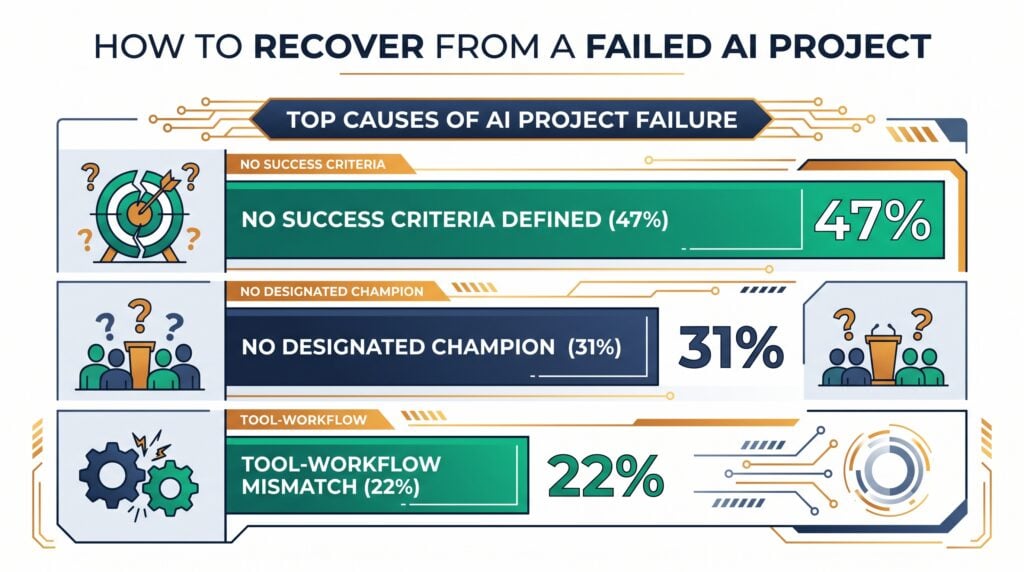
The three most common causes of AI project failure in growing businesses are no written success target, no named in-house champion, and a mismatch between the tool and the actual workflow it was bought to handle. Each cause can be found before restart and has a specific fix without needing a new tool. A business that clears all three failure causes before restarting has a much higher chance of reaching a real result.
Per McKinsey’s State of AI (2024), businesses that roll out AI tools all at once without a clear adoption plan always report lower staff adoption rates than those that roll out one tool at a time with a set workflow target. A fourth cause that comes up in about one in three recovery engagements is bad timing. The AI tool was brought in during a period of team disruption, leaving no room for learning. Seeing that clearly is the first step in a useful recovery.
How Do You Diagnose Why Your AI Project Failed?
A set root cause check for a failed AI project covers four key areas and takes 2 to 4 hours to write up. If any area gets a no answer, that is the main failure cause, not the tool itself. Running this check before restarting is the most reliable way to avoid repeating the same failure on a second try.
Most business owners skip the root cause check because restarting feels faster than finding the cause. That choice is costly. The same root cause that made the first rollout fail will make the second fail too if it is not found and fixed before access is restored. Businesses that finish this check before their second try reach a real result within 60 days in most cases. Those that buy a new tool without running the check repeat the same pattern because the cause is at the team level, not the tool level.
The four questions to answer in writing:
- Success Target. Was a named, real outcome written down before the project started? For example: “2 hours saved per user per week within 30 days.”
- Champion Named. Was one named person put in charge of weekly check-ins and adoption tracking?
- Workflow Fit. Did the tool link natively to the exact workflow it was bought to handle, without needing manual data export or copy-paste steps?
- Week-One Training. Was a set training session of at least 60 minutes run with all users within the first 7 days of access?
Write each answer down and share it with at least one other person before restoring access to the tool. The check gives you a clear next step: fix the failure cause and write the success target in the same session before any access is granted.
Which AI Projects Succeed Most Often on the Second Try?
AI projects that work on the second try share three traits. A narrow scope (one workflow, two to three users). A written success target set before week one. And a named champion who owns the daily check-in for the first 30 days. The project types below show the highest recovery rates for growing businesses, based on patterns across close to 1,000 businesses.
The shared thread across each project type is a simple structure. The workflow has a clear start and end point, makes a real output, and does not need the AI tool to make judgment calls. Projects that need AI to read unclear inputs or make highly varied outputs fail at higher rates on the second try because the team-level fix alone is not enough when the workflow itself is not yet able to be automated at the current state of the tech.
For an always-updated list of AI tools vetted for service businesses, see AI tools and apps on the AI Smart Ventures resource hub.
If your team has finished the root cause check and has a short-listed tool but no clear recovery plan, AI consulting help can map your exact workflow data to the right restart structure. AI Smart Ventures helps growing businesses move from stalled pilot to working rollout in under 30 days.
How Do You Structure a 30-Day AI Project Recovery?
A 30-day AI project recovery follows three phases. A 5-day check. A 20-day focused pilot. And a final 5-day choice window. Each phase has a written output so the team always knows whether the recovery is on track. Using the same tool that failed is almost always the right starting point. Switching tools before the root cause is found adds 2 to 3 weeks without changing the team-level factors that caused the failure.
Most business owners approach a failed AI project by buying a new tool and sharing access more broadly the second time. That approach fixes neither the root cause nor the missing structure that blocked adoption in the first try. The three phases below replace that pattern with a plan that has a clear check at each stage, one named champion, and a pre-agreed success target that sets whether the project grows or ends.
The three phases in practice:
- Days 1 to 5 (Check). Finish the four-question root cause check. Name one champion. Write one real success target and share it with the team before any access is granted.
- Days 6 to 25 (Focused Pilot). Limit access to the champion and one other user. Run the tool on the one workflow named as the main use case. Log results each day: time saved, errors cut, or manual steps removed.
- Days 26 to 30 (Choice). Compare logged results against the written success target. If the target is met, expand access to the full team and write the workflow as a standard process. If not, end the trial and move to the next short-listed option.
This plan works because it removes the two biggest sources of AI project confusion: too many users with different hopes, and no pre-agreed view of what success looks like. Businesses that want a set version of this plan can access it through AI advisory services focused on recovery planning and restart support.
What Does a Successful AI Project Recovery Look Like?
A working AI project recovery makes one written, repeatable workflow within 30 days and a team that can train new users on that workflow without outside help. Per the IBM Institute for Business Value (2024), businesses that set aside about 30% of their AI project budget for change management and training reach full adoption at least twice as fast as those that spend only on the tool.
For a growing business spending $200 per month on an AI tool, that 30% means putting about $60 per month in staff time toward training, check-ins, and process notes during the first 30 days. The most reliable recovery sign is not the tech doing what the vendor said. It is the named champion being able to explain the workflow to a new colleague in under five minutes by day 20. When that exists, the project has made team knowledge that does not disappear if the champion leaves.
Frequently Asked Questions
What Is the Most Common Reason AI Projects Fail?
The most common reason AI projects fail is no written success target before the project starts. Without a written goal such as “this tool must save at least 2 hours per user per week within 30 days,” teams have no clear basis for continuing or cancelling. The default is to keep going with no end while adoption quietly stalls. MIT Sloan Management Review (2023) names team readiness, not tool quality, as the top sign of first-90-day AI project results.
How Long Does an AI Project Recovery Take?
A set AI project recovery from a failed first rollout typically takes 5 to 7 weeks. One week for root cause check and recovery planning. 30 days for the focused second pilot. One week for result review and notes. Businesses that rush the check phase and restart within the same week repeat the same failure cause in most cases. Taking 5 to 7 business days to finish the four-question check before restarting is the most time-saving path for a growing business.
Can I Use the Same Tool on the Second Attempt?
Using the same tool on the second try is almost always right when the root cause was at the team level, not the tool level. The most common team-level failure causes, no champion, no success target, and no training in week one, can all be fixed without changing the tool. Switching tools before finishing the root cause check adds 2 to 3 more weeks of review, adds plan cost, and does not fix the adoption problem that caused the first failure.
What Is the 30% Rule for AI Projects?
The 30% rule for AI is the guide that about 30% of any AI project budget should go to change management, training, and workflow setup, not just the tool. A growing business putting $1,000 into AI tool plans should direct about $300 in internal staff time to training, process notes, and team contact during the first 30 days. The IBM Institute for Business Value (2024) has named this split as a consistent sign of adoption success.
How Do You Define Success for an AI Project?
A well-written AI project success target has three parts. A named result (hours saved, errors cut, or steps removed). A real threshold (at least 2 hours per user per week). And a time boundary (within 30 days). Vague targets such as “the team uses the tool often” do not support a clear choice to continue or cancel. Write the success target in a shared doc before week one and refer to it at the day-30 choice meeting.
What Should You Do If an AI Project Fails Twice?
If an AI project fails twice with different root causes, the problem is likely the workflow choice, not the tool or the team. A workflow that needs a lot of manual variation is hard to automate with current AI tools at the growing-business price range. The right next step is to find a more set, repeated workflow such as email response templates, meeting summaries, or document sorting, then restart the pilot there before going back to the complex workflow.
How Much Does an AI Project Recovery Cost?
An in-house AI project recovery costs less than $500 in most cases. The existing plan continues, and the main cost is internal staff time for the root cause check (3 to 5 hours) and set pilot management (1 to 2 hours per week). Outside AI consulting help for a set recovery typically starts between $2,500 and $5,000 for a 2 to 4 week engagement. Schedule a consultation to check which recovery path fits your team size and current timeline.
What Is the Difference Between an AI Pilot and an AI Project?
An AI pilot is a time-set, low-cost test of a tool on one workflow with a clear exit target. An AI project is a broader effort with a budget, a timeline, and multiple stakeholders across the business. Most growing businesses benefit from staying in pilot mode for the first 60 to 90 days of any new AI tool before expanding access, committing to annual billing, or naming the tool as a fixed part of the standard process.
How Do You Get Staff Buy-In After a Failed AI Project?
The most useful approach after a first AI project failure is to involve staff in choosing the recovery workflow. Ask two or three team members to name the task they find most repeated, then build the pilot around it. Adoption rates are always higher when the workflow is named by the people using the tool rather than assigned by management. The written success target should be shared with the full team before week one.
What Happens If the Tool Works But the Team Still Does Not Use It?
If a tool meets its output target but team adoption stays low after 30 days, the problem is almost always no workflow change, not tech pushback. A tool that saves 2 hours per week only gives that saving if the workflow is formally updated to use the tool instead of the old process. Removing the manual step from the standard process is the most reliable way to lock in adoption after a working pilot.
Executive Summary
An AI project failure fix is a set 4 to 6 week process that finds the team-level root cause of a first failed rollout and restarts the same tool on a narrower scope with a written success target. Per MIT Sloan Management Review (2023), team readiness is the top sign of first-90-day AI project results. The IBM Institute for Business Value (2024) shows that putting 30% of project budget toward change management and training doubles adoption speed. Most growing businesses that finish the four-question root cause check before restarting reach a real result within 30 days without switching tools.
What Should You Do Next?
Finish the four-question root cause check this week. Find whether the main failure cause was no written success target, no in-house champion, a tool-workflow mismatch, or bad timing. Write a one-sentence success target for the recovery pilot before restarting and share it with the team before week one starts. Run the recovery on one workflow with two to three users for 30 days before expanding access to the full team.
AI Smart Ventures offers AI consulting services for growing businesses working through failed AI rollouts and set recovery planning. Schedule a consultation to find your exact failure cause and build a recovery plan in under two weeks.
People Also Read
- How Do You Prove AI ROI to Your Board? The 2026 Framework for Demonstrating Value
- What Does an AI Consultant Do? (And How to Know If You Need One)
About the Author
Nicole A. Donnelly is the Founder of AI Smart Ventures and an AI Adoption Specialist with 20 years of experience as a founder and CEO and over a decade leading AI adoption initiatives. She helps businesses integrate artificial intelligence with clarity and confidence, driving innovation and sustainable growth. Nicole has trained over 20,217 professionals in Applied AI, delivered 624 workshops, and worked with close to 1,000 organizations across diverse industries.
Expertise: AI Transformation, AI Strategy, AI Implementation, AI Adoption, Applied AI, Marketing, Business Operations
Disclaimer: This content is for informational purposes only and does not constitute professional business or technology advice. Results vary based on industry, existing systems and implementation commitment. Contact AI Smart Venturesfor a consultation regarding your specific situation.