How AI Workflows and New Regulations Are Changing Business in 2026
If there is one theme that keeps popping up in my conversations with founders this week, it is the collision between the hot promises and your reality. We are past the honeymoon phase of artificial intelligence. Now, we are dealing with the messy, physical, and legal realities of integrating it into actual companies.
You will notice a pattern in this week’s news. The businesses that are winning are not just buying shiny new tools. They are rethinking their entire workflows based on current capabilities. AI has come leaps and bounds in 2026. At the same time, the regulatory and legal walls are closing in on companies that move too fast without thinking about data privacy or national security.
Here is what you should pay attention to now.
This week’s stories
How AI is Reshaping Workflows
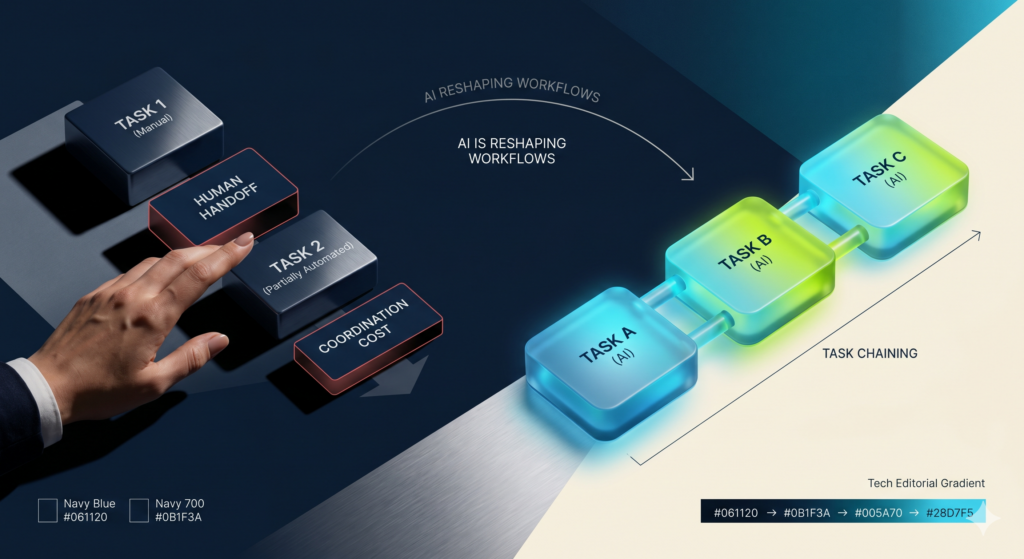
Researchers at MIT Sloan just released a study showing that AI value emerges at the workflow level, not the task level. No surprise there. They found that companies get the highest return on investment when they use AI for “task chaining,” which means linking adjacent automated tasks together. When human handoffs repeatedly interrupt an AI process, the coordination costs often erase the efficiency gains entirely.
My Take: This proves what I have been telling operators for months. Practical AI beats shiny object AI every single time. Businesses need seamless workflows, not just random demos that force your team to constantly stop and check the output. The winners will be the companies that redesign their operations to minimize friction, rather than just sprinkling automation on top of broken systems. Here’s our Workflow & SOP creator to help you get started!
Source: MIT Sloan
Healthcare Providers Face Class Action Over AI Transcription
Major healthcare providers like Sutter Health are facing a class action lawsuit in California over their use of an AI transcription tool called Abridge AI. The lawsuit alleges that these companies recorded and transcribed patient and clinician conversations without explicit consent. Plaintiffs argue this violates state privacy laws because sensitive medical data was transmitted to external servers for processing.
My Take: Legal and regulatory changes matter because careless AI use has real consequences. You cannot simply implement a tool to reduce documentation burdens without auditing your consent protocols first. If you are feeding customer or patient data into a third party AI system, you need to be completely transparent about it, AND get permission, or your legal exposure will skyrocket.
This is for any recordings of any meetings too. There are laws in many states and countries stating that you must get permission. Most recording tools on video meetings ask for permission to record. Don’t skip that step!
Source: PCMag

U.S. Pushes for Pre-Deployment Security Reviews
The White House and the Center for AI Standards and Innovation just signed agreements with Google, xAI, and Microsoft to evaluate their new foundational models for national security risks before public release. Meanwhile, officials are reportedly considering an executive order that would prevent companies from refusing government vetting. This comes after Anthropic pushed back against unrestricted military use of its technology, which included looking into user queries.
My Take: We are watching the regulatory net tighten in real time. The government is no longer sitting on the sidelines watching Silicon Valley dictate the pace of innovation. For business owners, this means you need to stay agile. The foundational models powering your tech stack could face unexpected deployment delays or be subject to government reach.
In plain terms, the data put into the AI may become discoverable by the US government for use at their discretion.
Source: Financial Times

MIT Deploys Open Source AI for Alzheimer’s Prevention
A team at MIT recently released FINGERS-7B, an open source AI model designed to predict Alzheimer’s risk years before clinical symptoms appear. Instead of looking at individual risk factors in isolation, the model analyzes lifestyle data, clinical records, and genomic signals all at once. Early tests show it is four times more accurate at preclinical diagnosis than previous methods.
My Take: This is a great example of artificial intelligence doing what human brains physically cannot do at scale. It connects invisible dots across massive datasets to solve incredibly complex problems. In healthcare and beyond, the most valuable applications will be the ones that look at the entire ecosystem of a problem, rather than getting stuck in data silos.
Source: The Brighter Side of News

Data Center Power Bottlenecks Slow Down Innovation
The artificial intelligence industry is hitting a severe physical constraint, as data centers struggle to secure enough electricity to train and run advanced models. Facilities face massive delays in connecting to power grids, which is slowing down the deployment of new server clusters. This power bottleneck is increasing operational costs for major tech companies.
My Take: AI is finally crashing into the limits of physical infrastructure. As compute power costs go up, those expenses will inevitably trickle down to everyday businesses in the form of higher subscription fees and API costs. This is a great reminder that simpler tech stacks are often smarter. You do not always need a massive, power hungry model if a smaller and cheaper alternative gets the job done.
Source: Transformer Magazine

🤖 Google AI Studio: The Professional’s Playground
While standard Gemini is like a friendly digital assistant, Google AI Studio is the high-performance workshop. It is designed for creators, developers, and entrepreneurs who need more than just a chat interface.
How to Use Google AI Studio
Step 1 — Go to the site
Open aistudio.google.com in your browser and sign in with your Google account. That’s it — free access, no subscription needed.
Step 2 — Pick your model
Use Flash for quick tasks and Pro for harder ones. Both can handle massive amounts of text — think entire books or codebases.
- Gemini 3.1 Flash — fast, for quick tasks, simple content, and rapid testing.
- Gemini 3.1 Pro — powerful, for complex reasoning, analysis, and nuanced writing.
- Both models share a 1 million token context window (about 1,500 pages of text).
Step 3 — Chat in the Playground
This is your main workspace. Ask questions, upload files (up to 100MB), and get answers. You can even share your screen and have the AI analyze it live.
- Upload documents, CSVs, or entire folders
- Use voice input — click the microphone icon and talk instead of type
- Share your screen — get real-time AI feedback on anything you’re looking at
Step 4 — Build an app (no coding needed)
Click Build in the left sidebar. Describe the app you want in plain English. Gemini writes and runs the code for you.
- Type your idea in plain English — e.g. “a habit tracker with streaks and dark mode”
- Click on any part of the app to annotate and describe changes
- Deploy to Cloud Run when your app is ready for production
Step 5 — Generate videos and images
Switch to Veo 3.1 to make short videos from text. Switch to Imagen for images. Both are free to try with starter credits.
- Veo 3.1 (video) — generate short clips from text, or reference up to 3 images
- Imagen (images) — generate, blend, and edit images with natural language
- TTS (text to speech) — create podcast-quality audio with multiple voices
Quick Tip: Before you start chatting, set a System Instruction – e.g. “always be concise” or “respond in bullet points.” It applies to your whole session so you don’t have to repeat yourself.
How to Build an AI Roadmap Without a Technical Co-Founder
Building an AI roadmap for non-technical solo founders is a process rooted in workflow data, not technical expertise, prioritizing time-saving “deployability” over complex capabilities. Instead of starting with tool research, a common mistake that leads to unused subscriptions, is that owners should conduct a comprehensive time audit to identify recurring tasks and rank them based on weekly hours consumed, revenue impact, and the level of human judgment required. A successful strategy follows a disciplined 90-day scope divided into three 30-day phases: selecting one browser-based tool for the highest-value task, refining that workflow, and then extending the process to subsequent use cases. By focusing on measurable business facts and using accessible, browser-only tools, founders can achieve significant operational efficiency without a technical co-founder or heavy IT infrastructure.
Read the full text
Tool picks of the week
- Content Studio : Centralize your social media management on a single platform.
- Gamma : AI tool for creating presentations, documents, and websites quickly.
- Canva: A familiar design platform that has integrated highly practical AI image generation and editing tools. This is the perfect example of practical AI beating shiny object AI. It embeds powerful features directly into a workflow your team is likely already using, reducing friction and coordination costs.
Join the Conversation
Got a burning question, a fresh take, or just want to share your latest AI wins? Hit us up at [email protected]. Your insights keep this community growing and thriving!
See you in the Lab,
-Nicole A. Donnelly
Founder, AI Smart Ventures
AI Strategy – AI Training – AI Consulting – AI Implementation