

How Do You Get Consistent AI Output? Fix the Inputs
Last Updated: September 2026
Consistent AI output is a result that comes back in the same shape, at the same quality, every time the task runs and whoever runs it. It does not mean word-for-word sameness. It means the format holds, the facts come from the same file, and the result passes the same check in September that it passed in March. That steadiness comes from the inputs around the model, which you control, not from the model itself, which you do not.
AI Smart Ventures has guided growing businesses through the stage where AI stops being a novelty and starts carrying real work. That is the point where quality can no longer depend on who typed the request. Teams that get there treat the instruction, the source file, and the format as fixed assets, not as something to redo each morning.
When output swings, the cost is not the poor draft. It is the checking. Every result gets read closely, because nobody can tell which one will be off, so the hours you saved go back into review. Trust goes with them, and staff quietly return to doing the job by hand.
Key Takeaways
- Fix the inputs, not the model: steady output comes from a saved instruction, a named source file, a set format and one accepted example.
- Write the standard before you judge the output: Applause’s 2026 AI quality research found 46.5% of teams decide if an AI feature is ready on how it feels to use.
- Give a repeated task one home: the OutSystems 2026 State of AI Development report found 94% of leaders worry about AI sprawl while just 12% manage it in one place.
- Test on a schedule, not after a complaint: run the saved prompt on the same sample tasks and count how many results pass your written checks.
- Diary the tool changes: Amazon Bedrock keeps a model in a Legacy state for at least six months before end of life, and migration never happens on its own.
Read together, those points move quality out of one person’s chat window and onto a page anyone can open: the prompt, the source file, the format, the checks. That page is the asset your team owns. The model behind it is swappable, and this year it probably will be swapped.
What actually makes AI output consistent?
Steady output comes from the inputs you control. Fix four of them and most of the wobble goes: the wording of the instruction, the source file the task draws on, the format you want back, and one example of a result you accepted. Asking the model to be consistent does nothing, because it holds no memory of your last version and nothing to compare against. Same start, same shape back.
Some drift is built into these tools and always will be. What you can remove is the drift you cause: a reworded request, a newer copy of the file, one person’s habits against another’s. A 2025 analysis of prompt templates used in real apps found that small changes in wording or layout make big changes in output, and that most teams still work by trial and error. Saving the input turns that trial into a decision.
Which inputs should you fix first?
Start with the instruction, because it moves the most and costs nothing to save. Then the source file: the exact page or extract the task should work from, named and dated. Then the format, down to headings, order, and length. Last, one worked example of an answer you would sign off. Four inputs on one page, kept where the team can reach them, beat any change of tool.
Order matters because each input removes a different kind of drift. A saved instruction stops the wording from moving. A named file stops two people working from different facts. A fixed format stops prose one week and bullets the next. The example does the work no instruction can, because it shows the standard instead of describing it. Write the four once, then change them on purpose rather than by accident, and note the date when you do.
- The instruction: the full request saved as text, with the blanks marked so anyone can fill them in.
- The source file: the named file or page the answer must come from, with a version date beside it.
- The output shape: headings, order, length, and anything the result must always contain.
- The worked example: one past result you accepted, kept beside the prompt as the visible standard.
How do you write a standard for AI output?
Write down what good looks like before you judge one. A usable standard fits on one page: the job the output must do, three to five checks it must pass, and one example that passes them. Every check must be something a second person can apply alone. “Reads well” is not a check. “Names the client, uses the agreed spelling and stays under 300 words” is one, because two people score it the same way.
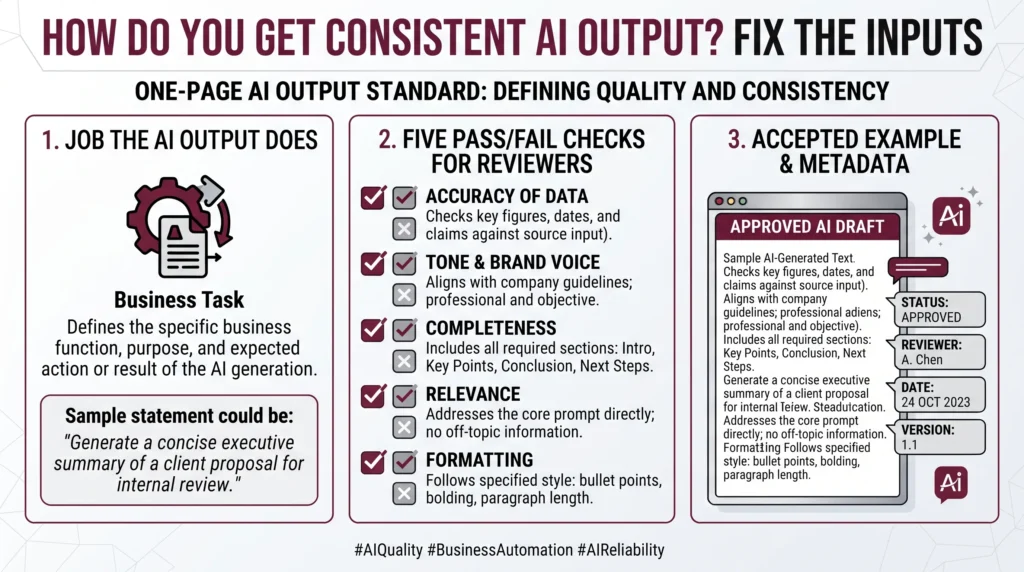
Most checking still runs on judgment alone. Applause’s 2026 research on AI quality, published in April and based on 1,636 people who build and test AI, found 60.8% check output with people, while 46.5% judge readiness on how a feature feels to use. Judgment is not the problem. Judgment with nothing written down is, because two reviewers pass different work and neither can say why it passed.
How do two people get the same result?
Give them the same inputs and checks, then name one owner. In practice: one saved prompt instead of two personal copies, one source file everyone points at, the standard on the same page, and one person who approves edits. Anyone may suggest a change. One person decides. Without that you do not have a shared workflow, you have two that look alike.
Sprawl makes this hard. The OutSystems 2026 State of AI Development report, based on 1,900 IT leaders, found only 36% have a central AI strategy, and 94% worry about tools spreading while just 12% manage them in one place. AI Smart Ventures observes that the fix is rarely technical: a shared folder, a named owner, and the habit of saving the version that worked. AI literacy grows there too: new staff see the standard instead of guessing.
Practical AI implementation support turns a prompt that works for one person into a standard the whole team can run.
How do you check that a prompt still works?
Run it. Take three real tasks from the past month, run the saved prompt on each one five times, and score every result against your written checks. Count the passes. A prompt that passes fourteen times out of fifteen is fit for daily work. One that passes nine is not, and the pattern in the misses shows which check to tighten. Do this on a fixed day, not when someone complains.
This is a scheduled test, not a hunt for what went wrong. You are not asking why one answer came back poor; you are asking whether the same inputs still give work you would sign off. Keep the three sample tasks fixed so you can compare month to month, and add a new one only when the work itself changes. When a run fails, change one input, run it again, and write down what you changed.
How do you keep output steady as tools change?
Write the model version into the prompt file and re-run your checks when it changes. Vendors publish retirement dates and hold to them. Amazon Bedrock’s model lifecycle page says a model stays Legacy for at least six months before end-of-life, that requests to a retired model then fail, and that migration will not happen on its own. Treat each notice as a booked re-test.
Those dates are close. On Bedrock, Claude Sonnet 4 has an end-of-life date of 14 October 2026, and Cohere’s Command R+ passed one on 19 August 2026. Chat apps update the model behind the same button, so put a check on the calendar there too. Keep one page per workflow: the tool, the model version, the prompt version and the date you last checked it. When a version moves, you re-run fifteen samples instead of rebuilding from memory.
What quietly breaks a consistent workflow?
Four things, and none look like a tool problem. Someone edits the saved prompt and tells nobody. The source file is updated while the prompt still points at last quarter’s copy. Two people paste different amounts of background into the same request. The standard lives in one person’s head, so it leaves when they do. Together they explain why a workflow that ran cleanly in March causes arguments by September.
Stopping that is simple and fairly dull: a change log beside the prompt, a version date on the file, and a five-minute handover when the owner changes. Tool-first AI agencies rarely cover it, because the interesting part of the work ends at the build. What holds output steady afterwards is plain change management and workflow optimization: telling people what changed, and retiring inputs that no longer fit. Put a name and a review date on that page.
Frequently Asked Questions
How do you get consistent output from an LLM?
Fix the inputs, then write down the standard. Save the instruction as a file instead of retyping it, point every run at the same source file, state the format you want, and keep one accepted example beside it. Score results against three to five written tests, not by feel. Most of the swing people blame on the model comes from inputs that moved.
What are AI outputs?
AI outputs are what a model gives back from your request: text, a summary, a table, code, an image or a set of tags. They are written fresh each time rather than looked up, which is why two runs can differ in wording while carrying the same content. An output is not finished when it appears. It is finished when it passes your checks.
Why do AI outputs vary?
Some drift is built into these tools, so word-for-word sameness is never promised. In daily work, most of the change you notice has a plainer cause: the request was typed differently, the background pasted in was a different length, or the source file changed. Fix those and what is left is cosmetic. Judge each result against a written standard, not against memory.
What should a reusable prompt include?
A reusable prompt names the job, the reader, the source file, the format and the limits, and it marks the blanks that change on each run. Keep the wording plain and the order stable, then add one accepted example below it so anyone can see the target. Give the file a version number, a date, and the name of whoever approved the last edit.
How often should you review a saved prompt?
Monthly for anything that runs weekly, and straight away when a source file, a policy or a model version changes. The review is short: run the prompt on your sample tasks, count the passes, and note anything you fixed by hand. Twenty minutes covers it. A prompt nobody has run in a quarter should be retired rather than left to drift.
Who should own the prompt library?
One named person, often the manager whose own work stalls first when the output is wrong. The owner approves edits, keeps the version history and decides when a prompt is retired. Everyone else can suggest changes and copy prompts for their own use, but only the owner changes the shared version. Ownership is what stops a library becoming a folder of near-copies nobody trusts.
Can you get the same AI output every time?
Word for word, no, and you rarely need it. Exact wording matters for contracts, names and figures, which should be filled in from your own records. What you can hold steady is output that comes back in the same format, draws on the same facts and passes the same checks. A reader spots a wrong figure at once. Nobody spots two sentences in a different order.
How do you start building consistent AI output?
Pick the task your team repeats most, then spend an hour on its page: the instruction, the source file, the format, one accepted example and three checks. Run it five times before anyone else touches it. Fix what fails, hand the page to a colleague and watch where they hesitate: that is your next edit. Schedule a consultation to work out which task to fix first.
Executive Summary
Consistent AI output is an input problem, not a model problem. Four inputs carry the load: the saved instruction, the named source file, the fixed format, and one accepted example. Around them sits a one-page standard with three to five checks a second person can apply, plus one owner who approves changes. Test on a schedule and treat every model end-of-life notice as a booked re-test. Operational efficiency arrives when the standard is written down, because the model behind it stays swappable.
What Should You Do Next?
Choose the AI task your team repeats most this week and give it a page: the instruction, the source file, the format, one accepted example, and three checks anyone can apply. Run it five times on real work and count the passes. Then hand the page to a colleague and let them run it without your help.
AI Smart Ventures offers AI implementation for growing businesses that need repeatable output rather than one good result. Schedule a consultation to turn your most repeated AI task into a standard the whole team runs from.
People Also Read
About the Author
Nicole A. Donnelly is the Founder of AI Smart Ventures and an AI Adoption Specialist with 20 years of experience as a founder and CEO and over a decade leading AI adoption initiatives. She helps businesses integrate artificial intelligence with clarity and confidence, driving innovation and sustainable growth. Nicole has trained over 20,217 professionals in Applied AI, delivered 624 workshops, and worked with close to 1,000 organizations across diverse industries.
Expertise: AI Transformation, AI Strategy, AI Implementation, AI Adoption, Applied AI, Marketing, Business Operations
Disclaimer: This content is for informational purposes only and does not constitute professional business or technology advice. Results vary based on industry, existing systems and implementation commitment. Contact AI Smart Ventures for a consultation regarding your specific situation.

