

What Happens When an AI Workflow Breaks?
Last Updated: September 2026
An AI workflow failure is any point where an automated process that uses AI stops doing the job it was built for. Some breaks are loud. The run halts, a link times out, and someone gets an alert in minutes. Others are quiet: the workflow runs on, the output keeps arriving, and it is wrong. Both need a planned response. The quiet one needs it more.
AI Smart Ventures has guided growing businesses through the point where a first automated process moves from a test into daily work. In founder-led teams, the break that does real harm is rarely a crash. It is a workflow that runs on after something it leans on has changed. No one agreed up front what a failure would look like, or who would hear of it.
An undefined failure costs you in ways no dashboard tracks: work redone, clients given wrong answers, and faith in the whole AI program lost over one bad week. A workflow with a defined failure mode fails small and fails loud. One without it fails quietly, for weeks, and the news reaches you from a client.
Key Takeaways
- Design the failure first: decide what the process does when it cannot do its job, and write that beside the trigger and the prompt.
- Treat quiet output as the main risk: a run that stops tells you, while a run that keeps sending wrong work does not.
- Give each workflow one owner: name the person told first, so the opening hour goes on the fix, not on finding someone.
- Make the failure path visible: sample the output, check its shape, and watch volume, so a drop in quality shows up as a signal.
- Stop rather than guess: held work costs you a slow afternoon, while sent work costs you a retraction.
- Close each incident in writing: note what broke, what fixed it, and what would have caught it sooner.
Those six points rest on one idea: failure is a normal state, not an exception, and operational efficiency depends on planning for it. AI Smart Ventures observes that most growing businesses reach their first real failure with no owner named, so the opening hour goes on finding one.
What are the ways an AI workflow can break?
An AI workflow breaks in four ways, and only one of them is obvious. It can stop, when a key, tool or link fails. It can stall, when a run waits on an input that never turns up. It can drift, when the data or the task changes and the old rules no longer fit. Or it can succeed wrongly, giving you neat output that is false.
MAST, a failure map from a team at UC Berkeley, was built from more than 1,600 tagged runs across seven agent frameworks. It sorts what goes wrong into 14 named modes in three groups: system design, agents talking past each other, and checking the work. That last group is the one that bites a growing business. It covers work that finished, looked whole, and was never held up against what the task asked for.
- Hard stop: the run fails outright because a key expired, a tool changed, or a file never arrived.
- Stall: the run waits on a queue or an approval, and nothing moves until a person notices.
- Drift: inputs or rules change, and instructions written for last quarter stop fitting.
- Confident error: the output lands on time, in the right shape, and says something untrue.
Why is silent failure the dangerous one?
Silent failure is dangerous because it wears the look of success. A stopped workflow interrupts someone, so it gets fixed that day. A workflow that keeps sending wrong work interrupts no one. The queue moves, the reports arrive, and the error flows into what comes next: a quote, a client email, a choice made on a summary nobody re-read. By the time it shows up, the harm has a long tail.
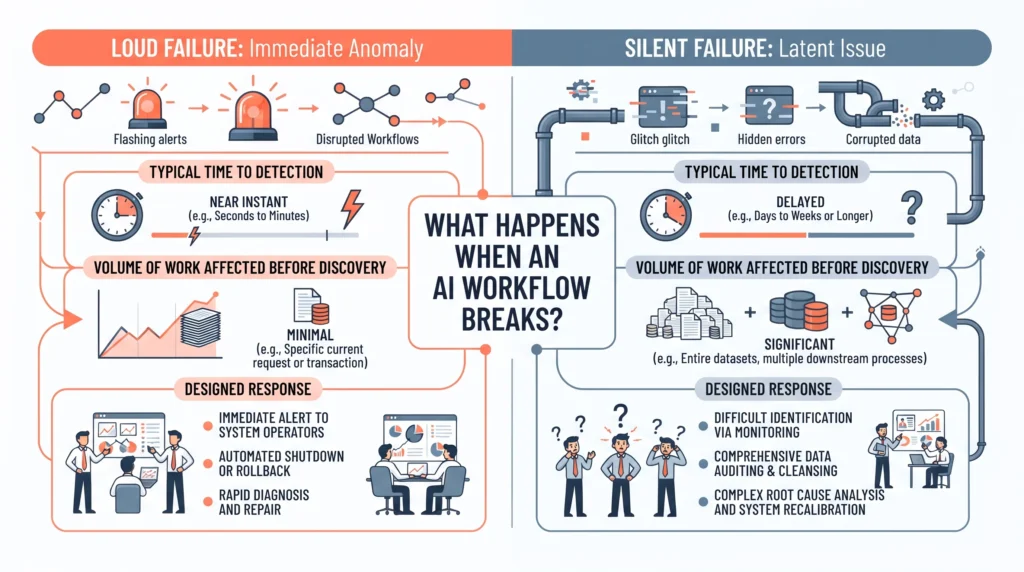
Site reliability engineers treat this as its own class of fault. Google’s postmortem guidance lists “a monitoring failure (which usually implies manual incident discovery)” as a trigger for a full review, on a level with data loss. Hearing about a problem from a human rather than a check is itself the incident. That fits AI work well. Most quiet failure in a growing business is caught by someone reading something odd, weeks after it began.
How do you make AI workflow failure visible?
Make failure visible by writing down what good output looks like before the workflow goes live, then checking against it on a set day each week. Three signals carry most of the load: shape, which catches empty or broken results; volume, which catches stalls and runaway loops; and a human read of a set number of outputs. None of this needs new software. It needs a written standard and one person who looks.
The sample is the step teams skip, and the only check that catches a confident error. Pick a number you can keep up, read those outputs against the standard rather than your sense of them, and log what you find even when the work is fine. The log turns a hunch into a trend. DORA, Google’s research program on software delivery, calls AI an amplifier of a firm’s existing strengths and weaknesses. A thin review gets amplified too.
What should happen automatically when it fails?
When a workflow fails, three things should happen with no one deciding: the work stops moving, it lands where a person can see it, and one named owner is told. Stopping is the default that protects you: held work can be picked up again, a sent email cannot. The owner counts as much as the alert. An unowned alert in a shared channel is read by all and acted on by none.
Incident practice solved the ownership problem years ago. Google’s guidance on managing incidents splits the jobs: one person holds the whole picture, one makes the changes, and one keeps everybody else informed. A small team does not need three people, but it does need the three jobs named up front and agreed before anything breaks. The same guidance says to declare early, including when a problem is still unsolved after an hour.
Tool-first AI agencies hand over a working automation and stop at the working part, which leaves the failure path to you.
That design work is easiest while the workflow is still being built. AI Implementation support covers this step: the failure rule, the named owner, and a fallback your team can run alone.
How do you get a broken AI workflow running again?
Get it running again by bringing the service back first and diagnosing second. Switch the broken step to the last version that worked, or to the manual path it replaced, and tell the people downstream what has changed. Then find out what happened. Reopening the automated path deserves a stated test, not a feeling: your check passes on a batch of real work, and the owner agrees the fix meets the cause.
Process, not tools, is where recovery usually goes wrong. Uptime Institute’s 2026 outage analysis, out in May, found that failures to follow set procedures remain the leading driver of outages caused by human error, along with unclear or patchy processes. So write the steps down while the incident is fresh. Then hold a short blameless review, which the same trade defines as one that finds the causes without blaming any person or team.
Frequently Asked Questions
How do I create an AI workflow?
Map one task you already do by hand, then write down what a correct result looks like. Pick the tool second. Set the trigger, the input, the instruction, and the output shape, and name who reads the results in the first weeks. Before you switch it on, write the failure rule: what this workflow does when it cannot give a good result.
How do I use AI to automate my workflow?
Link the AI step to the systems that hold your work, through an automation platform or a direct connection, so handoffs stop being copy and paste. Automate one step at a time. Keep a person on the final action for the first month, and add a hold-and-notify rule wherever work leaves your team, where an error becomes a client problem.
How do you use AI to improve an existing workflow?
Find the slowest steady step and give AI the drafting, sorting or summing-up part, while a person keeps the judgment. Measure the step before you change it, so you can tell later whether the change actually helped. Workflow optimization fails most often because no one wrote down the old baseline, leaving you to weigh a new process against a memory.
What is a defined failure mode?
A defined failure mode is a written rule saying what a workflow does when it cannot do its job. It names the trigger, action, owner and fallback. A typical rule holds the work in a queue, marks it for review and pings one named person. Without it the workflow decides for you, and it nearly always decides to carry on.
What is the most common point of failure in an AI workflow?
The input is. Most AI steps assume a shape of data: a field that is always filled, a file that always lands, a format that never shifts. When the shape moves, the model rarely throws an error. It fills the gap with something that reads as right. Checking inputs before the AI step catches more breaks, and sooner, than checking output after.
How do you spot a silent AI failure?
Compare a small sample of output against a written standard, on a set day, and log the result each time. Quiet failure shows up as slow change rather than an alarm: vaguer summaries, more hedging, fields that used to be filled and now are not. A weekly read of ten outputs will surface that pattern long before a client complaint does.
What is model drift in plain terms?
Model drift is when results get worse because the world the workflow was built for changed, not because the workflow broke. New product names, a different client mix or a rewritten form can all cause it. The rules still run and the output still looks normal. You catch drift by testing the same known examples each month and watching the answers move.
Who should own an AI workflow when it fails?
One named person, and the name belongs in the same document as the trigger and the prompt. That owner decides whether to pause the process, runs the fallback, and tells the people downstream. Incident practice splits the person steering from the person making changes, which is worth copying once more than two people join a fix. Ownership is change management, not tech work.
Should you switch the workflow off when it fails?
Usually yes, at least for the step that broke. Held work can be picked up later and wrong work sent to a client cannot, so stopping is the safer default when you are unsure. Keep the manual path written down, so a pause costs you a slow day rather than a lost one. Switch back on when your check passes on real work.
What belongs in an AI incident record?
Note what broke, when it started, how it was found, what it hit, what fixed it, and what would have caught it sooner. Keep it short and blameless: a record that assigns fault gets written with one eye on cover and teaches no one. Reliability practice treats a fault found by a person rather than a check as a finding of its own.
How often should you review a live AI workflow?
Weekly for the first month, then monthly once steady, and again whenever anything upstream changes: a new template, a new data source, or a new model version behind the same name. Model updates are the trigger teams forget. Your prompt did not change, so nothing looks new, but the thing reading it did. Re-run your known examples after each of those changes.
How do you get help setting up AI workflow failure rules?
Start with the workflows already running, since those carry the risk. Write the failure rule, the owner and the fallback for each one before you widen the net. AI Smart Ventures works with growing businesses on practical AI implementation, including the review and recovery steps that keep an automated process trustworthy. Schedule a consultation to design your first failure path.
Executive Summary
Every AI workflow fails in the end, and the failure worth planning for is not the one that stops the run. It is the one that keeps sending confident, plausible, wrong work while everything downstream carries on. Decide now what each live workflow does when it cannot do its job: stop, hold the work where a person can see it, tell one named owner, and fall back to the manual path. Check a small sample against a written standard weekly. When something breaks, restore the service first, then write down what happened.
What Should You Do Next?
List the AI workflows running in your business this week, and mark the ones where work reaches a client without a person reading it first. For each of those, write three lines: what stops the work, who is told, and what your team does by hand while it is paused. Then test that rule on purpose.
AI Smart Ventures offers AI Implementation for growing businesses moving automated work into daily use. Schedule a consultation to design the failure path and recovery steps for the workflows you already run.
People Also Read
- Build, Buy, or Outsource AI: How Owner-Operators Decide
- AI Quick Win Projects Are Not a Strategy: Turn Gains Into a Plan
About the Author
Nicole A. Donnelly is the Founder of AI Smart Ventures and an AI Adoption Specialist with 20 years of experience as a founder and CEO and over a decade leading AI adoption initiatives. She helps businesses integrate artificial intelligence with clarity and confidence, driving innovation and sustainable growth. Nicole has trained over 20,217 professionals in Applied AI, delivered 624 workshops, and worked with close to 1,000 organizations across diverse industries.
Expertise: AI Transformation, AI Strategy, AI Implementation, AI Adoption, Applied AI, Marketing, Business Operations
Disclaimer: This content is for informational purposes only and does not constitute professional business or technology advice. Results vary based on industry, existing systems, and implementation commitment. Contact AI Smart Ventures for a consultation regarding your specific situation.

