

How Does AI Learn From Your Data? A Plain-English Guide
Last Updated: August 2026
An AI model is software that has learned patterns from huge piles of text, images and numbers. It does not keep your files or look them up the way a search engine does. In training, it tweaks millions of inner dials until it can guess what tends to come next. Pasting a file into a chat window is a separate step: the model reads your text and replies. Whether your words are kept, and whether they later train a new model, depends on the plan you are on.
AI Smart Ventures has guided growing businesses through AI adoption since the first chat tools hit normal desktops. One pattern shows up again and again: owners think their data is either fully safe or fully exposed, and it is almost never either. The real answer sits in a settings page nobody has opened.
That gap costs money both ways. Teams who fear the worst ban the tools and give up the operational efficiency their rivals are busy building. Teams who assume all is well paste client records into a free account, then learn months later that a default setting was working against them. Knowing which mistake you are making is the first piece of practical AI literacy an owner needs.
Key Takeaways
- Training and use are not the same event. A model learns from your data only when a vendor trains on it, and that is a setting in a contract, not a fixed law of the tech.
- The defaults moved in 2026. GitHub switched its personal Copilot plans to train by default on 24 April, and Atlassian’s data sharing change starts on 17 August, so a setting you checked last year may not read the same today.
- Prep work is most of the job. In a 2026 study, 73% of those asked said firms should put more weight on AI data quality than they do now.
- Start narrow. One clean dataset tied to one weekly task will teach you more about your AI strategy than dumping a whole knowledge base ever will.
Under all four points sits one idea: your control lives in the settings, not in hope. Every serious vendor gives you switches, and most owners never find them, because the switches sit in an admin console while the work happens in a chat window.
How does AI actually learn from your data?
AI learns by tuning numbers, not by storing sentences. In training, a model reads huge volumes of examples and shifts its inner weights until its guesses get closer to the truth. Your data can reach a model by three routes: as training fuel for a public model, as tuning data for a private one, or as short-term context that shapes one answer and then goes. Those routes carry very different risks.
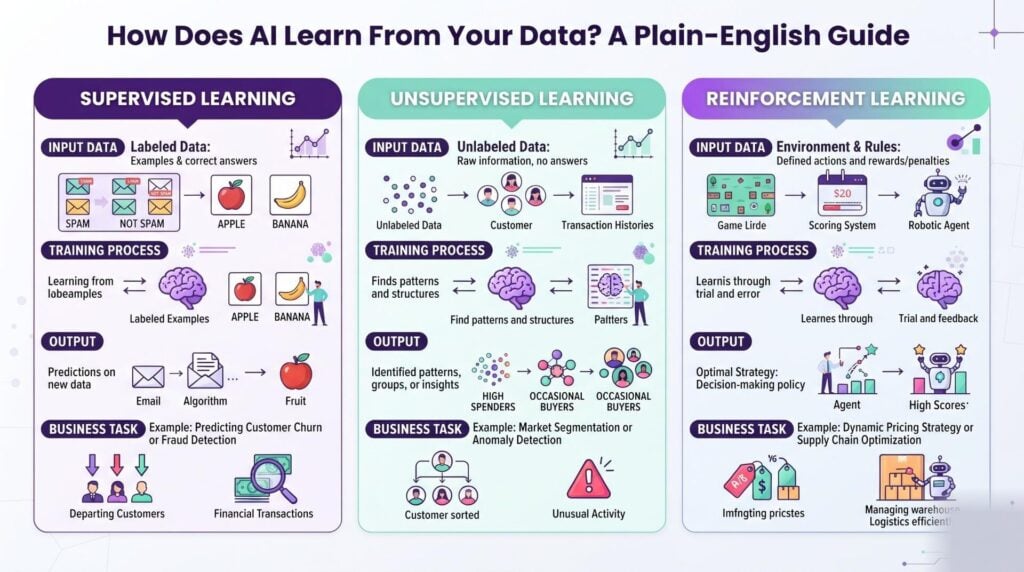
Telling them apart matters, because people argue about privacy while talking about two things. Public training is the route owners fear; private tuning is planned, written into a contract, and fairly rare. Short-term context is what happens dozens of times a day when someone pastes a spreadsheet in and asks for a summary.
Does AI use your data to learn?
Sometimes, the deciding factor is your plan, not the tool itself. Paid work plans mostly keep client content out of model training by contract. Free and personal tiers often include it by default, and two of the biggest names moved that default during 2026. What your setting says today matters far more than what a vendor told you a year ago.
- GitHub. On 25 March 2026, GitHub said that data from personal Copilot Free, Pro and Pro+ plans would train its AI models from 24 April 2026, unless the user opted out. Its paid team plans were left out of the change.
- Atlassian. The firm’s own data sharing page says the change to how it uses your metadata and in-app content to improve its products starts on 17 August 2026. In-app sharing is off by default on the higher plan tiers and on by default on the lower ones, and only an admin can switch it.
- Every other tool you pay for. Each one has a page like this, and an afternoon reading four of them beats any blog post.
What does AI do with my data after a prompt?
Your prompt goes to the vendor, gets processed, and comes back as an answer. Three things can happen next: the text is wiped on a schedule, it is held so the vendor can watch for misuse, or it joins a pool used for training. Which one applies is written in the service terms and in the Data Processing Agreement (DPA), the contract that sets out how a vendor handles personal data for you.
| Tool type | What happens to your data | Your control |
|---|---|---|
| Free public chat tools | Often added to a training pool unless you switch it off | Low, set one user at a time |
| Paid work plans | Read to answer you, kept out of base training by contract | Medium, set once by an admin |
| A model you host | Stays in your systems and trains only your model | High, and yours to maintain |
The middle row is where most growing businesses belong. You get cover in writing without asking a four-person ops team to run servers. Read the retention window before you sign, because thirty days and five years are both common and nowhere near the same promise.
What is the 30% rule in AI?
There is no formal 30% rule. It is a rule of thumb: expect at least 30% of any AI project to go on finding, cleaning and labeling data before anyone touches a model. Most teams find the true share runs higher. Treat it as a planning floor rather than a goal, and put it in the schedule before someone promises a launch date.
Survey work backs the instinct up. A 2026 Pulse Report from Harvard Business Review Analytic Services, sponsored by Cloudera, found that 73% of those asked agree firms must put more weight on AI data quality than they do now. None of that is a tech problem. It is a record problem in a tech costume.
How do you prepare your data for AI?
Pick one dataset, clean it, and leave the rest alone for now. Choose the records behind a task your team repeats every week, then fix the four faults that break models: duplicate rows, empty fields, two names for the same thing, and free-text notes that hide the answer you need. A hundred correct rows beat ten thousand messy ones. Clean input is what turns AI implementation from a demo into a working process.
Work through it in that order. Export the data into a spreadsheet, because faults that hide in a database jump out at you in a grid. Fix your naming next, then delete any record you would not defend in a client meeting. Label a small sample by hand, so you know what good output looks like before you ask for it. Workflow optimization starts here, not at the tool.
Our AI Advisory team has helped close to 1,000 organizations decide which data was worth cleaning first. Bring the messiest workflow you have, and we will tell you whether it is ready.
When is fine-tuning worth the effort?
Fine-tuning earns its keep when you need a fixed voice or output format that prompts alone cannot hold, and when you have a few hundred solid examples of the result you want. For most other jobs, handing the model the right file at the right moment works faster and costs less to keep up. Retrieval keeps your data in your systems. Fine-tuning bakes it into a model you then own.
The trick behind it is transfer learning. A general model knows grammar and structure, so your examples only have to teach it your own patterns. That is why a few hundred support tickets can shift tone well, while a few hundred rows will never teach a model your pricing logic. Ask what you want to change. Style responds to tuning; knowledge responds to retrieval.
What happens when AI learns from bad data?
It repeats your mistakes fast, and it sounds sure of itself. A model trained on one region’s sales history will forecast badly everywhere else. A support bot trained on unsolved tickets learns to close chats without fixing anything. Bias is rarely loud. It is often an old spreadsheet habit, copied forward and then used on a few thousand choices in one week.
The bigger risk is human, not technical. A July 2026 survey of 500 US workers run for the law firm Kolmogorov Law found that 38% had put work data into a personal AI account their employer does not control, and 23% had pasted internal emails, memos or files. Nearly two thirds did not know that they could break the law in some cases. Change management closes that gap. Software does not.
Frequently Asked Questions
Can I stop an AI tool from learning from my data?
Yes, on almost every major platform. Free tools put the control in your account privacy settings, often as one switch about training the model. Work plans handle it at the company level, where an admin sets it once for the whole team. The catch is that a single user often cannot opt out of a team-wide choice, so the fix has to come from whoever holds admin rights.
How much data do I need to customize a model?
Less than most people think. A few hundred well-chosen examples are often enough to shift tone, format or sorting habits, and some narrow tasks respond to a few dozen. Volume stops helping once your examples disagree with each other. Building a custom model from scratch is another job and needs thousands of records. Start with the smallest clean set that reflects your real work.
What is the difference between training and validation data?
Training data teaches the model, and validation data checks whether it learned anything general. You hold back part of your records, often 10% to 20%, and never show them during training. If the model scores well on the text it studied but poorly on the held-back set, it memorized rather than learned. That failure is called overfitting, and a clean split between the two sets is the standard way to catch it early.
Does deleting a chat remove my data from a model?
No, not once that data has been used for training. Deleting a chat drops it from your history and starts the vendor’s clock for stored copies, which often runs about 30 days. Weights that have already picked up a pattern cannot be edited back out one file at a time. Some vendors do retrain after an opt-out, though that takes months. Here, prevention beats deletion.
Is my data safe if a tool is SOC 2 compliant?
SOC 2 tells you a vendor has audited security controls. It does not tell you whether your content trains their models, and those are two separate questions that people often merge into one. A vendor can hold a clean SOC 2 report and still use your inputs to improve its product, if the terms allow that. Check the badge for safety, then read the data use clause for training.
Do AI models memorize the files I upload?
Usually not. A model stores number patterns rather than copies, so it cannot pull up your file the way a folder can. Copying does happen at the edges, when a phrase repeats many times in training data. That is why account numbers, passwords and client IDs should never go into a public tool. Uploads on a paid work plan are read for that one answer, then dropped.
Who owns what an AI tool creates from my data?
You own the output under most business terms, and the big vendors say so in writing. Your input never changes hands. The harder question is copyright, because some countries still ask for real human input before an AI-assisted work can be covered. Keep a record of the editing your team did. If the output feeds a product you sell, have a lawyer read the clause first.
How do we get started with an AI readiness check?
Start with a list of every AI tool already in use, the plan tier for each one, and what its data setting says right now. Most teams find two or three tools nobody approved. Then name one workflow worth improving and look hard at the data behind it. AI Smart Ventures runs an AI readiness check covering both steps. Schedule a consultation to map your data first.
Executive Summary
AI learns from your data in two ways. It reads what you send so it can answer you, and it may also fold that content into a model if the vendor’s settings allow it. Those settings changed at two big names during 2026, so last year’s audit is stale. The heavier work is prep: in a 2026 study, 73% of those asked said data quality needs more weight than it gets. Start with one dataset behind one weekly task, and check the plan settings before you scale.
What Should You Do Next?
This week, list every AI tool your team touches and write the plan tier beside each one. Open the data settings for the two largest and record what they say now, not what you remember them saying. Then pick the single weekly workflow whose data you would happily show a client, and start your AI strategy there.
AI Smart Ventures offers AI Advisory for growing businesses deciding which data belongs in an AI workflow and which does not. Schedule a consultation to review your tool settings and build a data prep plan you can finish.
People Also Read
- ChatGPT vs Microsoft Copilot: Which Is Better for Business?
- How Much Does Microsoft Copilot Really Cost Per Month?
About the Author
Nicole A. Donnelly is the Founder of AI Smart Ventures and an AI Adoption Specialist with 20 years of experience as a founder and CEO and over a decade leading AI adoption initiatives. She helps businesses integrate artificial intelligence with clarity and confidence, driving innovation and sustainable growth. Nicole has trained over 20,217 professionals in Applied AI, delivered 624 workshops, and worked with close to 1,000 organizations across diverse industries.
Expertise: AI Transformation, AI Strategy, AI Implementation, AI Adoption, Applied AI, Marketing, Business Operations
Disclaimer: This content is for informational purposes only and does not constitute professional business or technology advice. Results vary based on industry, existing systems and implementation commitment. Contact AI Smart Ventures for a consultation regarding your specific situation.

