

How to Use Fireflies AI for Business Meetings
Last Updated: April 2026
Fireflies AI is an AI meeting assistant that automatically joins business meetings, records audio and video, generates verbatim transcripts, and produces AI-powered summaries with action items – replacing manual note-taking for teams that run three or more recorded meetings per week. According to McKinsey‘s 2024 State of AI report, 72% of organizations now use AI in at least one business function, yet most teams still assign a human note-taker to meetings despite the availability of AI transcription tools that produce searchable, summarized records at a fraction of the time cost.
AI Smart Ventures has worked with close to 1,000 businesses and organizations on AI adoption and marketing since 2015. Founder Nicole A. Donnelly, an AI Adoption Specialist with 20 years of experience as a founder and CEO, works with business owners implementing AI meeting tools and needing a setup process that produces accurate, usable records from the first session rather than requiring weeks of configuration.
The most common setup failure with Fireflies AI is connecting the tool without configuring the summary template, then concluding the AI summaries are not useful. Default summaries cover generic categories that do not match the specific meeting types a business runs. Configuring the template before the first meeting is the step that determines whether the tool produces actionable records.
Key Takeaways
- Fireflies AI Joins Meetings as a Bot, Not a Plugin – Fireflies AI joins your meeting as an automated participant called “Fireflies Notetaker.” It records from within the call rather than through a screen capture plugin, meaning it works across Zoom, Google Meet, Microsoft Teams, and other platforms without requiring a platform-specific integration.
- The Summary Template Determines Usefulness – Default AI summaries cover generic topics. Business owners who configure a custom summary template matching their most common meeting type receive summaries that are immediately actionable rather than requiring manual editing after every call.
- Transcript Accuracy Depends on Audio Quality – Fireflies AI transcription accuracy is highest in meetings where speakers use dedicated microphones with low background noise. Reviewing transcripts after the first three meetings identifies systematic errors before they compound across a full month of records.
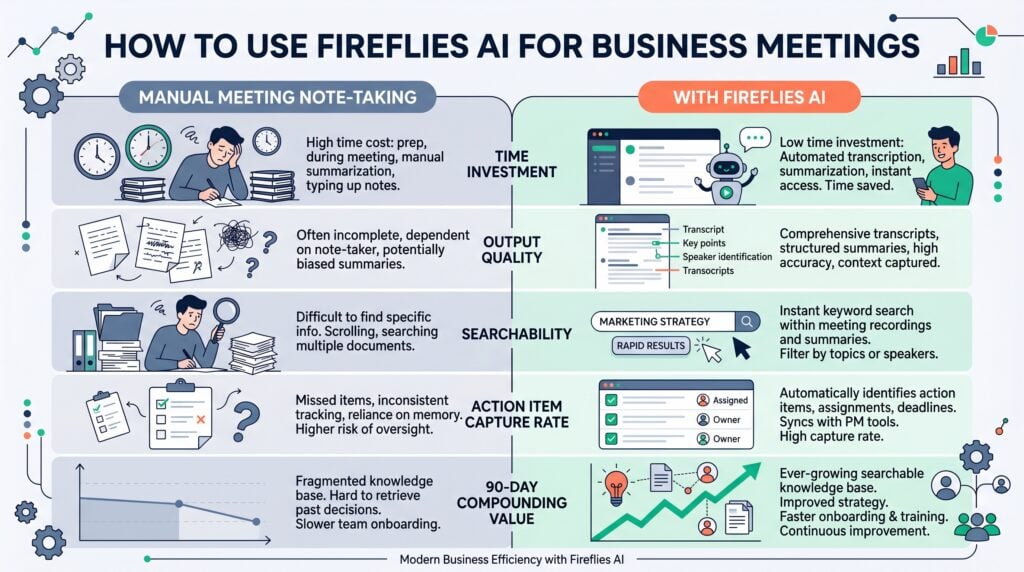
- Search Across Transcripts Is the Long-Term Value – The highest business value from Fireflies AI is not the per-meeting summary – it is the searchable archive that allows teams to find any conversation about a specific topic across months of meetings without reviewing recordings manually.
- Integrations Determine Whether Action Items Get Done – Fireflies AI integrates with HubSpot, Salesforce, Asana, and Notion. Teams that connect these integrations push action items from meeting summaries directly into their project management or CRM (Customer Relationship Management) system rather than relying on manual transfer.
Understanding these five patterns before setup prevents the most common adoption failures – connecting the tool without configuring it, reviewing one meeting result, and abandoning it before the search archive becomes valuable.
What Is Fireflies AI and How Does It Work?
Fireflies AI is an AI meeting assistant that joins a meeting as an automated participant, records the audio and video, generates a full transcript using speech-to-text AI, and produces a structured summary with key topics, action items, and speaker attribution. It requires no manual recording initiation – once connected to a calendar, it joins all meetings with conferencing links automatically. Transcripts and summaries appear in the Fireflies dashboard within minutes of the meeting ending.
The bot-based design means Fireflies AI is platform-agnostic: it joins Zoom, Google Meet, Microsoft Teams, Webex, and other major conferencing platforms through the same mechanism a human participant uses – by receiving a meeting link and joining as a named participant. This removes the dependency on platform-specific plugins or recording permissions that limit some competing tools. Meeting participants see “Fireflies Notetaker” in the participant list, which means transparency about AI recording is built into the design.
The two core outputs are the full transcript with speaker labels and timestamps, and the AI-generated summary organized into configurable sections. Both are stored in the Fireflies dashboard, can be searched by keyword across all past meetings, shared with team members, or exported to connected integrations.
How Do You Set Up Fireflies AI Correctly?
Setting up Fireflies AI correctly requires four steps: calendar integration, bot configuration, a custom summary template for your primary meeting type, and at least one downstream integration for action item handoff. According to Gartner‘s 2025 analysis of AI tool adoption, setup quality at day one is the strongest predictor of sustained tool use at day 90 – tools configured to match specific workflow requirements maintain higher usage rates than those deployed with default settings.
Missing the summary template step is the most consequential setup failure. Default Fireflies AI summaries use generic topic headers that do not match specific meeting types. A client call requires different summary sections than a sales discovery call or a team standup – the custom template takes 10 minutes to configure and covers client calls, sales discovery calls, weekly standups, and quarterly reviews, determining the quality of every meeting record the tool produces.
The four-step setup:
- Step 1: Calendar Integration – Connect Fireflies AI to your Google Calendar or Outlook calendar. The bot will join all calendar events with a video conferencing link automatically. Review which meetings you want it to join and create an exclusion list for meetings that should not be recorded.
- Step 2: Bot Settings – Set the bot name, configure whether it announces itself at the start of recordings, and set the recording consent message if required by your jurisdiction. Some states and countries require explicit participant consent before recording a meeting.
- Step 3: Custom Summary Template – Go to Settings > Summary > Custom Template. Build a template with the sections your most common meeting type requires – for a client call: Client Objectives, Discussed Solutions, Commitments Made, and Next Steps. This template determines the structure of every AI summary.
- Step 4: Downstream Integration – Connect Fireflies AI to the task management or CRM tool your team uses for action items. The HubSpot, Salesforce, Asana, Notion, and Slack integrations push action items from meeting summaries directly to the destination tool without manual transfer.
Teams that complete all four steps consistently report higher satisfaction with Fireflies AI at day 30 than those who connect the calendar and skip the template and integration steps. Business owners comparing AI meeting tools can browse the AI tools directory or explore AI advisory services for structured support deploying their first AI productivity stack.
If your team has connected Fireflies AI but is not using the summaries consistently, AI Smart Ventures offers AI training services for growing businesses building structured AI tool adoption programs. The AI Smart Ventures team has worked with close to 1,000 organizations on AI adoption since 2015.
What Can You Search and Review in Fireflies AI?
Fireflies AI stores every transcript and summary in a searchable dashboard that allows team members to search by keyword across all past meetings, filter by date, participant, or meeting type, and retrieve the specific moment in a recording where a topic was discussed. According to Harvard Business Review‘s 2023 research on organizational knowledge management, teams that can retrieve past decision context consistently make more accurate follow-up decisions than those relying on memory or manual notes.
The search function is where Fireflies AI produces its highest long-term business value. A business owner who can search every mention of a client’s name across six months of sales calls, every instance where a specific pricing objection appeared, or every commitment made to a particular vendor has a searchable organizational memory that would otherwise require manual review of dozens of recordings – a value that compounds significantly as the meeting archive grows over time.
The three high-value search patterns for business teams:
- Client History Search – Search a client’s name before a renewal call, onboarding meeting, or contract review to retrieve every prior commitment, objection, and agreement from previous meetings, replacing manual review of scattered email and document notes.
- Topic Trend Search – Search a specific topic or objection across all meetings over a time period to identify patterns – which product features are most frequently questioned in sales calls or which operational issues surface repeatedly in team standups.
- Speaker Action Item Search – Search a team member’s name to retrieve all action items assigned to them across past meetings, producing an accountability record that supplements project management tracking for commitments made in meetings but not logged elsewhere.
The archive’s search value compounds with each recorded meeting added. Growing businesses that need support building a structured AI productivity workflow – including meeting tools, drafting tools, and task management integrations – can explore AI consulting services for owner-operators building their first multi-tool AI system.
How Do You Review and Share Meeting Summaries?
Fireflies AI delivers meeting summaries to the dashboard and by email within minutes of a meeting ending, with options to share directly with participants or export to connected tools. AI Smart Ventures observes across close to 1,000 organizations that teams establishing a consistent summary review and distribution workflow within the first 30 days maintain higher adoption rates at 90 days than those leaving distribution ad hoc.
The summary review step is where business owners either capture or lose the meeting’s value. A summary that sits unread in the dashboard produces no operational benefit; a summary that is reviewed, corrected for any AI errors, and shared with the right team members within two hours of the meeting converts meeting time into documented commitments. The distribution workflow takes under five minutes when it becomes a post-meeting habit rather than an optional step.
| Plan | Price | Transcription | Video Recording | Integrations | Search |
| Free | $0 | Limited minutes/month | No | Basic | Limited |
| Pro | $10/user/month | Unlimited | Yes | Standard | Full archive |
| Business | $19/user/month | Unlimited | Yes | All (CRM + PM) | Full + analytics |
| Enterprise | Custom | Unlimited | Yes | Custom + SSO | Full + retention control |
What Does Fireflies AI Cost for a Business Team?
Fireflies AI pricing ranges from a free plan with limited monthly minutes to a Business plan at $19 per user per month that includes unlimited transcription, video recording, and all integrations. The Pro plan at $10 per user per month covers most growing business use cases with unlimited transcription and AI-powered search. Enterprise pricing is available for organizations requiring SSO (Single Sign-On), advanced analytics, and custom data retention policies.
Large consultancies such as Accenture and Deloitte Digital deploy AI meeting tools as part of broader knowledge management programs for enterprise clients, a different scope from a growing business evaluating a per-user subscription. For a growing business, the relevant cost comparison is Fireflies AI Pro at $10 per user per month against the time currently spent on manual note-taking – a team of five recovering 30 minutes per meeting across four weekly meetings recovers the monthly cost within the first week. Schedule a consultation to identify the right AI productivity tools for your team.
Frequently Asked Questions
What is Fireflies AI used for in a business?
Fireflies AI is used to automatically record meetings, generate verbatim transcripts with speaker labels, and produce structured AI summaries with action items for every meeting a team runs. It eliminates manual note-taking by joining meetings as a bot participant, storing all records in a searchable dashboard, and integrating with task management tools to push action items to the team’s existing workflow. It is most valuable for teams running three or more client calls or internal meetings per week.
Is Fireflies AI accurate for meeting transcription?
Fireflies AI produces high transcription accuracy in meetings with clear audio, limited background noise, and speakers who take turns. Accuracy drops with speakerphone audio, overlapping speakers, heavy accents, or specialized technical terminology. Reviewing transcripts after the first three meetings identifies systematic errors before they compound. Teams with specialized vocabulary – medical, legal, or technical – should review transcripts before relying on AI summaries for client-facing decisions.
How does Fireflies AI join meetings automatically?
Fireflies AI joins meetings automatically by connecting to your Google Calendar or Outlook calendar and monitoring for events with conferencing links. When a meeting starts, the Fireflies Notetaker bot joins as a participant using the meeting link. No manual start is required. Business owners who want to exclude specific meetings can remove the bot from the participant list before the meeting starts or configure an exclusion list in the Fireflies settings.
Can Fireflies AI be used across Zoom, Google Meet, and Teams?
Fireflies AI works across Zoom, Google Meet, Microsoft Teams, Webex, and other major video conferencing platforms because it joins as a standard meeting participant rather than through a platform-specific plugin. The same calendar integration works regardless of which conferencing tool the meeting host uses. Teams that run meetings across multiple platforms do not need separate tools or configurations for each platform – one Fireflies AI account covers all.
What integrations does Fireflies AI offer?
Fireflies AI integrates with HubSpot, Salesforce, Asana, Notion, Slack, and Zapier. The HubSpot and Salesforce integrations automatically log meeting notes and action items to the corresponding contact or deal record, eliminating manual CRM updates after sales calls. The Asana and Notion integrations push action items from meeting summaries to project management systems. Zapier extends integration possibilities to additional tools that support webhooks or API connections.
How do you get the most useful summaries from Fireflies AI?
The most useful Fireflies AI summaries come from configuring a custom summary template before the first recorded meeting. The custom template defines which sections appear – such as Client Objectives, Commitments Made, and Next Steps for a client call, or Blockers, Decisions, and Owners for a team standup. The default template uses generic section headings that require manual editing after every meeting. Teams that configure a custom template matched to their most common meeting type receive immediately actionable summaries.
What is the Fireflies AI free plan and who should use it?
The Fireflies AI free plan offers limited monthly transcription minutes and basic summary features, suitable for teams with infrequent recording needs or those evaluating the tool before committing to paid. The Pro plan at $10 per user per month is the appropriate tier for growing businesses using Fireflies AI as a regular meeting workflow tool. The Business plan at $19 per user per month adds video recording, advanced search, and full CRM integrations.
Does Fireflies AI comply with recording consent laws?
Fireflies AI includes consent notification features that announce recording at the start of a meeting and display a consent message to participants. Whether this satisfies applicable recording consent requirements depends on jurisdiction – some require two-party consent, meaning all participants must actively consent before recording begins. Business owners should review the recording consent laws that apply to their meetings before deploying Fireflies AI, particularly for meetings with clients or contacts in two-party consent jurisdictions.
How long does it take to see value from Fireflies AI?
Fireflies AI produces its first measurable value in the first recorded meeting – time saved on manual note-taking is immediate. The higher compounding value from the searchable archive becomes apparent between 30 and 90 days of use, when the dashboard contains enough past meetings for keyword search to return meaningful results across multiple sessions. Teams that configure the tool correctly from the start and use it consistently for all recorded meetings see the full search archive value within 60 days.
Executive Summary
Fireflies AI is an AI meeting assistant that joins meetings automatically, records and transcribes audio and video, and generates structured summaries with action items – replacing manual note-taking for business teams running frequent recorded meetings. Setup quality at day one determines summary usefulness: teams that configure a custom summary template for their primary meeting type and connect at least one downstream integration receive actionable records from every meeting. The long-term value is the searchable meeting archive, which compounds as each recorded meeting adds to a cross-searchable organizational knowledge base.
What Should You Do Next?
Connect Fireflies AI to your calendar, then build a custom summary template for your most common meeting type before the first recording – this 10-minute setup step determines the usefulness of every AI summary the tool produces. After the first three meetings, review transcripts for systematic accuracy issues and adjust your audio setup accordingly.
AI Smart Ventures offers AI advisory services for growing businesses selecting and deploying AI productivity tools. Schedule a consultation to map the right AI meeting workflow for your team’s cadence and integration requirements.
People Also Read
How to Get Your Team to Actually Use AI Tools
How to Integrate AI Into Existing Workflows Without Starting Over
About the Author
Nicole A. Donnelly is the Founder of AI Smart Ventures and an AI Adoption Specialist with 20 years of experience as a founder and CEO and over a decade leading AI adoption initiatives. She helps businesses integrate artificial intelligence with clarity and confidence, driving innovation and sustainable growth. Nicole has trained over 20,217 professionals in Applied AI, delivered 624 workshops, and worked with close to 1,000 organizations across diverse industries.
Expertise: AI Transformation, AI Strategy, AI Implementation, AI Adoption, Applied AI, Marketing, Business Operations
Disclaimer: This content is for informational purposes only and does not constitute professional business or technology advice. Results vary based on industry, existing systems and implementation commitment. Contact AI Smart Ventures for a consultation regarding your specific situation.

