

Microsoft Copilot for Business Without the Learning Curve
Last Updated: August 2026
A Microsoft Copilot for business rollout is the work of putting an AI helper inside the apps your team uses all day. Copilot runs in Word, Excel, Outlook, Teams and PowerPoint. It reads only the files and email that each person can open on their own. Ask, and it will draft a document, sum up a meeting, or turn raw data into a chart. The tool shows up on day one, but the saved hours show up later, once your people know what to ask for.
AI Smart Ventures has guided growing businesses through Copilot rollouts in finance, retail, health care and legal teams. One pattern shows up again and again. Teams that get real AI training put the tool to work within weeks, while teams handed a login and a help link slide back to old habits. AI adoption is a people problem dressed up as a software problem.
The gap between those two outcomes is money. A paid license bills you each month whether your team opens it or not, so a stalled rollout is a fixed cost with nothing on the far side. A failed first try makes the next one harder, since your people remember being asked to change once already. The fix is mostly about people, and it costs far less than the licenses do.
Key Takeaways
- Copilot pays off inside the apps your people live in, so start with Outlook, Teams and Word, not a new tool nobody has opened.
- Run a tight 30-day pilot with one keen team. Microsoft’s Copilot in 30 program, on sale through partners from 1 August 2026, is built for exactly that shape.
- Copilot shows a person only the files they could open by hand, so review who can see what in SharePoint before you roll out, not after.
- The block is rarely the tools, because most stalled rollouts trace back to people who never learned what to ask, and that is a training gap rather than a tool gap.
- Track time saved on named tasks, not logins. A recap that took twenty minutes and now takes three is the number your board will act on.
Those five points share one root: Copilot pays back teams that decide up front what they want it to do. A blank prompt box is an open question, and most of us answer open questions by closing the window. Naming two or three tasks per role turns that box into a tool your team can pick up.
What Can You Do With Copilot for Business?
Copilot drafts, sums up, sorts and builds, all inside the Microsoft 365 apps you already pay for. It writes and sorts email in Outlook. It builds meeting recaps with owners and next steps in Teams. It answers plain questions about a spreadsheet in Excel. It turns notes and older files into first drafts in Word and PowerPoint. Each of those is a task that someone on your team does by hand most weeks.
Microsoft’s release notes show how fast that list keeps growing. Chat in Outlook moved from a single thread to your whole inbox and calendar on 1 July 2026, and PowerPoint gained an agent mode that builds a deck from your own files and meetings. Notebooks can now turn a stack of notes into a document, a spreadsheet or a deck.
The short list matters more than the long one. Meeting recaps, email drafts, file summaries and spreadsheet questions cover most of the value for most roles. Teach those four well, then add the rest once your people trust what comes back.
What Is the Difference From Free Microsoft Copilot?
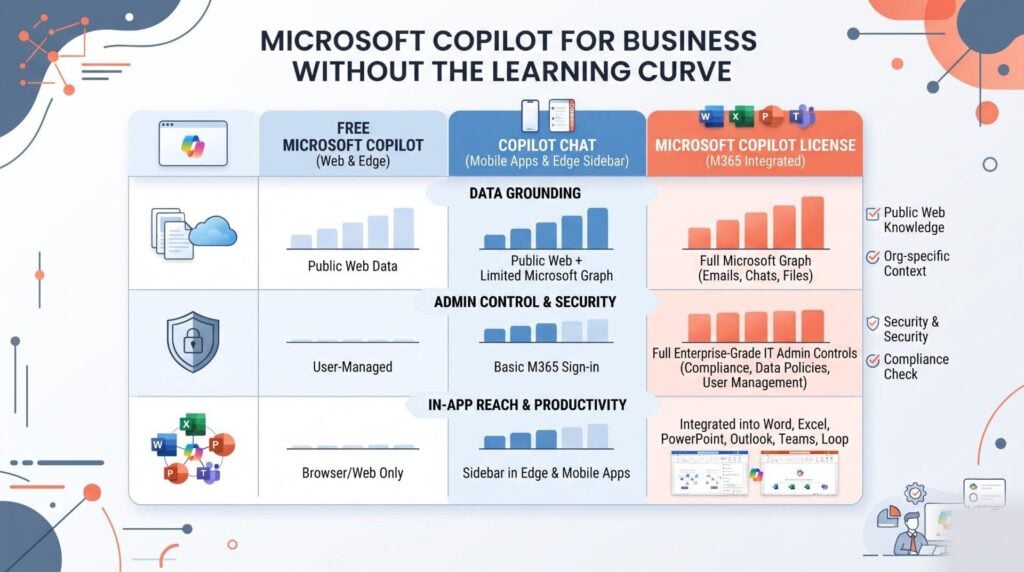
The split comes down to grounding, control, and where your data is allowed to go. Free Microsoft Copilot is built for home use and grounded in the web, and Microsoft’s guide tells users never to type work secrets into it. Copilot Chat comes with your Microsoft 365 plan and is also grounded in the web. It runs inside the Microsoft 365 service boundary, with admin and data controls in place. The paid license adds the part that counts at work: replies drawn from your own email, files, chats and meetings.
| Version | Grounded in | Admin controls | Best for |
|---|---|---|---|
| Microsoft Copilot (free) | The public web only | None in your tenant | Home tasks, nothing private |
| Copilot Chat | The web, plus files users paste in | Yes, via the admin center | Daily AI chat, no paid license |
| Copilot (paid license) | Your email, files, chats and meetings | Yes, plus agent control | Roles living in Outlook, Teams and Office |
Most growing businesses run both tiers. Give everyone Copilot Chat, then buy paid licenses for roles that live in Outlook, Teams and Office all day.
How Do You Run a 30-Day Copilot Pilot?
Run it tight: one team, one short list of tasks, and one number you agreed on before the start. Microsoft gave that shape a name on 14 July 2026 with Copilot in 30. It is a partner-led program built around a 25-user, 30-day Copilot Business trial. It aims at firms with fewer than 300 staff, and the trial goes on sale through the Cloud Solution Provider channel from 1 August 2026. The shape holds a lesson even if you never use it: thirty days and twenty-five people is enough to prove or kill the case.
- Pick the team by drive, not technical skill. A sales team fed up with admin work beats a curious IT team.
- Name three tasks per role. Meeting recaps, first-draft proposals and inbox triage make a fair starting set.
- Take a baseline in week one. Time those three tasks by hand before a single person touches Copilot.
- Set one number to beat. Cutting meeting follow-up time by half in a month is a target people grasp.
- Review on day 30 and decide. Grow it, extend it or stop it, but never let a pilot drift on as a standing trial.
Workflow optimization is the real output here, not a software install.
Can Copilot See Data It Should Not See?
No, though that holds true only if your access rights are right to start with. Microsoft’s privacy page states that Copilot shows a user work content only where that user has at least view rights. It also states that prompts, replies and data drawn through Microsoft Graph are not used to train the base models. So the tool does not create risk. It reveals risk you had all along: a file shared with everyone is a file Copilot will sum up for everyone.
That makes an access review the first technical job in any rollout, ahead of handing out licenses. Check which SharePoint sites are open to the whole company, which shared drives hold pay or contract records, and which labels apply. Most teams find a mess, and fixing it takes days, which costs far less than telling your board how a salary file turned up in a summary.
Admins also choose which agents may run in the tenant, and a review-and-approve step for in-house agents landed in July 2026. Use it. An agent store with no rules is the shadow AI problem back again, wearing a Microsoft badge.
Why Do Copilot Rollouts Stall After Month Two?
They stall because the training stopped at the demo. People watch a slick walkthrough, then go back to an inbox where no prompt comes to mind. The tool starts to feel like extra work, which is the one thing nobody has spare. Research across growing businesses shows a known curve: usage peaks in week two, sags by week five, and rarely climbs back on its own. A second round of AI coaching is what turns a pilot into a habit.
Three fixes do most of the work. First, teach prompts against real documents: your proposal template, your weekly report, your own meeting notes. Second, name a power user on each team who people can ask without feeling foolish, and give that person an hour a week. Third, post a short data policy so nobody has to guess what is allowed.
AI literacy is the outcome you are buying, and change management is how you get there. Capability building beats feature training every time, since features change each quarter and judgment does not. Practical AI habits survive the next update; a learned menu path does not.
Real AI training is what moves a Copilot license from a cost line to a working habit. Talk to our AI training team about a rollout plan built around the tasks your team does now, drawn from 20,000+ professionals trained in Applied AI.
Frequently Asked Questions
Is Copilot free for business?
No. Copilot for work is a paid license that you add on top of a Microsoft 365 plan. Copilot Chat is a different thing: it comes with most Microsoft 365 plans and gives people web-based AI chat with admin controls in place. The paid license is what grounds replies in your own email, files and meetings. Many teams give Chat to everyone and buy licenses only for roles that need work grounding.
Why is Copilot shutting down?
Copilot is not shutting down. Two parts of the free Copilot app retire on 18 August 2026: Deep Research and Podcasts. Thurrott reported on 21 July 2026 that Deep Research users move to Researcher, while podcasts made before that date stop working. Neither change touches Copilot inside Word, Excel, Outlook or Teams. Cuts like these are normal product housekeeping, not a sign that the platform is closing.
Does Copilot work with our current Microsoft 365 plan?
Most often, yes. Copilot for work is an add-on license that sits on top of a Microsoft 365 plan rather than replacing it. Your email, files and Teams setup stay exactly where they are. Older or odd plan mixes may need a base license change first, so check the license page in your admin center before you buy. That check takes ten minutes and saves an awkward refund call.
Will Copilot show people files they should not see?
Only if your access rights already allow it. Copilot shows a user work content only where that user has at least view rights, so it cannot reach a file they could not open by hand. The real risk is old, over-shared content that nobody has checked in years. Review company-wide SharePoint sites and shared drives before rollout, label anything private, and treat that audit as part of the project.
Does Microsoft train its models on our company data?
No. Microsoft’s privacy page states that prompts, replies and data drawn through Microsoft Graph are not used to train the base models behind Copilot. Chat history is stored and encrypted inside your own tenant, and admins can set retention rules or delete it with the same tools they use now. People can clear their own Copilot history from the account portal.
Which Microsoft apps include Copilot features?
Copilot appears in Word, Excel, PowerPoint, Outlook, Teams, OneNote and SharePoint, plus the stand-alone Copilot app and Microsoft Edge. What you get varies by platform, so a feature often lands on Windows before the web or Mac. Notebooks now turn a stack of notes into a document, a spreadsheet or a deck. PowerPoint gained an agent mode in July 2026 that builds a deck from your own files.
How long does it take to train a team on Copilot?
Most teams reach a useful level in two to four weeks with real AI training, and far longer with none. The driver is not brains, it is practice: people need to try the tool on their own repeat work rather than on a demo. A good shape is one live workshop, two weeks of guided practice, then a short follow-up session. Skipping that last step is the top reason AI adoption fades.
What is Microsoft Copilot Studio for?
Copilot Studio is a low-code tool for building agents that answer questions or run steps against your own data. Typical builds include a support agent that reads your help documents, a joiner agent for new staff, or a status agent that reports on projects. Agents built in house can be sent for admin review and posted in your own agent store.
How do we get started with Copilot training?
Start by naming the three tasks per role you want Copilot to take over, then train against those tasks rather than the feature list. Run a tight pilot, time each task before and after, and decide on day 30. AI Smart Ventures builds AI workshops and AI coaching around that same shape for growing businesses. Schedule a consultation to map a Copilot training plan for your team.
Executive Summary
Copilot for work pays back when you aim it at named tasks rather than hand out licenses and hope. The paid license grounds replies in your own email, files and meetings, while Chat covers web-based work for everyone else. Access rights decide what the tool can see, so review your sharing setup before rollout rather than after. Microsoft’s Copilot in 30 program, on sale from 1 August 2026, mirrors what works: a tight pilot, a small group, and a number agreed up front. Training, not tooling, decides whether the habit survives past month two.
What Should You Do Next?
This week, pick one team and write down the three tasks you want Copilot to take over. Time those tasks by hand so you hold a baseline, then review who can see what in SharePoint before a single license is assigned. Book the first workshop for week one of the pilot, not week three.
AI Smart Ventures offers AI Training for growing businesses rolling out Copilot across Outlook, Teams and Office. Schedule a consultation to build a 30-day Copilot pilot plan your team will finish.
People Also Read
- How Do You Get AI Unstuck? Moving From Pilot to Production
- What Is Agentic AI and Should Your Business Care in 2026?
About the Author
Nicole A. Donnelly is the Founder of AI Smart Ventures and an AI Adoption Specialist with 20 years of experience as a founder and CEO and over a decade leading AI adoption initiatives. She helps businesses integrate artificial intelligence with clarity and confidence, driving innovation and sustainable growth. Nicole has trained over 20,217 professionals in Applied AI, delivered 624 workshops, and worked with close to 1,000 organizations across diverse industries.
Expertise: AI Transformation, AI Strategy, AI Implementation, AI Adoption, Applied AI, Marketing, Business Operations
Disclaimer: This content is for informational purposes only and does not constitute professional business or technology advice. Results vary based on industry, existing systems and implementation commitment. Contact AI Smart Ventures for a consultation regarding your specific situation.

