

Searching Emails and Documents With AI: Set Limits First
Last Updated: October 2026
An AI email search is a tool that reads your mailboxes and shared files, then answers questions from what it finds, rather than matching words in a subject line. Ask when a client first raised a billing complaint, and it hands back the thread. Indexing is the step that makes that work: the tool reads what it can reach and builds a map of it. What sits in that map is easy to find.
AI Smart Ventures has guided growing businesses through AI implementation in sales, finance, and client service. Owners ask which tool to buy and how fast it can be plugged in. The question that bites lands a week later: of all the mail that tool can now read, how much of it should it be reading?
Point one at company email, and it will turn up HR matters, a medical note sent to a manager, a salary talk, a reference, a half-finished legal thread. Not because it goes wrong. Those things are in there, and search by meaning strips out the friction that used to keep them buried.
Key Takeaways
- Decide scope before switch-on: write down which mailboxes and folders the tool may read, because the first week of live use is a poor time to find out.
- Tools do surface what they should hold back: CI-Work, a July 2026 test of workplace AI agents, logged privacy violation rates of 15.8% to 50.9% across leading models.
- Name mailboxes, not just folders: shared inboxes, the owner’s own account and the mail of people who have left each need a yes or a no of their own.
- Tell staff before it goes live: several states ask for written notice of monitoring at work, and Connecticut’s rewritten rule took effect on 1 October 2026.
- Off in one app is not out of scope: Google’s admin guidance says data from a service you switched Gemini off for can still be reached through Gemini elsewhere.
Put those side by side and scope stops looking like a tool setting. It is a call about which of your own records your team may read at speed, and it sits with the owner, not with whoever installs the software. Most of it is AI advisory work: an hour with a list of mailboxes.
What does an AI email search actually read?
All of it, filtered by the access of the person asking. Indexing is the tool reading your mail and files to build a map. Permissions are the access rules each person already holds in your mail. Scope is the part you choose: which accounts and folders the tool is pointed at. Permissions limit who sees an answer; scope decides what is there to find.
Scope is the one most teams never set. A new tool offers the whole mail domain by default, so the quick path is to accept it and move on. Those access rules were written for a world where finding an old thread took an hour and a lucky guess. Dropbox’s help pages, updated on 28 August 2026, note that access set on a higher folder applies to each file under it.
Why decide scope before you switch it on?
Because later you are arguing with a tool your team already uses. CI-Work, a July 2026 test in the ACL industry track, asked whether workplace AI agents can pass on what a task needs while holding back the private mail around it. Across leading models it logged violation rates between 15.8% and 50.9%, and found the more useful an agent was, the more it leaked. Bigger models did not fix it.
That trade-off is the reason to set limits at the front. A tool earns its keep by reading widely, and reading widely is what carries the medical note into an answer about staffing cover. No careful wording tunes that out later. What you do control is the pool it draws from. Settle that in an afternoon before launch, or argue it out once fifty people lean on the tool each day.
Which mailboxes belong in scope at all?
Fewer than the tool offers. Start from none and add each account with a reason beside it. Shared team inboxes, like billing or support, are the easy yes: they hold mail several people already read. Single mailboxes are a call of their own each time, and the owner’s account needs the hardest thought. Mail from people who have left needs a plain answer, not a drift in with the domain.
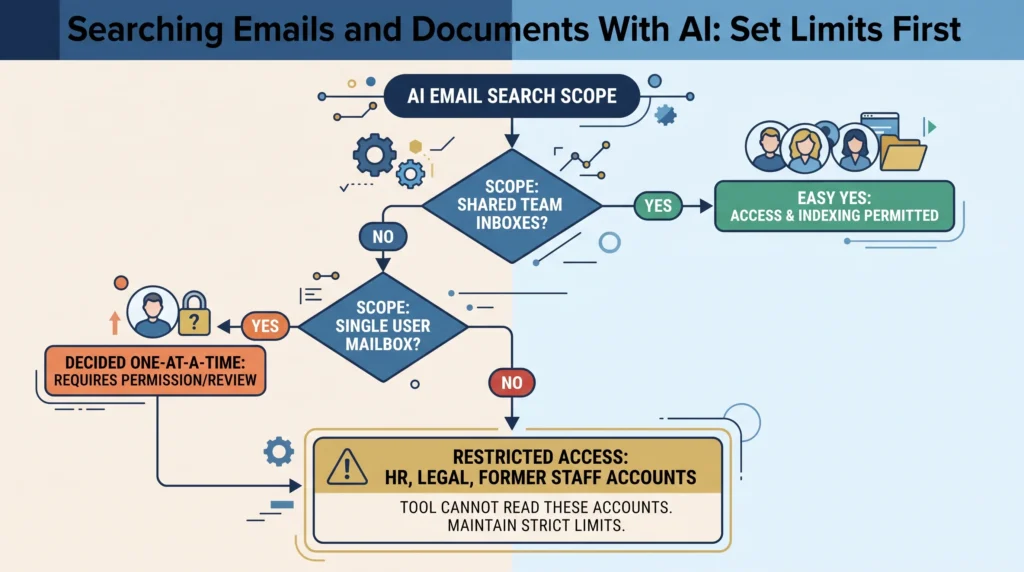
Shared inboxes carry one extra risk, because a tool several people use can pass content between them. So a shared mailbox needs its own call. PiSAs, posted on 6 July 2026, tests that leak across shared answers and shared memory, and reports that “even state-of-the-art models fail to reliably filter inappropriate content or restrict transmission to authorized users”. Each case carries two labels: whether the content suits the task, and who may see it.
How should search scope differ by role?
By what each role is already trusted to read, not by rank. Client service needs the client threads and the files behind them. A bookkeeper needs supplier mail and the invoice folder. Nobody outside HR needs the HR inbox, and the fact that an owner can open it all is no reason to point a tool at it all. Match scope to the job, then let your access rules do the rest.
Senior access is the quiet problem. An owner can often reach each folder, so a tool run from that account treats the whole firm as fair game, and a mild question about a staffing call can pull a complaint about a manager into the reply. Set the tool up from an account shaped like one job instead, and keep any wider setup rare. Change management is easier when limits look planned.
What should you tell staff before go-live?
That it is coming, what it will read, and what it will not. Put that in writing before launch, not after the first awkward answer. Several states already ask for written notice of monitoring at work, and the rules keep moving: Connecticut’s rewritten law, signed on 4 June 2026, took effect on 1 October 2026, and it asks notices to say where monitoring may happen, plus a plain-language note for new hires.
This article is not legal or HR advice, and it cannot be. What you may index, and what you must tell people, turns on your own policies, your staff contracts and the law in your state. A lawyer or an HR adviser makes those calls; your job is to bring them the list. New York has asked private employers to tell staff about email monitoring since May 2022, so answers differ by state.
What should the written scope note say?
One page, four lines. What is in scope, listed by mailbox and drive. What is left out, with the reason beside it. Who may ask the tool questions, and from which account. When the list gets read again. Keep it short enough that your team reads it and plain enough that a new starter can tell whether a folder belongs. The reason column is what saves you a repeat argument.
Then test the half you left out, because switching something off does not always put it out of reach. Google’s admin guidance, updated on 9 October 2026, states that “even if Gemini is off for a specific app, users can still access its data when using Gemini in other apps”. Ask your tool something only a mailbox you excluded could answer. If an answer comes back, the note records a wish, not a setting.
AI Smart Ventures runs AI Implementation for growing businesses putting AI email search in place, with scope agreed and tested before the first mailbox gets connected.
How do you review scope once it is running?
On a short cycle, with the questions people asked in front of you. Scope drifts on its own: a new drive gets linked, someone leaves, a shared inbox fills up with a complaint thread. Reading a quarter of the query log teaches you more than a policy review, because it shows what your team hoped to find. Then add or drop a mailbox, update the note, and run the test again.
Two events belong on that list beyond the quarterly look: a leaver, and any new link to a system. Both change the pool with nobody making a call. Keep the review in one pair of hands so it never becomes everyone’s job and nobody’s. Generic AI consultants will offer a framework here. Practical AI at this size is a named owner, a one-page list and a repeat calendar entry, and the operational efficiency comes from that habit.
Frequently Asked Questions
How do you point an AI assistant at your email?
You connect it, then narrow it. Most tools ask an admin to approve access to your mail system, which hands over the whole domain by default. The useful work comes next: hold the tool to the accounts on your in-scope list, check each person’s own access still applies, then ask real questions and read where the answers came from. Plugging it in takes minutes; agreeing what it may read takes longer.
Does Gmail’s own assistant stay inside one mailbox?
Not always. A built-in helper answers from what the signed-in person can reach, which takes in shared drives and any mailbox they stand in for. Admin settings control which services it draws on, though Google’s guidance notes that switching it off for one app does not stop that app’s data being used from another. Treat Gmail as one source of several.
Can an AI assistant search a shared mailbox?
Usually yes, and it is worth deciding on purpose. A shared inbox is often the best thing to index, because it holds customer mail several colleagues already read. It also gathers things nobody meant to file there, from a resignation note to a query naming a client’s health. Read a month of one before you index it, then set a rule for what gets moved somewhere tighter.
Should a departed employee’s mailbox stay searchable?
Only if you have a reason, and only while that reason lasts. Mail from former staff gets kept for continuity, then forgotten, and an index brings it back into daily use. Decide who owns each one, what it is for, and when it goes. Access that should have ended rarely shows up until someone asks the tool a question it answers a little too well.
What counts as private content in a work mailbox?
More than most owners picture. HR matters, a medical note sent to a manager, a salary talk, a reference, a complaint about a colleague, an unfinished thread with a lawyer, and personal mail people sent because the work address was the one open on screen. None of it is hidden or odd. It sits in plain folders under plain subject lines, which is why a search by meaning finds it.
Can staff ask for their mailbox to be left out?
They can ask, and the answer is a policy question, not a technical one. Work mailboxes belong to the business under most setups, so a blanket opt-out is rare. A named exception can still make sense, say a manager who carries HR mail in their inbox. Decide the rule once, write it into the scope note, and apply it the same way for everyone instead of case by case.
Do free inbox AI tools answer the scope question?
No. Free or paid makes no difference to what a tool may read, because your scope list decides that, and a free tier often has fewer admin controls to hold it. Check three things before you connect one: whether an admin can limit which mailboxes it reaches, what happens to the content it reads, and whether you can see a log of queries afterwards.
How do we agree scope before we switch this on?
List each mailbox and shared drive you hold, then mark them in, out or not yet decided, with a reason. Take the HR, legal and former-staff entries to an adviser rather than guessing. Write the result on one page, test the half you left out, and name who reviews it. Most growing businesses settle this in a week. Schedule a consultation with AI Smart Ventures to work through your list.
Executive Summary
An AI email search answers from your own mail and files, so it finds the private along with the useful. Set scope first: the accounts, drives and folders it may read, each with a yes or a no and a reason. Shared inboxes, the owner’s account and the mail of people who have left need their own answers. Tell staff in writing before launch, and let a lawyer or HR adviser rule on notice. Then test what you left out and read the query log each quarter.
What Should You Do Next?
This week, list every mailbox and shared drive a tool could reach, then mark each one in scope, out of scope or undecided with one line saying why. Send the HR, legal and former-staff entries to your adviser. Draft the staff notice before anyone plugs anything in.
AI Smart Ventures offers AI Implementation for growing businesses rolling out AI email search across mail and shared files, with scope agreed and tested first. Schedule a consultation to set the limits before your rollout.
People Also Read
- Leading vs Lagging AI Metrics: A Business Owner’s Quick Reference
- AI for Australian Businesses Building a US Sales Pipeline in 2026
About the Author
Nicole A. Donnelly is the Founder of AI Smart Ventures and an AI Adoption Specialist with 20 years of experience as a founder and CEO and over a decade leading AI adoption initiatives. She helps businesses integrate artificial intelligence with clarity and confidence, driving innovation and sustainable growth. Nicole has trained over 20,217 professionals in Applied AI, delivered 624 workshops, and worked with close to 1,000 organizations across diverse industries.
Expertise: AI Transformation, AI Strategy, AI Implementation, AI Adoption, Applied AI, Marketing, Business Operations
Disclaimer: This content is for informational purposes only and does not constitute professional business or technology advice. Results vary based on industry, existing systems and implementation commitment. Contact AI Smart Ventures for a consultation regarding your specific situation.

