
The Microsoft 365 Copilot Add-On License Ends 1 December
Last Updated: November 2026
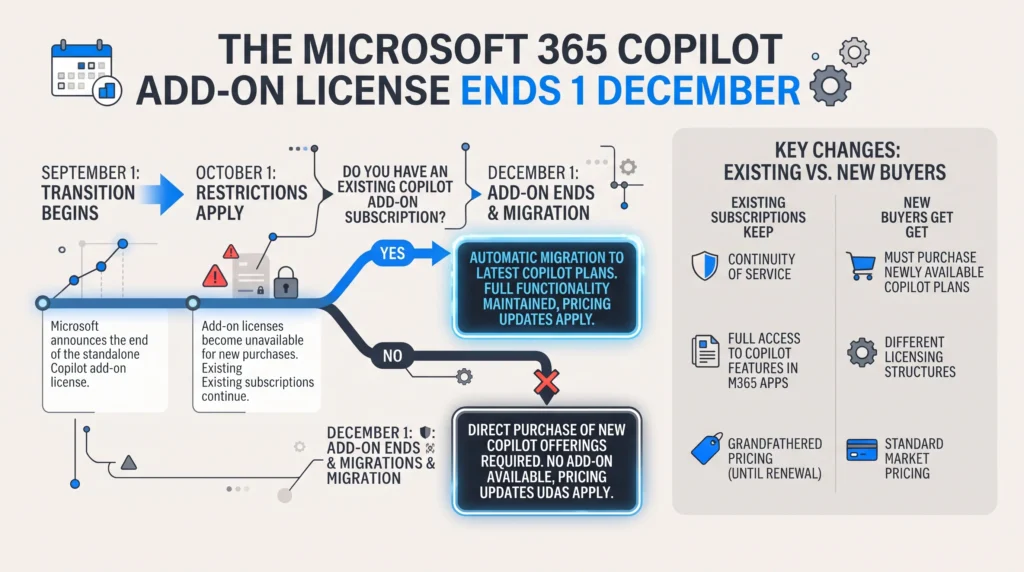
A Microsoft 365 Copilot add-on license is a paid per-user seat that needs a Microsoft 365 base plan under it. The vendor renamed those offers in October 2026, so the words “(add-on)” now sit in the product name itself. On 1 December 2026, they reach end of sale in the partner channel. End of sale is not end of life. The seats you hold today keep running, and you can still renew them and change the count.
AI Smart Ventures has guided growing businesses through AI adoption calls that sound alarming and turn out to be clerical. This one is mostly clerical, with a single real decision inside it, and your Copilot does not stop working. The live question is what your next quote says, and who is watching the meter.
Get this wrong in either direction, and it costs you. Read “end of sale” as “end of service,” and you pull out a working tool for nothing. Ignore the date and you meet a quote with a product name your records do not hold, plus a billing default nobody chose.
Key Takeaways
- End of sale is not end of life: new buyers can no longer order the add-on offers after 1 December 2026. Plans you hold keep running.
- Your current seats do not move: IDs, prices, renewal terms, auto-renew and service all stay put. Nothing to migrate, no seats to move.
- New buyers drop the base-plan rule: from that date, the new Copilot offers need no Microsoft 365 plan under them.
- Pay as you go arrives switched on: new Copilot Business plans bought through the partner channel default to it. The vendor moved that date back from 2 November 2026.
- Your own records are the weak link: only 31% of firms can see their AI software, per Flexera’s 2026 State of ITAM Report.
One pattern runs through all five: every change sits on the buying side, not on what Copilot does in Word or Teams. So this is a buying job rather than AI enablement work, and practical AI housekeeping rather than strategy. The awkward part is that it lands on whoever owns the license records.
What exactly ends on 1 December 2026?
One thing ends: the sale of the add-on offers to new buyers in the partner channel. The vendor’s October 2026 partner note dates that at 1 December 2026. It names both “Microsoft 365 Copilot (add-on)” and “Microsoft 365 Copilot Business (add-on)”. Nothing is switched off on the day, and no service stops; those offers simply stop being something a new buyer can order.
The rename came first, and it is the tell. From 16 October 2026 the vendor added “(add-on)” to the name of every offer that still needs a base plan. So a fresh quote may already read differently from your admin center. The old route used the base plan as a gate, and the new one does not. Partners were told to point scripts and catalog maps at product and SKU IDs, not names.
| Date | What happens |
|---|---|
| 16 Oct 2026 | Offers needing a base plan gain “(add-on)” in their name |
| 1 Nov 2026 | New product and SKU IDs land before the price list preview |
| 1 Dec 2026 | Add-on offers end of sale, stand-alone offers on sale, pay as you go defaults on |
Does your current Copilot subscription change?
No, and the vendor is blunt about it: no action is needed for plans you already hold. Product IDs, SKU IDs, prices, renewal terms, auto-renew, and the service itself all stay as they are. There is nothing to migrate and no seat to reassign. You can keep renewing the plan you hold today, and you can move seat counts up or down after the date.
End of sale governs what a partner may sell, not what a buyer owns. Your plan is a live contract with its own IDs, and the catalog keys on those IDs once the offer name retires. So the risk here is not lost service. It is paperwork drift: a purchase order, an asset register, or a renewal calendar still carrying the old name. Good change management on this one is mostly filing.
What replaces the add-on offer for new buyers?
New stand-alone offers, each with its own product and SKU IDs. From 1 December 2026, the new Copilot and Copilot Business offers can be bought with no Microsoft 365 base plan at all. They go on sale in every channel, and cover business, government, school, and nonprofit buyers. The vendor prices them the same as the offers they replace. Buying changes; the tool does not.
One caveat does the heavy lifting, and new buyers skip it. The vendor’s wording is that Copilot still depends on the Microsoft 365 apps and services a buyer is licensed for. Dropping the base-plan rule at the till does not drop the need for mail, files and sites to read. Buy a seat into an empty tenant and the tool has nothing of yours to read. The gate moved from buying to use.
Why does usage-based billing switch on by default?
Because the newer AI work bills on use, and the vendor wants the plumbing ready first. From 1 December 2026, new Copilot Business plans bought through the partner channel arrive with pay as you go switched on. That date moved back from 2 November 2026. The reason given is less billing setup, since the Azure link it needs now comes with the new licenses.
A seat and a meter behave nothing alike, and your finance lead should hear that early. The vendor’s cost management guide for Copilot Credits names what draws on credits. The list runs Cowork, deep work in SharePoint and OneDrive, the Work IQ API, Teams Phone Agent and Code. Each user gets a preset monthly credit limit, which admins can change. Spending rules also spread to new tools unless somebody turns that off.
- Name the owner before 1 December: one person reads the cost dashboard each month and reports what moved.
- Check your spending rules: auto-apply is on by default, so new tools inherit the rule you already set.
- Give finance a read-only role: reader roles see the use reports without rights to change billing.
What will this license change cost you?
In money, most likely nothing new. The vendor prices the new offers the same as the add-on ones, and current plans keep their prices and terms. The real cost is time, and it lands in two places. One is about an hour in the admin center, working out what you hold. The other is the metered side, which only grows once your team turns those tools on.
Sequence is the lever that moves the total, so confirm the base plans and seat counts you hold first. Agree the metered limits next, then widen seats only to roles where real use shows up. In that order the change costs an afternoon; backwards, you face a quote built against records that no longer match. Generic AI consultants open with a tool tour, when the leaner first move is a license audit.
What should you check before 1 December?
Five things, and they all sit in the Microsoft 365 admin center or your partner’s quote. Confirm which Copilot offer your plan actually is, since the name gained “(add-on)” in October. Confirm the renewal date, then the auto-renew setting, then the base plan under each Copilot user. Last, ask your partner for the new product and SKU IDs, which the vendor dated to 1 November 2026.
Getting this right is worth more than it looks. Flexera’s 2026 audit findings put software audits at 48% of the firms surveyed in the past year. Microsoft was named by 64% of those audited. So a license record that matches your tenant is not filing for its own sake: it is what makes a renewal, or an audit, dull. Build it once, and the next license change costs you a phone call.
AI Smart Ventures has worked with close to 1,000 organizations. A call like this usually opens with a license audit, not a tool demo. Our AI Advisory team maps what you hold before December arrives.
Frequently Asked Questions
What does “end of sale” actually mean here?
It means a partner can no longer sell that offer to a new buyer after 1 December 2026. It does not mean the product stops, your seats stop, or your plan lapses. The vendor states plainly that end of sale is not end of life, and current buyers can keep renewing and changing seats. Your own users notice nothing at all on the day.
Must you own Microsoft 365 to buy Copilot now?
Until 1 December 2026, yes: the add-on offers all need a Microsoft 365 base plan that counts. From that date, the new stand-alone offers can be bought with no base plan at all. The catch is use rather than the rules. The vendor’s note says Copilot still depends on the apps and services you are licensed for. A seat with no mail or files behind it has little to read.
What license families does the eligible list cover?
Nine families, which is wider than most buyers assume. The vendor’s license options page names Microsoft 365 and Office 365 plans, Teams plans, Exchange Online, SharePoint, OneDrive, Planner and Project, Visio and Clipchamp. Office 365 E1, E3, E5 and F3 all count. Public sector and school plans carry their own lists, and Copilot Business covers firms up to 300 users on a yearly term.
Can you buy Microsoft 365 outright instead?
No. Microsoft 365 is sold as a subscription, and the one-time route does not carry Copilot. The vendor’s partner guidance says Copilot runs only on the cloud-backed apps inside Microsoft 365 suites, and that on-premises versions of Office are not eligible. Office LTSC 2024 still exists where rules or network limits rule out the cloud, though choosing it rules out the add-on seat as well.
Why is there a new Copilot line on your bill?
Two lines can appear where one used to. The seat is the fixed per-user charge, while a second line shows up once metered tools get used, since those bill on use. Open Billing in the Microsoft 365 admin center and match the product name to your plan list. From 1 December 2026, new Copilot Business orders arrive with pay as you go already on.
Will your renewal date or auto-renew setting move?
No. The vendor lists renewal terms and auto-renew settings among the things that do not change for current plans. Product IDs, SKU IDs, prices and the service sit on the same list. Check both anyway, because a setting switched off months ago is a separate problem this date will expose. Keep the date in a shared calendar, not one person’s inbox.
Can you still add seats to an add-on subscription?
Yes. The vendor’s note says current buyers can keep renewing and changing seat counts after the add-on offers reach end of sale. A hire who starts in March still gets a seat on the plan you hold, with no workaround. What you cannot do is open a brand new add-on plan, because new orders move to the stand-alone offers from that date.
Does anything change about what Copilot can do?
Nothing. The vendor calls this a buying change that affects how buyers purchase Copilot, not what Copilot does. The same tool shows up in the same apps, reading the same work data under the same access rules as today. If a seller tells you December forces a feature migration or a rebuild, ask them to show you where the partner note says so.
When do the new product and SKU IDs appear?
The vendor dated the new IDs to just before the 1 November 2026 price list preview, with the offers on sale from 1 December. Partners were told to move scripts, catalog maps and ordering tools onto product and SKU IDs rather than offer names by 16 October 2026. If you run license scripts in-house, that advice applies to yours too.
Where should a growing business start on this?
Start with a list, not a quote. Write down every Copilot seat, the base plan under it, the renewal date and the last person to use it. Then decide what to carry into December. Treat the metered tools as a separate call, with a named owner and an agreed limit. Schedule a consultation to work through your license picture before the date lands.
Executive Summary
A Microsoft 365 Copilot add-on license is a per-user seat that needs a Microsoft 365 base plan under it. Those offers reach end of sale in the partner channel on 1 December 2026, after the vendor added “(add-on)” to their names in October. End of sale is not end of life. Current plans keep their IDs, prices, renewal terms, auto-renew settings and service. New buyers get stand-alone offers that need no base plan, while new Copilot Business plans arrive with pay as you go switched on.
What Should You Do Next?
This week, open the Microsoft 365 admin center and list your Copilot seats with the base plan under each user. Confirm the renewal date and auto-renew setting, then ask your partner for the new SKU IDs on the same call. Agree who owns the metered side before anyone switches it on.
AI Smart Ventures offers AI Advisory for growing businesses deciding what to license, keep and drop as AI terms change. Schedule a consultation to turn your Copilot position into a clean December renewal and a real gain in operational efficiency.
People Also Read
- How Professional Services Firms Use AI to Win Large Clients
- AI for Customer Service Without a Support Team in 2026
About the Author
Nicole A. Donnelly is the Founder of AI Smart Ventures and an AI Adoption Specialist with 20 years of experience as a founder and CEO and over a decade leading AI adoption initiatives. She helps businesses integrate artificial intelligence with clarity and confidence, driving innovation and sustainable growth. Nicole has trained over 20,217 professionals in Applied AI, delivered 624 workshops, and worked with close to 1,000 organizations across diverse industries.
Expertise: AI Transformation, AI Strategy, AI Implementation, AI Adoption, Applied AI, Marketing, Business Operations
Disclaimer: This content is for informational purposes only and does not constitute professional business or technology advice. Results vary based on industry, existing systems and implementation commitment. Contact AI Smart Ventures for a consultation regarding your specific situation.