

Using AI for Job Descriptions: Hiring Guide for Business Owners
Last Updated: July 2026
AI tools for writing job descriptions help growing businesses make and improve job postings. You no longer start from a blank page. Business owners input role needs and culture details into an AI system. The tool makes a structured draft in seconds. This cuts hiring delays and removes inconsistency. It also helps attract candidates who match the actual needs of the role. It is one of the fastest ways to improve hiring output. You don’t need to add headcount to your HR team.
AI Smart Ventures has guided hundreds of growing businesses through the issue of scaling their hiring operations. The team works with owner-operators who need faster, more consistent hiring. They help you keep the human touch that defines your company culture.
Business owners face growing pressure to fill roles quickly while maintaining quality. Generic job postings attract unqualified applicants. This leads to wasted time in the screening step. AI-assisted drafting creates a smarter foundation. It better matches your internal needs to external talent. The sections below explain how to make this step work for your growing business.
Key Takeaways
- Define your needs clearly: Create detailed prompts that capture company culture, success metrics, and specific tool needs. Clear instructions prevent AI from producing generic or off-target output.
- Keep humans in control: Verify every AI-made draft for accuracy, tone, and brand voice before publishing. Human review ensures the final posting reflects your real standards.
- Remove bias actively: Audit each AI output for exclusionary language to widen your candidate pool. This reduces compliance risk and supports fair hiring practices.
- Use AI for the first draft: Build your initial document with AI to save time while keeping your team in full editorial control. This approach cuts draft production time by up to 50%.
- Build a standard workflow: Create a written step that lists approved prompt templates and a mandatory review step. A consistent step helps your team produce better results over time.
Why Use AI for Your Job Descriptions?
Using AI for job descriptions gives growing businesses a big head start. It speeds up the hiring step from day one. Most owner-operators struggle with the blank-page problem. Starting a posting from scratch takes longer than the actual review step. AI solves this by making a full foundation in seconds. It works from your role inputs. Your hiring team can then focus on refining rather than building from zero.
This shift alone speeds up hiring cycles. It keeps your pipeline moving when volume increases. AI systems analyze your needs and suggest language that connects with your target candidates. They find key skills tied to your role. Then they turn those skills into clear, attractive language. This turns a generic announcement into a targeted request. It reflects what your team actually needs.
According to McKinsey’s State of AI research, companies that adopt AI tools report faster steps and better output across business functions. When you stop writing every posting from scratch, you reclaim hours each week. You can use that time for higher-value work.
How Do You Prompt AI for a Job Description?
Give the AI a specific, structured input to get a good job description. Go far beyond just a job title. To get good output, define the core responsibilities and required skills. Add company culture keywords and output goals for the first 90 days.
When you supply this detail, the AI makes a tailored description. It speaks directly to the right candidates for your business. Include context about who the person reports to. Also add the main tools they will use. Add the outcomes you expect in the first quarter. Giving this context prevents the generic output that fails to attract top talent. Use the AI to draft the content. Keep your specific culture and goals at the center of the step.
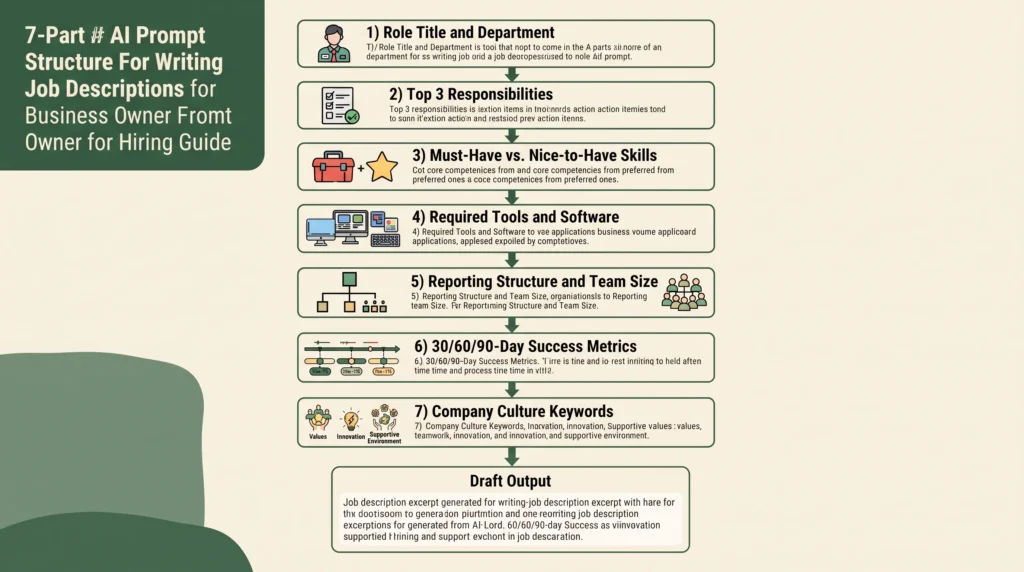
Your prompt should include:
- Role title and department
- Top three responsibilities
- Must-have skills and nice-to-have skills
- Required tools or software
- Reporting manager and team size
- Success metrics for the first 30, 60, and 90 days
- Three to five culture keywords that describe your team
If your first output feels too generic, add more specifics. Tell the AI what makes your company different. Refine the prompt by including examples of what success looks like in the role. Each time you do this, the output gets better.
Ready to build a smarter hiring step for your growing business? Our team helps owner-operators create AI-powered workflows that reduce time-to-hire and attract better candidates. Explore our AI Consulting services or schedule a consultation to see how this works for your team.
What Are the Risks of AI-Made Job Posts?
The main risk of relying on AI for job descriptions is generic content. It may miss your company’s unique culture. It may also fail to attract top talent. Machines make text based on generic market patterns. They often ignore the specific qualities that make a role rewarding.
These tools can also bring in hidden biases from their training data. This creates barriers that shrink your candidate pool. Without careful oversight, AI can introduce legal risk. It may use language that discriminates based on age, gender, or background. Terms like ‘digital native’ or ‘energetic team player’ can signal age bias. They send the wrong message to experienced experts.
AI-made postings can misrepresent the role. This happens when the prompt lacks accurate info from the hiring manager. A simple review checklist with five to seven criteria removes most errors before publication.
How Do You Remove Bias From AI Job Postings?
Removing bias starts with checking the output before it reaches any candidate. AI systems are trained on old job market data. They may copy patterns that excluded certain groups. This means postings can use subtle language that favors one group over another. Active human review at every stage is the best way to catch these patterns. Fix them before your posting goes live.
Start by scanning for gendered language. Words like ‘aggressive’ or ‘competitive’ tend to attract male candidates. Words like ‘nurturing’ or ‘supportive’ skew female. Gender-neutral alternatives improve representation across all roles. Tools like Textio and Gender Decoder help flag these patterns quickly. But human judgment still matters.
Next, audit for unnecessary needs. Ask whether every listed qualification is genuinely needed to do the job well. Requiring a four-year degree for roles that do not need one is a common mistake. It can cut out qualified candidates from non-traditional backgrounds. Removing artificial barriers widens your candidate pool without lowering your standards.
What AI Tools Work Best for Job Descriptions?
Several AI tools work well for drafting and refining job descriptions. The right choice depends on your team size, budget, and current setup. Think about how much setup you need. You may want a standalone drafting tool. Or you may want one that connects with your current applicant tracking system. Each tool category offers different trade-offs between ease of use and depth of features. Gartner’s AI research shows that business adoption of AI tools is rising fast across all industries.
General-purpose AI models like ChatGPT and Claude work well for owner-operators. They offer flexible drafting at low cost. You supply the prompt and receive a full draft within seconds. For teams that need more structure, try specialized tools like Textio, Ongig, and Workable. These include bias-checking and tone features. They are designed mainly for hiring.
When selecting a tool, check whether it connects with your current HR systems. Look for reusable prompt templates and inclusive language suggestions. Start with a free or trial version. Run it against three to five current job descriptions. Then commit to a paid plan only if it works well.
How Do You Review and Improve AI Drafts?
Reviewing an AI-made job description needs a structured approach. Cover content accuracy, language quality, and bias risk. A single-pass review is rarely enough to catch every issue. Plan for a two-step process. A hiring manager reviews for role accuracy first. Then a second reviewer checks for brand voice and inclusive language. This workflow catches errors that any single reviewer might miss under time pressure.
Your review checklist should cover accuracy, tone, and inclusion. Also check length (aim for 300 to 500 words) and add a clear call to action. After each hire, review the posting that attracted your best candidate. Compare it against your AI-made template to find what worked. This feedback loop improves your prompt library over time. It also reduces the editing needed for each new role.
Can AI Replace HR in Writing Job Posts?
AI cannot replace HR in writing job posts. Treating it as a full substitute creates more problems than it solves. Keep it as a drafting assistant. The tech is great at making structured content quickly. But it does not understand your team dynamics, culture, or real-world output patterns. Human judgment is still needed at every stage of the hiring step.
HR experts and hiring managers bring insight that AI cannot copy. They know which candidate qualities predict success in your specific environment. They can spot early red flags in a posting before it goes live. They also adjust the framing to attract the right people. The best hiring teams use AI as a drafting tool, not a decision-maker. They treat AI output as a first draft. They invest the time saved into better candidate conversations and more thorough reference checks.
Frequently Asked Questions
What is AI for writing job descriptions?
AI for writing job descriptions means using AI models and software to make, refine, and improve job postings. These tools take input from hiring managers. You include role responsibilities, required skills, and culture keywords. The tool produces a formatted draft in seconds. Business owners use these tools to speed up hiring. They also create more consistent postings across all open roles.
How accurate is AI-made content for job postings?
AI-made content is only as accurate as the input you give. Detailed, specific prompts produce output that closely matches your actual needs. Vague prompts produce generic output. Accuracy also depends on the tool you select. General-purpose models need more editing than recruitment-specific tools built for hiring workflows. Plan for human review regardless of which tool you use to verify role accuracy before the posting goes live.
Does AI make job descriptions better or worse?
AI makes job descriptions better when used correctly and worse when used carelessly. A well-prompted draft saves time and improves consistency across multiple openings. A poorly prompted draft produces generic content that fails to attract qualified candidates. The difference lies in how you write your prompts. It also depends on how well your team reviews and refines the output before publishing.
Can AI remove bias from job descriptions?
AI can help find and reduce certain types of bias, mainly gendered language and restrictive needs. But AI tools can also introduce bias if their training data reflects historical hiring patterns that excluded certain groups. The most reliable approach combines AI as an initial screening tool with human review using specific inclusion criteria. Apply both methods before any posting goes live.
How long does it take to use AI for a job description?
Writing a job description with AI takes five to fifteen minutes, including prompt writing, output review, and edits. This compares well to the one to two hours needed to write a posting from scratch. The time savings grow when you are hiring for multiple roles at once or updating several postings at the same time. Building a reusable prompt library cuts the time you need for every future hiring cycle.
Are there legal risks in using AI for job descriptions?
There are legal risks if AI-made job descriptions include discriminatory language or needs that violate employment law. Needs that screen out candidates based on age, gender, or disability can create legal risk. This applies to any protected characteristic under employment law. Review each posting against your local employment law guidelines before publishing. The EEOC gives guidance on AI and hiring practices that can help you stay compliant. Legal counsel or HR compliance software can catch issues that standard AI output may miss.
How much does it cost to use AI for job descriptions?
General-purpose AI tools are ready at low cost, with many offering free tiers that cover basic drafting needs. Specialized recruitment AI tools typically cost between $200 and $800 per month depending on features and team size. For growing businesses, AI Smart Ventures offers AI Consulting to help you find the right tools for your hiring step. Schedule a consultation to get a personalized recommendation.
Can I reuse AI-made job description templates?
Yes, you can and should reuse AI-made templates for recurring roles. Create a library of base prompts and approved templates for your most common positions. Review and update each template every six months to reflect changes in role needs, tools, and compensation expectations. This template system delivers one of the highest returns on investment. It helps owner-operators who hire for the same positions throughout the year.
Executive Summary
Using AI for job descriptions gives growing businesses a faster path. It helps attract qualified candidates. According to the Salesforce State of AI report, more businesses are using AI to improve their operations every year. Owner-operators who build clear prompt libraries report much shorter hiring cycles. Strict human review also helps. They also see better candidate quality from the first round. Treat AI as a drafting assistant, not a replacement for human judgment. Start with a structured prompt that includes role responsibilities, required skills, and culture keywords. Add success metrics too. Review every draft for accuracy, tone, and bias before publishing. Build a template library for recurring roles. Measure your results against your baseline hiring metrics. The combination of AI speed and human oversight is the best hiring formula. Use it when you want to scale without sacrificing quality.
What Should You Do Next?
Audit your current job description step. Find the roles where you spend the most time on drafts. Build a prompt template for your three most common positions. Test it against your best recent hires. Measure the time you save and the candidate quality you attract. Check results in the first two weeks after switching to AI-assisted drafting.
AI Smart Ventures offers AI Consulting for growing businesses. We help you build smarter hiring systems using proven AI tools and steps. Schedule a consultation to design a workflow that fits your team and your timeline.
People Also Read
- How Much Do AI Marketing Services Cost? A Guide for Business Owners
- What Does an AI Marketing Audit Actually Uncover? A Guide for Business Owners
About the Author
Nicole A. Donnelly is the Founder of AI Smart Ventures and an AI Adoption Specialist with 20 years of history as a founder and CEO and over a decade leading AI adoption plans. She helps businesses connect AI with clarity and confidence, driving innovation and lasting growth. Nicole has trained over 20,217 experts in Applied AI, delivered 624 workshops, and worked with close to 1,000 businesses across diverse industries.
Expertise: AI Transformation, AI Strategy, AI Rollout, AI Adoption, Applied AI, Marketing, Business Operations
Disclaimer: This content is for informational purposes only and does not constitute expert business or tech advice. Results vary based on industry, current systems and rollout commitment. Contact AI Smart Ventures for a consultation about your specific situation.

