
What Does a Microsoft 365 Copilot Subscription Include?
Last Updated: November 2026
A Microsoft 365 Copilot subscription is a paid, per-user license that adds an AI helper to the apps your team uses all day. One seat covers chat, plus the AI built into Word, Excel, PowerPoint, Outlook, and Teams, and agents in SharePoint. It also lets the tool read your own mail, files, chats, and meetings, but only what that user may open. The seat sits on top of a plan you already pay for.
AI Smart Ventures has guided growing businesses through AI adoption calls just like this one. The name on the box stays the same while the terms under it shift. The live question is rarely whether the tool works. It is which parts your plan covers now, and which parts bill the moment your team uses them.
Buy this the wrong way, and you pay twice: once for seats no one opens, then again for use no one planned. Microsoft gave the product a new name in October 2026, and it changes how you buy on 1 December. So the answer you read a year ago is now partly wrong, and the gap shows up on a quote. Both traps are easy to dodge once you know what one seat covers.
Key Takeaways
- The seat covers more than the Office apps: one license adds chat with Pages and agents in SharePoint. You also get the AI inside the Microsoft 365 apps, Copilot Analytics and SharePoint Advanced Management.
- Your current plan may count: the base plans that qualify run from Business Basic and Business Standard up to E3, E5 and E7. Several Office 365, Exchange, SharePoint and Visio plans count as well.
- New AI work bills on use, not the seat: Cowork, the Work IQ API and Teams Phone Agent all run on Copilot Credits. So does deep work in SharePoint and OneDrive.
- 1 December 2026 changes how you buy: the add-on offers reach end of sale in the partner channel, and stand-alone offers arrive. Pay as you go also switches on by default for new Copilot Business plans.
One pattern runs through all four. The license covers what Microsoft has already built into the apps, while the newer agent work sits outside it on a meter. That split keeps your AI strategy steady, or lets it drift. It also names the person who must watch the admin center each month. This is practical AI at its most boring: read the license, then plan the work.
What does the Copilot license actually cover?
Microsoft names six things in its Copilot Studio license guide: chat with Pages, the AI inside the Microsoft 365 apps, and agents in SharePoint. The list also holds Copilot Analytics, SharePoint Advanced Management, and agent work built in Copilot Studio when it runs in chat, Teams or SharePoint. The seat grounds the tool in your own data through the Microsoft Graph, so answers draw on files that user can open.
Grounding is the part worth slowing down for, because it splits a paid seat from the chat your plan may include free. With no paid license, chat mostly reads the web, though a user can still paste text in or upload a file. With one, Microsoft’s chat guide says the tool reads across mail, meetings, chats, files and sites. That is the gap between a tool that answers questions and one that answers yours.
What has to be in place before Copilot works?
Four things, and three are likely in place now. Each user needs a Microsoft 365 base plan that counts, a paid license, and a work account in Entra ID. Features that read the mailbox also need Exchange Online. Microsoft’s Copilot setup page adds three catches: some features need OneDrive, group mailboxes are out, and device-based licenses do not work. None of this is heavy lifting, and all of it is checkable in an hour.
The list of base plans that qualify is wider than most teams think. Microsoft’s license options page names Business Basic, Business Standard, and Business Premium, then E3, E5 and E7. Several Office 365 plans count, as do stand-alone Exchange, SharePoint, OneDrive and Visio plans. Copilot Business, built for firms up to 300 users, runs on a yearly term and caps at 300 seats per tenant. Network setup counts too, since the app domain has to pass your firewall and proxy.
What is not included in a Copilot subscription?
Three groups sit outside the seat, and the first is AI that bills on use. Cowork, the Work IQ API and Teams Phone Agent all draw on Copilot Credits, per Microsoft’s pay-as-you-go guide. Copilot Code and deep work in SharePoint and OneDrive draw on them too. Second is Copilot Studio work you publish anywhere other than chat, Teams, or SharePoint. Third is control tools such as Microsoft Purview, which the vendor advises but does not bundle.
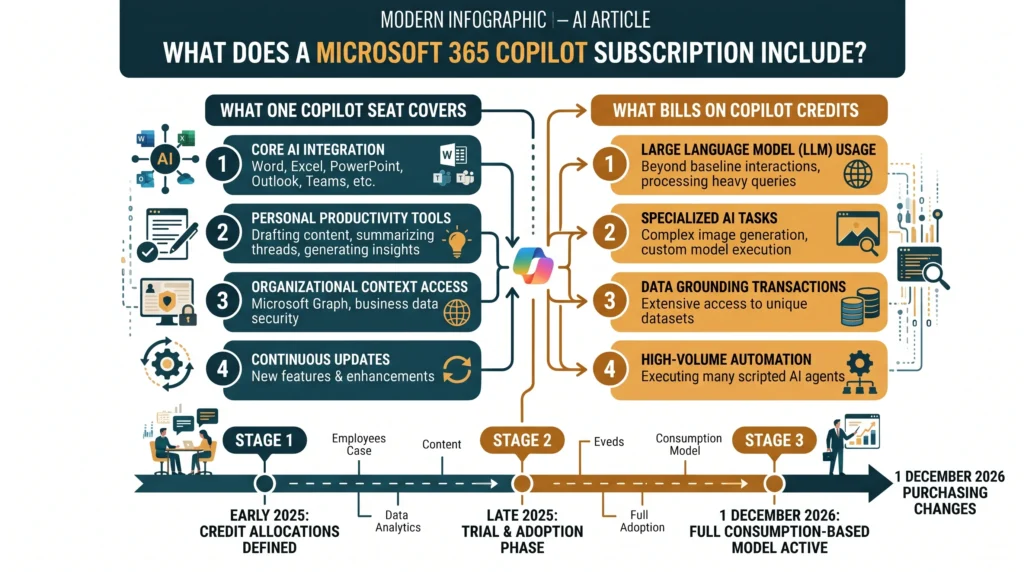
Credits act nothing like a seat, and that is where budgets slip. Studio capacity is checked each month, and credits you do not use do not roll over. Spending rules also spread to new tools and agents on their own, unless an admin turns that off. So a seat is a fixed cost you can plan, while credits move and someone has to watch them. Name that person before anyone builds an agent.
| What you get | How it bills |
|---|---|
| Chat, and the AI inside the Microsoft 365 apps | In the seat |
| Agents in SharePoint, and Copilot Analytics | In the seat |
| Cowork, Work IQ API, Teams Phone Agent | Copilot Credits, by use |
| Agents published outside chat, Teams or SharePoint | Studio capacity, or pay as you go |
| Microsoft Purview controls | Bought on their own, and advised not required |
What changes for Copilot buyers on 1 December?
Three things change on 1 December 2026, and none of them change what the tool does. Microsoft’s October 2026 partner note confirms that the add-on offers reach end of sale in the partner channel. Those are the offers that need a base plan underneath. New stand-alone offers can be bought with no base plan at all. Pay as you go also turns on by default for new Copilot Business plans. End of sale is not end of life.
That date has moved once, from 2 November, so treat it as a planning input and check it with your partner. The new name matters as much as the date. That same setup page now says Microsoft 365 Copilot is called Microsoft Copilot, and the app’s web address is changing. Quotes, scripts and internal notes that match on the old names will all need a pass. Good change management here is mostly clerical, but skip it and your renewal paperwork stops matching your tenant.
- End of sale, not end of life: the add-on offers stop being sold to new buyers in the partner channel. Current plans keep their product IDs, renewal terms and settings, and can still add seats.
- A base plan is no longer the gate: from 1 December you can buy either paid plan with no Microsoft 365 plan under it.
- Pay as you go is on by default: new Copilot Business plans bought through the partner channel arrive with it switched on. Each user gets a preset monthly credit limit, which admins can change.
How much does a Microsoft 365 Copilot seat cost?
Cost tracks three things, not one: seat count, the base plan under those seats, and how much metered AI your team turns on later. The seat is a fixed per-user term, yearly in the case of Copilot Business. Credits are the moving part, and they only build up when people use the tools that meter. Ask your partner for the current rate card, then model the credit side on its own, because the two behave nothing alike.
Order of play is the lever that moves the total. Assign a small group first, then read the usage reports in the admin center for a month. Widen only to the roles where real use shows up. Zylo’s 2026 SaaS Management Index found that 46% of software licenses go unused in a given 30-day span. Tool-first AI agencies tend to start at the demo, and Copilot often gets bought the same way: for the whole team, before anyone measured. Cost drops sharply when you flip that order.
AI Smart Ventures has served close to 1,000 organizations, and the first session is often a license audit rather than a tool tour. Our AI Advisory team maps what your current plan covers before you add one more seat.
Frequently Asked Questions
Is there a Copilot you already pay for?
Most likely, yes. Chat is open to users on a Microsoft 365 plan that counts, with no paid license at all. It covers web-based chat, file uploads, image work, and agents at standard access. What it leaves out is broad reading of your own data through the Microsoft Graph and the search index. Chat inside Word, Excel and PowerPoint varies by license, and in-app labels show which version a user has.
Which Microsoft 365 plans qualify for a Copilot seat?
More than most buyers expect. The list names Business Basic, Business Standard and Business Premium, plus Microsoft 365 E3, E5 and E7. Office 365 E1, E3 and E5 count, as do stand-alone Exchange Online, SharePoint, OneDrive and Planner plans. Public sector and school plans carry their own lists. Copilot Business is the route for firms up to 300 users, and bigger tenants use the other plans.
What happens to Copilot if your base plan lapses?
Copilot stops being useful before it stops being billed. It reads your Microsoft 365 data. Once a base plan lapses, mail, files and sites drop out of service, and nothing is left to read. Keep the base plan current and track renewal dates on both lines. From 1 December 2026, new stand-alone offers no longer need a base plan at the point of sale.
Can you buy one Copilot seat for one person?
Yes. Nothing in the current license options sets a floor on seat count, so you can license one user and widen later. That user still needs a base plan that counts. Copilot Business runs on a yearly term, with a cap of 300 seats per tenant. One seat is a sound test, so pick someone whose week is truly routine. Agree up front what AI enablement should change.
What is the leanest way to start with Copilot seats?
Start with the plan you already own, and check whether it covers your users for chat today. Then add paid seats only for roles where you can name the task that repeats. Set a spending rule before anyone touches metered tools, and read the use report each month. Schedule a consultation to size the pilot and pick the roles that get the first seats.
Can Copilot open files a user cannot already see?
No. The tool works inside your current Microsoft 365 access model, and reads only what the signed-in user may open. It grants no new access, which makes your sharing habits the real control. If a private site is open to the whole team, the summary goes to the whole team as well. Microsoft urges a clean, governed data layer first, using SharePoint Advanced Management and Purview.
Do Researcher and Analyst come with the license?
Yes. Microsoft opened both reasoning agents to users who hold a paid license. Researcher runs multi-step research across work and web data, and can pull from links such as Salesforce and ServiceNow. Analyst works like a data scientist, runs Python, and shows its code so you can check the logic. Both reward a bit of AI literacy, so plan for a short learning curve.
Does Copilot work in the browser versions of the apps?
Yes, with one setting to check. The AI runs in Word, Excel and PowerPoint on the web as well as the desktop apps. Those web versions need third-party cookies turned on. Links in chat replies are also checked through Safe Links, which needs cookies allowed for the Safe Links domain. Where a managed browser rule blocks them, users see a link check error instead.
Executive Summary
A Microsoft 365 Copilot subscription is a per-user license. One seat covers chat, the AI inside the Microsoft 365 apps, agents in SharePoint, Copilot Analytics and SharePoint Advanced Management. It reads the work data each user may open. The seat sits on a base plan, and the list of plans that count is wider than most buyers think. Newer AI work bills on Copilot Credits instead, including Cowork, the Work IQ API and deep work in SharePoint. On 1 December 2026 the add-on offers reach end of sale and stand-alone offers arrive. Pay as you go then becomes the default for new Copilot Business plans.
What Should You Do Next?
This week, open the Microsoft 365 admin center and list the users your plan already covers for chat. Then name the two roles with the most routine document and inbox work, and set a spending rule before you switch on anything that meters. Check the 1 December dates with your partner on the same call.
AI Smart Ventures offers AI Advisory for growing businesses deciding what to license, keep and drop as AI terms shift. Schedule a consultation to map your Copilot seats to the work that truly repeats.
People Also Read
- What Is ISO 42001 and Does Your Business Need It in 2026?
- AI Indemnification Clauses Explained for Business Owners in 2026
About the Author
Nicole A. Donnelly is the Founder of AI Smart Ventures and an AI Adoption Specialist with 20 years of experience as a founder and CEO and over a decade leading AI adoption initiatives. She helps businesses integrate artificial intelligence with clarity and confidence, driving innovation and sustainable growth. Nicole has trained over 20,217 professionals in Applied AI, delivered 624 workshops, and worked with close to 1,000 organizations across diverse industries.
Expertise: AI Transformation, AI Strategy, AI Implementation, AI Adoption, Applied AI, Marketing, Business Operations
Disclaimer: This content is for informational purposes only and does not constitute professional business or technology advice. Results vary based on industry, existing systems, and implementation commitment. Contact AI Smart Ventures for a consultation regarding your specific situation.