

What Happens to Work When an AI Tool Goes Down?
Last Updated: October 2026
An AI outage is any stretch when a tool your work depends on stops answering, or answers so slowly and poorly that nobody can use it. A full stop is the easy case. Degraded service is harder: the tool still replies, just late, partial, or wrong enough to slow the team down. A fallback is the path the work takes instead, usually a manual one. Most outages are short. What sets the damage is whether your team knows what to do in the first ten minutes.
AI Smart Ventures has guided growing businesses through AI implementation in sales, finance and client work, and the pattern repeats. A tool gets good enough to trust, the old manual steps quietly fall out of use, and nobody writes down what replaced them. Then the tool goes quiet on a Tuesday, and a workflow that ran itself for eight months has no second path.
Skip this and the first outage becomes an afternoon of guesswork: people retrying, work piling up unseen, and a client hearing about it from somewhere other than you. Write the manual path first and the same hour turns dull. Dull is the goal.
Key Takeaways
- List the workflows, not the tools: one tool can sit inside four workflows, and only those with a deadline need a written path.
- One page per workflow, not a manual: the trigger, the steps, the data a person needs and the stop line fit on one page.
- A path nobody has walked is a guess: one walkthrough finds the missing login, the lapsed access, and the file nobody can reach.
- A written fallback is not always a control: 2026 research calls an abandoned manual process a fictional fallback.
- Name the switch and the messenger: one person calls it, a second tells customers and staff, and both names sit on the page.
- Plan the catch-up, not just the gap: decide now what gets re-run, what stays as written, and who checks the first batch.
Those six add up to a short page and one rehearsal, not a continuity program. An hour per workflow covers most growing businesses, and this is practical AI work at its least exciting. The real job is picking which workflows earn it.
Which of your workflows would stop without the tool?
The ones where a person now starts from the tool’s output instead of the raw input. List every workflow that touches the tool. If a quote begins life as a drafted paragraph, that draft is load-bearing. If someone pastes a transcript in to shorten it, the transcript still exists, and the summary is a bonus. The first kind stops dead. The second only slows down.
Reliance builds faster than anyone notices. In GoTo’s Pulse of Work study, published on 19 May 2026 from 2,500 employees, 50% said they rely on AI too much and 30% said they cannot work without it. Sort the list into three buckets: stops dead, runs slower, waits a day. Only the first needs a written path this quarter, and the AI literacy test is whether anyone can still describe the steps.
What does a manual path actually look like?
One page per workflow, written in the order a person would work. Name the trigger, the steps without the tool, the data the person needs and where it sits, how long it takes by hand, and where you stop. That last line matters most. A path that takes four times as long is fine for a morning and wrong for a week. The page says which.
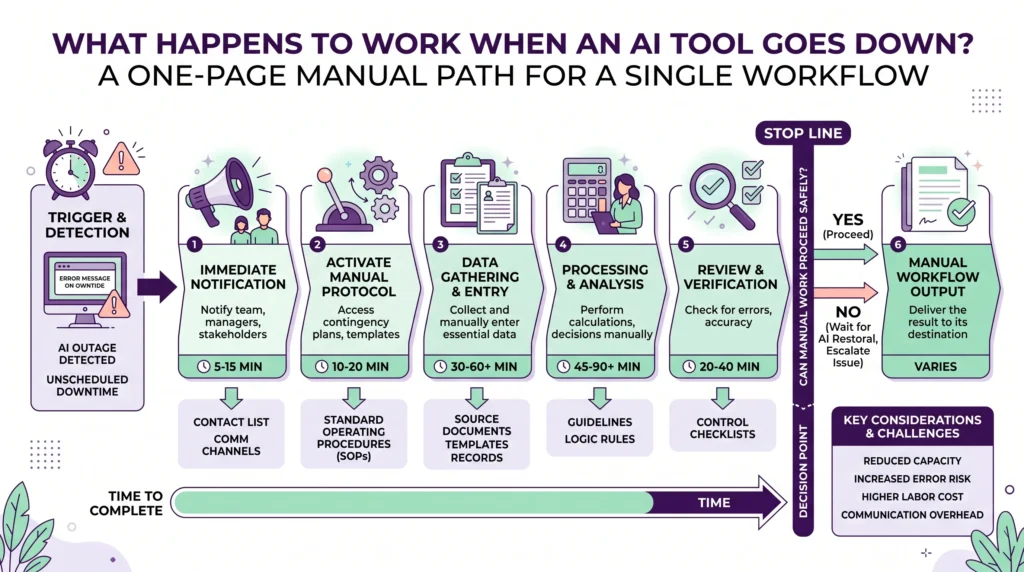
Keep it to a page on purpose. This is not paperwork for its own sake, nor an SOP library. A March 2026 review by the Financial Conduct Authority expects testing plans to record recovery times, workarounds and the assumptions behind them, which is a fair bar for one page. Write the guesses down where you make them: that the export still opens, that two people know the client, that someone holds the login.
- Trigger: what a person can see, like two people on different networks hitting one error.
- Steps: the shortest run that still gives a customer something they will accept.
- Inputs: where the raw data sits when the tool is not there to fetch it.
- Stop line: how long you run by hand before you pause and tell people.
Why walk the manual path before the outage?
Because a path nobody has walked is a guess, and guesses fail on small things: a login one person holds, a report needing access nobody has, a client list last exported in March. Ready.gov says it plainly in its guidance on testing and exercises: you may find parts of your program that will not work in practice. One walkthrough finds most of them inside an hour.
The 2026 research puts it more bluntly. A July 2026 paper on bringing AI inside the operational resilience perimeter argues that a fallback written down but not resourced is not a control, and that where AI replaced a manual process that has since withered, the fallback is fictional. Walking it is how you learn which kind you own. Do it on a quiet morning, with the person who would do the work.
Who decides to switch, and who tells people?
One named person decides, and a different named person tells customers and staff. Splitting the two keeps the call fast and the message the same. The decider needs no technical skill, only the right to call it and a clock: if nothing has moved in twenty minutes, go manual. Write both names on the page, each with a backup, because outages ignore who is on vacation.
Telling people is the part teams skip. The same review found firms held a plan for talking to customers during an outage, but little proof they had tested it in their drills. That is where most messages go wrong. Draft two short notes now and keep them with the page: one internal, one external. Each says what is slow, what you are doing, and when the next update comes. Good change management is mostly fewer surprises.
AI Smart Ventures builds this into AI Implementation work for founder-led businesses, so the manual path and the named roles arrive with the workflow, not a year later.
What piles up, and how do you catch up after?
Three things pile up: work nobody did, work done by hand that still needs entering, and the queue the tool runs all at once when it returns. Decide the order before the day arrives. Name what gets re-run, what stays just as the person wrote it, and what you drop. Then check the first batch after the restart, because that is where duplicates show up.
Outages also run longer than the ten minutes people picture. Cloudflare’s own write-up of its 20 February 2026 outage, posted the next day, records a total of 6 hours and 7 minutes, with about 1,100 customer address ranges pulled offline by a bug in a cleanup task. A fault like that outlasts a morning, and vendors selling automation as AI rarely talk about this part. Plan the catch-up in hours, give the backlog to one person, and protect the operational efficiency you bought.
Frequently Asked Questions
How do you tell a tool outage from a problem on your end?
Have a second person on a different network and device try the same thing. If they see it too, it is the tool. If only you see it, the fix is local and it is yours. Either way, start the clock, not the search for a cause. Twenty minutes of poking around is the usual way a short outage becomes a lost morning.
Can you find out why a tool stopped working?
Rarely while it happens, and the answer often lands a day later. Causes are mostly ordinary: a change the provider made to its own systems. Cloudflare’s report on 20 February 2026 traced six hours of trouble to a bug in a cleanup job. One provider can also sit under several tools you treat as separate, so one fault can look like the whole internet failing.
What counts as degraded service rather than an outage?
Degraded service is when the tool answers, but badly: slower than normal, missing parts, or timing out on longer jobs. It is harder than a clean stop, because nobody says so and people keep retrying instead of switching. Put a number on the page that anyone can check, such as a one-minute task taking five. Past that line, treat it as an outage and move.
How long should you wait before going manual?
Set one number per workflow and write it down. Twenty minutes suits most daily work, and an hour is fine for anything that could wait until tomorrow. The number matters less than having one. Without it, people retry until the day is gone. The named decider calls the switch when the clock runs out, without waiting for a cause or a fix time.
Does every workflow need a written manual path?
No. Write one for the workflows that stop dead and carry a deadline: client delivery, payroll inputs, anything with a date on it. Work that merely runs slower needs a single line saying so. Most growing businesses end up with three to six pages, not thirty. Keeping the list short is what gets it written at all, and read again a year later.
Who should write the manual path for a workflow?
The person who does the work, with half an hour from whoever set the tool up. The doer knows the steps the tool hides; the builder knows which inputs it fetches quietly. A manager writing it alone makes a page that reads well and fails at the first login screen. Keep the page with the workflow, not in a folder nobody opens.
How often should you walk the manual path again?
Twice a year covers most workflows, plus once after any change to the tool, the team or the data source. The walk is short: do one real item by hand, time it, note what broke. People leave, access lapses and file formats change, so a page that worked in March can quietly fail by September. Record the date of the last walk at the top.
What makes a fallback fictional?
A fallback is fictional when the manual process it points to no longer exists. The spreadsheet was retired, the person who ran it left, or nobody holds the access. A July 2026 paper on AI and operational resilience says it directly: a fallback that is written down but not resourced is not a control. Finding one should start a fix, not a log entry.
Should you keep a second AI tool as a backup?
Sometimes, though it is not a fallback on its own. A second tool helps only if your people know it, your data already sits in it, and it does not rest on the same provider. Otherwise you are learning something new on a bad morning. A written manual path needs no license and no training day, and never fails twice for the same reason.
What should a review after an outage cover?
Four questions, in under thirty minutes: how long work stopped, when someone noticed, what the manual path got wrong, and what piled up. Write the answers on the same page and date them. Skip the blame, and skip the provider’s own story, because neither changes what you do next time. One or two edits to the page is a good outcome. A new program is not.
How do you stop the catch-up creating duplicate work?
Mark everything done by hand as you go, in whatever system holds the record. When the tool returns it often runs its own queue again, so the risk is two versions of the same invoice, email or summary. Give one person the job of checking the first batch after the restart. An hour of checking beats a client finding the copy a week later.
What does it take to get a manual path in place?
One workflow, two hours, two people: half an hour listing what stops, half an hour writing the page, and an hour walking it. Scope grows with the number of workflows carrying a deadline, not the size of your team. Most teams finish the first in a morning. Schedule a consultation with AI Smart Ventures to design manual paths into the work you already run.
Executive Summary
An AI outage stops the workflows where a person now starts from the tool’s output, not the raw input. Those are the ones that need a manual path: one page naming the trigger, the steps without the tool, the data a person needs, how long it takes by hand, and where you stop. Walk it once before you need it, because a path nobody has tried is a guess. Name one person to call the switch and another to tell customers. Then plan the catch-up, and fix the page afterwards.
What Should You Do Next?
Pick the workflow that would hurt most if the tool went quiet this week. Write its manual path on a single page: trigger, steps, inputs, how long it takes by hand, when you stop. Then walk it with the person who would do the work, and name who calls the switch and who tells customers.
AI Smart Ventures offers AI Implementation for growing businesses that want the fallback designed in with the workflow, not bolted on after a bad morning. Schedule a consultation to design manual paths for the workflows you already depend on.
People Also Read
- Reclaim vs Motion: AI Calendar Showdown for Busy Founders 2026
- AI Voice-of-Customer Analysis for Business Owners in 2026
About the Author
Nicole A. Donnelly is the Founder of AI Smart Ventures and an AI Adoption Specialist with 20 years of experience as a founder and CEO and over a decade leading AI adoption initiatives. She helps businesses integrate artificial intelligence with clarity and confidence, driving innovation and sustainable growth. Nicole has trained over 20,217 professionals in Applied AI, delivered 624 workshops, and worked with close to 1,000 organizations across diverse industries.
Expertise: AI Transformation, AI Strategy, AI Implementation, AI Adoption, Applied AI, Marketing, Business Operations
Disclaimer: This content is for informational purposes only and does not constitute professional business or technology advice. Results vary based on industry, existing systems and implementation commitment. Contact AI Smart Ventures for a consultation regarding your specific situation.

