

What Is Cursor AI and Can Non-Developers Use It for Business?
Last Updated: July 2026
A Cursor AI for non-developers is a code editor that uses artificial intelligence to turn plain-English prompts into working code. It runs on your computer and connects to AI models that write, fix, and explain code for you. By 2026, over 1 million users have adopted Cursor AI for tasks ranging from simple data reports to full app automation.
AI Smart Ventures works with growing businesses that want to use AI tools like Cursor without building a development team. The team helps owner-operators choose the right tools, set them up, and build workflows that match their goals. This article draws on that hands-on experience to explain what Cursor AI is and how you can put it to work today.
Most business owners think they need a developer to build custom tools. That idea is becoming outdated. Tools like Cursor AI close the gap between having an idea and getting a working result. The real question is how much time you are willing to put into learning the basics.
Key Takeaways
- Cursor AI is free to start – The free plan includes 2,000 AI-powered code completions per month, enough for most owner-operators to test the tool before spending anything.
- No coding degree required – Cursor uses natural language prompts, so you type what you want in plain English and it writes the code for you.
- Common business use cases include – automating reports, building internal dashboards, and processing data files, all without paying a developer.
- Pro plan starts at $20 per month – This tier gives you unlimited completions and access to models like Claude 3.7 Sonnet and GPT-4o.
- Learning curve is manageable – Most non-developers feel comfortable with basic Cursor tasks after 5-10 hours of practice, based on user reviews on Product Hunt.
Cursor AI is not just for software engineers. It sits between you and the code that solves your problem. You still need to understand your problem clearly. But you no longer need to know syntax or programming logic to get results.
What Is Cursor AI Exactly?
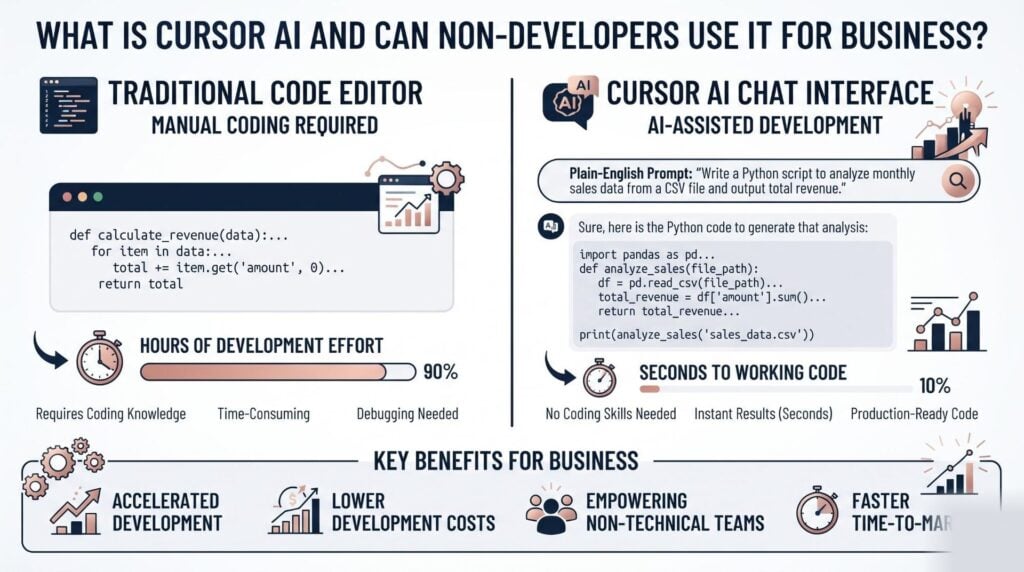
Cursor AI is a code editor that uses AI to help you write code through chat and autocomplete. It is built on Visual Studio Code, the most widely used code editor in the world. Over 1 million developers and business users had adopted Cursor by early 2026, based on the company’s public data.
Cursor works like a smart assistant inside your coding workspace. You type a question in plain English, and it responds with working code you can run right away. You can also ask it to explain any code block, fix errors, or rewrite a function. The experience feels more like texting a colleague than writing code from scratch.
Can Non-Developers Really Use It?
Yes, non-developers can use Cursor AI for well-defined, repeatable business tasks. A 2025 survey by Stack Overflow found that 38% of Cursor users described themselves as non-professional programmers. That share has grown in 2026 as the AI models inside the tool have improved.
The catch is that Cursor works best when you know exactly what output you want. If you can describe your task in clear steps, Cursor usually produces working code on the first or second try. Review all outputs carefully, since AI-generated code can look correct but contain logic errors underneath.
What Business Tasks Can Cursor Handle?
Cursor can handle data processing, report automation, web scraping, API connections, and simple app building. Business owners use it to pull data from spreadsheets, send automated emails, and build lightweight internal tools. One popular use case is connecting Google Sheets to an API to auto-fill client records on a schedule.
Here are the most common tasks owner-operators use Cursor for today:
- Building Python scripts to clean and reformat CSV files from accounting software
- Creating simple web dashboards that display sales or inventory data in real time
- Automating email follow-up sequences triggered by form submissions
- Pulling publicly available competitor pricing data for weekly tracking
These tasks often cost $200–$500 to outsource to a developer. With Cursor, a business owner willing to practice can finish similar tasks in a day or two. This tool works best for contained, well-defined tasks rather than large or complex systems.
How Does Cursor AI Compare to Other Tools?
Cursor competes with GitHub Copilot, Replit, and Bolt.new for the non-developer market in 2026. Each takes a different approach to making code accessible to people without technical backgrounds. Cursor sits closest to a traditional coding setup with AI built on top.
| Tool | Best For | Starting Price | Knowledge Needed |
|---|---|---|---|
| Cursor AI | Code editing and AI chat | Free / $20/mo | Low |
| GitHub Copilot | Autocomplete in existing editors | $10/mo | Medium |
| Replit | Browser-based app building | Free / $25/mo | Very Low |
| Bolt.new | Full-stack app generation | Free / $20/mo | Very Low |
Cursor is not the easiest place to start. Replit and Bolt.new need almost no setup. Cursor asks you to install the app and learn the basic controls first. That said, Cursor gives you more control over the final output. Many business owners who want to maintain their own tools prefer it for that reason.
What Does the Cursor AI Free Plan Include?
The free plan gives you 2,000 code completions per month and limited AI chat. It supports GPT-4o mini and basic autocomplete. For most business owners, the free plan is enough to finish 3–5 real projects before you decide to upgrade.
Here is what changes between the main plans:
- Free: 2,000 completions per month, limited AI chat, basic AI models
- Pro ($20/mo): Unlimited completions, full AI chat, access to Claude and GPT-4o
- Business ($40/user/mo): Team features, admin controls, privacy mode, centralized billing
Most owner-operators start on the free plan and upgrade after their first successful project. Note that Cursor does not include built-in hosting. You will still need a place to run what you build, such as Railway or Render.
AI Smart Ventures helps growing businesses choose the right plan and hosting setup for their first Cursor project. Schedule a consultation to map out your first use case and avoid costly setup mistakes.
Is Cursor AI Safe for Business Data?
Cursor AI offers a privacy mode that stops your code from being stored or used for model training. The Business plan turns this on by default. If you handle client data, turn on privacy mode before writing any code that touches sensitive records.
By default, Cursor may send code snippets to its AI provider for processing. If your business handles data covered by GDPR or HIPAA, read Cursor’s privacy policy and turn on privacy mode first. Never paste real client names, account numbers, or medical records into a Cursor prompt.
How Long Does It Take to Learn Cursor AI?
Most non-developers feel productive in Cursor within 5–10 hours of practice. Reviews on Reddit’s r/cursor and Product Hunt confirm this range. The learning curve is steepest in the first two hours, when you get used to the interface and learn to write clear prompts.
Good prompt writing is the most important skill you will build in Cursor. The clearer your instruction, the better the output. Typing “filter overdue invoices and email me the list” gets far better results than typing “make a script for my invoices.”
Frequently Asked Questions
Do I Need Coding Skills to Use Cursor AI?
You do not need prior coding knowledge to use Cursor AI for basic business tasks. Describe what you want in plain English, and the tool generates working code from your description. Most non-developers finish their first project within a day or two. Learning basic logic concepts like conditions and loops will help you get better results over time.
Is Cursor AI the Same as ChatGPT?
Cursor AI is not the same as ChatGPT. Cursor is a code editor with AI built in, while ChatGPT is a general-purpose chat tool. Cursor connects the code it generates directly to your files so you can run it right away, without copying and pasting. ChatGPT can also write code, but you have to move it into another environment before it does anything useful.
What Languages Does Cursor AI Support?
Cursor supports all major programming languages, including Python, JavaScript, TypeScript, HTML, CSS, and SQL. For business use, Python is the most common choice because it reads like plain English and handles data tasks well. Most non-developer projects start with Python scripts or simple web pages built in HTML and JavaScript.
How Much Does Cursor AI Cost for a Business?
Cursor AI starts free with 2,000 completions per month. The Pro plan costs $20 per month, and the Business plan costs $40 per user per month. AI Smart Ventures helps growing businesses decide whether the free tier meets their needs before committing to a paid plan. Schedule a consultation if you are unsure which plan fits your workflow and budget.
Can Cursor AI Connect to My Existing Tools?
Cursor AI can help you write code that connects to other tools through APIs. It can write a script that pulls data from HubSpot, processes it, and drops the results into a Google Sheet. However, Cursor does not have built-in integrations like Zapier does. You write and run the connection code yourself, though Cursor handles most of the writing for you.
Is Cursor AI Better Than Hiring a Developer?
Cursor AI is not a full replacement for a developer, but it reduces how much development work you need to pay for. Simple, well-defined tasks that would cost $200–$500 to outsource can often be done in Cursor by a motivated business owner. For complex systems, security work, or anything customer-facing, a developer review is still worth the cost.
What Are the Biggest Risks of Using Cursor Without Help?
The biggest risk is shipping code that looks correct but has errors in the logic underneath. Non-developers may not catch these problems until something breaks in a live workflow. A second risk is privacy: pasting client data into prompts carelessly may send that data off your machine. Start with internal tools that have no customer impact while you build your confidence.
Can Cursor AI Help With Marketing Tasks?
Cursor AI can help with marketing tasks that involve data or automation. You can build a report that tracks campaign results or set up social posting through an API. For content writing or creative strategy, other AI tools are a better fit. Cursor works best when the task involves structured data, repeated steps, or connecting two systems together.
Executive Summary
Cursor AI is a code editor with a built-in AI assistant. Non-developers can write and run code using plain-English prompts, making it a practical option for growing businesses in 2026. The free plan covers most early use cases. The Pro plan at $20 per month adds unlimited completions and access to advanced AI models. Turn on privacy mode, start with contained internal projects, and invest 5–10 hours in prompt-writing practice before tackling anything customer-facing.
What Should You Do Next?
Start by downloading Cursor AI and picking one specific, low-stakes project, such as automating a report you currently do by hand. Define the exact output you want before you open the tool. Clear thinking leads to better prompts, and better prompts lead to better results every time.
AI Smart Ventures offers AI consulting services for growing businesses ready to move from testing to real results. Schedule a consultation to find your best first Cursor project and get it done right.
People Also Read
- What Is Agentic AI and Should Your Business Care in 2026?
- Best AI Automation Tools for Growing Businesses in 2026
About the Author
Nicole A. Donnelly is the Founder of AI Smart Ventures and an AI Adoption Specialist with 20 years of experience as a founder and CEO and over a decade leading AI adoption initiatives. She helps businesses integrate artificial intelligence with clarity and confidence, driving innovation and sustainable growth. Nicole has trained over 20,217 professionals in Applied AI, delivered 624 workshops, and worked with close to 1,000 organizations across diverse industries.
Expertise: AI Transformation, AI Strategy, AI Implementation, AI Adoption, Applied AI, Marketing, Business Operations
Disclaimer: This content is for informational purposes only and does not constitute professional business or technology advice. Results vary based on industry, existing systems and implementation commitment. Contact AI Smart Ventures for a consultation regarding your specific situation.

