

Who Decides? Using AI to Build a RACI Chart
Last Updated: October 2026
A RACI chart generator is a tool that turns your task list and your team’s names into a grid. Each row gets four letters: R for the person who does the work, A for the one who answers for the result, C for anyone whose input you need first, and I for anyone who only needs to hear the outcome. AI builds that grid in seconds. The draft is not the point. The first read is.
AI Smart Ventures has guided growing businesses through AI adoption for more than a decade, and the same thing happens every time a team drafts one of these grids. It comes back tidy. The argument it starts with is the useful part, and most teams edit that argument away before anyone has to have it.
Skip that argument, and you keep a chart that looks settled while the work stays unowned. A task gets done twice, or not at all, and nobody finds out until a date is missed. Role confusion is not a formatting problem, and it does not cost you minutes.
Key Takeaways
- A chart earns its place by forcing a choice: if nothing on the grid changes anyone’s week, you have drawn a diagram instead of making a call.
- Unclear roles do the most harm: a 2026 review of 515 studies covering about 800,000 workers found role ambiguity the most damaging of the three classic role stressors.
- One A per row, always: two A’s on a line means the call has no home yet, and the fix is a talk, not a cell edit.
- Watch the C column hardest: a person marked C on nearly every row quietly becomes the slowest step in your project.
- Short beats complete: a dozen rows people remember will beat forty rows filed and forgotten.
Read together, those five point at one shift in how you treat the draft. The grid is a way to find where you disagree, not a record that you agree. That changes what you do in the twenty minutes after AI hands it back.
What do the four letters in a RACI chart mean?
R is the person doing the work. A is the one person who answers for the result and makes the call when a row stalls. C is someone whose input you need before the work is final. I is someone who only has to hear what happened. The split that matters is the first two: doing a task and answering for it are two jobs that often sit with two people.
That split is where drafts go soft. CIO’s guide to the RACI matrix states the rule plainly: there must be one A for every step, and only one person can be the A. The R can be shared across two or three people without harm. The A cannot, because the moment a row needs a call, a shared A means everybody waits for somebody else. That one column is the whole point of the grid.
Can AI draft a RACI chart from your task list?
Yes, and that part is fast. Paste your task list, the names on the project and a line on what each person does, then ask for a grid with one letter per cell. Most tools return something usable on the first pass. What they cannot do is know your team. They guess from job titles, so the draft shows how this work splits up elsewhere, not where power sits here.
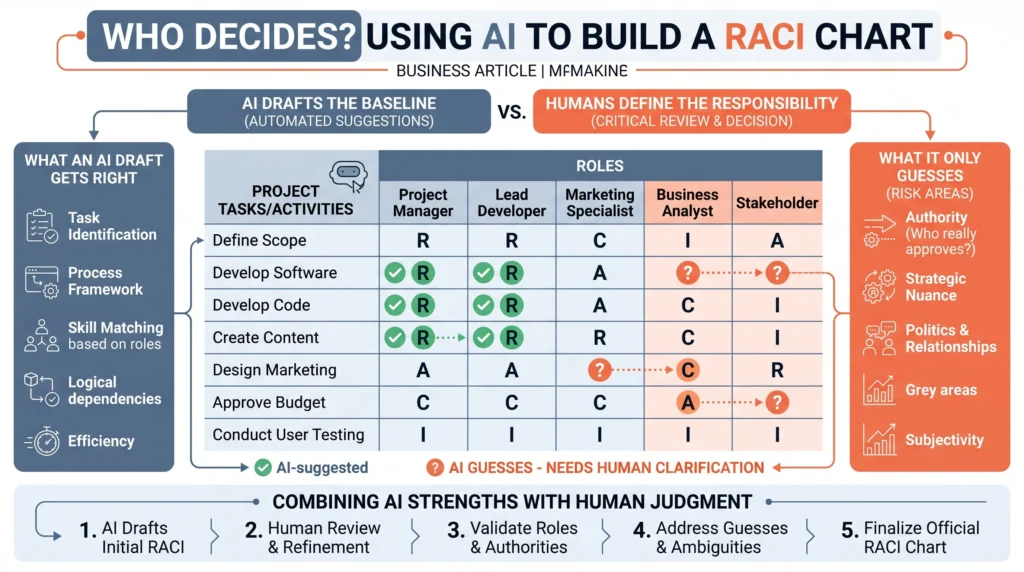
Keep your hopes modest. A review of AI use in IT project work, published in April 2026 by Ionut Anghel and Tudor Cioara, found the field still at an exploratory stage, leaning on prompt writing rather than built-in tools, and listed project role-based AI agents as a research path rather than a product. The draft is a starting point. Treat that first grid as practical AI at work, fast to make and worth only what the next half hour adds.
Which disagreements does an AI draft expose?
Three, and each is a real problem the chart found rather than made. Two A’s on one row means nobody has agreed who decides. A row with no A at all means the work has no home. A person marked C on nearly every row means the project moves at the speed of one calendar. None gets fixed by tidying the grid. All three are worth an awkward half hour.
The C pattern is the quietest and the most costly. A February 2026 paper, Multi-Agent Teams Hold Experts Back, tested groups of AI agents and found they averaged expert and non-expert views instead of weighting the expert, falling short of their best member by up to 41.1% even when told who that member was. A long C list does the same to a human call. Trim it before the meeting, not during one.
- Two A’s on a row: ask which of them would answer the client, then write that name in alone.
- A row with no A: ask whose week it appears in; if nobody claims it, it is not real yet.
- A C on every row: cut that person back to rows where their input changes the answer.
- One name almost everywhere: the project has a single point of failure, which is a workload talk.
How do you run the conversation a RACI chart starts?
Put the draft on a screen with the named people present and work down the rows out loud. Read each row as a sentence: this person does it, this person answers for it. Then stop at every row where someone pauses, because the pause is the data. Ask one thing at each stop: who makes the call if this row stalls on a Friday.
Resist settling it yourself to save time. A call made in the room tends to hold; one imposed later gets quietly ignored. Bain’s account of its RAPID decision model makes the same case for one owner, noting that giving the decision to one individual ensures single-point accountability. Expect the pass to take under an hour, and expect two or three rows to raise the argument that was always there. That hour is capability building, not admin.
AI Training from AI Smart Ventures builds this kind of AI literacy into how your team already plans, so people draft a grid fast and then hold the conversation it opens.
When is a RACI chart worth making at all?
When more than one team touches the work and at least one call is in dispute. A project inside one team with a clear lead does not need a grid; it needs a name against each task. The chart pays for itself where handovers cross reporting lines, where an approval sits outside the project, or where the same question keeps coming back to you because nobody else feels free to answer.
There is a quicker test than building anything. If you can say out loud who decides each disputed item and nobody in the room blinks, skip the chart. AI Smart Ventures observes that teams reaching for a grid are often asking a different question, usually about workload rather than power. Generic AI consultants will build the artifact either way, which is how charts end up in folders nobody opens. Operational efficiency comes from fewer grids that people read.
How short should a RACI chart be to get read?
Short enough to hold in your head, which for most projects means ten to fifteen rows grouped by stage. A forty-row grid can be right and still useless, because nobody checks it midweek. Write rows at the level of a result or a call, not a single action, and let the task list carry the detail. Being complete is not the goal here. Being remembered is.
Length also decides whether the chart lives through a change. A short grid gets updated when the project shifts; a long one is dropped at the first change and then misleads everybody reading it. Review it at the points each project turns, when scope moves or someone leaves. That small habit is workflow optimization and change management at once, and the grid has to cost less to keep up than the confusion it prevents.
Frequently Asked Questions
Is the RACI chart an outdated way to assign work?
No, though it is one option among several named alternatives. Atlassian’s DACI play uses Driver, Approver, Contributor and Informed, and insists on one Approver: contributors get a voice, not a vote. CIO’s guide names RASCI, which adds a Supportive role, and Bain’s RAPID splits the decision itself into five parts. Pick whichever form fits the argument you actually need to settle, then stop shopping.
What is the one rule that makes a RACI chart work?
One A per row, with no exception made for seniority or politeness. The R can be shared, the C list can be short, and the I list can be long. The A stays single, because it is the only column that answers the question the chart exists to settle. When you cannot bring yourself to choose between two names, that is the finding.
Does Excel ship a ready-made RACI grid?
Not in the application’s own template gallery. Microsoft does publish a RACI matrix workbook through its Download Center, a file called RACI-WARP-program.xlsx dated July 2024, and free templates are easy to find. Building one takes five minutes anyway: tasks down the left, names across the top, one letter per cell, with color coding if you want it. The template was never the difficult part.
Who belongs in the A column on a project?
The person who would answer the client if the work went wrong, which is often not the person doing it. Depending on what the row covers, that is a project lead, a department head or the sponsor. Choose by authority, not by availability. If the named person cannot stop the work or redirect it, they are an R with a bigger title.
Can a free online RACI generator be trusted?
For the layout, yes. For the letters, no. A free generator builds a clean grid and exports it, which saves real time. What it cannot know is who in your business holds a given decision, so treat every letter it suggests as an assumption to be tested. Also check what the tool retains, because client and staff names are company information.
Should an AI tool itself appear in the chart?
No. The chart names people, because only a person can be asked why a decision went the way it did. If AI drafted something that sits on a row, that row still carries the name of whoever does the work and whoever answers for it. Note the tool in a comment column if that helps your team remember, and keep it out of the four letters.
What if the same name fills most of the chart?
Then the chart has found a capacity problem, not a responsibility one. One name across most rows means a vacation or a resignation stops the project, which is worth knowing before either arrives. Split the R column first, since that column is the actual work. The A can stay concentrated longer, because making a decision takes far less of a week than delivering.
Does the chart need redoing when the project changes?
Only at the changes that move who decides. A new date does not; a new sponsor, a new team or two merged workstreams all do. Review the grid when scope moves, when somebody leaves, and at the start of each stage. A chart examined three or four times across a project stays trusted. One reviewed every week turns into admin people stop opening.
Does a two-person team need a RACI chart?
Rarely. With two people, say who decides what out loud and write it into two lines at the top of the plan. A grid earns its place the moment a third group appears, above all one in another department or outside the business. Before that, the chart adds formality without adding clarity, which is the main way these documents lose credibility.
How do we get started building a RACI chart this month?
Pick the project carrying the most open questions, list its ten biggest deliverables, and ask a tool for a draft grid. Then book 45 minutes with everyone named on it. Effort here tracks how many groups touch the project and how contested the decisions already are, not how many rows you finish with. Schedule a consultation to work through your first chart.
Executive Summary
A RACI chart gives each row four letters: R for who does it, A for who answers for it, C for who is asked first, I for who is told after. AI drafts that grid quickly from a task list and a set of names, guessing from job titles rather than knowing your team. What the draft exposes is the value. Two A’s on a row, a row with no A, or one person marked C on everything each name an argument to settle with the people involved.
What Should You Do Next?
This week, take the project where you most often get asked to decide something small, list its ten biggest deliverables, and have a tool draft a grid of who does each and who answers for it. Then read it out loud with the named people and stop wherever someone hesitates.
AI Smart Ventures offers AI Training for growing businesses where project decisions keep returning to one desk. Schedule a consultation to turn a tidy draft grid into owned work your team will act on.
People Also Read
- Granola vs Otter vs Fireflies: Best AI Meeting Notes App in 2026
- AI Internal Knowledge Search: Fix Your Team’s Information Gap
About the Author
Nicole A. Donnelly is the Founder of AI Smart Ventures and an AI Adoption Specialist with 20 years of experience as a founder and CEO and over a decade leading AI adoption initiatives. She helps businesses integrate artificial intelligence with clarity and confidence, driving innovation and sustainable growth. Nicole has trained over 20,217 professionals in Applied AI, delivered 624 workshops, and worked with close to 1,000 organizations across diverse industries.
Expertise: AI Transformation, AI Strategy, AI Implementation, AI Adoption, Applied AI, Marketing, Business Operations
Disclaimer: This content is for informational purposes only and does not constitute professional business or technology advice. Results vary based on industry, existing systems and implementation commitment. Contact AI Smart Ventures for a consultation regarding your specific situation.

