

AI for Operations Managers: Which Tools Save the Most Time?
Last Updated: August 2026
AI for operations managers is the use of smart tools to run the parts of a job that repeat: shift plans, stock counts, order updates, set reports and the daily chase for status. The tools read data from apps your team runs now, spot trends a person would miss, and act on small calls with no prompt. The big calls stay yours, so what shifts is the balance: less time goes on moving facts around and more goes on the choices that shape your week.
AI Smart Ventures has guided growing businesses through AI adoption in operations roles, from plants and depots to field crews and client teams. One pattern shows up again and again: teams that win back real hours start with one dull task they repeat every day, never with a switch to a new platform.
Getting this wrong costs far more than the fee on the bill. A manager who spends the first two hours of each day chasing updates has less left for late suppliers, hiring and margin. Choose badly and you add one more login, one more place for data to go stale, and a team that slides back to spreadsheets.
Key Takeaways
- Start with the dull work that repeats. Set reports, data entry, shift plans and ticket sorting pay back first, since they run each day and need no real judgment.
- Work tools now act, not just track. Since May 2026 the agents live inside the platform your team opens each morning, so adoption no longer hangs on a new login.
- Spend the saved time on purpose. Managers win back about six hours a week, and a third of that slips back to admin unless someone plans where it goes.
- Write the base numbers down first. Hours, error rates and lead times you guess at later will not hold up in a budget talk.
- Keep a human on every big call. Just one in ten leaders trusts AI to decide with no review, and that caution is earned.
One thread runs through all five points, and it is restrained. Fewer tasks, one tool, a written base line, a human at the gate. Businesses that stall are usually the ones that bought widely, measured nothing, then judged that AI does not fit their kind of work.
Which Operations Tasks Should AI Handle First?
Start with tasks that repeat each day and call for no judgment: set reports, data entry, meeting slots, invoice codes and first-line ticket sorting. These share three traits that make them safe to hand over. They run often enough that a small gain adds up fast, they follow rules you can write on one page, and a slip is quick to spot and undo. Odd, one-off work goes last. Good test: if a new starter could do it from a checklist, a tool can probably do it too.
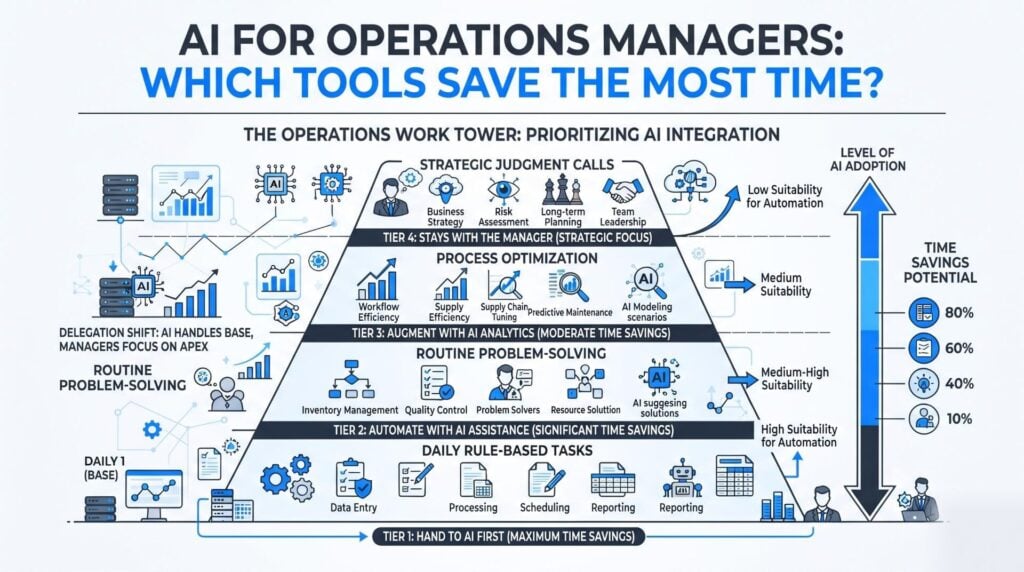
Sequence counts for more than brand here, so pick one task, run it for thirty days, and keep an honest note of what broke. Teams that pilot five things at once learn very little from any of them.
What Changed for Operations Tools in 2026?
The short answer: work tools began to do the work, not just log it. On 6 May 2026 monday.com relaunched as an AI Work Platform, with agents built in for all 250,000 of its customers and no setup step. SiliconANGLE wrote that these agents can sort tickets, draft reports, run sign-offs and push work along under human watch. Asana and ClickUp shipped much the same thing. For a manager the shift is plain: the AI now sits in the board your team opens each day.
That kills the main reason such projects die, which is one more tool that no one opens. It also raises a fresh point about oversight, since a tool that acts for you can act wrong at speed. Change management counts for more now, not less.
Which AI Tools Save Operations Managers Time?
The tools that give back the most hours are the ones that can already see your data. Three types cover most growing businesses: an assistant built into the platform your team lives in, a no-code link that moves data between apps, and a forecasting tool aimed at stock or demand. Rank them by fit with the stack you run today, never by the length of a feature list.
| Tool type | Best when | Hours it gives back |
|---|---|---|
| Helper built into your work app | Your team runs one main system | Status notes, summaries, routine sign-offs |
| No-code link between apps | Data gets retyped from one tool to the next | Manual entry and copy-paste hand-offs |
| Stock and demand forecast tools | Stock, capacity or lead times drive your week | Reorders and spreadsheet plans |
How much of your real work a tool can see is what turns a demo into genuine workflow optimization. Skip anything that needs a six-month data build first. If a vendor cannot show real output in the opening call, using your own numbers, it belongs in next year’s AI strategy.
How Do You Measure the Hours AI Actually Saves?
Track it the way you would track a new hire, by writing the base numbers down first. Log how long the task takes now, how often it goes wrong, and how many days pass from request to done. Switch the tool on for one team, leave the rest alone, then compare after thirty days. According to BetterUp, managers win back about six hours a week with AI, yet just 42% of that time goes to better work while 33% flows straight back to admin.
That second number is the one most businesses miss. Saved hours leak back into low-value work unless somebody decides in advance where they should go. Book the time before the tool arrives: a weekly planning block, a supplier review, an hour with a team member who is stuck.
Not sure which of your workflows would survive contact with an agent? AI Advisory from AI Smart Ventures gives owner-operators a vendor-neutral read on where AI pays back and where it just makes new work.
Will AI Take Over Operations Management?
No. AI is taking on parts of the job, not the job. Forecasts, data checks, shift plans and trend spotting are moving to software fast, while the human parts stay put: talks with a supplier who missed a date, reading the mood on a shift, choosing which client waits. RELEX reports that just 10% of supply chain leaders trust AI for critical calls without review.
The role shifts shape instead of going away. Less time spent on what went wrong last week, more on what to do next. Managers who build AI literacy across their teams now will run these tools with clarity and confidence.
Frequently Asked Questions
What is the best AI for operations management?
The best tool is the one that plugs into the apps you run now, not the one with the longest feature list. If your team works in Microsoft 365, the helper built into it will beat a stand-alone product, since your documents and calendars already sit there. Teams based in a work platform such as monday.com, Asana or ClickUp should test the native agents first. Depth of integration beats raw power every time.
What is the 30% rule for AI?
The 30% rule is a rule of thumb, not a set standard. It says that about a third of the tasks in a complex role can go to AI today, while the rest still needs human context, judgment and ownership. Some versions flip the ratio and apply it to routine work instead. Either way the point holds: aim for a real slice, resist automating everything, and keep a person accountable for results.
Why do some AI jobs pay such headline salaries?
Those pay packets go to a small group of research staff who build frontier models at the labs that train them, not to anyone using AI in an operations team. Pay climbs because the pool of people who can lead that work is tiny, the labs compete hard, and most of the package is equity, not salary. Your business needs none of that. Practical AI skills in your current staff drive far more operational efficiency.
How does AI improve inventory and demand forecasting?
Forecast tools read years of sales, seasons, supplier lead times and live market signals, then call demand more closely than a rolling mean can. Better forecasts mean less capital tied up in stock and fewer lost sales from empty shelves. Adoption is still early: First Analysis noted that in Sage’s 2026 survey of 200 retail and wholesale operators, just 10% had AI live in supply chain workflows.
Can AI tools connect to my existing ERP or CRM?
In most cases, yes. Current tools ship standard API connectors for the main ERP and CRM systems, and many now include native AI that reads your database with no plugin. Check three things first: whether your version and tier support the link, whether it writes data back or only reads it, and who owns the fix when it breaks. Confirm all three in writing during the trial.
How does AI help with quality control in operations?
AI watches for patterns that drift from normal, then flags them while the issue is small. That covers production data, service tickets, delivery times and supplier performance, monitored all day rather than sampled at a weekly review. A vision system also inspects parts more evenly than tired eyes late in a shift. The value sits in early warning, since a defect caught at the line costs far less than a recall.
Do my staff need training before we roll out AI tools?
Yes, and the gap here is wider than most owners expect. According to Asana’s Work Innovation Lab, just 17% of employees have had training on day-to-day AI use, and only 30% of US knowledge workers say their firm has published any AI guidance at all. Short, role-based AI upskilling beats a generic course. Show your team the exact tasks they own, then let them practice on live work.
What are the risks of letting an agent act on its own?
Speed and silence are the two big risks. An agent that follows a flawed rule can push through hundreds of records before anyone spots it, and it will not tell you it was unsure. Set clear limits: what it may do alone, what needs sign-off, and where it must stop. Log every action it takes, then read those logs weekly at first and monthly once you understand the error pattern.
Should I build a custom tool or buy an existing one?
Buy first, almost always. Off-the-shelf tools cover the common operations problems well, and setting one up takes days, not quarters. Building only makes sense when your workflow is genuinely unusual and central to how you compete. A sensible middle path is to buy the platform and configure agents on top, which most work tools now support with no code. Custom AI implementation is a last resort, not a starting point.
How long does it take to see results in operations?
Expect a first clear result in thirty to sixty days if you start narrow. One task handed to AI shows up in the numbers quickly, since it ran often to begin with. Wider capability building across several workflows takes two or three quarters, since it rests on habits changing rather than software installing. Anyone promising company-wide results in a single week is selling optimism.
Which operations metrics should I track after adoption?
Track four: staff hours on the task you handed over, error or rework rate, lead time from request to done, and on-time delivery. Capture each one before launch so you have something to compare against. Add an adoption number too, meaning the share of the team that uses the tool every week. A workflow that saves time on paper while nobody uses it has saved nothing.
How do we get started without disrupting operations?
Run a two-week time audit first, listing the tasks that eat the most hours. Pick one, hand it to AI for a single group, and leave the rest alone while you watch. Keep the manual route live for a month as a fallback. AI Smart Ventures works with founder-led organizations on this exact order of steps. Schedule a consultation to map your first workflow.
Executive Summary
Operations managers gain most from AI when they hand over frequent, rule-based tasks and keep the judgment work. The 2026 shift counts because agents now live inside the platforms teams open each day, which removes the barrier that killed earlier projects. Saved hours are real, near six a week for managers, but a third slips back to admin unless leaders steer it. Track against a written base line, keep a human on the big calls, and treat AI training as part of the roll-out.
What Should You Do Next?
This week, list every operations task your team repeats more than five times and mark the ones that follow a fixed rule. Pick the one that runs most often and log how long it takes now, how often it goes wrong, and who fixes it. Then test one agent in the app you already run, on that task alone, for thirty days.
AI Smart Ventures offers AI Advisory for growing businesses choosing between AI tools and setting the order of their AI implementation. Schedule a consultation to find which workflows will give your managers the most hours back.
People Also Read
About the Author
Nicole A. Donnelly is the Founder of AI Smart Ventures and an AI Adoption Specialist with 20 years of experience as a founder and CEO and over a decade leading AI adoption initiatives. She helps businesses integrate artificial intelligence with clarity and confidence, driving innovation and sustainable growth. Nicole has trained over 20,217 professionals in Applied AI, delivered 624 workshops, and worked with close to 1,000 organizations across diverse industries.
Expertise: AI Transformation, AI Strategy, AI Implementation, AI Adoption, Applied AI, Marketing, Business Operations
Disclaimer: This content is for informational purposes only and does not constitute professional business or technology advice. Results vary based on industry, existing systems and implementation commitment. Contact AI Smart Ventures for a consultation regarding your specific situation.

