

Client Project Updates With AI: Lead With the Ask
Last Updated: October 2026
An AI project update is a short written report to a client, drafted with help from an AI tool, that says what changed and what you need them to decide. The second half is the point. An update exists to get one answer out of the person paying for the work. The rest is context. Most updates skip that job and list activity instead, so the client ends up well briefed, and the project waits.
AI Smart Ventures has guided growing businesses through AI adoption in client-facing work, where the weekly update is often the only thing a client reads. The same pattern shows up in agencies, consulting firms, and software teams. The draft lands on time, reads well, and never says what the client must do.
The bill for that gap arrives two weeks later. An approval nobody asked for clearly sits unsigned, the work stalls against a date you promised, and the client hears of it from a line on page two. A client who is never asked to answer anything stops opening the file.
Key Takeaways
- Open with the decision, not the recap: the University of Wisconsin-Madison business writing guide says to put the essential information in the first sentence when you are making a request.
- Smooth is not the same as useful: in a June 2026 paper accepted at EMNLP, raters preferred AI summaries mostly for surface fluency, while human versions still led on substance and accuracy.
- AI drops what sits in the middle: a study of long-form summaries found a U-shaped pattern, where models hold the start and end of a document and neglect the middle.
- Keep the shape fixed: same sections in the same order each week, so the client knows where to look before reading a word.
Those four add up to one swap that costs you nothing. You are not writing more. You move one paragraph to the top and let the tool fill in behind it. Teams that make the swap get answers in a day rather than a fortnight, which is the plainest workflow optimization going.
Why is an activity report the wrong shape?
Because a client cannot act on a list of what you did. An activity report answers a question nobody asked, which is how your week went. It leaves the reader to work out whether anything is needed. Your client holds a short list of things your team cannot do alone: an approval, a name, a date, a file. An update naming none of those is a receipt, not a request.
Look at what the tools hand you and the bias is plain. Asana’s status update feature offers project highlights such as completed milestones and overdue tasks, charts that show progress, and task lists of completed or in-progress work. Every one of those describes your side of the project. None of them is a field for the thing you need back. The shape comes free with the software, so the shape is what most teams send.
What should lead a client project update?
One decision, named in the first sentence, with a date and a plain note on what slipping costs. Not three decisions. One. Write it as a question the client can answer with yes, no, or a date: do we start phase two on the 3rd, or hold until your audit closes? The University of Wisconsin-Madison guide is blunt about requests and routine messages. Put the essential information in the first sentence, so the purpose lands at once.
Two details separate a polite request from one that gets answered. Give it a deadline, because an ask with no date competes with the whole inbox and loses. Then say what the wait costs, in days and in work rather than in blame. The guide keeps one exception: bad news reads better delivered indirectly, with a buffer and the reasons ahead of it. Lead with the ask on an ordinary week, and change the order the week you have something hard to say.
- The decision: one sentence answerable with yes, no, or a date, written without jargon.
- The date: the day you need the answer by, not the day the work is due.
- The cost of waiting: what stops, and for how long, if the reply is a week late.
- The person: who on their side can say yes, named, so the message does not sit with someone who cannot act on it.
What else belongs in the written update?
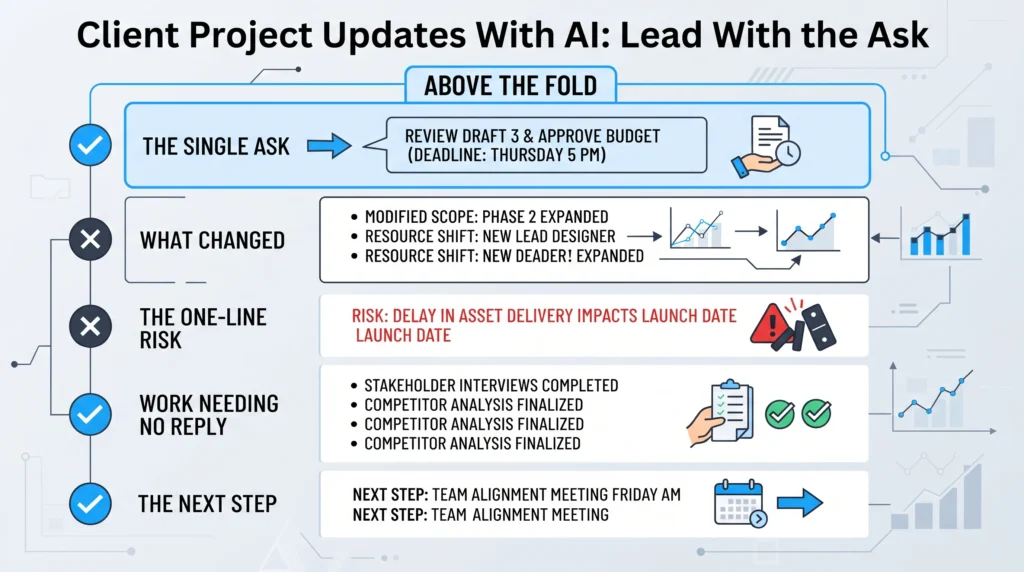
Four blocks, in the same order, under the ask. What changed since last time. What is at risk, in one line. What is moving along and needs nothing from them. What you do next without being asked. That is the body of the update, and it should read faster than the ask above it. A client who finishes knowing which single thing is theirs has read a good update.
The risk line is where teams go too far. One sentence is enough here, pointing at the register your team keeps and the trigger that would change the status. The full detail belongs in your own records, not in a client email. The block people cut first covers work that needs nothing from them. That is a mistake. Naming what is quietly fine stops a client reading silence as trouble.
| Section | What it answers | What it is not |
|---|---|---|
| The ask | What do you need from me, and by when | A menu of open questions |
| What changed | What is different since last time | A log of finished tasks |
| What is at risk | Which one thing could move the date | Your internal risk register |
| Needs nothing | What is fine and needs no reply | Padding, or a plea for praise |
| Next from us | What we do without being asked | A promise you have not checked |
| Budget status | Whether the plan still holds | A place for numbers |
Getting that order right is a training job, not a tooling one. AI Training works on the updates your account leads already send, with AI coaching on the ask.
Why does AI bury the ask in a draft?
Because you hand it activity and ask for a summary, so it hands back activity, written nicely. A tool reading your task history, your notes and your time logs sees nothing that marks one line as the thing a human has to answer. Asana’s feature page says you can use AI to suggest a status and draft updates. The raw material it reads is the finished, overdue and in-progress work sitting in the project. Activity in, activity out.
Two findings explain why the ask sinks even when you include it. A study of long-form summaries found a U-shaped pattern in faithfulness: models hold to the start and the end of a document and skip the middle, and they did worse when key material was moved there. A separate June 2026 paper accepted at EMNLP found raters preferred model summaries largely for surface fluency, while human versions still scored better for substance and accuracy. Smooth prose is no proof the useful part survived.
So the fix sits upstream of the prompt. Write the ask yourself, before the tool sees anything. An internal summary for your own boss is a different job: there you name the decision so the tool knows what to keep. Here it sits outside your company. Generic AI consultants will sell you a longer prompt instead. AI Smart Ventures observes that growing businesses lose more weeks to asks nobody noticed than to refusals. Project notes carry client names, so draft in a cleared tool and follow your firm’s own rules.
How do you hold the same shape every week?
Fix the sections, fix the slot, and let the software nag you. Linear’s project updates pair a health marker of on track, at risk or off track with a written note on status, challenges and next steps. An admin can set reminders daily or at a set interval, and overdue projects get a missed-update status. The rhythm matters as much as the wording. A client who knows the update lands Thursday starts looking for their ask.
Some weeks you really need nothing, and that is worth saying rather than inventing a question. Write “no decision needed this week” as the first line and keep the rest of the shape. Clients read a skipped update as a problem and a short one as control. Asana lets you save custom sections and reuse them next time, which keeps the habit light. Give one named person the final read, because capability building here means protecting that one paragraph.
Frequently Asked Questions
What should the first line of a client update say?
The single decision you need, and the date you need it by. Something close to: we need your sign-off on the revised scope by Thursday the 15th to keep the February start. Nothing about the week, no greeting that delays it. The rest of the update exists to support that sentence, or to tell the client plainly what needs no reply from them.
How do you word an ask so a client can answer it?
Write it so the only replies are yes, no, or a date. Name the two options if there are two, name the person who can decide, and attach the day you need the answer. Vague asks produce vague replies, and “let us know your thoughts” is not an ask. If you cannot phrase it as a closed question, you are still working out what you want.
How often should a written client update go out?
Weekly for live delivery work, biweekly in a slower phase, and always on the same day. Project tools support that rhythm. Linear lets an admin set reminders daily or at an interval such as weekly or biweekly, and flags projects whose update is overdue. Frequency matters less than a steady day. A client who knows when the update arrives reads it. One who does not, skims.
What do you write when there is no ask this week?
Say so in the first line and keep every other section in place. “No decision needed this week” is a useful sentence, because it tells the client to read the rest at their own pace. Then cover what changed, the one risk worth naming, and what is moving along fine. Inventing a question to fill the slot teaches clients that your first line is noise.
What project work are teams handing to AI now?
Mostly the drafting and the digging. Pulling what changed out of a task history, turning rough notes into a first draft, sorting inbound client requests into themes, and writing the status text once the status is set. The thread running through it is that a person sets the judgment and the tool fills in. Start with one repeated piece, such as the weekly update.
What changed in AI status reporting during 2026?
The drafting moved inside the tools where the work already lives. Asana’s Spring 2026 release, published on 20 May 2026, lets you create projects, assign work, monitor the status of initiatives and flag risks through a connector from Claude, ChatGPT or Gemini. Its status update feature can suggest a status and draft the text. That makes an activity report the default, so the ask needs writing by hand.
Should a client know AI drafted the update?
Tell them where the tool sits in your process, once, in your terms or at kickoff. The honest version is short: a tool drafts from our project records, a named person checks the figures, and the decision we ask you for is written by us. Being open costs nothing and protects you when a draft gets something wrong. It must not stand in for the check itself.
How do we roll this update format out to every account?
Start with one account and one template: the ask, what changed, the risk line, what needs nothing, next steps. Run it for a month, then compare how fast decisions came back against your old format. Effort tracks the number of account leads rather than the client list, and most teams settle the habit inside a month. Schedule a consultation to build the format your accounts will answer.
Executive Summary
An AI project update earns its place when it opens with the one decision you need from the client, with a date and the cost of waiting attached. Under it sit four fixed blocks: what changed, the single risk worth naming, what needs nothing from them, and what you do next. AI drafts bury that ask because you feed them activity, and because research on summaries shows models hold the start and end of a document while thinning the middle. Write the ask yourself, let the tool build the rest, and keep the shape steady.
What Should You Do Next?
This week, open the last update you sent each active client and check whether a decision appears before the recap. Rewrite the opening of the next one as a single closed question, with a date and the cost of delay. Then fix the sections underneath it as a template, and put one named person on the final read.
AI Smart Ventures offers AI Training for growing businesses whose account leads write to clients every week, with change management support for the people who own the ask. Schedule a consultation to turn your client updates into messages that come back answered.
People Also Read
- AI Adoption for Hybrid Teams: What Works and What Fails in 2026
- AI Vendor Switching Costs: The Hidden Bills Business Owners Miss
About the Author
Nicole A. Donnelly is the Founder of AI Smart Ventures and an AI Adoption Specialist with 20 years of experience as a founder and CEO and over a decade leading AI adoption initiatives. She helps businesses integrate artificial intelligence with clarity and confidence, driving innovation and sustainable growth. Nicole has trained over 20,217 professionals in Applied AI, delivered 624 workshops, and worked with close to 1,000 organizations across diverse industries.
Expertise: AI Transformation, AI Strategy, AI Implementation, AI Adoption, Applied AI, Marketing, Business Operations
Disclaimer: This content is for informational purposes only and does not constitute professional business or technology advice. Results vary based on industry, existing systems and implementation commitment. Contact AI Smart Ventures for a consultation regarding your specific situation.

