

How Coaches Use AI to Scale Without Losing Clients
Last Updated: August 2026
AI for coaching is the use of software to run the parts of a practice that repeat: booking, notes, call records and the message you send after each session. The tools do not coach. They hold the paperwork and the nudges that sit around each hour of client work, so one coach can take on more clients without adding hours or giving each one less time.
AI Smart Ventures has guided growing businesses through this shift, and founder-led organizations in the coaching field all ask the same thing. What is safe to hand to software, and what must stay human? Coaches who answer that on purpose keep clients longer, because no one feels passed off to a bot.
Get that line wrong and the cost shows up where you can least afford it. Clients spot a note that reads like a form letter, and a coach who is not really there. Coaches who grow well treat AI adoption as a choice about how clients feel, not a software buy, and that shift changes what you hand off first.
Key Takeaways
- Hand off the work clients never see before you touch anything else. Booking, intake and billing carry no bond with the client, so software takes them at no cost to trust.
- Keep about 70 percent of your work time in front of clients and let systems take the rest. The split is a planning aid, not a rule, but it stops admin from eating your week.
- Tell clients which tools touch a session before you turn them on. Consent up front is what makes a note tool helpful instead of a breach of trust.
- Pick tools that fit the way you already work, not the ones with the longest feature list. Fit with your calendar and billing beats raw power every time.
- Treat the recap, not the session, as the place AI earns its keep. A sharp recap sent within the hour lifts follow-through and takes minutes.
Under all five sits one point that catches most coaches off guard: AI rarely adds value inside the session. It pays off in the ring of work around the session, where tasks repeat and are easy to write down. Clients hold no stake there, so a wrong step stays small.
What admin work can AI take off your plate?
AI takes the back-office work that repeats in every coaching practice: booking and rebooking, intake forms, contracts, bills, call records and the first draft of each recap. These jobs share three traits. They run the same way each time, they follow rules you can write down, and no client ever picked you for how well you do them. Hand them to software and you get back the hours you actually sell.
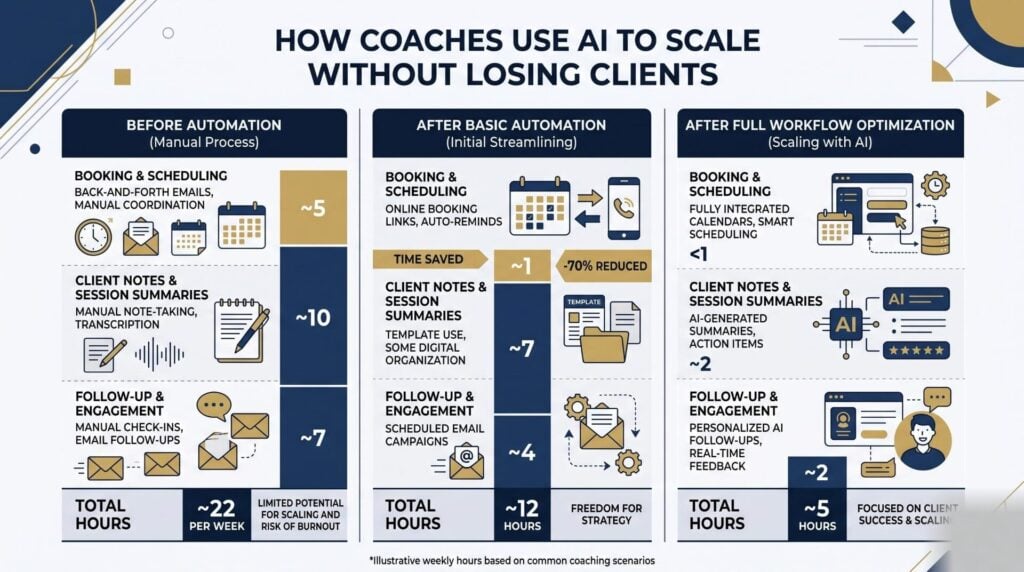
Booking is the first honest win, since a link that reads your calendar and sends its own nudges wipes a whole class of email out of your week. Intake comes next, because a form that fires the moment a payment clears can send the contract, the welcome pack and the login while you sleep.
Call records and notes pay back the most. When a tool captures and sums up the hour, you stop splitting your mind between the client and your pen, and the record beats what you would type from memory.
How can AI be used for coaching sessions?
AI helps a coaching session in three spots: before it, during it and after it. Before, it pulls the client’s past goals and open promises into a short brief you read in two minutes. During, it captures and writes up the talk so you stay with the client, not your notepad. After, it drafts the recap, the agreed next steps and the date of the next call, which you edit and send while the hour is fresh.
That last step is where most renewals are won or lost. Research across growing businesses shows that follow-up quality, not session quality, is what clients name when they stay. A recap built from the client’s own words lands far better than one made of warm filler.
AI also shows you patterns that memory alone will miss. When a client raises the same block in three calls out of four, a search of your own records finds it at once.
What is the 70/30 rule in coaching?
The 70/30 rule says you should spend about 70 percent of your work time in front of clients and route the other 30 percent through systems and help. It is a planning ratio, not a rule of the trade, and coaches use it to judge what truly needs their own hours. Once admin creeps past a third of the week, most people work longer rather than fix the flow, and that is where growth stalls.
Using it is simple. Track a normal week in fifteen-minute blocks, mark each block as client work or not, then add up the two columns. Most coaches find the split closer to 50/50 than they thought, which is a change management problem more than a time problem. The fix is not to work faster on admin. Hand the largest non-client block to software, then check again in a month.
Which AI tools work best for coaches?
The best AI tool for coaching is the one that plugs into what you already run, because a tool that stands alone creates more copy and paste than it saves. Judge each option by the job it does, not by the label on the box. Most coaches settle on four: a booking tool, a call recorder, a general assistant for drafts, and a connector that moves data between them.
| Job to be done | What to look for | Common mistake |
|---|---|---|
| Booking | Two-way calendar sync, buffer rules, self-serve rebooking | Running two booking links |
| Call records | Sharp transcripts, consent prompts, output you can edit | Recording before you tell the client |
| Drafts | Steerable tone, no training on your data | Sending a draft you never read |
| Joining systems | Steady triggers, error alerts, logic you can follow | Automating a flow you never wrote down |
Tools such as Otter.ai and Fathom cover call records, assistants such as Claude and ChatGPT handle drafts, and a connector such as Zapier or Make moves data between them. Names change fast, so the jobs matter more than the brands.
If you want that order set for your own practice instead of pieced together from videos, AI Consulting from AI Smart Ventures maps your work first and picks tools second. Talk to our consulting team about the workflow costing you the most hours.
Where is coaching headed by 2036?
Coaching is headed toward one of four futures, says the 2026 ICF Coaching Futures Report from the International Coaching Federation, out in April 2026. The report plots tech against teamwork and draws four likely worlds for the trade by 2036. Which one lands rests less on the tools themselves and more on whether coaches agree on shared standards for the way they use them.
- Digital First, Human Optional. Tech races ahead and platforms shape what the client feels, but weak teamwork leaves standards split and trust thin.
- Global Coaching Commons. Tech and teamwork rise as one, hybrid models spread, and shared standards let coaches work across borders.
- Digital Divides. Uptake swings by region, so coaching stays person-first while access turns patchy.
- Local Roots, Human Touch. Tech sits in the back seat and coaching goes back to close, local work.
The report draws on 24 expert talks across 20 countries, and its technology chapter is blunt about the trade-off. AI has moved from a plain tool to a co-pilot, yet it cannot copy the trust and ethics that make coaching a trade. Use AI to widen your reach, then spend the free time on human-first AI habits.
How do you protect client data and trust?
You protect trust by naming every tool before it touches a session, picking vendors who do not train models on your calls, and writing down how long you keep records. The ICF Artificial Intelligence Coaching Framework and Standards, out in November 2024, sets what good looks like across six areas, among them ethics, privacy and access. Firms may state which parts they meet, so treat it as a checklist for your AI strategy, not a badge.
Start with a Data Processing Agreement (DPA), the contract that sets out how a vendor may store and handle personal data for you. Ask any call or notes vendor for their DPA before you upload a single session. Then set a window for how long you keep files, and delete them when it ends.
Telling clients works better as a talk than a tick box. Say what the tool does, what it grabs, and how it makes your work better for them. Most clients say yes to a note tool once they see it buys them your full focus for the hour.
Frequently Asked Questions
Can ChatGPT be my life coach?
ChatGPT can sort your thinking and ask good questions, but it cannot hold you to a promise or spot what you dodge. The American Psychological Association polled 1,242 psychologists in April 2026 and found 39 percent had patients using AI to self-diagnose, while 36 percent saw patients lean on chatbots too much. Use it to reflect and draft between sessions. Keep judgment, challenge and follow-through with a human coach.
Will AI replace human coaches?
No. Coaching sells judgment, challenge and a bond that holds over time, and none of that lives through being automated. What AI does take is the admin ring around coaching, which eats about a third of a normal week. Coaches who use these tools tend to beat those who skip them. The 2025 ICF Global Coaching Study counted 122,974 coaches at work, up 15 percent since 2023.
Do I have to tell clients I use AI in sessions?
Yes, and you should tell them before the tool runs, not after. That one habit splits a helpful note tool from a breach of trust, and it takes about thirty seconds at the start of a first call. Name the tool, say what it grabs, and show how the output helps them. Log the consent in your client contract, then offer a by-hand path for anyone who wants one.
Is it safe to record coaching sessions with AI?
It is safe when three things hold: the client says yes, the vendor does not train models on your audio, and you delete files on a set clock. Ask for the vendor’s Data Processing Agreement and read the retention terms before your first upload. Keep records in one place with locks on them. Calls that touch health, legal or money matters need tighter care than a standard goal-setting call.
How many clients can one coach handle with AI?
There is no fixed number, since it rests on call length, prep depth and how much help each client needs between calls. The useful gauge is your client-facing share: if admin drops from 40 percent of your week to 25, that gap is your real gain. Add clients in small steps and watch the quality of your recaps. When they start landing late, you have hit your ceiling.
What should a coach automate first?
Automate booking first. It is the highest-volume, lowest-judgment job in almost any practice, the tools are mature, and a link kills a whole class of email inside a week. Intake and payment come next, then call records and recaps, then renewal nudges. That order puts capability building in the right sequence, well before you touch client talk. Do not try to rebuild the whole practice in one weekend.
What training does a coach need to use AI well?
You need practical skill, not tech skill: writing clear instructions, checking output against your own judgment, and handling client data with care. No code background is needed, and basic AI literacy covers most of what a working coach uses. Three focused hours on your real workflow beats a broad course, since the skill that counts is aiming tools at your own notes and recaps. AI training should start there.
How do I get started with AI in my coaching practice?
Start with one week of honest time tracking, then hand off the largest non-client block you find. Most coaches find booking or note writing at the top, and both can be live inside a week. Build the second one only once the first has held steady for a month. AI Smart Ventures runs an AI readiness check with founder-led practices to set the order. Schedule a consultation to map your first workflow.
Executive Summary
AI for coaching pays off around the session, not inside it. Booking, intake, call records and recaps repeat, need little judgment and carry no bond with the client. The 70/30 split gives you a quick test: if client work has slipped below about 70 percent of your week, fix the flow first. Name every tool that touches a call, agree how long you keep files, and offer a by-hand path. Done that way, AI implementation grows your caseload while the work still feels human to every client.
What Should You Do Next?
Track one full week in fifteen-minute blocks and mark each block as client work or not. Take the largest non-client block, usually booking or note writing, and hand it to software first. Write your consent line and your file-keeping window into your client contract the same week.
AI Smart Ventures offers AI Consulting for growing businesses building practical AI into daily work. Schedule a consultation to set the order of hand-offs that guard client bonds while your caseload grows.
People Also Read
- What Is Human-Centered AI Adoption? A Guide for People-First Organizations
- How Do CFOs Evaluate AI Investments? A Financial Leader’s Guide
About the Author
Nicole A. Donnelly is the Founder of AI Smart Ventures and an AI Adoption Specialist with 20 years of experience as a founder and CEO and over a decade leading AI adoption initiatives. She helps businesses integrate artificial intelligence with clarity and confidence, driving innovation and sustainable growth. Nicole has trained over 20,217 professionals in Applied AI, delivered 624 workshops, and worked with close to 1,000 organizations across diverse industries.
Expertise: AI Transformation, AI Strategy, AI Implementation, AI Adoption, Applied AI, Marketing, Business Operations
Disclaimer: This content is for informational purposes only and does not constitute professional business or technology advice. Results vary based on industry, existing systems and implementation commitment. Contact AI Smart Ventures for a consultation regarding your specific situation.

