

Microsoft Copilot Tips for Microsoft 365: Real Results
Last Updated: August 2026
A Copilot for Microsoft 365 tip is a small habit that turns a vague request into work you can actually send. The tool sits in Word, Excel, Outlook, Teams and PowerPoint, and it reads only the files each person can open. What splits a good answer from a bland one is rarely the model behind it. It is the request itself: what you want, why you want it, which file to read, and the shape it should come back in.
AI Smart Ventures has guided growing businesses through Applied AI work in finance, law firms and health care. One thing shows up in every team. People who name the file and the format they want get a usable draft on the first try. People who type a bare question then spend ten minutes fixing what came back. AI literacy shows up in the prompt box long before it shows up in a report.
That gap costs more than it looks. A licence bills you each month whether your team asks well or badly, and a weak draft does not just vanish. It lands in a colleague’s inbox, and they fix it. What your team learns in the first two weeks decides whether you win hours back or simply move them out of sight.
Key Takeaways
- Build each request from four parts: the goal, the context, the file to read, and the format you expect back. Microsoft’s own prompt guide uses that same structure, and it repairs most weak answers.
- Keep the tool away from arithmetic. Microsoft’s COPILOT function page says to use SUM, AVERAGE and XLOOKUP for any figure that has to be exact and repeatable.
- Turn on Track Changes before you let it edit in Word. Review workflows arrived in June 2026, so each edit shows up as a revision you approve or reject.
- Attach a deck you like and ask PowerPoint to match it. A written description takes longer and lands further from the thing you pictured.
- Save the prompts that earn their keep, because custom skills and Copilot Notebooks turn a one-off instruction into something your whole team can run again next month.
Look at what those five share. Each one moves the work earlier: twenty seconds spent framing a request, not ten minutes spent repairing an answer. That trade is the whole game with practical AI, and it explains why two people on the same licence get such different results.
What Makes a Copilot Prompt Actually Work?
A prompt that works has four parts: the goal, the context, the source and the format. Microsoft’s prompt guide, last updated in February 2026, says a clear goal is the only part you must have, though you will want the rest. The goal is the task. The context says who it is for. The source points at the file, thread or meeting to read. The expectations set the format of whatever comes back.
Two simple habits beat clever wording. Name the file, since the tool will guess when you do not, and plan on a second turn, because a first answer is a start and not a verdict. Microsoft also warns that one prompt run twice can hand you two answers that do not match, which is worth knowing before you argue with it.
What Can a Copilot Do in Word Right Now?
Word gained two sets of workflows in mid 2026, and both change how you should ask. Review workflows came in June. They let the tool edit with Track Changes on, so each edit shows as a change you accept. Drafting workflows came in July, per Microsoft’s July 2026 Copilot update. It can now insert and update a table of contents, and manage headers, footers, page numbers and footnotes.
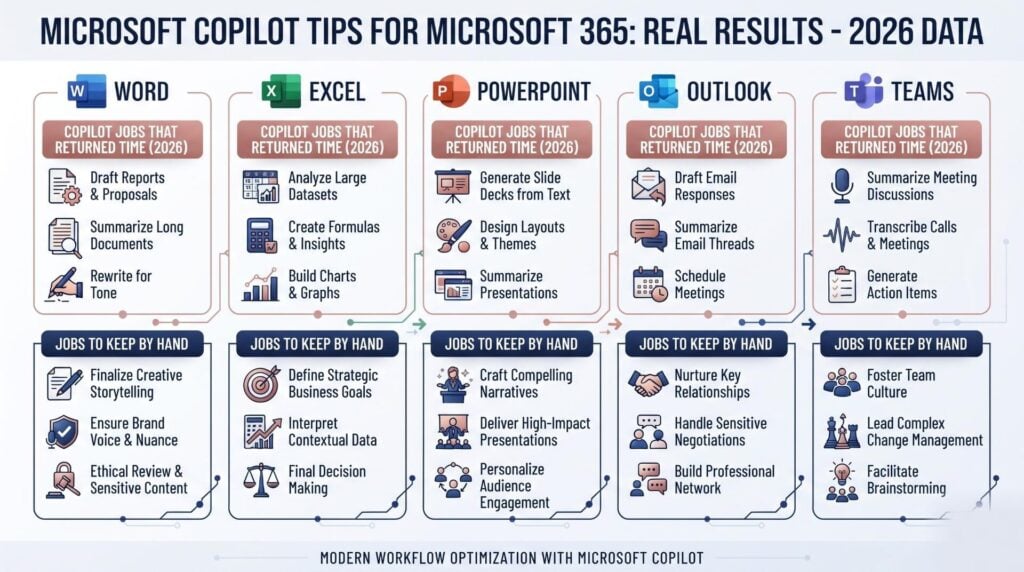
Four asks that earn their keep in Word:
- Rewrite this part for a reader who has never seen a contract, and keep it under 200 words.
- Add a table of contents, number the pages, then list each heading that breaks our style.
- Read my last three project notes and draft this week’s in the same voice.
- Reply to the open notes on page two and close the ones we have answered.
Which Excel Jobs Should You Give Copilot?
Hand over the shapeless work and keep the maths yourself. Edit with Copilot in Excel, once called Agent mode, builds tables, charts, PivotTables and formulas from a plain description. The COPILOT function goes further and puts a prompt inside one cell. Microsoft’s function page is blunt about where it does not belong: not calculations, not lookups inside your own workbook, and nothing carrying legal or audit weight.
| Give this to Copilot | Keep this by hand |
|---|---|
| Sorting 300 survey replies into themes | Any total, mean or variance |
| A first chart of monthly trends | A lookup against your product list |
| Draft blurbs from a column of specs | Numbers headed for a filed report |
The function is capped at 100 calculations every ten minutes, and it will not run at all in a workbook marked Confidential. Power BI data reaches the Excel grid in August 2026, so trusted numbers land in the sheet with no export step and no copy and paste.
How Should You Use Copilot in Outlook and Teams?
Use it before the call and after it, not during. It prepares you for a meeting by pulling the notes, tasks and files you would otherwise dig out by hand, and Microsoft’s release notes date that view landing in classic Outlook for Windows to August 2026. Email coaching now runs in the chat pane while you draft, so you pick which suggestions to apply rather than accept the whole set.
Teams changed on the far side of the call. July 2026 brought a Meeting recaps app you can pin to the sidebar. It holds recaps from the past 30 days, with filters and an audio version for the drive home. The habit is simple: stop typing notes, then ask for the calls made and who owns what.
What Is the Fastest Way to Build a Deck?
Start from a presentation you already trust. Since June 2026 you can attach one and ask for its layouts, theme and visual style to be applied to new content, which beats describing a design in words. If your organisation has loaded a brand kit into the Microsoft 365 brand centre, PowerPoint pulls the approved colours, fonts, logos and icons into the slides, which removes most of the manual tidying.
Two more habits save real minutes. Ask it to draft, reply to and close slide comments, listed in Microsoft’s monthly update as a July 2026 release, so review threads stop leaking into email. Then feed it your own source: a report, rough notes or a meeting recap makes a deck worth editing, while a bare topic makes filler.
Where Do People Waste Time With a Copilot?
On work that looks done and is not. A January 2026 Harvard Business Review piece by BetterUp and Stanford researchers calls this “workslop”: polished text that pushes the real thinking onto whoever receives it. BetterUp’s research, a survey of 1,004 full-time desk workers, found 40% had been sent some in the past month, and each instance took about one hour and 51 minutes to sort out.
The second waste is asking for the wrong kind of proof. Anything that has to add up, or stand up to an audit, belongs in a formula and not in a sentence. Check before you forward, and treat a calm, fluent tone as no proof at all. Over-prompting burns time as well, since three rounds of rewording usually cost more than editing the second draft yourself.
Getting these habits into daily use is where most teams stall. Talk to our AI advisory team about a practical AI session built on the tasks your people repeat every week.
How Do You Reuse a Prompt That Worked?
Save it where the tool can find it again. Custom user skills reached Copilot in PowerPoint in August 2026, so people can build and upload their own skills to OneDrive and turn a repeated instruction into reusable guidance. Copilot Notebooks take TXT and RTF files as references, with Markdown added in August 2026, which suits transcripts, procedure notes and rough documentation. Both options keep good wording out of one person’s private notebook.
That turns one person’s knack into shared capability building. A prompt that lives in one head walks out the door on leave day; a saved skill stays put. Workflow optimization here is unglamorous and costs nothing: one shared file of tasks that worked, read through each month, and pruned when a feature moves.
Frequently Asked Questions
How do you effectively use Microsoft 365 Copilot?
Give each prompt four parts: goal, context, source and format. Microsoft’s prompt guide, updated in February 2026, says a clear goal is the only part you must have, but naming the file and the format you expect is what saves an editing round. Plan on a second turn as well. Most of the good stuff comes from one follow-up, such as “shorter, and as a table”, not from one perfect request.
What can you do with Copilot for Microsoft 365?
It works across five apps you already use. Word drafts and edits with Track Changes on. Excel builds tables, charts and PivotTables from a plain description. Outlook prepares you for meetings and coaches an email draft while you write it. Teams make recaps, now held in one app that keeps the past 30 days. PowerPoint builds or restyles a deck from your own files.
How do you get the best out of Microsoft Copilot?
Tidy your files first, then point at them on purpose. It answers from files each person can already open, so three copies of a single policy will hand you three different answers. Attach the file or thread you mean rather than hoping the right one turns up. Then check every number and name before the work leaves your desk, because a smooth draft is not a checked one.
Can Copilot handle the maths in a spreadsheet?
Partly, and the split matters. Edit with Copilot writes real Excel formulas that recalc like any other, which is safe for maths. The COPILOT function is not: Microsoft says to keep it away from sums and from lookups in your own sheet, since it sees only your prompt and the cells you hand it. It also stops at 100 runs per ten minutes.
Does Copilot change my Word file without asking?
Not since June 2026, as long as you use review workflows. It edits with Track Changes on, so each edit shows as a marked change you accept or reject one at a time. It can also add, read, reply to and sort comments, which keeps notes tied to the right paragraph. Turn Track Changes on first and the review stays yours.
Which Copilot licence do you need for these features?
The in-app tools in Word, Excel, Outlook, Teams and PowerPoint need the paid Microsoft 365 Copilot licence on that person’s account. Copilot Chat, which comes with most Microsoft 365 plans, covers web chat but does not read your own files. The COPILOT function sits in the premium tier and needs a live link. Check the licence page in your admin centre before you plan who gets what.
Why does Copilot answer the same prompt in two ways?
Because the models behind it carry some randomness, which Microsoft states plainly in its own guide. Two runs of one prompt tend to word things a little apart, and the Excel function may drift over time as its model is swapped. If you need one fixed answer, copy the output and paste it as values, or save the reply into the file rather than leave it live.
How do you get started with better Copilot habits?
Pick one task per role, write four-part prompts for it, and run them for two weeks before you add a thing. Time the task first so you hold a baseline worth reading. AI Smart Ventures runs AI workshops and AI coaching built on the work a team already repeats, drawn from 20,000+ professionals trained in Applied AI. Schedule a consultation to shape that first fortnight.
Executive Summary
Copilot pays you back when you tell it what to read and what to hand over, not when you ask a bare question. Microsoft’s four-part structure (goal, context, source, expectations) removes most of the editing. In 2026 the tool became far more specific: Track Changes review in Word, chart and PivotTable building in Excel, a pinned Meeting recaps app in Teams, and deck restyling from a file you already like in PowerPoint. Keep sums in formulas, check before you forward, and save the prompts that work so a good habit outlives the person who found it.
What Should You Do Next?
This week, pick the one task your team repeats most and write a four-part prompt for it. Time that task manually first, then run the prompt for ten working days and note what you had to change each time. Save the version that worked into a shared file, and turn Track Changes on before anyone lets Copilot edit a live doc.
AI Smart Ventures offers AI Advisory for growing businesses that already pay for Copilot and want more from it. Schedule a consultation to turn scattered prompts into habits your team keeps.
People Also Read
- When Should You NOT Use AI? A Practical Guide for Business Leaders
- Open Source AI Models Explained: Llama, Mistral, and DeepSeek for Business
About the Author
Nicole A. Donnelly is the Founder of AI Smart Ventures and an AI Adoption Specialist with 20 years of experience as a founder and CEO and over a decade leading AI adoption initiatives. She helps businesses integrate artificial intelligence with clarity and confidence, driving innovation and sustainable growth. Nicole has trained over 20,217 professionals in Applied AI, delivered 624 workshops, and worked with close to 1,000 organizations across diverse industries.
Expertise: AI Transformation, AI Strategy, AI Implementation, AI Adoption, Applied AI, Marketing, Business Operations
Disclaimer: This content is for informational purposes only and does not constitute professional business or technology advice. Results vary based on industry, existing systems and implementation commitment. Contact AI Smart Ventures for a consultation regarding your specific situation.

