
What Does an AI Folder Summary Leave Out?
Last Updated: October 2026
An AI document summarizer is a tool that reads one or more files and writes a short account of what they say. Point one at a folder and it will summarize the folder. What it will not tell you, unless you ask, is which files it never managed to read. The summary reads the same either way.
AI Smart Ventures has guided growing businesses through AI implementation for more than a decade, and this is the question teams forget to ask. The summary lands on time, it reads well, and nobody checks whether it covered twenty files or fourteen.
That gap decides real things. A renewal date in the one scanned contract, a limit inside the locked spreadsheet, a promise in a handwritten note: each can sit outside the summary, and the summary gives you no reason to doubt it.
Key Takeaways
- Ask for the skipped list first: make the tool name every file it could not open, skipped or cut short, then read that list before the summary.
- Coverage leaves no trace: a summary built from fourteen files out of twenty reads just like one built from all twenty.
- Page images start the silence: the olmOCR project, best demonstration paper at ACL 2026, scores open systems on 1.4K hard PDFs, so reading a scan is still a graded task.
- Caps cut files down quietly: Google’s Drive connector guidance pulls 1 MB of text per file, caps optical reading in PDFs at 80 pages, and drops big files from search.
- Spreadsheets are the weakest format: on a January 2026 test of 30 workbooks, older methods answered just 24% of questions right, per FRTR-Bench.
- Some folders are not ready: drafts, signed finals, scans and two clients in one place need sorting first.
Read together, they move the first question off the summary and onto the folder. You are not judging the writing, which is rarely the problem. You are asking which files sit behind it, and practical AI can answer that in seconds.
What does an AI folder summary usually leave out?
Four kinds of file, in the order they usually go missing. Page images with no text behind them: a scanned invoice, a photographed note. Files the tool cannot open, such as locked documents and formats it does not support. Spreadsheets, where the meaning sits in a grid rather than in sentences. And files too long to read in one pass. Handwriting sits in the first group and is the hardest case.
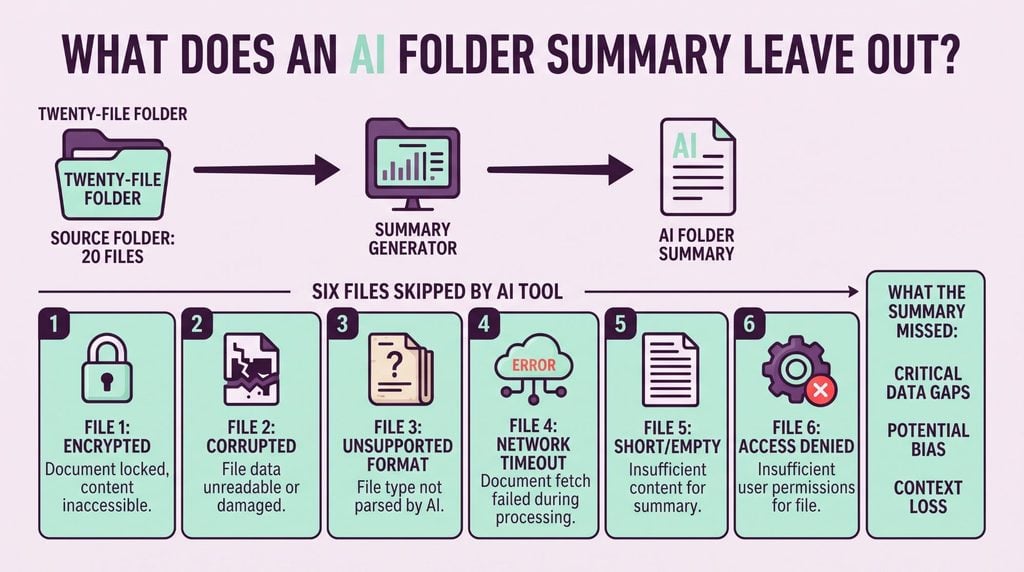
None of these gaps show up in the writing. The tool reports on the files it did read, in the same even voice, and the reader gets no signal that anything is missing. Google is clear about scope when you ask about a folder: Gemini in Drive can only answer questions about text documents, PDFs, spreadsheets and presentations. That boundary is fair, and easy to forget once an answer lands looking complete.
How do you ask for the list of skipped files?
Ask in one line, before you read a word of the summary: list every file in this folder you could not open, could not read, or had to cut short, and give the reason for each. Then ask what settles it. How many files are in the folder, and how many did you use? Two numbers and a list. A tool that will not give you them has told you the summary is partial.
Keep the questions in that order, because the list is close to useless once you have read the summary. By then you have a story in your head, and the gaps get fitted into it. Read the skipped files first and the summary shrinks into the smaller claim it always was. This is workflow optimization rather than prompt craft: two fixed questions, asked by whoever owns the folder, every time.
Why can’t AI read a scanned or locked file?
Because something has to turn the page into text first. A scan is a picture of a document, so reading it needs OCR, short for optical character recognition, which is software that works out the letters in an image. That step can be missing, or it can run and get part of the page wrong. A locked file fails sooner: the tool cannot open it, so there is no text to read at all.
Long files meet a different wall. A model reads inside a context window, which is how much text it can hold at once, and anything past that gets truncated, or cut off with no warning. Caps arrive early: Google’s connector guidance sets 1 MB of text per file and 80 pages of optical reading in a PDF. On quality, Ai2 reported 82.3% on old math scans in October 2025, up from 79.9%. Good, but not right.
What do you do about each kind of gap?
Handle them by kind, because the fix differs in each case and only one of them is about the tool. Two you can clear in minutes. Two need a decision about what the folder is for, and that decision belongs to a person. The skipped list is what turns a vague worry about accuracy into four or five named files, each with an owner and a next step.
Sort the list before you act on it. A scanned contract carrying a date you rely on is worth an hour; a scanned flyer from last spring is worth none. AI literacy at this level is knowing which gaps matter, and that judgment sits with the person who knows the work. Write the decision beside each file, so the question does not come back next month. Two of them usually carry all the risk.
- Scans with no text: run OCR on the file, save the readable copy into the folder, then ask again.
- Locked files: find the password or ask for an open copy, since no tool reads through it.
- Spreadsheets: ask about one sheet at a time, and pull the figures you rely on by hand.
- Files too long for one pass: split them by section, summarize each part, then join them.
- Formats it cannot read: convert them, or record them as out of scope in the summary.
Making that routine is implementation work rather than a tool choice. AI Implementation from AI Smart Ventures builds the skipped-file question into the document work your team already runs.
How do you tell if the summary covered the folder?
Three checks, and together they take five minutes. Compare the files the tool used against the files in the folder. Name one file yourself, usually the oldest or the oddest, and ask what it says. Then ask which file each claim in the summary came from. A claim with no file behind it is not a finding, and a named file that returns nothing was never read.
Checking one answer and checking a whole summary are the same job at two sizes. For a single answer you ask for the exact line it rests on. For a folder you ask which files it rests on, then compare that set with what the folder holds. Keep a short record of what gets skipped each month: repeat offenders point at a filing habit rather than the tool, and closing them is where the operational efficiency shows up.
| Check | What it tells you |
|---|---|
| Files used against files present | Whether anything was skipped |
| Name the oldest file and ask what it says | Whether that file was opened |
| Ask which file each claim came from | Whether the summary can be traced |
| Add a file with a distinctive line | Whether new files get picked up |
When is a folder too mixed to summarize at all?
When it holds more than one kind of thing, and more than one version of some of them. Drafts beside signed finals, two clients in one place, scans beside documents, notes beside contracts. A summary of that folder averages everything into one calm voice and buries the conflicts, which is worse than no summary. Split it, or ask against a named set of files instead.
Scale is the other limit. A 2024 benchmark built for this problem, Summary of a Haystack, found that long-context models without a retriever scored below 20%, against about 56% for people. A summary written for a decision-maker starts by naming the decision; this one starts by naming the files. Generic AI consultants sell the drafting step; sound AI advisory work treats coverage first. AI Smart Ventures observes that the teams who trust these pages read the skipped list first.
Frequently Asked Questions
How should you word a request to summarize a document?
Say what the summary is for, then set its shape. Name the reader, the length you want, and the facts that must appear, such as dates, owners and deadlines. Then add the line most people skip, and ask the tool to report whatever it could not read. For a long file, ask for a section-by-section pass rather than one summary, so nothing gets cut on the way.
Can AI summarize a PDF that is only a picture of pages?
Only after those page images have been turned into text. A scanned or photographed PDF holds no text behind it, so OCR has to run first, inside the tool or before you upload. Quality tracks the scan, and old or marked-up pages are hardest. Google’s guidance caps optical reading in a PDF at 80 pages, so a long scan can be read in part and summarized as if whole.
Are free AI summarizers enough for a work folder?
For one short public document, often yes. For a work folder, the limits bite in two places. Free tiers cap how many files and how much text you can send at once, and they rarely say which files got dropped. The larger question is whether company files belong on a personal account at all. Check what a tool does with your uploads before you point it at a folder.
How many files can you put in one folder summary?
Fewer than most folders hold. Google’s Gemini help page allows up to 10 files per prompt, counts each file inside a folder against that limit, and caps most types at 100 MB per file. So a folder of forty documents is not one request. It is several passes, and someone has to track which files went into which pass, and which never did.
Does a bigger context window remove the truncation risk?
No. It moves the limit rather than removing the behavior. ARC, published at EACL 2026, tested eight open-weight models on long documents and found they often leave out important points, worst of all when those points are spread thinly through the text. The paper names position inside the context window as one cause. More room helps; it does not make a long file read evenly.
What happens when a file in the folder is locked?
It gets skipped, and usually in silence. A password-protected file cannot be opened by the tool, so there is nothing to read and nothing to report unless you ask. The same holds for a file you can see but are not allowed to open, since access rules still apply. Locked files tend to be the sensitive ones, which makes them the worst ones to lose.
Should the skipped-file list go in the summary itself?
Yes, at the top, inside the document people will forward. A list that lives in a chat window disappears, and the summary travels on without it. Two lines cover it: how many files were read out of how many, and the names of the ones that were not, each with its reason. A later reader can then see the edge of what the summary covers.
How do we get started checking folder summaries for gaps?
Pick the folder your team summarizes most and run both questions on it this week. Ask for the skipped list, compare files used against files present, and write down what comes back. Effort tracks how messy the folder is rather than how large your team is, and it drops once scans and locked files are dealt with. Schedule a consultation to build the check into your review step.
Executive Summary
An AI folder summary tells you what the files it read contain. It does not tell you which files it could not read, and the writing looks the same either way. So the first request is the skipped list: every file the tool could not open, read or finish, with a reason, plus the count of files used against files present. Scans need OCR, locked files need an open copy, spreadsheets need one sheet at a time, long files need splitting. Some folders are too mixed to summarize and need sorting first, which is filing work and change management rather than AI adoption.
What Should You Do Next?
This week, take the folder your team summarizes most and ask two questions before reading anything. Which files could you not open, read, or finish, and why? How many files did you use out of how many? Then close the two gaps that matter, and put the answer at the top of the summary.
AI Smart Ventures offers AI Implementation for growing businesses that want coverage checks built into everyday document work, with capability building and clarity and confidence. Schedule a consultation to design that step around the folders your team relies on.
People Also Read
- What Is an AI Red Team Test and Should Your Business Run One?
- Computer Vision AI: Buying Guide for Business Owners in 2026
About the Author
Nicole A. Donnelly is the Founder of AI Smart Ventures and an AI Adoption Specialist with 20 years of experience as a founder and CEO and over a decade leading AI adoption initiatives. She helps businesses integrate artificial intelligence with clarity and confidence, driving innovation and sustainable growth. Nicole has trained over 20,217 professionals in Applied AI, delivered 624 workshops, and worked with close to 1,000 organizations across diverse industries.
Expertise: AI Transformation, AI Strategy, AI Implementation, AI Adoption, Applied AI, Marketing, Business Operations
Disclaimer: This content is for informational purposes only and does not constitute professional business or technology advice. Results vary based on industry, existing systems and implementation commitment. Contact AI Smart Ventures for a consultation regarding your specific situation.

